1. Opening: what if a tool could finish this step for you…
It's 1 a.m. You've just taken your WeChat article to its eighth revision. The body copy is beautiful, but five things are still in front of you: pick a CSS theme, source three images, generate WeChat-compatible HTML, screenshot it and eyeball the QA, then open the WeChat backend and create a draft. If any one of those steps fails, the send slips. That repeatedly stuck "last five miles" is exactly what the DUYI WeChat Skill Suite targets.

2. Project overview: what it is in one sentence
DUYI WeChat Skill Suite is an Agent Skill suite designed around the WeChat Official Account production pipeline. It sits at the stage where "the article is already written and the next step is to push it into a publishable state". It splits layout, images, HTML rendering, screenshot QA, API dry-run and draft creation into five independent Skills, with duyi-wechat as the orchestrator. The project is written in TypeScript, has 6 stars today, and is a classic small-and-focused tool.
3. Core features in depth
1. CSS style layer: duyi-wechat-css-layer
Handles the theme system and style selection, turning "reskinning" into a switchable style layer. The same body copy can switch to a different visual style in one click, saving the time spent editing CSS by hand.
2. Layout rendering: duyi-wechat-paipan
The core layout engine, responsible for converting Markdown into WeChat-ready HTML. This is the step where the WeChat editor is easiest to trip over — pasting loses formatting, images don't scale where they should, code blocks overflow. This Skill solves it with a unified rendering pipeline.
3. Cover and images: duyi-wechat-peitu
Cover images and inline illustrations are its job. It replaces the manual workflow of pulling assets from Gaoding Design / Canva and uploading them again, producing images directly inside the Skill.
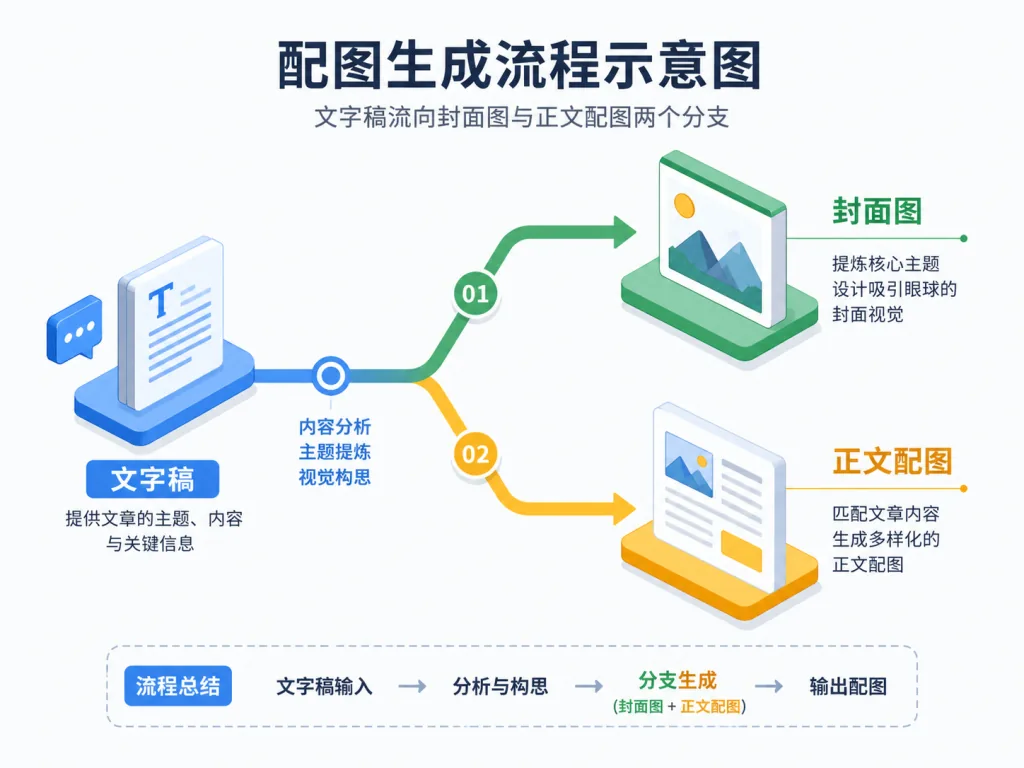
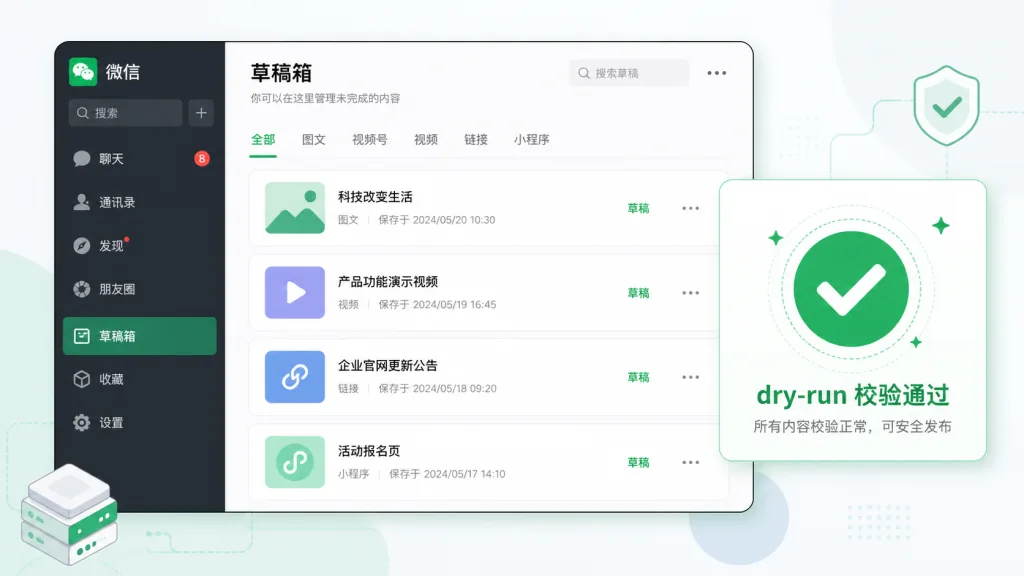
4. Draft publishing: duyi-wechat-fabu
Creates WeChat Official Account drafts, runs the API dry-run, and does phone previews. Until the pipeline has been verified, it never touches the live endpoints, so production data stays clean.
5. Orchestration: duyi-wechat
Chains the four Skills above into a complete pipeline. Running alongside an Agent, the user only needs one instruction — for example "use duyi-wechat to process this WeChat draft" — to start the whole flow.

4. Technical highlights and performance numbers
The design philosophy is "separated responsibilities + clear safety boundaries". The five Skills each do their own job, and they can run as a full pipeline or just the middle steps — say "just lay it out for a look, don't touch the draft box" and it stops at the HTML stage.
Architecturally it does three things:
- Private config isolation: the WeChat
app_id/app_secretlive in~/.wechat-article-suite/.env; the repo carries no keys. - Decoupled runtime: Skills install into
~/.agents/skills/and are then symlinked into the Claude, Codex and Hermes directories, so one config runs in several places. - Lightweight runtime: no bundled
node_modules, no local browser login profiles, minimal publish artifacts.
5. Where it fits, and who it's for
Use cases:
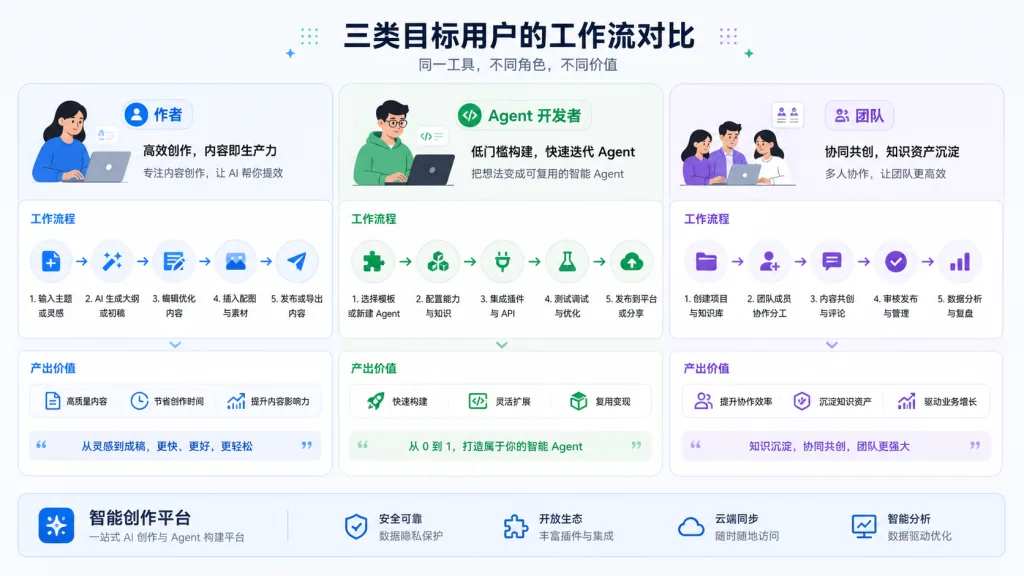
- WeChat authors who already have a Markdown draft and want a reusable "layout + images + draft" pipeline.
- AI Agent developers who want their Agent to produce WeChat content directly — just install the Skills into Claude / Codex / Hermes.
- Content teams that need a standardised visual output for WeChat, with several authors sharing one theme and rendering spec.
Who it's for: heavy WeChat authors, Agent tool developers, teams that produce WeChat content in bulk.
Who it's not for: people who only want a one-off send and won't configure a Skill runtime; and automation needs outside the delivery boundary, such as "scheduled auto-publishing".
6. Comparison with alternatives
| Dimension | DUYI WeChat Skill Suite | Manual WeChat backend | All-in-one layout editor (e.g. Xiumi) |
|---|---|---|---|
| Agent integration | Native | No | No |
| Layout + images + draft in one go | Yes | No | Layout only |
| Keys never in the repo | Yes | N/A | N/A |
| Usable piecemeal (layout only / images only) | Yes | No | No |
| Actual publishing | Out of scope | Yes | Partial |
The differentiator is the Agent-native design — other tools are built for "a human clicking buttons", this one is built for "an Agent calling Skills". That's still a rare angle among WeChat tooling.
7. Getting started fast
Step 1: clone the repo
git clone https://github.com/duyi2076/duyi-wechat-skill-suite.git
cd duyi-wechat-skill-suite
Step 2: install the 5 Skills into ~/.agents/skills/
mkdir -p "$HOME/.agents/skills"
for skill in duyi-wechat duyi-wechat-css-layer duyi-wechat-paipan duyi-wechat-peitu duyi-wechat-fabu; do
  mkdir -p "$HOME/.agents/skills/$skill"
  rsync -a "skills/$skill/" "$HOME/.agents/skills/$skill/"
done
Step 3: symlink into the Agent environment (pick one of Claude / Codex / Hermes, or all three)
ln -sfn "../../.agents/skills/duyi-wechat" "$HOME/.claude/skills/duyi-wechat"
Step 4: install the runtime dependencies — duyi-wechat-fabu uses Bun, duyi-wechat-paipan uses npm; run install in each directory.
Step 5: configure the keys
mkdir -p "$HOME/.wechat-article-suite"
cat > "$HOME/.wechat-article-suite/.env" <<'EOF'
WECHAT_APP_ID=replace_with_your_app_id
WECHAT_APP_SECRET=replace_with_your_app_secret
EOF
Step 6: give the Agent an instruction: "Use duyi-wechat to process this WeChat draft: finish the layout, images and HTML QA, then create a WeChat draft."
8. Summary and what to do next
The core value of DUYI WeChat Skill Suite is turning the WeChat production pipeline into Skills, so an Agent can handle layout, images and draft creation the way it calls any other tool. It suits people who already write WeChat drafts with an Agent and want to hand the last five miles to a tool.
How to use it: first run "layout only, no draft box" to get the HTML rendering pipeline working; once the styling looks right, enable the dry-run of duyi-wechat-fabu; only then turn on real draft creation.
Project link: https://github.com/duyi2076/duyi-wechat-skill-suite
There's one reason to give it a try: when you no longer want to click five buttons by hand at 1 a.m., this Skill suite is your stand-in.