1. Opening: still stuck on this?
Requirement review just wrapped up, and you open your IDE to get going: change interfaces across a dozen files, run tests, fix errors, catch up on docs. AI tools hand you a snippet and you're on your own for copying, pasting and running commands; switch models and you have to learn a new UI; try to wire it into CI and there's no automation entry point. Two hours of coding end up buried under three hours of toolchain fiddling.
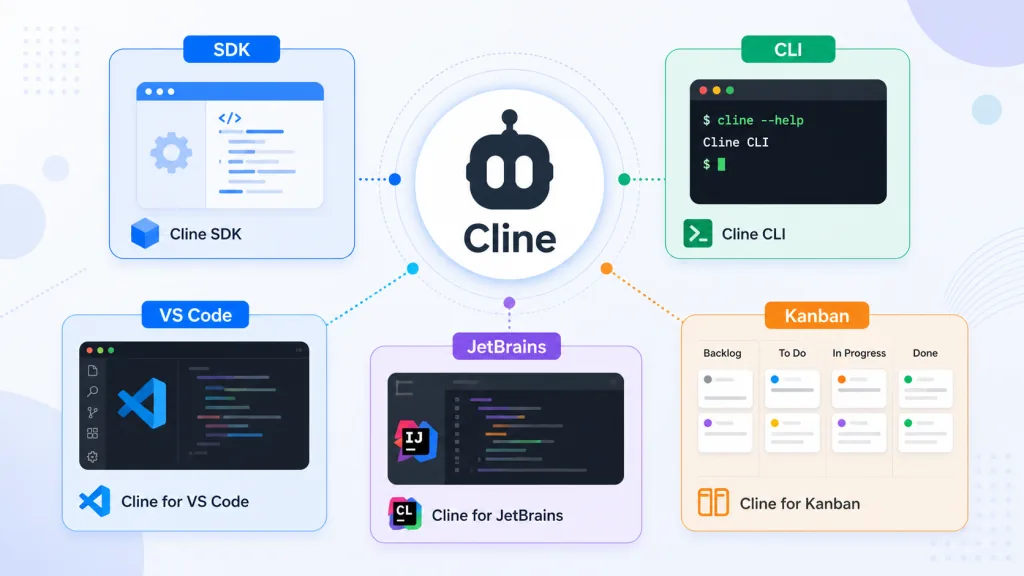
Cline is aimed at exactly that half-automatic workflow. It pushes agent capability down into an SDK, then ships it in four forms — CLI, VS Code extension, JetBrains plugin and a web kanban board. 66K+ stars on GitHub, TypeScript as the main language, and the most complete product shape in the open-source coding agent race right now.
2. In one sentence: what this project is
Cline is an open-source coding agent engine, positioned around an SDK plus multi-platform clients.
- Keywords: Autonomous Coding Agent, SDK, Multi-Platform, Apache 2.0
- Form factors: SDK, CLI, VS Code extension, JetBrains plugin, Kanban board
- Milestone: 66,076 GitHub stars, Apache 2.0, open source and self-hostable
3. Core features in depth
1. Cross-file editing and Bash execution
Cline scans the project structure first, works out how the files depend on each other, then makes coordinated edits. While it works it watches linter and compiler output and fixes missing imports, type mismatches and syntax errors on its own. Every edit shows up as a diff for you to confirm, with a checkpoint you can roll back to at any point.
It also runs commands straight in the terminal — installing dependencies, running builds and tests, starting a dev server. Long tasks run in the background with output streaming back live, and it catches compile errors, failing tests and crashed services as they happen.
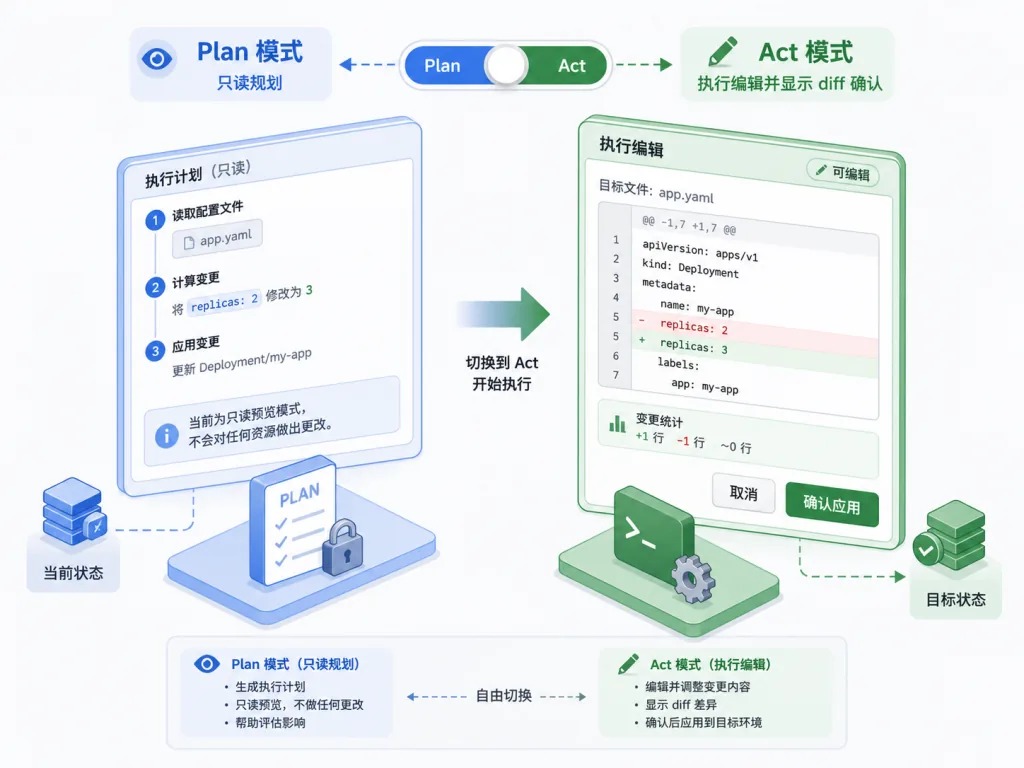
2. Plan / Act dual modes
In Plan mode Cline only reads: it lays out the approach and gets your agreement first. Switch to Act mode and it starts touching files and running commands. Every change needs your click to confirm; if that's too much friction, turn on auto-approve and let it run to the end.
3. Rules and Skills
Write your team's conventions into .clinerules and Cline loads them automatically across the CLI, VS Code and JetBrains. The Skills mechanism lets the model pull in specific rules on demand, so the context doesn't drown in them.
4. Multi-model access
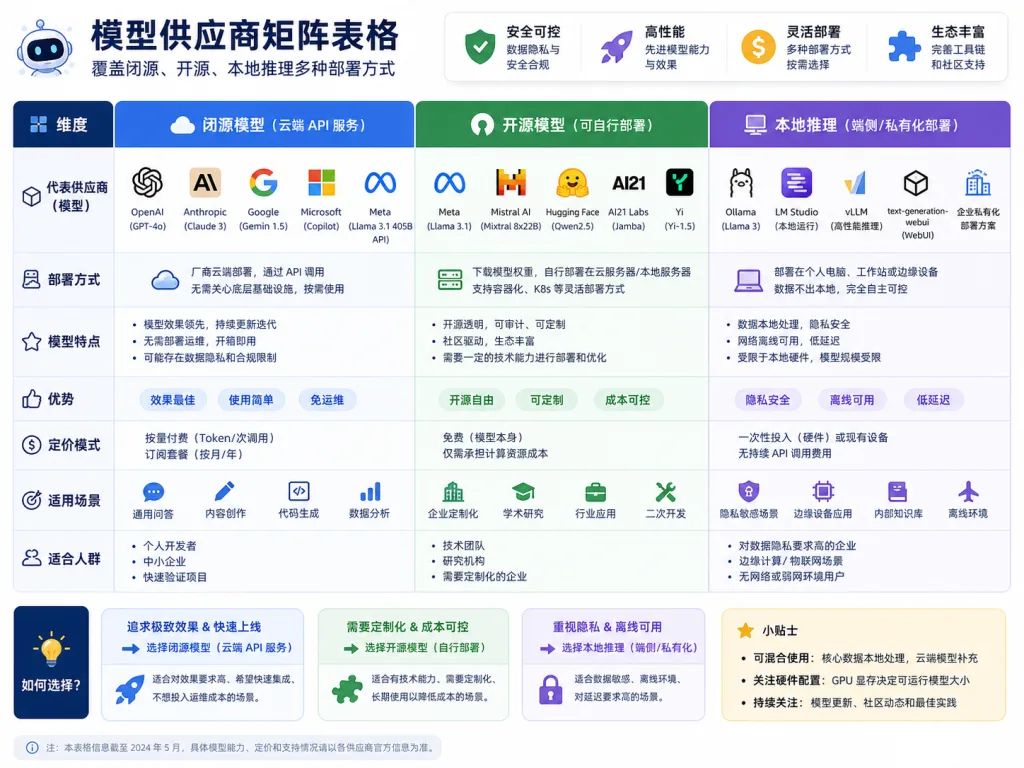
Cline isn't locked to one vendor. Anthropic, OpenAI, Google Gemini, 200+ models on OpenRouter, AWS Bedrock, Azure / GCP Vertex, Cerebras / Groq, plus local Ollama / LM Studio are all supported, and any OpenAI-compatible API works too.
5. Plugins and MCP extensions
@cline/sdk lets you register custom tools and lifecycle hooks for logging, auditing and policy control. Cline also speaks the MCP protocol, so it can call community servers to reach databases, query APIs and manage cloud resources. Need a new tool? Let Cline write one on the spot.
6. Multi-agent teams and scheduled jobs
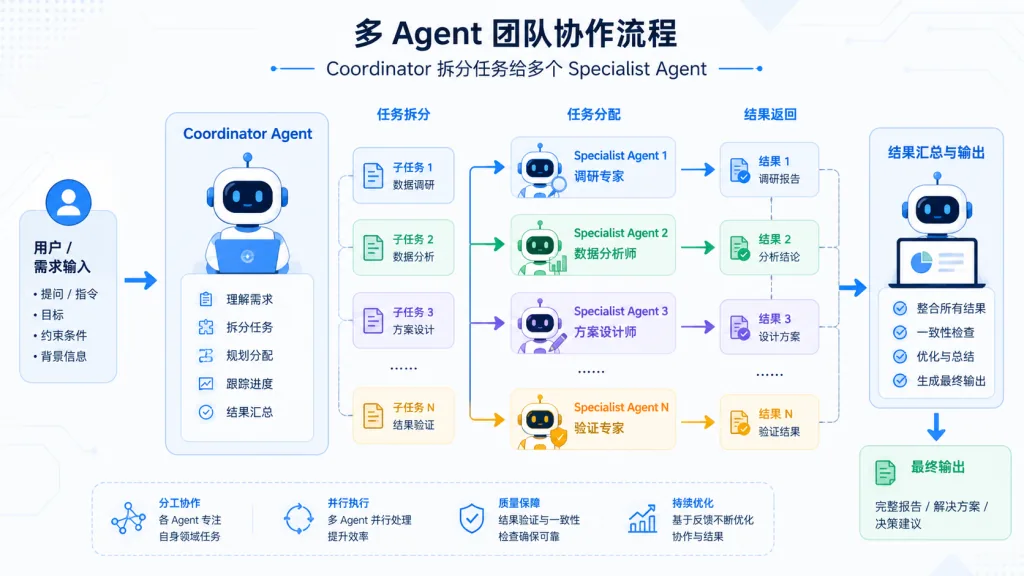
A Coordinator Agent splits work across specialist agents, each with its own tools and context, with state persisted across sessions. cline schedule runs cron jobs — for example, a PR summary at 9am every weekday.
7. Chat platform integrations
Telegram, Slack, Discord, Google Chat, WhatsApp and Linear all connect to Cline. Each thread maps to one agent session, with access control built in.
8. CI/CD-friendly headless CLI
cline "..." runs a task with no interaction, emits JSON for jq to parse, and drops into GitHub Actions or any other pipeline.
4. Technical highlights and performance
- One engine, five entry points: the same SDK code feeds the CLI, VS Code, JetBrains and Kanban, avoiding the experience drift that comes from reimplementing on every platform.
- Protocol-neutral: tools extend over MCP, so the community ecosystem is reusable as is.
- Model-agnostic: covers closed frontier models, mainstream open-source routers and local inference.
- Observable state: edit diffs, checkpoints and command output are all visible, and background process failures get caught proactively.
- Engineering governance: the team maintains several CHANGELOGs, split by SDK / CLI / extension.
5. Who it's for
Good fit:
- Engineers doing mid-sized changes across many files, who need the agent to actually understand the project structure before touching it.
- DevOps / platform teams running automated code review, dependency audits and PR summaries in GitHub Actions.
- Engineering leads who want an in-house AI coding assistant without being tied to one cloud.
- Backend and data teams already deep in the JetBrains stack that want AI collaboration inside it.
Not a great fit: tiny jobs like a one-line CSS tweak, where the overhead outweighs the payoff.
6. Comparison
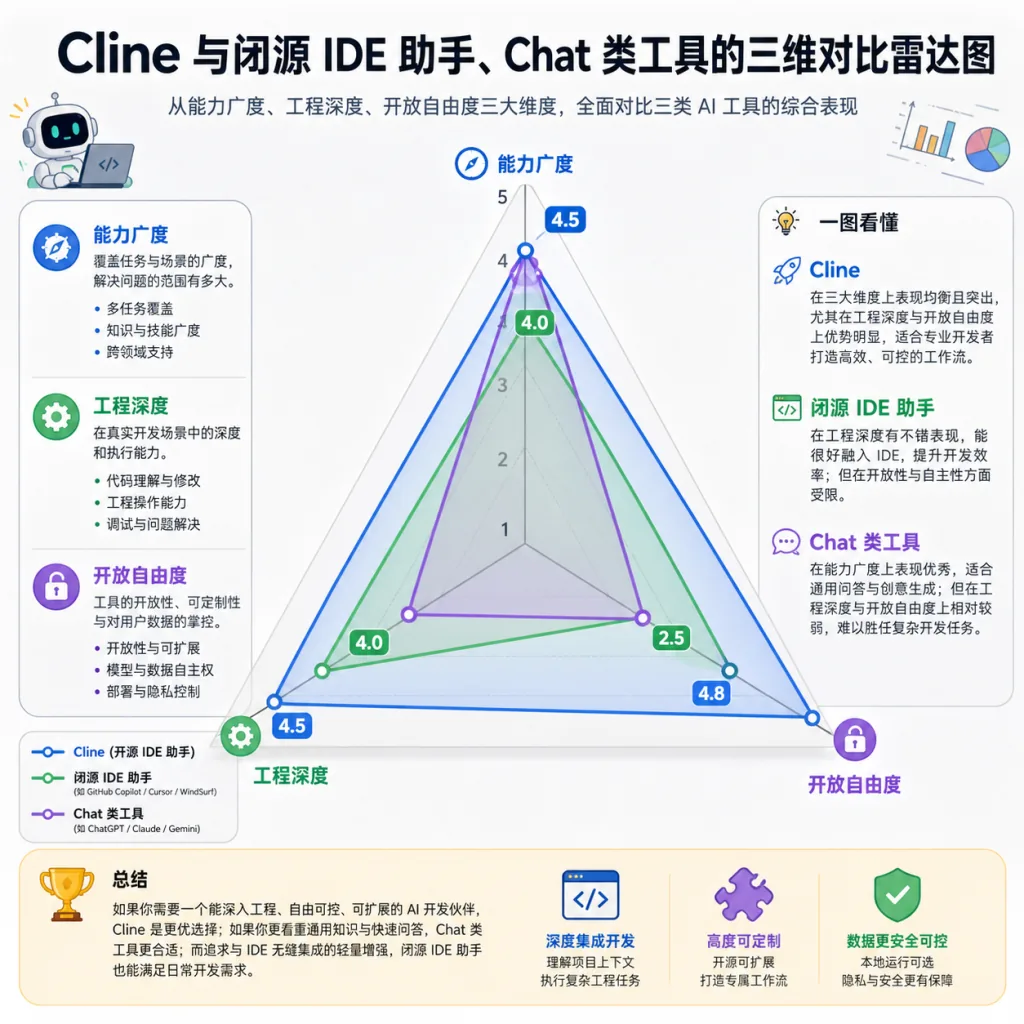
| Dimension | Cline | Closed-source AI IDE assistant | Generic chat tools |
|---|---|---|---|
| Open-source license | Apache 2.0 | Usually closed | Mostly closed |
| Form factor | SDK + CLI + editor + kanban | Usually an editor plugin only | Usually web chat only |
| Cross-file diff & checkpoint | Yes | Partial | No |
| Model choice | Multiple vendors + local | Tied to the vendor | Depends on the platform |
| CI/CD integration | Native headless CLI | Weak | Weak |
| Self-hosting / data control | Yes | Usually not | No |
If what you want is controllable, modifiable and CI-ready, Cline has the most complete shape in the open-source camp.
7. Getting started fast
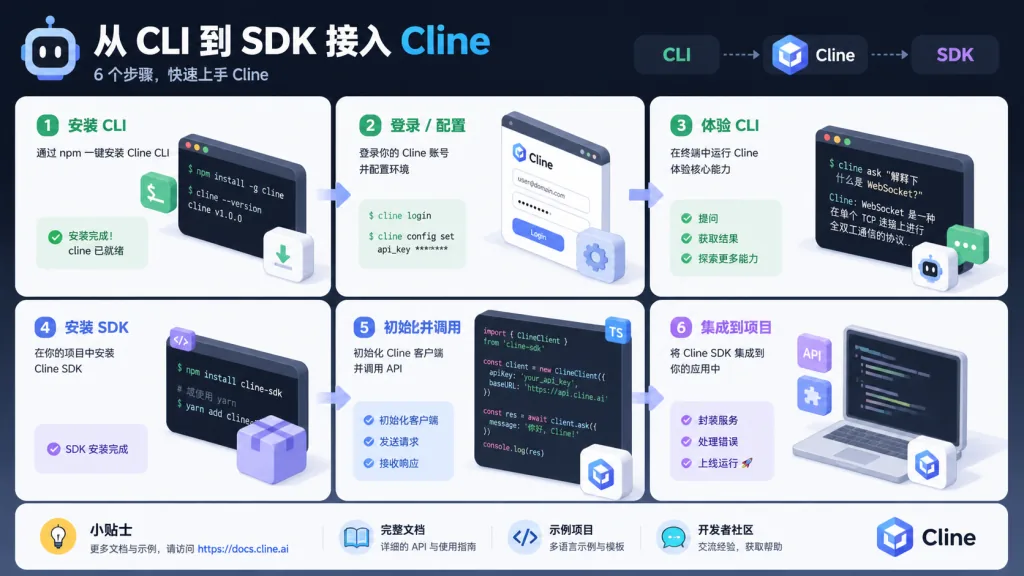
Start with the CLI:
npm i -g cline
cline "add JSDoc comments to every function in this project"
VS Code users: search cline in the VS Marketplace, install it, then sign in to a model provider.
SDK integration:
npm install @cline/sdk
Minimal example:
import { Agent, createTool } from "@cline/sdk"

const deployTool = createTool({
  name: "deploy",
  description: "Deploy the current branch to staging.",
  inputSchema: { type: "object", properties: { env: { type: "string" } }, required: ["env"] },
  execute: async (input) => { /* your deployment logic */ },
})

const agent = new Agent({ tools: [deployTool] })
Advanced tip: write your team's coding conventions into .clinerules first, run a round of non-critical tasks in Plan mode to check the results, and only turn on auto-approve once it looks stable.
8. Wrap-up and what to do next
Cline's core value is turning a coding agent into an engineering component you actually control: open-source engine, many form factors, model-neutral, extensible protocol, CI/CD friendly. It's built for putting AI coding into your team's pipeline, not for staying at the "ask ChatGPT" level.
Next steps: run a non-critical task through the CLI to get a feel for the interaction; then turn on Plan mode in VS Code and take on a mid-sized change; finally move your daily PR summary into cline schedule and let the agent plug into your team's rhythm.
- Project home: https://cline.bot
- Docs: https://docs.cline.bot
- GitHub: https://github.com/cline/cline
One-line recommendation: if you want an open-source coding agent that both writes code and fits into CI, Cline is the most complete answer right now.