Title options (pick 1 of 3)
10 GitHub gems I keep to myself — the cure for AI tools' low-value output
Too much AI waffle? These 10 open-source projects fix it
I used these 10 GitHub projects to turn my AI assistant into a productive colleague
1. Opening: almost every developer has hit this pain
It's Monday morning. You open Cursor and ask the AI assistant to write some user auth logic. It produces three hundred words that open with "Great question!" and close with "Hope this helps!". The actual code is three lines, buried in the second paragraph. You rub your eyes and keep scrolling. Later, in a PR review, you ask the AI to look at the diff. It flags seventeen "potential issues", fourteen of which are false positives. Another time you ask it to pull an issue from GitHub and it tells you the connection timed out. ==Again and again, we end up wrestling with the low-value output of our AI tools==. The ten open-source projects below are the ones from my private list most worth handing over — each one solves a specific problem from that list.
2. The projects at a glance
| Repository | Stars | Language | What it is |
|---|---|---|---|
| alibaba/open-code-review | 38K | Go | Alibaba's AI code review CLI, with line-level precision |
| bilawalsidhu/gods-eye-view | 39K | JavaScript | Satellite map in the browser — live planes, ships, earthquakes |
| affaan-m/ECC | 263K | JavaScript | Agent coding scaffold that makes AI coding steadier and faster |
| ayghri/i-have-adhd | 49K | Python | Makes AI skip the fluff and hand you executable steps |
| stablyai/orca | 73K | TypeScript | Desktop workbench for running multiple coding agents in parallel |
| Tencent/WeKnora | 27K | Go | Turns documents into a queryable RAG knowledge base |
| Panniantong/Agent-Reach | 83K | Python | Lets agents read Twitter, browse Xiaohongshu and watch Bilibili for free |
| addyosmani/agent-skills | 97K | JavaScript | Nine slash commands covering the whole development workflow |
| blader/humanizer | 50K | Python | Text polishing skill that erases the traces of AI writing |
| microsoft/markitdown | 185K | Python | One-command PDF/Word/Excel to Markdown |
3. The projects in detail
alibaba/open-code-review — Alibaba's code review with line-level precision
This is an AI code review CLI incubated inside Alibaba. Over the past two years it has served tens of thousands of developers and caught millions of code defects. It reads the Git diff, sends the changed files to a configurable LLM, and with tool-calling support produces structured review comments with line numbers. The agent can read whole files, search the codebase, and cross-check other changed files instead of commenting on the diff surface only.
The core idea is a hybrid architecture of "deterministic pipeline + LLM agent": a built-in multi-language rule set (NPE, thread safety, XSS, SQL injection), plus compatibility with OpenAI and Anthropic APIs. In benchmarks, on the same model it scores noticeably higher on precision and F1 than a general-purpose agent, at roughly 1/9 the token cost.
- Who it's for: mid-to-large teams, and project leads who want code review inside CI; individual developers who want an AI line of defence on their PRs.
- Who it isn't for: pure business roles that live in the GitHub web UI and never touch a CLI.
Minimal setup
Tell your agent:
Install this skill for me: https://github.com/alibaba/open-code-review
Or do it manually:
npx open-code-review review --base main --head feature/auth
The review comments come out with line numbers.
Source: https://github.com/alibaba/open-code-review
bilawalsidhu/gods-eye-view — a spy satellite running in your browser
It layers public data sources — flight transponders, ship beacons, seismographs, public cameras — onto a photorealistic 3D globe. First-person view lets you follow a plane all the way down to the ground, and every target within 250 km can be switched on at will. Click any target and the camera locks on, draws a fading trail, and pops up the full metadata.
The coolest feature is "click to track anything": send a fire hotspot or a ship to the nearest live camera in one click. The voice whiteboard lets you draw boundaries, routes and annotations while you talk. GLSL shaders switch between five sensor looks: CRT, night vision, thermal, Noir, and snowfall.
- Who it's for: geeks who love geospatial visualization and want to dig into global shipping and flight data; tech evangelists who need a jaw-dropping opener for a demo.
- Who it isn't for: users who don't care about live data streams and just want a static map tool.
Minimal setup
One-click install with Pinokio:
pip install pinokio
pinokio install bilawalsidhu/gods-eye-view
Start the local server and open http://localhost:7860 in your browser.
Source: https://github.com/bilawalsidhu/gods-eye-view
affaan-m/ECC — an operating system for your agent
This is the hottest agent coding scaffold right now: it packages Skills, Instincts, Memory, Security and Research-first into a single harness. It supports Claude Code, Codex, Cursor, Opencode and every other mainstream agent framework. The goal isn't to write more code, it's to make the agents you already have run more reliably.
Its killer feature is the research-first workflow: investigate before you start, write tests before you write code, self-review before you merge. The bundled ecc-agentshield adds security guardrails so an agent can't wipe your files or run a dangerous command by accident.
- Who it's for: developers who use Claude Code or Cursor heavily every day; teams that want AI output to go from "it works" to "it ships".
- Who it isn't for: light users who poke at AI in the browser once in a while.
Minimal setup
In Claude Code, say:
Install ECC from https://github.com/affaan-m/ECC and refer to AGENTS.md for the steps.
Or do it manually:
claude plugin marketplace add affaan-m/ECC
claude plugin install ecc@ecc
Every session picks it up automatically after that.
Source: https://github.com/affaan-m/ECC
ayghri/i-have-adhd — teaching AI to say "here's what you do next"
Its core promise is "Action first. Steps numbered. No 'Hope this helps!'". Once installed, the assistant stops padding a three-line answer into three hundred words and just hands you an executable checklist, ending with "next, do this".
The ten rules are blunt: "action first", "number multi-step answers", "end with one concrete next step", "suppress tangents", "restate state every turn", "give time in minutes, not 'in a bit'", "make small wins visible", "state errors plainly", "never more than 5 list items", "no preamble, no recap, no closing". The whole SKILL.md is a few dozen lines, and it hard-constrains the agent's output style.
- Who it's for: developers worn down by AI pleasantries and walls of text; engineering cultures that like short, imperative output.
- Who it isn't for: users who need the AI to write long proposal documents or detailed explanations.
Minimal setup
Paste this into your CLI:
Install the i-have-adhd skill/plugin from https://github.com/ayghri/i-have-adhd, refer to the repo's AGENTS.md for instructions.
Restart the agent, ask it a code question, and compare the output with what you got before.
Source: https://github.com/ayghri/i-have-adhd
stablyai/orca — an AI orchestrator on your desktop
Orca is a desktop app built for the "100x builder": it runs Codex, Claude Code, OpenCode and Pi in parallel, with each agent in its own git worktree. Send one prompt to five agents, compare the results and merge the best — that "horse race" is its signature move.
The extras: a Ghostty-class WebGL terminal with infinite splits and scrollback that survives restarts, plus a mobile companion app so you can watch agent progress from your phone and fire off a follow-up the moment a completion notification arrives. Design Mode lets you point at UI elements in a real Chromium window and feed HTML + CSS + screenshot straight to the agent.
- Who it's for: tech leads juggling several projects who need A/B comparisons; remote developers who are glued to their phones and want to watch progress on the commute.
- Who it isn't for: solo users running a single agent with a minimal workflow.
Minimal setup
Download the desktop client from the website:
brew install --cask orca
Or do it manually:
Download the .dmg / .exe / .AppImage from https://github.com/stablyai/orca/releases/latest
Log in with any agent subscription after installing.
Source: https://github.com/stablyai/orca
Tencent/WeKnora — turning documents into a reasoning knowledge base
This is Tencent's open-source LLM knowledge framework. Its core job is to pull scattered documents — PDF, Word, Feishu, Notion, GitLab — into one Wiki you can question, reason over and let maintain itself. RAG is the baseline; the ReAct agent is the highlight. It can autonomously orchestrate retrieval, MCP tools, cross-session long-term memory and Docker/E2B sandboxes to handle multi-step tasks.
The new Wiki Mode has the agent distill raw documents into a self-maintaining, cross-linked Markdown knowledge base, with knowledge-graph visualization, manual editing, version history and one-click rollback. Multi-workspace RBAC, full-trace observability via Langfuse, and support for 20+ LLM vendors mean it can go straight into an enterprise setting.
- Who it's for: people building internal knowledge bases; teams that need contracts, specs and technical docs turned into a conversational Q&A system.
- Who it isn't for: minimal needs of a handful of Markdown files; pure SaaS users who won't self-host anything.
Minimal setup
Start it with Docker:
git clone https://github.com/Tencent/WeKnora
cd WeKnora
docker compose up -d
Open http://localhost:8080 and upload a PDF to start asking questions.
Source: https://github.com/Tencent/WeKnora
Panniantong/Agent-Reach — eyes on the internet for your agent
It solves the long-standing headache of letting an AI agent read Twitter, browse Xiaohongshu, watch Bilibili and scrape Reddit. Every platform has its own barrier — paid APIs, IP blocks, forced login, data cleanup — and Agent Reach flattens all of them into one command.
Two things stand out in the design. "Primary + fallback" multi-backend routing switches silently when one access path dies (in June 2026, after Bilibili's anti-bot rules killed yt-dlp, it fell back to bili-cli with users noticing nothing). And "doctor built in": agent-reach doctor tells you in one command what works, what doesn't, and how to fix it. It supports YouTube subtitle extraction, Twitter search, Reddit reading, Xiaohongshu notes and Bilibili video summaries — all free.
- Who it's for: ops, product and developer folks who need agents for sentiment monitoring, competitor research or content aggregation.
- Who it isn't for: purely local development work that only cares about code generation and needs no network access.
Minimal setup
Let the agent install it itself:
Install Agent Reach for me: https://raw.githubusercontent.com/Panniantong/agent-reach/main/docs/install.md
Then just ask:
Show me what Codex posts have been trending on Xiaohongshu lately
Source: https://github.com/Panniantong/Agent-Reach

addyosmani/agent-skills — nine commands covering the whole workflow
Addy Osmani, engineering director on the Google Chrome team, packaged a senior engineer's workflow into 25 Skills + 9 slash commands: Define → Spec → Plan → Build → Test → Review → Ship, mapped to commands like /spec /plan /build /test /review /ship.
The one most worth installing is /build auto: once the plan is approved, the agent runs every task on its own, still following TDD per task and committing each separately, pausing on failures or dangerous steps. Skills also activate by context — designing an API triggers api-and-interface-design, building UI triggers frontend-ui-engineering.
- Who it's for: teams who want a "senior engineer workflow" but have no time to develop one; tech leads who want to roll out coding standards across the team.
- Who it isn't for: minimalists who need one skill and can't be bothered with a full workflow diagram.
Minimal setup
Install everything with one command:
npx skills add addyosmani/agent-skills
Or install one at a time:
npx skills add addyosmani/agent-skills --skill test-driven-development
Then try /spec to kick off a new requirement.
Source: https://github.com/addyosmani/agent-skills
blader/humanizer — erasing the traces of AI writing
This Skill rewrites text that reeks of AI into a "written by a human" voice without changing what it says. It lists 25 telltale patterns of AI writing — "Not X but Y", rule-of-three lists, mandatory em dashes, opening with "let's dive in", closing with "Hope this helps" — each with a before/after example.
The workflow is "mark the strongest AI tells → rewrite without assuming a structure → check against the original meaning → output the final version". It won't invent facts: missing numbers, names and quotes get asked for. You can also feed it a sample of your own writing for "voice matching", so it mimics your rhythm, word choices and punctuation habits — including how fond you are of em dashes.
- Who it's for: bloggers, technical writers, and ops people whose external content keeps getting flagged by AI detectors.
- Who it isn't for: engineers writing pure technical docs who don't care about style.
Minimal setup
Install with one command:
npx skills add blader/humanizer --global
Then call it:
/humanizer

[paste your AI text]
It first gives you a rewrite, then points out the AI tells still left, then outputs the clean version.
Source: https://github.com/blader/humanizer

microsoft/markitdown — feed any file in as Markdown
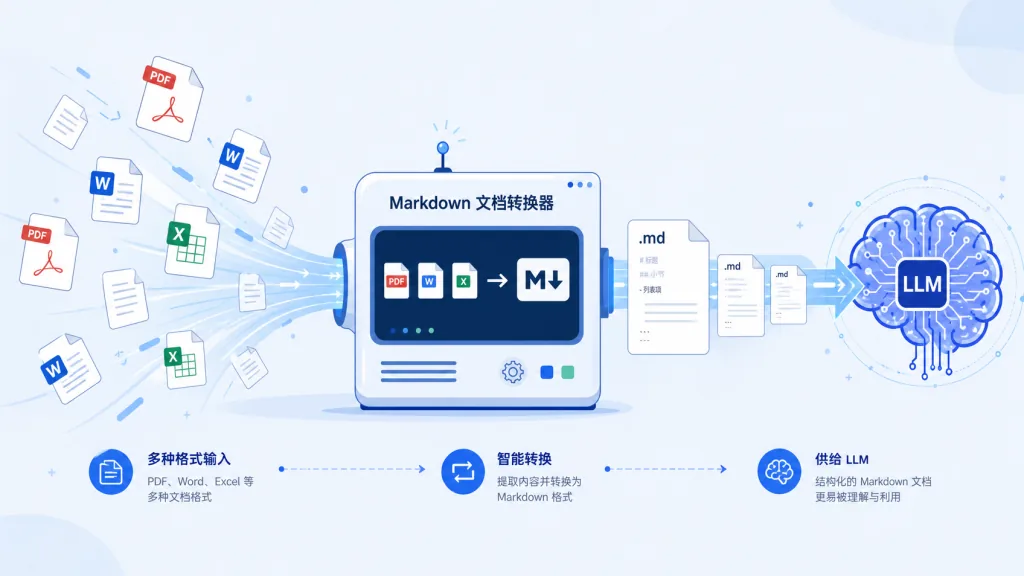
This is a small Microsoft tool that converts PDF, PowerPoint, Word, Excel, images, audio, HTML, CSV, JSON, ZIP, YouTube links and EPUB into Markdown — keeping headings, lists, tables and links intact, and designed specifically for feeding LLMs.
Why Markdown? Because mainstream LLMs (GPT-4o and friends) natively "speak" Markdown: token-efficient and clearly structured. Install with one line, pip install 'markitdown[all]', or just [pdf, docx, pptx] if that's all you need. ==Note: the library requires Python 3.10+ and errors out on older versions==.
- Who it's for: developers who need to batch-process documents for RAG; tool builders working on local knowledge bases, content analysis and automatic summarization.
- Who it isn't for: light users who occasionally convert a PDF to show a colleague (an online tool is a better fit).
Minimal setup
Install:
pip install 'markitdown[all]'
Convert a PDF:
markitdown report.pdf -o report.md
Or pipe it:
curl -s https://example.com/page.html | markitdown
Source: https://github.com/microsoft/markitdown
4. Summary and what to do next
- Want faster results today? Install two:
agent-skills(the full workflow spec) andi-have-adhd(kills AI waffle). Near-zero cost, and your day-to-day output quality changes. - Doing content or research work? These are mandatory:
Agent-Reach(gives the agent the internet),humanizer(polishes your text),markitdown(turns documents into LLM food). - Team-level rollout? Go deeper as needed:
open-code-review(into CI),WeKnora(knowledge base),Orca(multi-agent orchestration) andECC(agent tuning) all need a scenario assessment before you decide on deep integration.
#AIAgents #AIWorkflow #Automation #OpenCodeReview #GodsEyeView #Ecc #IHaveAdhd #Orca #Weknora #AgentReach