
1. Why you need this
Do the words "Transformer", "CNN" and "RNN" leave you completely blank? Did you open a Tsinghua or Peking University AI course on Coursera and swipe away after five minutes? Are the 7 million posts on Reddit's r/MachineLearning nothing but Greek letters and formula matrices you cannot chew through? Stack Overflow's 2024 developer survey found that 63% of respondents named "a high barrier to entry" as the biggest obstacle to learning AI — and among the 920 million AI-related repositories on GitHub, structured courses built for beginners are rare.
What stings more: for many people, the gap between "I want to learn AI" and "I wrote my first line of code" averages six months. The problem is not that you are slow. It is that you are missing a route from zero to a model that actually runs. The repo we are looking at today, microsoft/AI-For-Beginners, is exactly that route — 12 weeks, 24 lessons, pure hands-on, and officially published by Microsoft.

2. What it is, in one sentence
microsoft/AI-For-Beginners is an open-source AI curriculum published on GitHub by Microsoft's Azure Cloud Advocates team, built around the tagline "12 Weeks, 24 Lessons, AI for All!" It uses Jupyter Notebooks to break core AI concepts — symbolic AI, neural networks, deep learning, computer vision, natural language processing, reinforcement learning — into 24 runnable lessons, each shipped with both PyTorch and TensorFlow code.
The headline numbers: 64,683 GitHub stars, Jupyter Notebook as the primary language, 50+ language translations (Simplified Chinese included), 200+ contributors, and 120k+ forks. It is the flagship AI repo in Microsoft's "For Beginners" course family.
3. Core features, in depth
1. 24 structured lessons covering the whole AI map
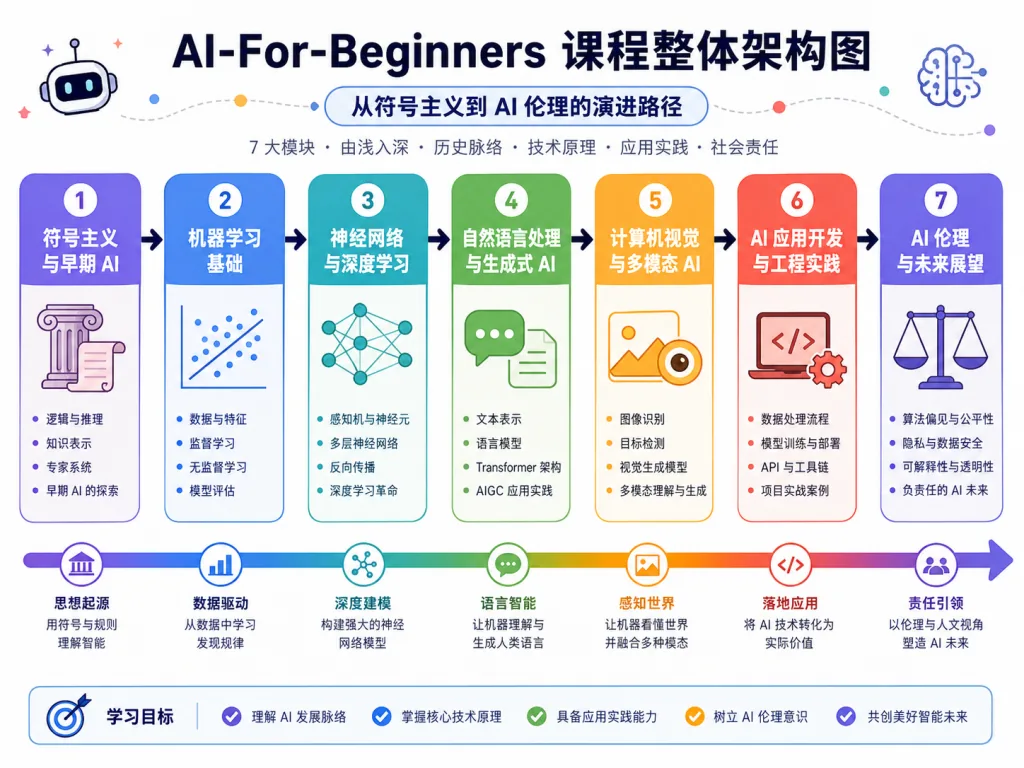
The course runs across seven modules: intro to AI, symbolic AI, knowledge representation and expert systems, neural networks, computer vision (CNN / transfer learning / GAN / segmentation), natural language processing (word embeddings / RNN / Transformer / BERT / LLMs), other AI techniques (genetic algorithms / deep reinforcement learning / multi-agent systems), and AI ethics. Each lesson has three parts — pre-reading, a runnable notebook and a lab — and skipping any one of them will cost you later.
2. Two frameworks side by side: PyTorch and TensorFlow for the same concept
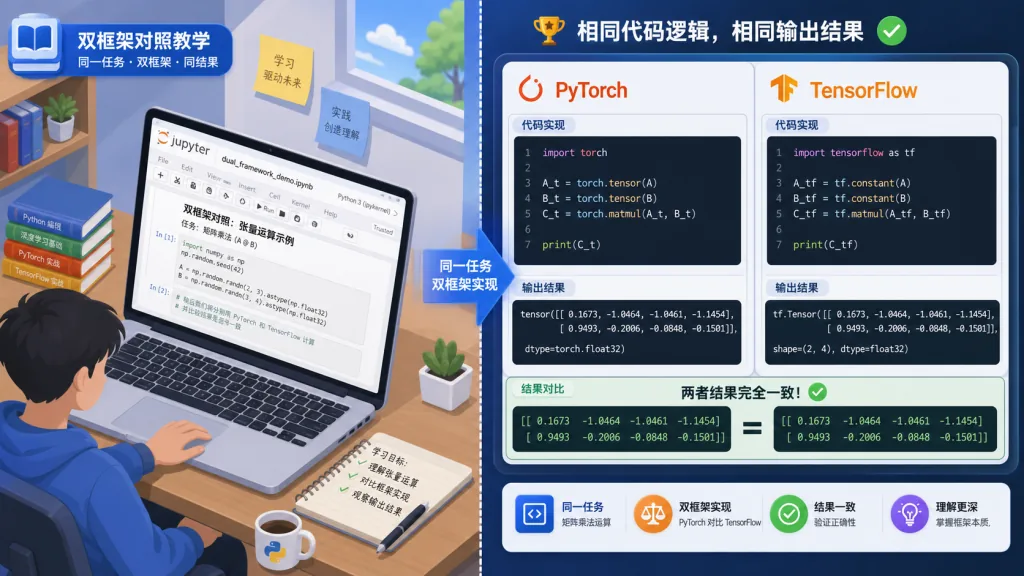
! This is the most thoughtful design in the whole course. The biggest trap in learning deep learning is picking a framework: choose PyTorch and you worry it is not industrial enough, choose TensorFlow and you worry the community is cooling off. The course's answer is to ship one PyTorch notebook and one TensorFlow/Keras notebook for each lesson — MLP, CNN, Transformer and the rest — so you can compare API styles on the same concept. Research leans PyTorch, production deployment leans TF, and this dual-track teaching lets you switch naturally depending on where you are headed.
3. 50+ languages plus sparse checkout: everyone gets a copy
A GitHub Action translates the course automatically into 50 languages, including Arabic, Bengali, Simplified Chinese, Traditional Chinese, Hindi, Thai and Swahili. But 50 translations bloat the repository, so the team provides sparse checkout commands that clone only the source and skip the translation folders — downloads get 70%+ faster.
4. Labs plus online quizzes: learn it, then do it
This is not a theory-only course. Lessons 05 (framework intro), 07 (CNNs), 08 (transfer learning), 11 (object detection), 15 (word embeddings), 19 (named entity recognition) and 22 (deep reinforcement learning) all ship with labs built on real datasets. Each lesson also includes a Quiz App you can run locally or deploy to Azure, so you check your understanding right after the lesson — which sticks faster.
4. Technical highlights and performance data
- Runnability first: everything ships as Jupyter Notebooks that run in one click on GitHub Codespaces, Binder or VSCode. No local environment to configure — open a browser and go.
- Breadth of concepts: from symbolic AI (GOFAI) to Transformers and LLMs (prompt programming), including "non-mainstream" topics such as genetic algorithms and multi-agent systems. You get the full AI map.
- Microsoft ecosystem links: every lesson ends with a link to a Microsoft Learn path, so you can slide into enterprise AI services such as Azure AI, Fabric and Azure ML.
- Community scale: thousands of people answering questions on Discord, an active GitHub Discussions board, and a high PR merge rate.
- Instructional design: each lesson has six blocks (pre-reading + theory + code + lab + quiz + further reading), paced to fit a 12-week learning curve.
Compared with the traditional "read a deep learning book cover to cover" approach, this course compresses 600+ pages into 24 runnable units of 2–3 hours each — a pace that fits an evening after work.

5. Who it fits, and who it doesn't
A good fit for five kinds of people:
- Career switchers with no background: you want to move from web development or data analysis into an AI engineer role but do not know where to start.
- University students: you need a structured AI course as credits or as the base for a thesis.
- Teachers and trainers: you want to teach an AI course but lack material — the repo ships
for-teachers.mdwith a teaching guide. - Traditional software engineers: you know Python but not neural networks, and you want to rebuild your AI knowledge.
- Self-learners and parents: you want an authoritative, credible, runnable AI starter list for a kid.
Not a fit for three kinds of people:
- Anyone who wants to become an LLM deployment engineer fast — this is an intro course and does not cover cloud production stacks such as Azure ML, Databricks or Fabric.
- Anyone who wants deep learning math — the course leaves the math foundations to Ian Goodfellow's Deep Learning.
- Senior researchers with 3+ years of deep learning experience and 100+ top-conference papers under their belt.
6. How it compares
| Dimension | AI-For-Beginners | fast.ai | Coursera — Andrew Ng's Deep Learning | Kaggle Learn |
|---|---|---|---|---|
| Course length | 12 weeks / 24 lessons | 7 weeks / 2 courses | 5 months / 5 courses | 1–2 weeks / single skill |
| Frameworks | PyTorch + TensorFlow, dual track | Mostly PyTorch | TensorFlow / Python | Python + sklearn |
| Case breadth | Symbolic AI → LLM → RL, full spectrum | Computer vision and NLP, deep-learning leaning | Neural networks → structured data → CV → NLP → sequences | One narrow skill at a time |
| Community language | 50+ translations | English | English (some Chinese subtitles) | English |
| Best for | Zero-background systematic start | People who already code | People with solid math | Fast data-competition skills |
One line: AI-For-Beginners is the best answer to "I want to actually understand AI in 12 weeks"; fast.ai leans toward hands-on tuning, Andrew Ng's course leans toward math, and Kaggle Learn leans toward short, sharp skills.
7. How to get started fast
Step 1: Fork and clone the repo
git clone https://github.com/microsoft/AI-For-Beginners.git
Step 2: Only want the code, not the translations? Use sparse checkout
git clone --filter=blob:none --sparse https://github.com/microsoft/AI-For-Beginners.git
cd AI-For-Beginners
git sparse-checkout set --no-cone '/*' '!translations' '!translated_images'
Step 3: Open Lesson 0 at lessons/0-course-setup/setup.md and follow the official instructions to set up Python 3.8+ and Jupyter. Do not want to configure anything locally? Click the Binder badge in the README and run it in the browser without installing a single line.
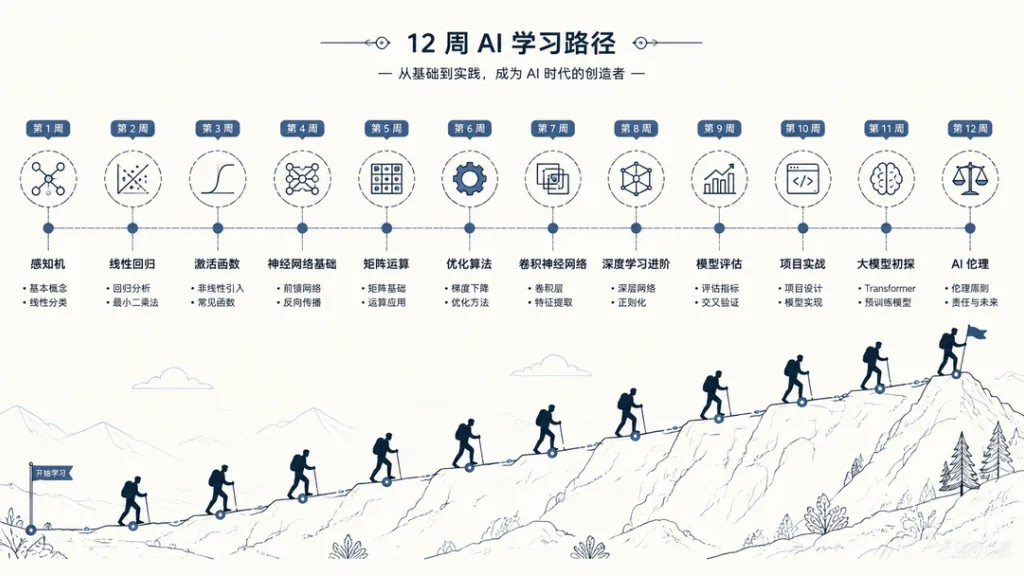
Step 4: A suggested path
- Week 1: read Lessons 1–2 (AI intro + symbolic AI) and get the Animals.ipynb expert system running.
- Weeks 2–3: Lessons 3–5 (perceptron → MLP → framework intro). The key is understanding backpropagation.
- Weeks 4–6: Lessons 6–12 (computer vision). Run the CNN first, then the transfer learning experiment.
- Weeks 7–10: Lessons 13–20 (NLP), from bag of words to Transformers and LLMs.
- Weeks 11–12: Lessons 21–24 (genetic algorithms, deep reinforcement learning, multi-agent systems, AI ethics).
One more tip: after each lab, find the matching dataset on Kaggle and run it again; when you get stuck, ask on Discord or open a GitHub Issue.
8. Takeaways and what to do next
The core value of microsoft/AI-For-Beginners is "fit the whole AI map into your head in 12 weeks". It fills the gap between "crash-course videos" and "600-page tomes", letting someone with zero background run the full path from a perceptron to BERT. 64.6K stars, 50+ languages, dual-framework comparison and enterprise ecosystem links are the moat this course has built.
What you should do now:
- Open GitHub, star the repo, and find Lesson 1 in the README.
- Spend 30 minutes tonight getting the first Animal Expert System notebook to run.
- Rope in three friends to form a 12-week study group — one lesson a week, reviewing each other's labs.
- When you finish, move on to the sibling repos
Generative-AI-for-BeginnersorML-for-Beginners.
Links:
- GitHub repo:
https://github.com/microsoft/AI-For-Beginners - Course mind map:
http://soshnikov.com/courses/ai-for-beginners/mindmap.html - Companion Microsoft Learn path:
https://learn.microsoft.com/en-us/collections/7w28iy2xrqzdj0
One-line recommendation: this is the AI starter course most worth opening in 2026 for anyone starting from zero — and it is not close.