1. Why you need this tool
You finished writing the technical docs — now what? Configure docusaurus.config.js, fight React dependencies, wire up routing, install Algolia, set up i18n: just standing up a docs site eats half a day. The official README lands the point with a single line: "No React, no bloat, just content." In 2024, maintaining a docs site should not be harder than writing the docs. The project has 2329 stars on GitHub and downloads are growing steadily — more and more developers are voting with their feet and leaving the bloated frameworks behind.

2. Project overview: what it is in one sentence
docmd (GitHub: docmd-io/docmd, site: https://docmd.io) is a zero-config Markdown docs site generator written in TypeScript, currently at version 0.9.1. Three keywords: zero config (drop in a folder and it runs), lightweight (~18 KB default JS payload), and AI-native (built-in RAG assistant, MCP, llms.txt). It supports 7 languages, ships an official Docker image, and requires Node.js 18+.
3. A deep dive into the core features
1. Zero config plus a blazing-fast SPA
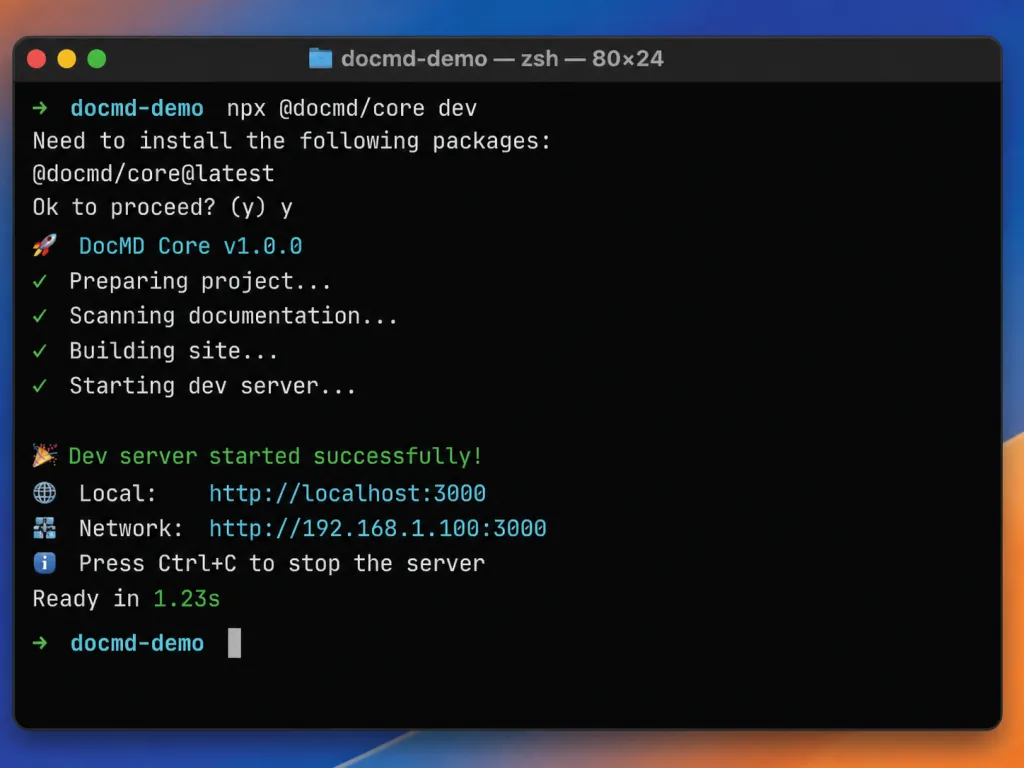
Run npx @docmd/core dev — no config file, no frontmatter, no framework to learn. Navigation is generated from the folder structure automatically, and the first build finishes in 1.2 seconds. Output is static HTML plus SPA routing, and it deploys straight to Vercel, Cloudflare Pages, Netlify or GitHub Pages.
2. Absurdly small payload
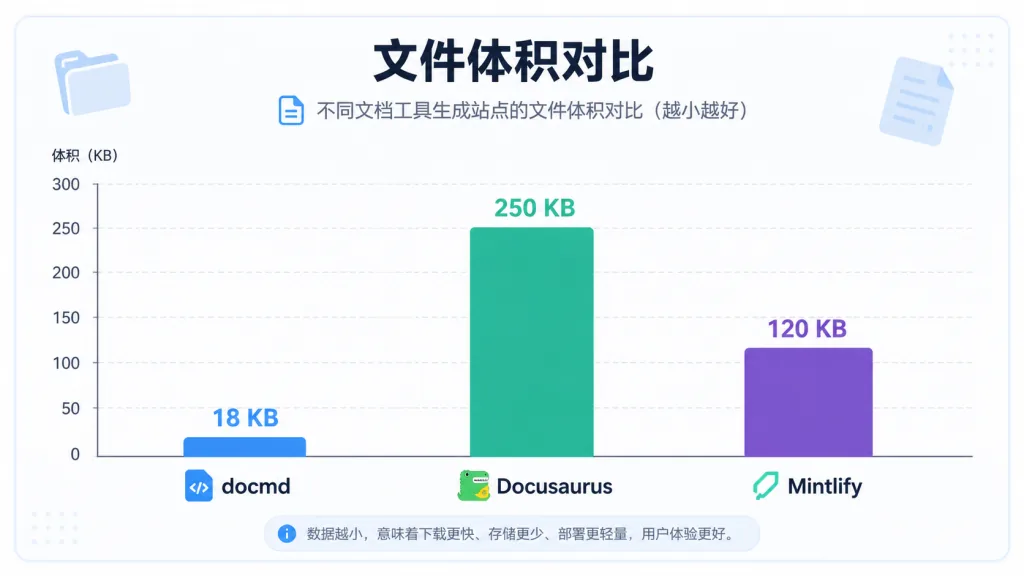
The default JS payload is ~18 KB, against ~250 KB for Docusaurus, ~120 KB for Mintlify and ~50 KB for VitePress — a gap of 5 to 14 times. SEO tags, sitemap, canonical URLs and Open Graph are all built in, and search is offline full-text, with no cloud service involved.
3. AI-native by design
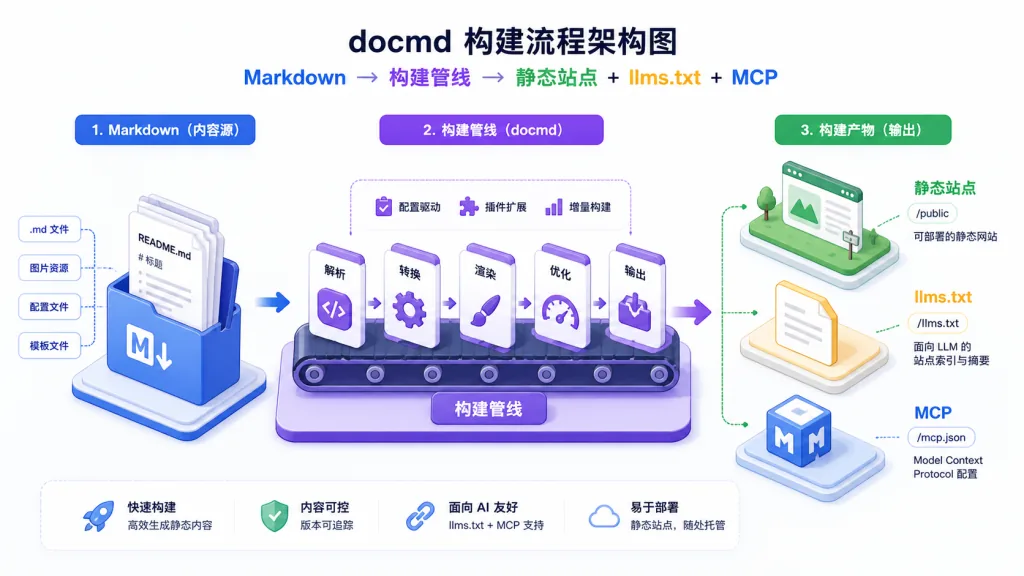
@docmd/plugin-ai provides a RAG assistant supporting BYOK (bring your own key) or the official Cloud Relay. docmd mcp exposes your docs to AI agents over stdio; at build time it automatically generates llms.txt, llms-full.txt and OKF (Open Knowledge Format) multilingual knowledge bundles. In the browser, one click for Copy as Markdown / Copy Context feeds the content straight to an LLM.
4. Enterprise features out of the box
Multilingual support (a separate search index and hreflang per language), versioning (multi-version docs detected automatically), monorepo workspaces, and an extensible plugin system (with type-checked hook returns and async support) — all without extra configuration.

4. Technical highlights and performance numbers
Performance: first paint is static HTML, and SPA route changes produce almost no white flash; JS payload ~18 KB; first build 1.2 seconds (on the official sample data).
Architecture: fully typed TypeScript; a layered design of core + ui + optional plugins; the build emits the RAG embedding index, sitemap, llms.txt and OKF in one pass.
Ecosystem compatibility: one-command migration from Docusaurus, VitePress, MkDocs and Starlight (docmd migrate); preset deployment templates for Dockerfile, NGINX, Caddy, Vercel and Netlify (docmd deploy).
5. Where it fits, and who it's for
Scenario 1: open-source project docs — solo developers maintaining a small or mid-sized project who need to ship fast and deploy to GitHub Pages.
Scenario 2: multilingual enterprise docs — global teams that need to publish in 7 languages in parallel, and want the content readable by AI agents.
Scenario 3: CI/CD pipeline integration — build docs in CI through the Node API (await build('./docmd.config.json')), and run docmd validate for internal link checks.
Not for: teams that need heavily customized React components (pick Docusaurus); teams already using Mintlify and locked into its deep integrations.
6. Comparison with alternatives
| Dimension | docmd | Docusaurus | VitePress | Mintlify |
|---|---|---|---|---|
| Config file | None needed | docusaurus.config.js | config.mts | docs.json |
| Default JS payload | ~18 KB | ~250 KB | ~50 KB | ~120 KB |
| AI assistant | Built in (BYOK + Cloud) | None | None | Built in (cloud only) |
| MCP / llms.txt | Built in | None | None | llms.txt only |
| Pricing model | Open source, free | Open source, free | Open source, free | Freemium |
Why docmd: when your priority is "lightweight + AI-readable + zero config" rather than "deep React component customization", docmd is the most complete option available today.

7. Getting started fast
Install and run (three steps):
mkdir my-docs && cd my-docs- Drop your Markdown files into the
docs/directory npx @docmd/core dev, then openhttp://localhost:3000
Production build: npx @docmd/core build emits a site/ directory you can drop onto any static host.
Next steps: generate docmd.config.json with docmd init; install optional plugins such as pwa, math and openapi with docmd add <plugin>; run docmd doctor + docmd validate in CI as a safety net.
8. Summary and what to do next
With a ~18 KB JS payload, a built-in AI assistant, native llms.txt and MCP, docmd separates "writing docs" from "standing up a docs site" again. It doesn't go after Docusaurus's React ecosystem, but it takes the lightweight + AI-native path as far as it goes.
Project links:
- GitHub: https://github.com/docmd-io/docmd
- Website: https://docmd.io
- Docs: https://docs.docmd.io
- Online editor: https://live.docmd.io
- License: MIT
One-line recommendation: if you're done paying the setup tax on docs sites, make npx @docmd/core dev the first command of your next project.