
Pick a title (1 of 3)
20,000 photos in your camera roll and you can't delete a single one? Immich gives you back ownership of your digital memories
Immich at 110K stars: 100,000 photos searched in milliseconds instead of 30 seconds
I didn't pay a cent for cloud storage — I built a photo and video hub for the whole family with Immich
The self-hosted photo and video manager: Immich at 110K stars, and the digital memory freedom behind it
1. Opening: why you need this tool
Your camera roll holds 20,000 photos, cloud storage is nearly full, and you don't dare delete anything. Finding a photo from last year's Kyoto trip takes half an hour of scrolling. You want to build a growth timeline for your kid, but the recommendation algorithm only pushes popular content. Google Photos and iCloud look effortless — until the monthly subscription, the privacy terms, the compressed image quality and the forced AI categorization each remind you that your memories are being managed by someone else's rules.
The open source world had the answer all along: Immich has 116K stars on GitHub and has held a top-three spot among self-hosted projects for two years running. It gives you back control of your photos and videos with one complete solution.

2. Project intro: in one sentence
Immich positions itself as a "high-performance self-hosted photo and video management solution", with four core keywords: self-hosted, cross-platform, AI search, privacy-first. The project is mainly TypeScript with a unified frontend and backend; native iOS/Android apps cover mobile and the web client works out of the box; the community has contributed localization for 20+ languages, with complete Simplified Chinese docs.
3. Core features in depth
1. Automatic backup and multi-device sync
Open the mobile app and new photos upload automatically, with per-album selective backup running silently in the background. Uploads are deduplicated, so existing files never take up space twice. The web client supports drag-and-drop batch upload of a thousand-plus files at a time. The backup structure is user-defined and original quality is preserved in full — no compression at all.
2. AI-powered search
Immich integrates three kinds of AI: CLIP semantic search, face recognition clustering and object detection. Type "sunset", "dog" or "birthday cake" and you'll find it. Upload ten photos of your kid and the system automatically clusters every image of the same person. EXIF data, GPS coordinates and camera parameters are all searchable.

3. Albums, sharing and collaboration
Personal albums, shared albums and partner sharing are all supported. Public links can be password-protected with an expiry date. Live Photos and Motion Photos back up and play losslessly; 360-degree panoramas render natively on the web. Archive, favorites, tags and folder view round out a complete organization system.
4. Multi-user and permission management
The web admin panel handles user management, quota control and storage policy configuration. OAuth login works with identity providers like Authentik and Authelia, and API keys let third-party tools (migration scripts, rclone) access resources. Every user gets their own space with no interference.

4. Technical highlights and performance numbers
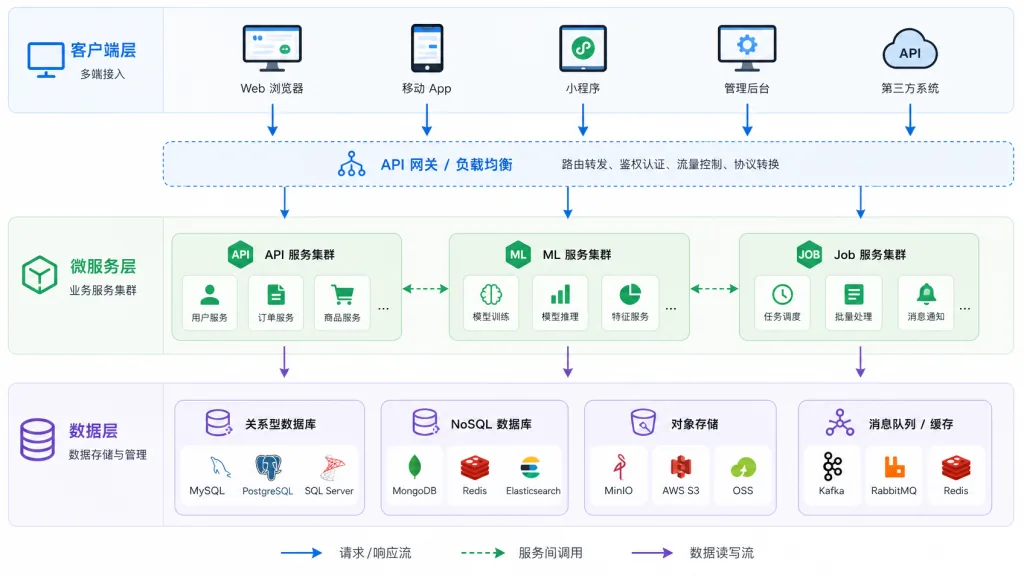
The Immich backend runs on NestJS + PostgreSQL + Redis, while the frontend uses SvelteKit and Flutter. Machine learning inference goes through ONNX Runtime with both CPU and GPU modes; vector search leans on the pgvector extension, giving millisecond responses on a 100,000-image library. The architecture is microservice-based, so the ML service, background jobs and API service scale independently; storage backends include local disk, S3 and MinIO. Official hardware guidance: 4 CPU cores + 8 GB RAM handles 100,000 photos for daily use, and enabling hardware transcoding makes video previews smoother by more than 3x.
5. Use cases and audience
Family media hub: parents shooting their kids, grandparents storing photos, multiple family members collaborating — a single Immich instance shared by everyone, no more compressed zip files sent around in group chats.
Photographers and content creators: full RAW support, complete EXIF retention, project organization by folder — a lightweight alternative to local Lightroom management plus cloud drive backups.
Privacy-sensitive users: medical images, contract photos, private family videos — deploy on an intranet or your own server and the data never leaves your racks.
Not suitable for: pure Windows GUI users (deployment requires Docker), or people who only want tidying and don't care about ML models (the free tier of Google Photos may be handier).

6. Comparison with alternatives
| Dimension | Immich | Google Photos | PhotoPrism | Nextcloud Memories |
|---|---|---|---|---|
| Self-hosted | ✅ | ❌ | ✅ | ✅ |
| Original quality | ✅ | ❌ (compressed on free tier) | ✅ | ✅ |
| AI search | CLIP + faces + objects | Strong | Weak | Weak |
| Mobile app | Native | Official | Third-party | Official |
| Deployment effort | Medium | None | Medium | Medium |
| Multi-user | ✅ | ✅ | ✅ | ✅ |
| Activity | Very high (116K stars) | — | Medium | Medium |
Immich's differentiator is the triangle balance of "AI capability + mobile experience + active community", something PhotoPrism (desktop-leaning) and Nextcloud Memories (office-scenario-leaning) struggle to match.
7. Getting started quickly
Minimum hardware: dual-core CPU, 4 GB RAM, 50 GB storage. Recommended: quad-core CPU, 8 GB RAM, a dedicated GPU (for ML inference).
Deployment: one-command startup with Docker Compose. The official docker-compose.yml lives in the immich-app/immich repo — copy it and run docker compose up -d. Open http://server-ip:2283 in the browser and create the admin account on first visit.
Advanced tips: use PostgreSQL 16+ with the pgvector extension to speed up vector search; enable hardware transcoding (Intel QSV / NVIDIA NVDEC) to cut CPU usage; put a reverse proxy in front with Cloudflare or your own domain and enable HTTPS; follow the 3-2-1 backup rule and sync regularly to external storage or object storage.
8. Summary and next steps
Immich's 116K stars prove one thing: users want both the convenience of AI and ownership of their data. It delivers both — and the experience holds up against commercial products.
Core value recap: self-hosting protects privacy, original quality stays lossless, AI search saves time, and the experience is consistent across devices.
Next steps: start with an old PC or a NAS and run the default config for a month. Then enable hardware transcoding and external backups as needed. Finally, onboard every device in the family and treat it as the single entry point for your household's digital assets.
Links:
- GitHub: https://github.com/immich-app/immich
- Website and docs: https://immich.app
- Demo: https://demo.immich.app (account demo@immich.app / password demo)
There's only one reason worth trying it: your memories should be yours to control.
#immich #Immich #immich-app #AIVideoEditing #ScriptedVideo #TalkingHeadVideo #OpenSource #GitHub