
1. Opening: why you need this tool
Writing UI with Claude, Cursor and Codex is routine now, but once you've tried it you know the cringe: purple gradient backgrounds, glassmorphism cards, the emoji trio, a giant centered bold headline — the whole page looks like 'this is what a default LLM looks like.' Developers call it AI slop; users swipe past it in a second. Search AI generated UI on GitHub and the most-saved results are all about how to wash the AI smell off. The problem isn't model intelligence. Every LLM has converged on the same high-probability output — the more 'stable' it is, the more it looks like everyone else's. Hallmark does something blunt: it smashes that safe zone and forces every output through a different structure, theme and typographic fingerprint.
2. Project overview: what it is in one sentence
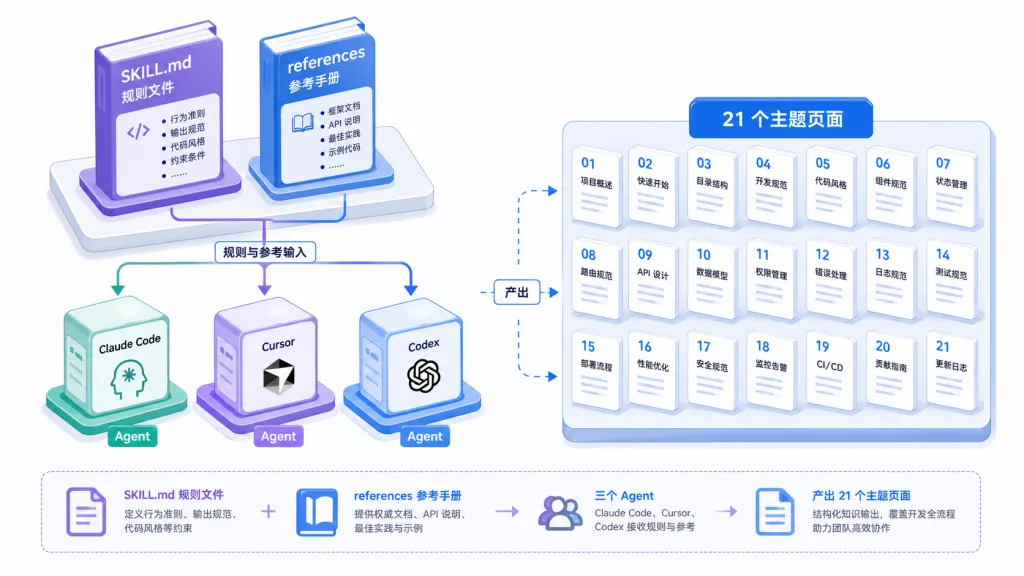
Hallmark is an anti-AI-slop design skill pack for Claude Code, Cursor and Codex. It ships 21 themes, 57 slop detection gates and 4 verb commands. Every incoming brief triggers a fresh pick of macro structure, color anchors and font pairing, plus a pre-delivery self-critique. It currently has 24,222 GitHub stars, is MIT licensed, is made by Together AI, and is positioned as 'make the pages AI writes stop looking like AI wrote them.'

3. A deep dive into the core features
1. Four verbs, four ways to use it
By default Hallmark generates new UI straight from the brief. Type hallmark audit <target> and it scores existing code against the anti-pattern list and emits a fix list while changing not a single line. hallmark redesign <target> keeps the copy, information architecture and brand, throws the structure away and rebuilds it with a brand-new fingerprint. hallmark study <screenshot|URL> extracts the design DNA you admire — macro structure, font pairing, color anchors — while refusing pixel-level cloning and paid templates, and can export a portable design.md for other AI tools to pick up. Four verbs cleanly split write, revise, audit and learn.
2. 21 themes plus a Custom branch
Hallmark ships 21 themes including Hum, Cobalt, Carnival, Lumen, Riso and Press, each one a complete set of typography, color and whitespace rules. When a brief comes in it picks the closest match first, so the result doesn't feel like a re-skin. The sharper part is the Custom branch: when a brief carries creative intent no existing theme can cover, it builds the palette, type and layout from scratch — skipping templates while still running the same 57 gates. Custom is a quiet branch that ordinary briefs never reach, and that's deliberate: it prevents over-reach.
3. 57 slop gates plus pre-delivery self-critique
This is the most valuable part of Hallmark. It breaks 'AI smell' into 57 detectable anti-patterns — purple-blue gradients, glassmorphism, centered giant headlines, emoji decoration, blurry glow blobs, excessive border radius and more — each with explicit criteria. After generation it runs one more pre-emit self-critique against the gate list and fixes whatever fails. With both layers stacked, the output side isn't just 'looks okay' — every rule has been called out by name.

4. Anti-default distribution: different briefs, different shapes
In the official demos, the same tool and the same Hallmark, given a dozen-plus different briefs — a sourdough app, a content extraction API, a record label EP, an AI inference tool, a tea menu, a honey farm, a Riso print exhibition, an independent type studio, a SaaS product page, travel booking, Moroccan fashion, developer infrastructure — produced pages with completely different structure, typography and color. Not one template recolored: the branching starts at the macro structure. Every page is single-file HTML+CSS, and the CSS comments are stamped with the macro structure used, so the audit is traceable.

4. Technical highlights and performance data
Hallmark is essentially a set of structured prompt rules plus Markdown reference manuals, with CSS as the main language (the theme style assets). Three architectural highlights. First, rules live outside the code: the core rule set is plain text under SKILL.md and references/, so any IDE agent can consume it directly. Second, themes compose: the 21 themes are discrete assets you can pull out individually and recombine. Third, the protocol ports: design.md exports the design DNA it learned, so another AI tool can take over without rerunning the whole pipeline. It works with all three mainstream agents — Claude Code, Cursor and Codex — covering more than 90% of AI coding users today.
5. Where it fits and who it's for
Scenario one: an indie developer shipping a product landing page. A weekend tool needs a hero page you're not embarrassed to show, and Hallmark's default verb nails it in one pass. Scenario two: a design or frontend team writing AI collaboration standards. Put SKILL.md in the team knowledge base and raise the floor for AI-written UI. Scenario three: de-AI an existing page. audit gives you the fix list, redesign swaps structure and skin in one move. Scenario four: hand off across tools. study a site you admire, export design.md, and drop it into any LLM to reproduce the vibe.
Good for: frontend developers sick of AI slop, indie developers, product managers, teams that need demos fast. Not for: cases that demand pixel-perfect reproduction of a reference site, or admin systems where visual consistency is strict and only templates can guarantee it.
6. How it compares
| Dimension | Hallmark | shadcn/ui templates | Raw prompting | Tailwind UI skin | |---|---|---|---|---| ---| | Anti AI slop | 57 gates + self-critique | None | Luck | None | | Theme variety | 21 + Custom branch | Single system | Uncontrollable | Single system | | Structural fingerprint | Macro structure re-picked every time | Fixed template | Default high-probability | Fixed template | | Cross-agent | Claude/Cursor/Codex | Generic components | Depends on the model | Generic components | | Traceable audit | Stamped in CSS comments | No | No | No |
Core difference: other options offer a better default. Hallmark offers a mechanism that refuses the default — it will not accept the high-probability solution inside the LLM's training distribution.
7. Getting started
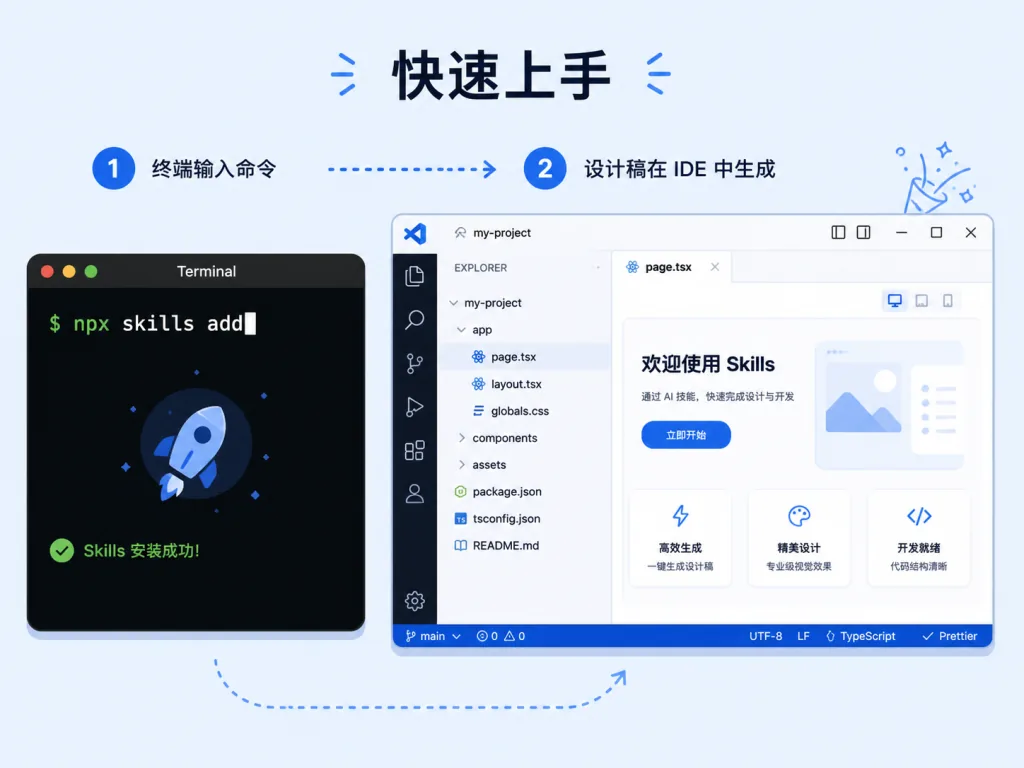
One-line install:
npx skills add nutlope/hallmark
Then pick the drop location per IDE: for Claude Code, drop it in ~/.claude/skills/hallmark/; for Cursor, use .cursor/rules/hallmark.mdc (body of SKILL.md only, frontmatter stripped); for Codex, use ~/.codex/skills/hallmark/ per user or .codex/skills/hallmark/ per project. To update, rerun the same command.
Minimal usage: describe the brief right in the agent chat and Hallmark takes over by default. To audit, write hallmark audit ./src/landing.tsx; to rebuild, write hallmark redesign ./src/landing.tsx; to learn from an outside design, hand it a screenshot or a URL. For advanced play, read docs/recipes.md and docs/study-examples.md — they're field-tested workflow recipes.
8. Summary and what to do next
Hallmark's core value in one sentence: it drags 'AI-written UI' from an insult back to a neutral term. Through an externalized rule set, 57 gates, 21 themes and a Custom branch, it forces every output out of the LLM's default distribution. A three-step plan: run the default verb on your own product page once to feel the difference, audit an old page with audit to see which items get flagged, then use study on a site you admire and export design.md into your team's knowledge base.
- GitHub: https://github.com/Nutlope/hallmark
- Live demo: https://www.usehallmark.com
- Install command:
npx skills add nutlope/hallmark
One-line pitch: if you've had enough of every AI-built UI showing up with the same purple gradient, Hallmark is the cleanest antidote available right now.