
1. Intro: why you need this tool
At 2 a.m. you ask an AI assistant to "clean up the logs directory" and it runs rm -rf / without blinking. Agents that act on their own like this are a daily occurrence. Worse, most Agents have no persistent memory: teach it a preference today and you have to repeat it tomorrow. And who watches the extra spend? Who brings it back up after a crash?
If these problems sound familiar, Mercury Agent gives a straight answer: ask before acting, remember what matters, never go offline. It has picked up nearly 3,000 stars on GitHub, the current stable release is v1.1.13, it's written in TypeScript, and it's built around "permission hardening + persistent memory + multi-channel always-on."

2. Project overview: what it is, in one sentence
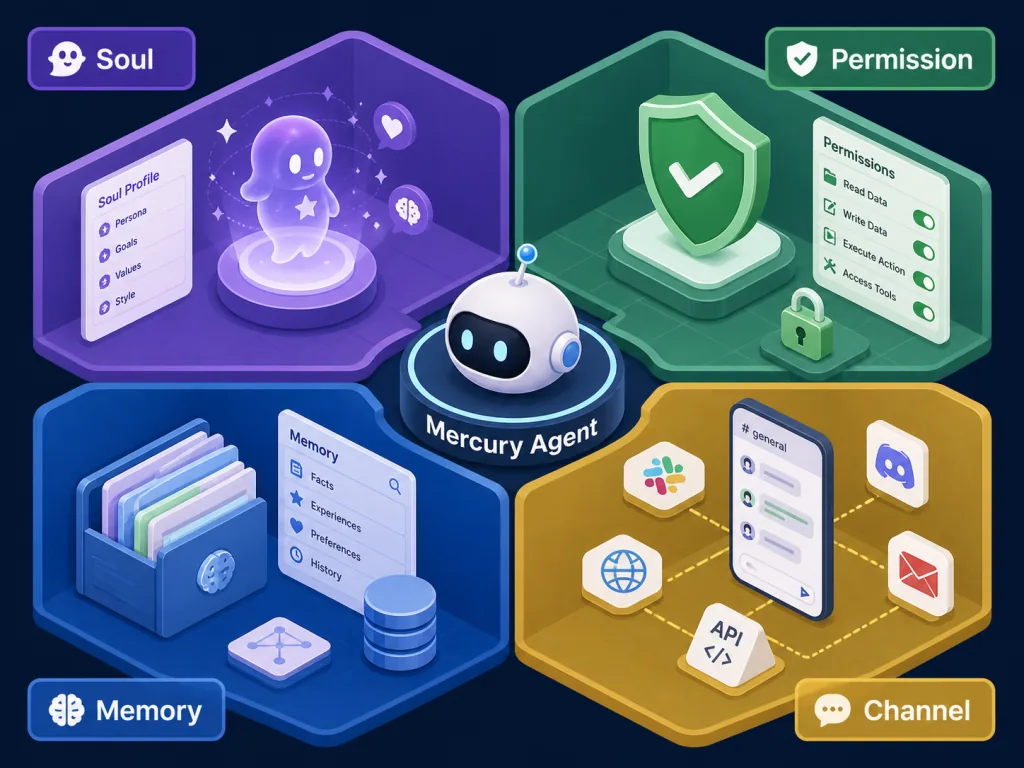
Mercury is an "AI Agent with a soul," and its core keywords are just four: Soul-Driven (a definable personality), Permission-Hardened, Token-Budgeted, and Multi-Channel (CLI / Telegram / Web). It upgrades AI from a "chat toy" into a "24/7 personal assistant," and ships with 31 built-in tools, kanban tasks, skill extensions and a SQLite-driven "Second Brain" memory system.
3. Core features in depth
1. Permission-Hardened: an ask-before-acting permission sandbox
Mercury elevates "is this allowed?" to a system-level concern. Shell commands come with a built-in blacklist (sudo, rm -rf / and other high-risk commands never execute), file reads and writes are authorized at directory granularity, and every sensitive action triggers an "Ask Me / Allow All" approval flow. Users can pick a permission mode before each session, deciding on the spot whether to "let it run this time" or "question everything."
2. Second Brain: structured memory that grows
Memory isn't "replaying the whole chat history"; it's structured data across 10 types (identity, preferences, goals, projects, habits, decisions, constraints, relationships, events, reflections). Mercury uses SQLite + FTS5 full-text indexing as the base, automatically extracting 0–3 facts after each conversation, and injecting the 5 most relevant memories into context before a call (900 characters of budget). Conflicts are resolved by confidence, expired memories are pruned automatically, and long-term patterns generate "reflections."
3. Token Budget: daily cap + automatic trimming
A default daily token cap, with automatic switching to a trimmed mode past 70%. The /budget command checks, changes and resets it at any time; /budget override can grant a temporary exception for a single request. For an Agent running 24/7, this is the first line of defense against being woken up by the bill.
4. Multi-Channel + Always On
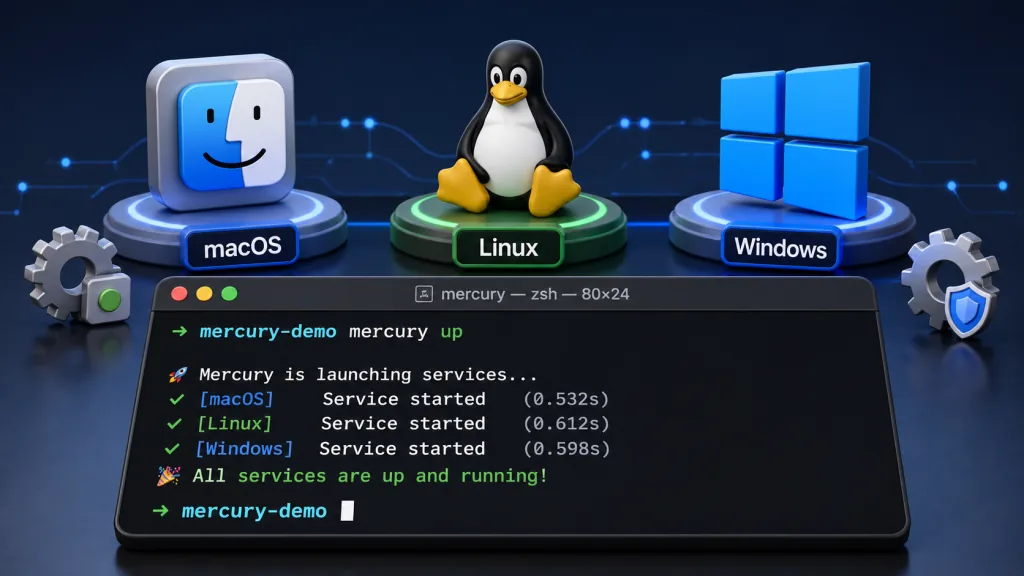
With a single mercury up command, Mercury stays resident in the background: LaunchAgent on macOS, systemd user units on Linux, Task Scheduler on Windows — all with boot-time autostart. After a crash it restarts automatically with exponential backoff (at most 10 times per minute). The CLI renders streams with an Ink TUI, Telegram supports editable streaming messages and file uploads, and the Web Dashboard even packs in a kanban board and a Workspace IDE.
4. Technical highlights and performance data
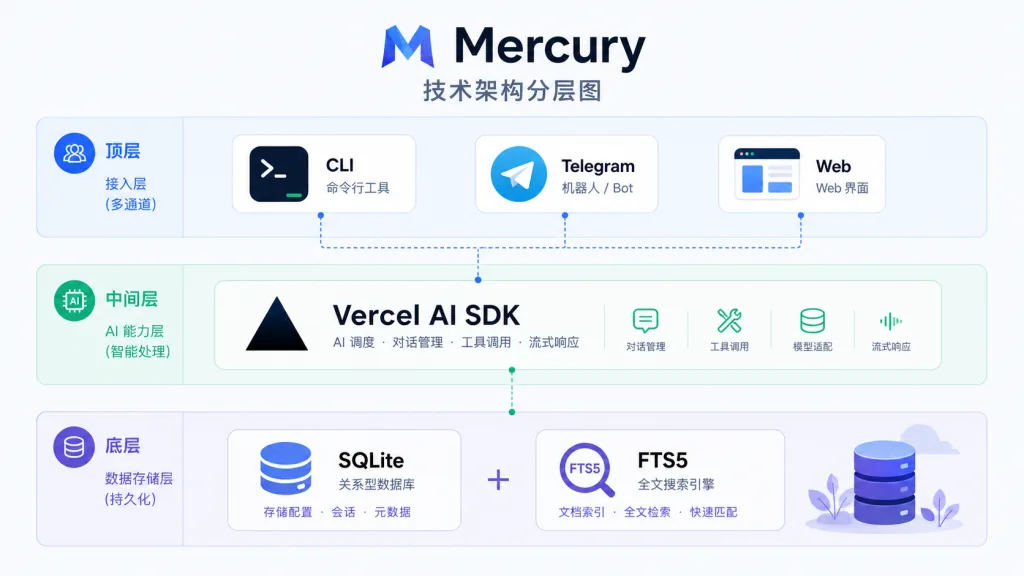
Mercury is built on TypeScript + Node.js 18+, with ESM modules and a tsup build. The Agent loop runs on top of Vercel AI SDK v4's generateText / streamText, with at most 10 steps per session. Telegram integration uses grammY, the memory layer uses the SQLite + FTS5 + JSONL trio, and a separate daemon manager handles launching and supervising the daemon.
On the LLM provider side, DeepSeek, OpenAI, Anthropic, Grok and Ollama Cloud / Local are one-click configurable, with automatic fallback to the next provider on failure, and the last successful provider remembered as the starting point next time. Standalone executables are compiled and packaged with Bun, and the final artifacts cover 5 target platforms (macOS arm64/x64, Linux x64/arm64, Windows x64), all with SHA-256 checksums.
5. Use cases and audience
Use cases:
- 24/7 personal assistant: hand scheduled tasks, calendar reminders and news aggregation to a Telegram Bot.
- Developer copilot: drive Git, the filesystem and shell tools directly in CLI mode, with a kanban board for managing multiple tasks.
- Long-running project collaboration: Second Brain accumulates your preferences and project context automatically, understanding you better the more you use it.
Who it fits: indie developers and heavy AI users who care about permission boundaries, need long-term memory, and want one tool to cover CLI / Telegram / Web.
Who it doesn't: people who only want one-off Q&A, who don't want data living locally, or whose teams must use a centralized SaaS console.
6. Competitor comparison
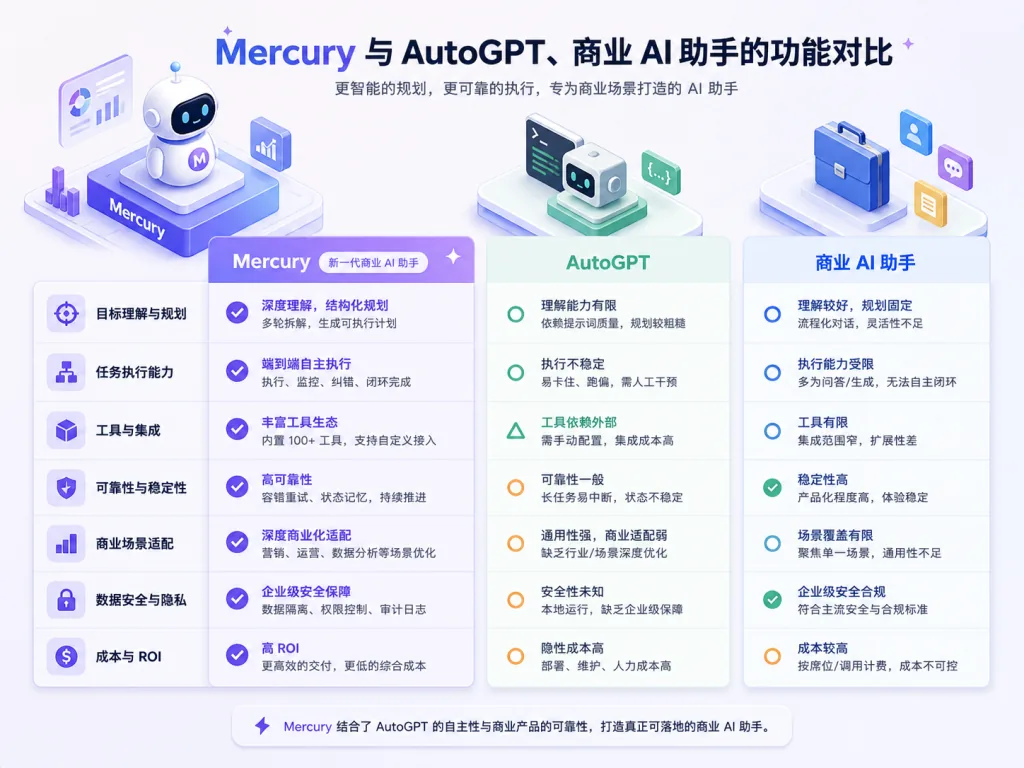
| Project | Permission model | Persistent memory | Multi-channel | Token budget |
|---|---|---|---|---|
| Mercury Agent | Built-in hardening + approval flow | SQLite + FTS5 / 10 memory types | CLI / Telegram / Web | Daily cap + auto trimming |
| AutoGPT-style Agents | Mostly no explicit permission layer | Mostly short-term context | Mainly CLI | No unified management |
| Commercial AI assistants | Managed centrally by the platform | Cloud, limited export | Usually 1–2 channels | Subscription billing |
Mercury's differentiation is "local-first + auditable permissions + unified cross-channel sessions," which suits users who care about privacy and control.
7. Getting started quickly
One-line install, no Node.js environment required:
curl -fsSL https://mercuryagent.sh/install.sh | sh
Windows users: irm https://mercuryagent.sh/install.ps1 | iex
Already have Node.js 20+: npx @cosmicstack/mercury-agent
The first launch opens a setup wizard (name, provider, optional Telegram), then you pick the Ask Me or Allow All permission mode and you're ready to chat.
Want Mercury to stay resident? One command does it: mercury up registers the system service, starts the daemon and confirms it's alive. Maintain it afterwards with mercury status, mercury logs and mercury restart. When you need to reconfigure, mercury doctor brings up the diagnostics and configuration wizard at any time.
8. Summary and next steps
Mercury Agent's core value boils down to one sentence: lock down permissions first, keep the memory second, and never let it go down last. If you're fed up with AI Agents that "act on their own," have "goldfish memory," and "disappear while running," it's practically a bespoke remedy for exactly those problems.
A suggested learning path: start with the CLI to experience the permission flow and Second Brain, then add Telegram for daily reminders, and finally manage long-running tasks with the kanban board in the Web Dashboard.
- GitHub: https://github.com/cosmicstack-labs/mercury-agent
- Website: https://mercuryagent.sh/
- Skill marketplace: https://skills.mercuryagent.sh
- Discord: https://discord.gg/5emMpMJy5J
One-line recommendation: if you want an AI assistant that asks before acting, remembers you, and is always online, Mercury Agent is the most worthwhile open-source option to self-host today.