
1. Opening: why you need this tool
Two in the morning, and the team lead is staring at 47 MRs on GitLab — this week's code reviews are backed up again. Developer Zhang wants to try Cursor but worries about code leaking and getting a call from compliance. He'd like Claude Code, but setting up the local environment eats an entire afternoon. He wants automated tests, then discovers the machine has only 8GB of RAM and can't run a mainstream AI IDE at all. This is not an isolated case. According to the Stack Overflow 2024 developer survey, 72% of teams want to adopt AI coding tools, yet over 60% end up abandoning them because of three problems: data security, local compute, and fragmented workflows. Professional engineering teams don't need another "AI code completion toy" — they need an AI development platform that fits into the R&D process, supports private deployment, and covers everything from requirement to review. MonkeyCode targets exactly those three pain points.

2. Project overview: what it is in one sentence
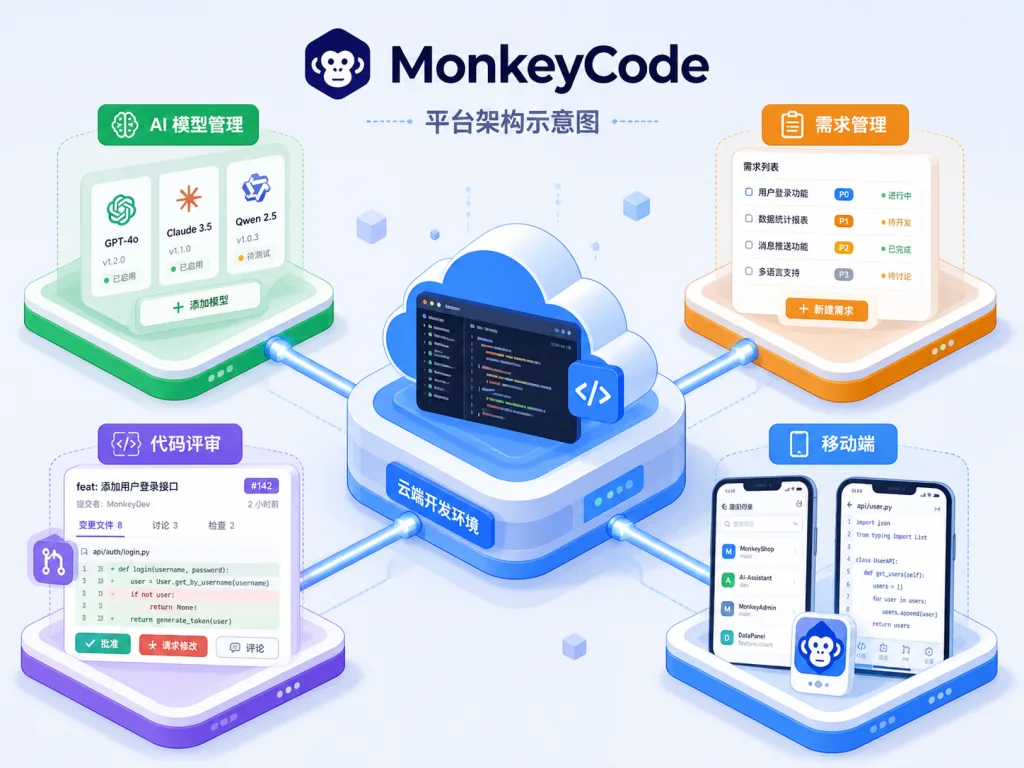
MonkeyCode is an enterprise-grade AI development platform open sourced by Chaitin Tech, with 4349 stars on GitHub. The main repository is built in TypeScript, and the core value can be summed up in four keywords: cloud development environment, multi-model access, private deployment, team collaboration. It positions itself as "an AI assistant for professional engineering teams", not a vibe coding toy for individuals. Unlike local IDE plugins such as Cursor, MonkeyCode puts the development environment, AI models, requirement management and automated review into one self-hostable platform that enterprises can deploy on their intranet, so AI coding actually joins the R&D pipeline.
3. Core features in depth
1. Cloud development environment, goodbye "my machine can't run it"
MonkeyCode ships a hosted cloud development environment where every AI task runs in a real server-side sandbox — builds, tests and previews all happen in the cloud. The official recommended specs: at least 8C/16GB/100GB for the development environment host, and just 2C/4GB/40GB for the platform console. That means even a frontend colleague on an 8GB MacBook Air can run a full build of a large project.
2. Free model switching, all the major domestic models in one platform
The platform includes mainstream large models such as GLM, Kimi, MiniMax, Qwen and DeepSeek, and users can schedule them automatically by task type or pin a specific model. This matters especially for teams in China: no more paying separately and switching accounts for each model. A dev lead can assign different models to coding tasks, requirement-document tasks and review tasks, then settle everything in one bill.
3. Requirement and SPEC management that makes AI tasks traceable
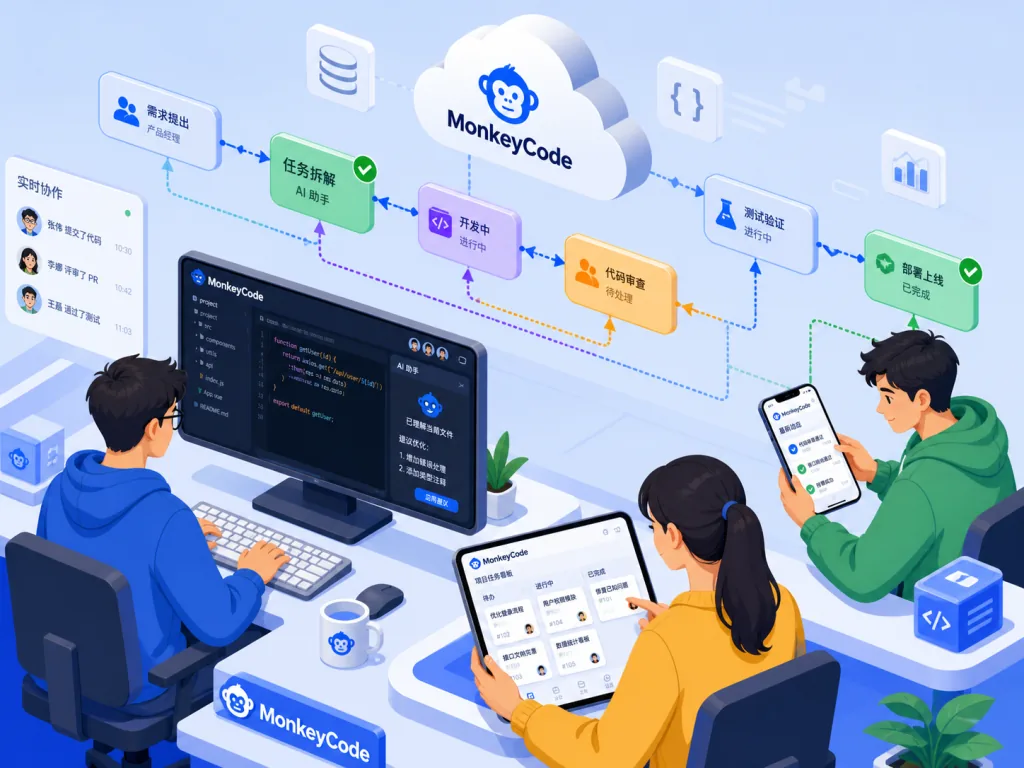
MonkeyCode is not a "paste a paragraph, get code" tool. It folds requirement breakdown, SPEC writing, task execution and automated review into one pipeline. A dev lead can split a requirement across several AI tasks, each with its own explicit SPEC, and the output is linked back to the requirement automatically. In the README's comparison table this is MonkeyCode's unique edge: Cursor, Claude Code and Codex all get red crosses, MonkeyCode gets a green dot.
4. Automated PR/MR code review
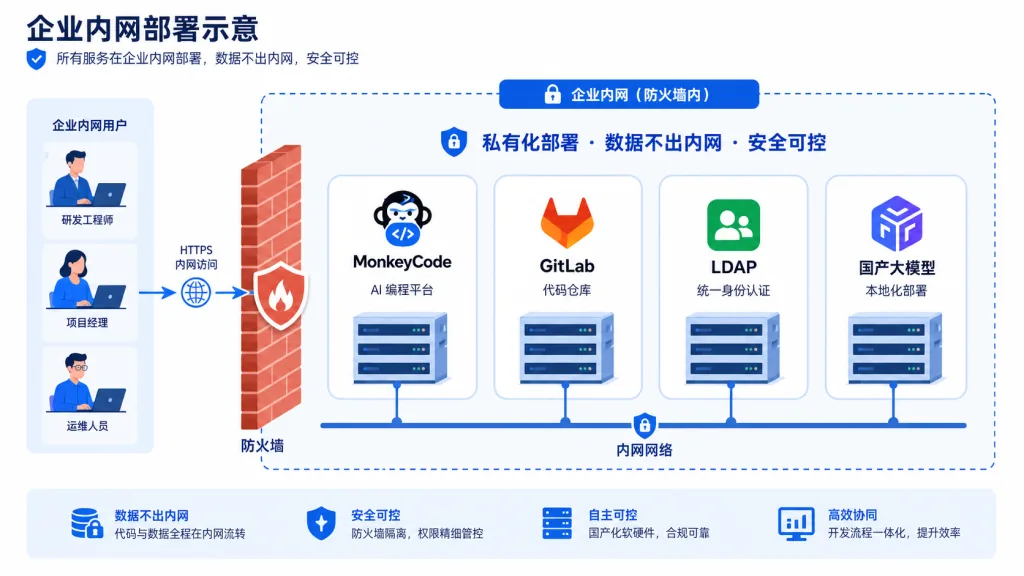
The platform can trigger AI review automatically before code is merged, freeing developers from "reading PRs on the weekend". Paired with a self-hosted GitLab or GitHub, enterprises can keep the review AI on the intranet too, so no code snippets leave the building.
5. Native mobile support
There are native iOS and Android clients, with data syncing in real time between desktop and mobile. Tasks keep running in the cloud while you walk away from your desk.

4. Technical highlights and performance data
- AGPL-3.0 license: the core code is fully public, so enterprises can audit it, extend it and distribute it internally.
- Full-stack TypeScript: frontend and control plane share one language, which lowers the barrier to contributing and to customization.
- Architecture: the console and the development environment host are deployed separately, decoupling AI task scheduling from actual code execution — good for scaling.
- Ecosystem compatibility: works with mainstream Git platforms (GitHub, GitLab, Gitee), mainstream domestic large models, and enterprise identity providers (LDAP/OIDC depending on the deployment edition).
- Both an official Electron client and an online SaaS are available; the CI pipeline runs on GitHub Actions and releases land on a steady cadence.
5. Use cases and audience
- Scenario one: an AI coding middle platform for mid-size and large R&D teams. When you need to manage AI usage for 50+ developers in one place, control cost, audit output and keep code from leaving the building.
- Scenario two: heavily regulated industries such as finance and government. Private deployment is mandatory, data must not leave the intranet, and the team still wants the productivity gain from AI coding.
- Scenario three: orchestrating AI coding requirements. When a team wants to automate the chain of requirement → SPEC → development → test → review, MonkeyCode's requirement and SPEC module works as is.
- Not a great fit: individual developers looking for a lightweight IDE completion booster (Cursor is a better match); Mac power users who want to write code in a CLI (MonkeyCode's local CLI is a red cross in the comparison table).
6. Comparison with alternatives
The README offers a 10-dimension comparison table; here are a few key dimensions:
| Dimension | MonkeyCode | Cursor | Claude Code | Codex |
|---|---|---|---|---|
| Requirement and SPEC management | 🟢 | 🔴 | 🔴 | 🔴 |
| Team collaboration | 🟢 | 🔴 | 🔴 | 🔴 |
| Domestic model support | 🟢 | 🔴 | 🔴 | 🔴 |
| Private deployment | 🟢 | 🔴 | 🔴 | 🔴 |
| Open source | 🟢 | 🔴 | 🔴 | 🔴 |
| Local IDE / CLI | 🔴 | 🟢 | 🟢 | 🟢 |
The takeaway: Cursor, Claude Code and Codex are strong on "local experience for individual developers", while MonkeyCode is strong on "team-level engineering and enterprise compliance". If your goal is "let 50 developers use AI together without letting code out the door", MonkeyCode is one of the few options that works out of the box.
7. Getting started quickly
Option A: try it online (individuals and small teams) Go to https://monkeycode-ai.net/, sign up and create your first AI task — no client download needed.
Option B: self-hosted deployment (enterprise intranet) Start the online installer with one command:
bash -c "$(curl -fsSL https://monkeycode-ai.com/online/install)"
Deployment docs: https://monkeycode.docs.baizhi.cloud/node/019eb0f3-9424-7c93-9489-4e584f989527
Minimum working flow: sign up → create a cloud development environment → pick a model → enter the requirement → wait for the AI to produce the SPEC and code → run tests in the cloud terminal → trigger a PR/MR review with one click.
8. Conclusion and next steps
MonkeyCode's core value is upgrading AI coding from "a personal toy" to "team infrastructure": the cloud development environment removes the compute bottleneck, multi-model access reduces vendor lock-in, requirement and SPEC management make AI tasks traceable and auditable, and private deployment satisfies compliance. If you're a dev lead still agonizing over whether to adopt AI coding, start with a small pilot of the online edition (zero cost, zero deployment), then decide whether to move to the self-hosted version based on your data compliance requirements.
- GitHub repository: https://github.com/chaitin/MonkeyCode
- Try it online: https://monkeycode-ai.net/
- Deployment docs: https://monkeycode.docs.baizhi.cloud/
- Enterprise inquiries: https://baizhi.cloud/consult
One line to recommend it: if what you need isn't "another code completion plugin" but "an AI development platform that runs on your intranet and covers the whole workflow", MonkeyCode is worth an afternoon of deployment.