1. Opening: ten agents at once, and the desktop turns into a slideshow
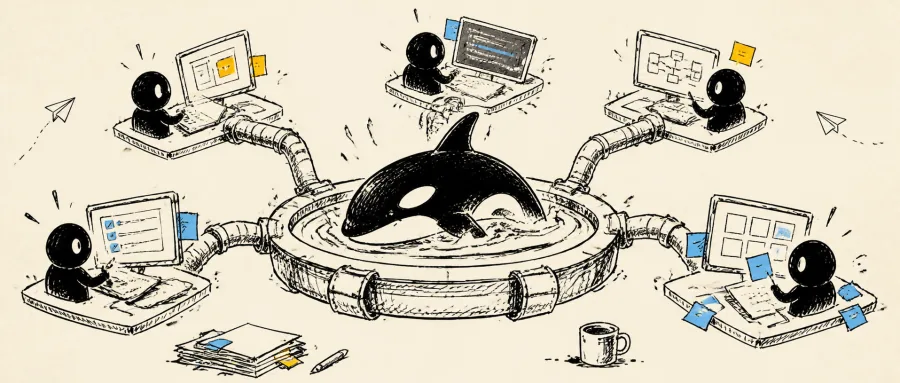
Our last refactor broke the team: five AI agents editing code at once, three terminals and two IDEs stacked on screen, Chrome eating the rest of the RAM, and a laptop that spun its fans for three hours before blue-screening. Progress was tracked by hand in a WeChat group, and whoever's agent finished had to shout about it.
This isn't a joke. It's a real slice of how AI coding workflows look today. Claude Code, Codex, Cursor and Grok each do their own thing, and the developer is forced into being a human scheduler: switching windows, syncing state, merging branches, checking results. Pure coordination overhead eats 30% of your throughput.
Orca, with 43.8K stars on GitHub, targets exactly that pain: making "agent orchestration" a desktop IDE that's actually usable.
2. In one sentence: what this project is
Orca calls itself an "Agent Development Environment (ADE)", and its mission is one sentence long — make a group of parallel agents work like an orderly engineering team.
- Core positioning: an AI orchestration IDE for "100x builders"
- Key features: parallel agents, worktree isolation, mobile remote control, terminal + IDE + browser in one
- Ecosystem: native support for Claude Code, Codex, Cursor, Grok and 25+ other CLI agents
- Milestones: 43,832 GitHub stars, MIT license, macOS / Windows / Linux
Orca itself is written in TypeScript and built on Electron for the desktop, so the adoption cost is close to zero — any CLI agent you can think of, it can orchestrate directly.
3. Core features in depth
1. Parallel Worktrees: one prompt dispatched to five agents
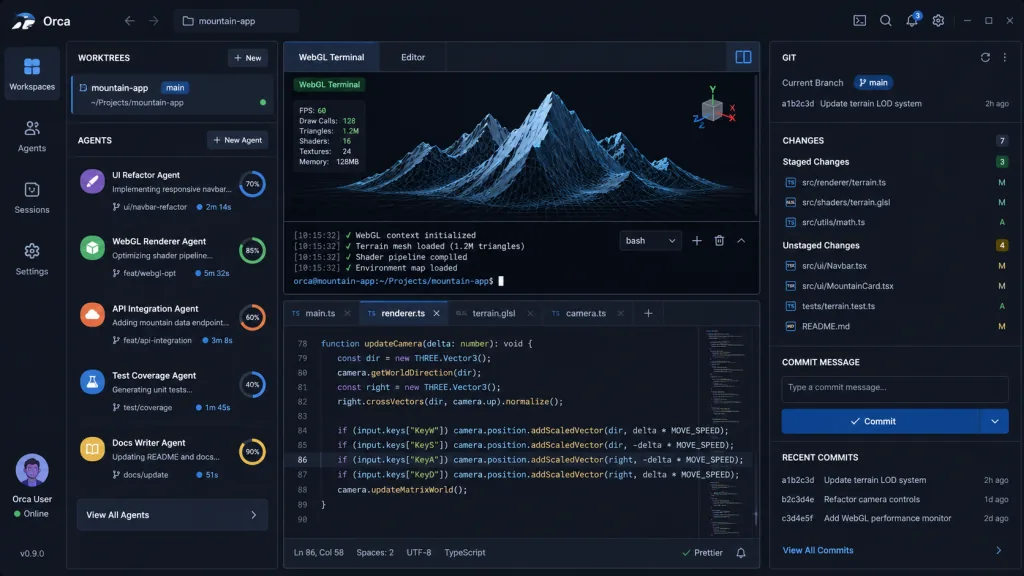
This is Orca's most distinctive capability. Drop in a single requirement and it forks N independent git worktrees, runs one agent in each, with no cross-contamination. When they finish, compare results side by side and merge the winner.
The traditional approach is either waiting in series or hand-writing a pile of git worktree add commands. Orca collapses that into one button in the UI.
2. Mobile Companion: monitor and steer from your phone
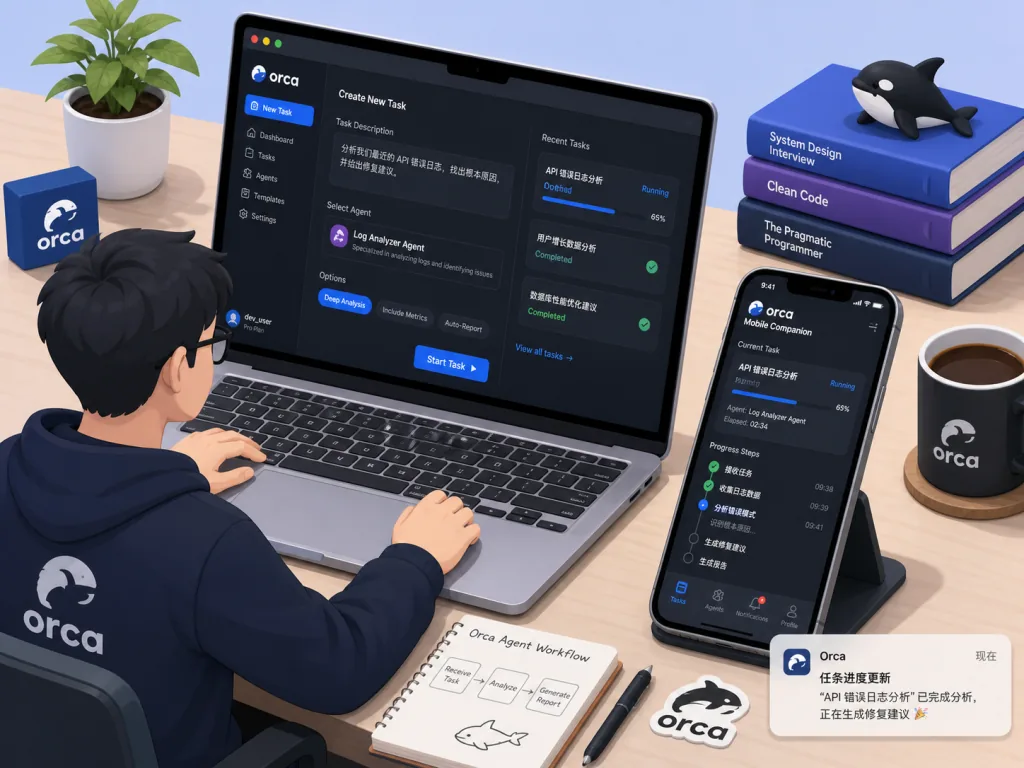
Walked away from your desk while an agent is still running? Orca ships iOS and Android clients, pushes a notification when an agent finishes, and lets you reply to the prompt or change direction right from your phone. Agent babysitting becomes a 24/7 pocket capability.
3. Ghostty-class terminal + VS Code editor
Orca embeds a WebGL-rendered terminal with unlimited splits and scrollback that survives restarts; the editor integrates the VS Code core with global autosave. Files and images can be dragged straight into an agent prompt — no more cat-ing something out just to paste it.
4. Design Mode: circle UI in a real browser
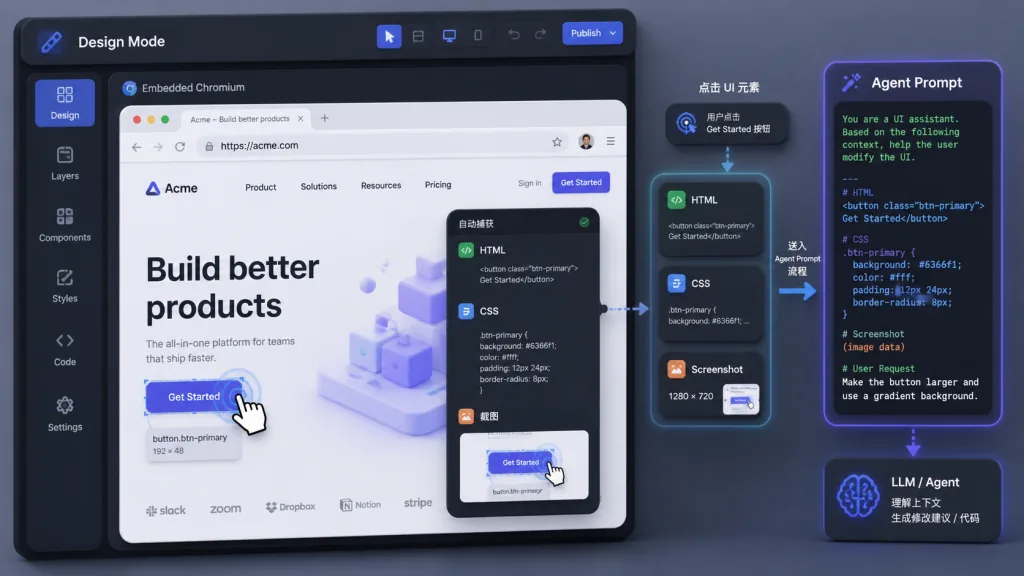
An embedded Chromium window. Click any UI element and Orca packages the corresponding HTML, CSS and a cropped screenshot and sends them to the agent. Ten times clearer than typing "change the color of the third button in the top right".
5. SSH Worktrees + CLI
Remote dev machines can be attached to Orca to run agents, with automatic reconnect and full port forwarding. There's also an orca CLI, so agents can call back into Orca to automate workflows — a two-way loop.
4. Technical highlights and performance numbers
Orca's engineering tradeoff is explicit: it doesn't build agents, it builds the orchestration layer for agents. That positioning pays off in a few ways:
- Zero-intrusion compatibility: any CLI agent works — "if it runs in a terminal, it runs in Orca"
- WebGL terminal: rendering performance on par with Ghostty, so heavy split layouts don't drop frames
- Git-native: every agent runs in its own worktree, so branch management carries zero mental load
- Cross-platform consistency: desktop + mobile + headless Linux server (
orca serve) all speak one protocol - Daily releases: the team openly says "the feature list will always lag behind the changelog" — iteration speed close to early Cursor
5. Use cases and audience
Typical scenarios
- Parallel validation of approaches: give the same requirement to Claude and Codex at once, take the better implementation
- Remote development + agents in the background: fire off a task from your laptop, run the agent on a remote 4090 box, follow up on your phone
- UI revisions: circle an element in Design Mode and the agent produces a diff directly, no coordinates to describe
- PR / issue review: built-in GitHub + Linear browsing, worktrees linked straight to tasks
Who it's for: independent developers juggling several AI coding streams at once, tech leads on AI teams, engineers who want to productize agent workflows.
Who it's not for: light users who only ever run a single agent on small scripts, and minimalists who refuse to install an Electron desktop app.
6. Comparison with alternatives
| Tool | Positioning | Parallel agents | Mobile | Any CLI agent |
|---|---|---|---|---|
| Orca | Agent orchestration IDE | ✅ Worktree isolation | ✅ iOS / Android | ✅ 25+ |
| Cursor | AI IDE | ❌ Single agent | ❌ | ❌ Mostly built-in |
| Claude Code native CLI | Single-agent terminal | ❌ | ❌ | Claude only |
| Aider / Continue | Plugin-style assistance | ❌ | ❌ | Limited |
Orca isn't competing head-on with single-point IDEs. It's going after the empty lane of "managing a team of agents".
7. Getting started quickly
- Download the desktop app from onorca.dev, or run
brew install --cask stablyai/orca/orca - Sign in with your own Claude / Codex account (your subscription stays yours, no middleman)
- Open a Git repo, hit "+ Worktree" to create your first parallel agent
- Type the requirement, pick the agent, press enter
- Need to run remotely? Run
orca serveto spin up a headless instance on a VPS
Advanced: wire the Orca CLI into your own CI and let agents drive agents inside CI — the canonical "agent operating agent" setup.
8. Summary and next steps
Orca solves a real, high-frequency problem: once AI agents go from "a toy" to "a team", what we lack isn't a stronger model but a better control desk. With worktree isolation, cross-device remote control and a terminal/IDE/browser combo, it offers the most complete answer available today.
- GitHub: https://github.com/stablyai/orca
- Download: https://onorca.dev
- Docs: https://www.onorca.dev/docs
One-line recommendation: if you can no longer live without two or more AI agents, it's time to move them out of five terminal windows and into Orca.