Title options (pick 1)
My private list of 8 open-source AI coding tools I use every day
These 8 GitHub finds finally made my coding agent useful
Drowning in coding agents? These 8 open-source projects quietly do the work for me
1. Intro: from pain to payoff, one project at a time
Last month a colleague pulled me in to rescue an old repo. It ran fine locally, but every PR merge depended on a human gatekeeper, and a single line changed by AI could hide three subtle bugs. Three of us spent a week on it and still needed overtime just to keep the review step stable. In the retro we all agreed on one thing: there are plenty of coding agents, but almost none of them can take over end to end, plug into the toolchain a team already has, and stay lean on memory at the same time. That thread led me to write up the 8 open-source projects I kept reaching for. They don't step on each other and they each do something different. The only thing they share is that I've used them every day since I installed them.
2. Projects at a glance
| Repo | Stars | Language | One-line positioning |
|---|---|---|---|
| cline/cline | 68.9K | TypeScript | Autonomous coding agent living in the IDE, CLI, desktop and SDK at once |
| can1357/oh-my-pi | 32.1K | TypeScript/Rust | Coding agent with a built-in toolchain for 60+ model providers |
| different-ai/openwork | 23.7K | TypeScript | Desktop collaboration platform that shares skills and MCP across agents |
| 1jehuang/jcode | 19.9K | Rust | An extremely memory-frugal coding agent harness |
| TencentCloud/TencentDB-Agent-Memory | 27.0K | TypeScript | Team-level agent memory hub that settles four kinds of assets |
| DeusData/codebase-memory-mcp | 43.9K | C | Code knowledge graph with millisecond indexing and sub-millisecond queries |
| alibaba/open-code-review | 38.4K | Go | Precise line-level code review hardened inside Alibaba |
| AmazingAng/old-coder | 0.7K | Python | A Skill that runs the full Gauntlet and reports evidence first |
3. Project breakdowns
cline/cline — an autonomous coding agent for IDE, terminal, desktop and SDK
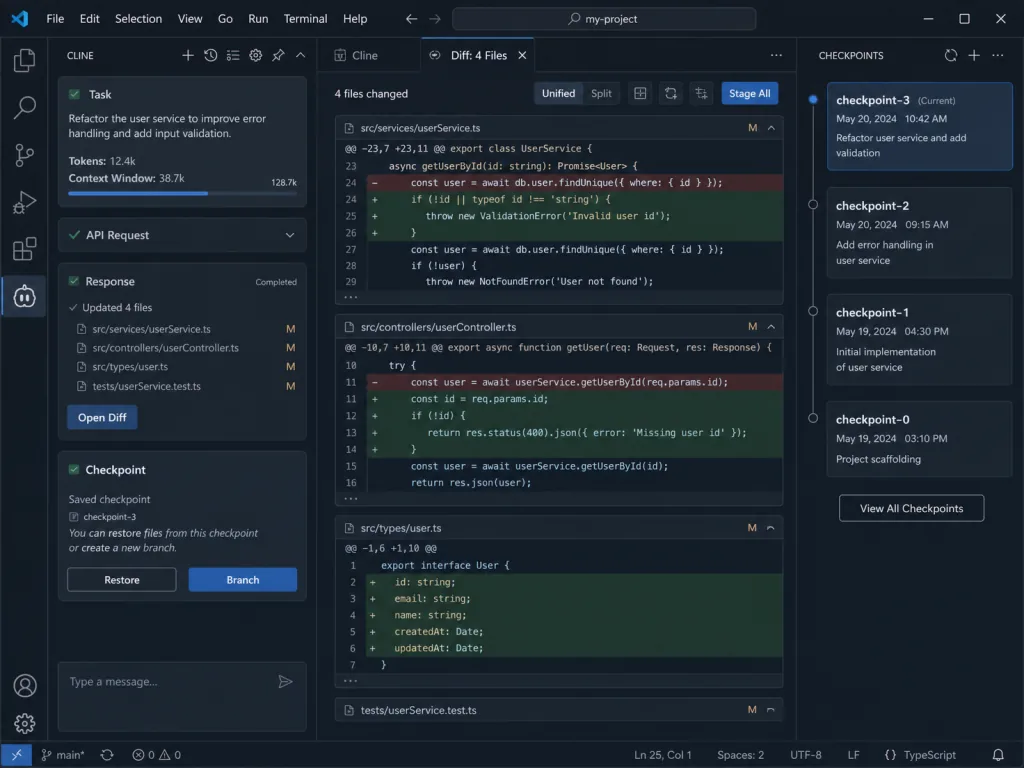
Cline ships the "autonomous coding agent" in four shapes: a VS Code / JetBrains extension, a CLI, a desktop app and a Node.js SDK. It reads the repo structure directly and coordinates multi-file changes, watching lint and compile errors as it goes, so missing imports, type mismatches and syntax errors die before anything hits disk. Every edit is shown as a diff first, and rollback is just a checkpoint away. In the CLI, npm i -g cline gets you started, and CI/CD or scripted scenarios can run headless with -y.
Who it's for
- People who want the agent to change multiple files, add dependencies and wire up scripts right inside the IDE
- Engineering teams who want to push the same agent capability into CI pipelines and desktop workflows
Who it's not for
- Light users who only want chat and never need the agent to write files to disk on its own
Quick start
VS Code users can just install the Marketplace extension. For the CLI route:
npm i -g cline
cline
Repo: https://github.com/cline/cline
can1357/oh-my-pi — a coding agent with a built-in toolchain for 60+ model providers
oh-my-pi (omp) takes the "one toolchain that makes every model perform at the top tier" route. It ships 31 built-in tools, 14 LSP operations and 28 DAP operations, with a Rust core of roughly 80,000 lines, ready out of the box. Models span 60+ providers. In testing, Grok Code Fast 1 went from a 6.7% first-pass diff success rate to 68.3%, and Grok 4 Fast cut output tokens by 61%. Installation covers Homebrew, Bun, Nix, mise and more.
Who it's for
- People who switch models constantly and A/B test how different providers perform
- Heavy agent users who want the toolchain to arrive complete instead of assembling LSP/DAP themselves
Who it's not for
- Light scenarios that call a single model from a fixed provider
Quick start
One-line script install:
curl -fsSL https://omp.sh/install | sh
Repo: https://github.com/can1357/oh-my-pi
different-ai/openwork — a desktop collaboration platform that shares skills and MCP across agents
OpenWork gives coding agents a shared layer for team workflows. Connect one OpenWork MCP to Codex, Claude Code, Cursor or any compatible agent, and skills, plugins, MCP connections, Google Workspace and Microsoft 365 capabilities that used to be scattered everywhere can be orchestrated under one organizational authorization model. The desktop app is optional, and when you want to hand it to someone else, a few clicks replicate the whole setup. On the org side there is OpenWork Den, a control plane for managing models, members, app versions and the marketplace.
Who it's for
- People mixing several agent tools who want one set of team skills and connections
- Small teams who want to run the Claude Cowork playbook as a private deployment
Who it's not for
- Solo users who only ever run locally and have no intention of sharing or collaborating
Quick start
A one-line install prompt for the desktop app:
Install OpenWork on my computer, set up my first workspace, and open it ready to use. Follow the steps in https://openworklabs.com/start.md?v=hero
Or attach it to Claude Code directly:
claude mcp add --transport http openwork https://api.openworklabs.com/mcp/agent
Repo: https://github.com/different-ai/openwork
1jehuang/jcode — an extremely memory-frugal coding agent harness
jcode pushes agent harness memory usage to a new low. A single active session uses only 167.1 MB of PSS memory (drop local embeddings and it goes down to 27.8 MB), versus 371.5 MB for OpenCode and 214.9 MB for Cursor Agent — somewhere between one-half and one-thirteenth of the competition. When you run many sessions in parallel, RAM decides how many agent instances you can keep open on one machine, and jcode wins that argument outright. It also has a built-in /update TUI command that downloads the latest build in the background without interrupting the session.
Who it's for
- Local developers running several sessions at once on a tight memory budget
- People who want to run an agent on a small server or an old laptop
Who it's not for
- Users who depend heavily on IDE plugins or a desktop GUI and can live with the memory cost
Quick start
macOS / Linux:
curl -fsSL https://jcode.sh/install | bash
Repo: https://github.com/1jehuang/jcode
TencentCloud/TencentDB-Agent-Memory — a team-level agent memory hub
TencentDB Agent Memory settles an agent's conversations, documents and code into four kinds of assets at once: Chat Memory / Skill / LLM-Wiki / Code-Graph. Point every agent's base URL at one proxy and it is connected (Claude Code, Codex, CodeBuddy, Hermes, OpenClaw and DeepSeek Harness all covered), with no plugin, hook or MCP server code change required. The same memory is shared and governed across team members, devices and agents, which amounts to handing a one-person company a unified memory foundation.
Who it's for
- Teams who want several agents to share one long-term memory and knowledge base
- People mixing Claude Code, Codex and other agents who want to stop rebuilding the same wheel
Who it's not for
- Light users running a single agent who don't need memory carried across sessions
==Note: requires Node >= 22.16, plus two sets of LLM parameters (memory group + proxy group)==
Quick start
git clone https://github.com/TencentCloud/TencentDB-Agent-Memory.git
cd TencentDB-Agent-Memory/deploy/global-images
cp .env.example .env
$EDITOR .env
./start-all.sh
Repo: https://github.com/TencentCloud/TencentDB-Agent-Memory

DeusData/codebase-memory-mcp — a code knowledge graph with millisecond indexing and sub-millisecond queries
codebase-memory-mcp uses a tree-sitter AST pipeline written in pure C to index a repo into a persistent knowledge graph, finishing the average repository in milliseconds. The Linux kernel (28M LOC / 75K files) indexes in 3 minutes, and structured queries answer in under 1 ms. It covers 162 languages, and for Python, TypeScript, JavaScript, JSX, TSX, PHP, C#, Go, C, C++, Java, Kotlin, Rust and Perl it layers on Hybrid LSP for semantic type resolution. One static binary, zero runtime dependencies, zero API keys, and 45 clients that activate automatically or conditionally. A single structured query costs roughly 3,400 tokens, about 120x fewer than file-level grep/read.
Who it's for
- People who want the agent to know the structure of a large repo instead of paging through files
- Agent teams who care about token spend and need fast context retrieval
Who it's not for
- Small script-sized projects where a few hundred lines are fine to eyeball
Quick start
Download the release and run:
./install
Restart the agent afterwards and it picks up the 15 MCP tools automatically.
Repo: https://github.com/DeusData/codebase-memory-mcp
alibaba/open-code-review — precise line-level review hardened inside Alibaba
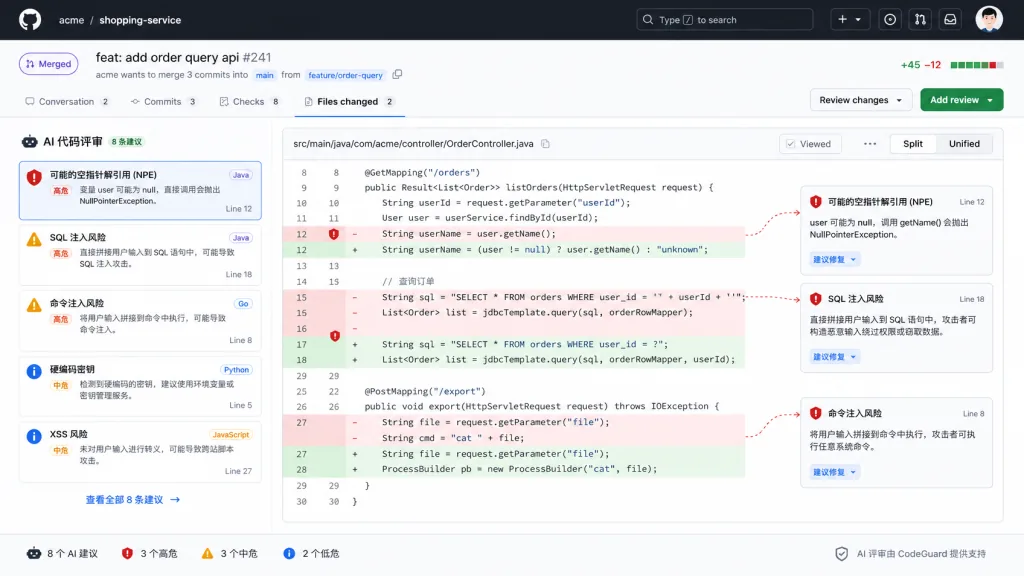
Open Code Review is Alibaba Group's official internal AI code review assistant, open-sourced only after two years of serving tens of thousands of developers and catching millions of defects. It uses a hybrid architecture of "deterministic pipeline + LLM agent": rules first flag multi-language issues such as NPEs, thread safety, XSS and SQL injection, then the agent reads deep context and outputs structured review comments with line numbers. On the same model, Open Code Review's Precision / F1 is clearly higher than a general-purpose agent while consuming about 1/9 of the tokens. Beyond diff review, ocr scan can audit a whole file.
Who it's for
- Engineering teams who want PR gating automated with precise line-level feedback
- Developers already on Claude Code / Codex / Cursor who can plug it in and go
Who it's not for
- People with no established diff workflow who just write the occasional script
Quick start
Configure the model endpoint per the official docs, then:
npm install -g @alibaba-group/open-code-review
ocr review
Repo: https://github.com/alibaba/open-code-review
AmazingAng/old-coder — a Skill that runs the full Gauntlet and reports evidence first
old-coder turns Uncle Bob's "don't read the code, trade constraints for trust" idea into an executable Skill. Before writing any code the agent produces a SPEC (test plan) and only starts after you nod. When it's done it runs the full Gauntlet — unit tests, types and lint, changed-line coverage, mutation testing, property testing, real execution, supply chain and secrets, suite health — and then delivers an EVIDENCE report. The whole rule set shuts down the agent's ability to grade its own homework: failed checks can only be marked unverified, and weakening a test until it passes is not allowed. It is pure Markdown, installed via npx skills add, and works with Claude Code / Codex CLI / Cursor / Aider.
Who it's for
- People who don't want to read every line the agent writes but still want high-confidence delivery
- Teams on critical projects involving money, login, data or concurrency who want hard constraints on agent output
Who it's not for
- Small tasks like fixing a typo, where setting up the Gauntlet is more work than it's worth
Quick start
npx skills add https://github.com/amazingang/old-coder --skill old-coder
Drop the prompt the repo provides into Claude Code and let the agent get to work.
Repo: https://github.com/AmazingAng/old-coder
4. Takeaways and what to do next
- Install two of them and you'll feel it immediately:
old-coderchanges your working habits (you only review the SPEC and the EVIDENCE), andcodebase-memory-mcpgives the agent structural memory. Together they let you get high-confidence delivery without reading the code. - For team collaboration, add
TencentDB-Agent-Memory: bring it in once several people are mixing Claude Code / Codex / CodeBuddy and need to share one long-term memory. - For PR automation, wire up
alibaba/open-code-reviewand run a pass through the GitHub Action flow before merging.
Pick the point that hurts most right now and start there along this thread; install the rest as you need them.
#AIAgents #AIWorkflow #Automation #Cline #OhMyPi #Openwork #Jcode #TencentdbAgentMemory #CodebaseMemoryMcp #OpenCodeReview