
1. Opening: why do you need this tool?
If you run content across multiple platforms, you have probably lived this: 9 a.m. open Douyin to read comments, 10 a.m. switch to Xiaohongshu to answer DMs, 11 a.m. dig through Kuaishou for post stats, and in the afternoon publish something new on WeChat Channels. Accounts swapped back and forth, sessions dying over and over, competitor posts checked by manual refresh. Four apps, four logins, and your efficiency sliced into confetti.
Content collection is the nastier half: you spot a hit and want to break it down, so you grab the original with a third-party downloader, then upload it to your own account through yet another flow. Getting monitoring, downloading, publishing and notifications to run end to end usually takes 3–5 tools.
CreatorHub puts that whole chain inside one local web panel. Behind its 859 stars is an ability to bring Douyin, Xiaohongshu, Kuaishou and WeChat Channels accounts under the same roof.

2. What it is, in one sentence
CreatorHub is a locally run multi-platform content management panel built on Python + FastAPI. It centrally manages account login, post monitoring, comment listening, content download, automated publishing and multi-channel notifications across Douyin, Xiaohongshu, Kuaishou and WeChat Channels. Login sessions, the database and media files all stay local — no data passes through a third-party server.
Four keywords sum it up: multi-platform unification (one web panel for four platforms), local deployment (full data autonomy), full-chain coverage (monitor → download → publish → notify) and open source and customizable (859 stars, actively iterated).
3. Core features in depth
1. Unified multi-platform account management
CreatorHub puts a platform switcher at the top of the web panel, and the Accounts module on the left supports QR login, creator login and cookie login. Each account gets its own browser profile directory, so nothing collides; once logged in you can refresh the profile, check status or log in again in one click. Douyin additionally exposes the creator center entry, and Xiaohongshu keeps a main-site read session and a creator publish session separately, which sidesteps the familiar "the QR login can read but cannot post" trap.
Where similar tools tend to offer a single platform with generic cookie reuse, CreatorHub gathers all four accounts into one interface and saves you from cycling through browser instances.
2. Multi-dimensional post and comment monitoring
Post monitoring accepts four subscription types: creator homepage, post link, short link and platform ID. New targets watch only posts from the moment you subscribe by default, with an option to backfill the last N historical posts. Comment monitoring can subscribe to a single post or aggregate recent comment activity per account.
Douyin also gets a dedicated short-video danmaku monitor: it probes and sorts comments along the video timeline, filters by time range, keyword, text length, like count and capacity cap, and persists records to SQLite. For your own videos it goes through the creator center API, for public videos it intercepts at the player — two complementary paths that cover more ground than plain comment monitoring.
3. Link parsing and multi-quality downloads
Paste a full share message or short link into the web panel and CreatorHub extracts the URL and downloads it. Douyin offers selectable quality, and Xiaohongshu handles both image sets and video. Downloads support resume and retry, and engine.worker_pool_size sets the download concurrency.
The command line works too: python -m app.engine.share_downloader "full share text" -o ./data/media/share -q 1080, and add --links-only to parse without downloading.
4. One-click publishing and cross-platform forwarding
Xiaohongshu natively supports image sets, video and scheduled publishing; Douyin, Kuaishou and WeChat Channels publish through their own creator platforms. The more useful part is cross-platform forwarding: a downloaded Douyin post can be forwarded to Xiaohongshu or WeChat Channels, and a Xiaohongshu post to Douyin, with the title, body and hashtags editable in the panel beforehand — no manual re-upload.
Publishing jobs land in a task queue you can watch, and together with the auto-comment / auto-reply rule engine this gives you semi-automated operation: spot a trending topic → reach it automatically.

4. Technical highlights and performance data
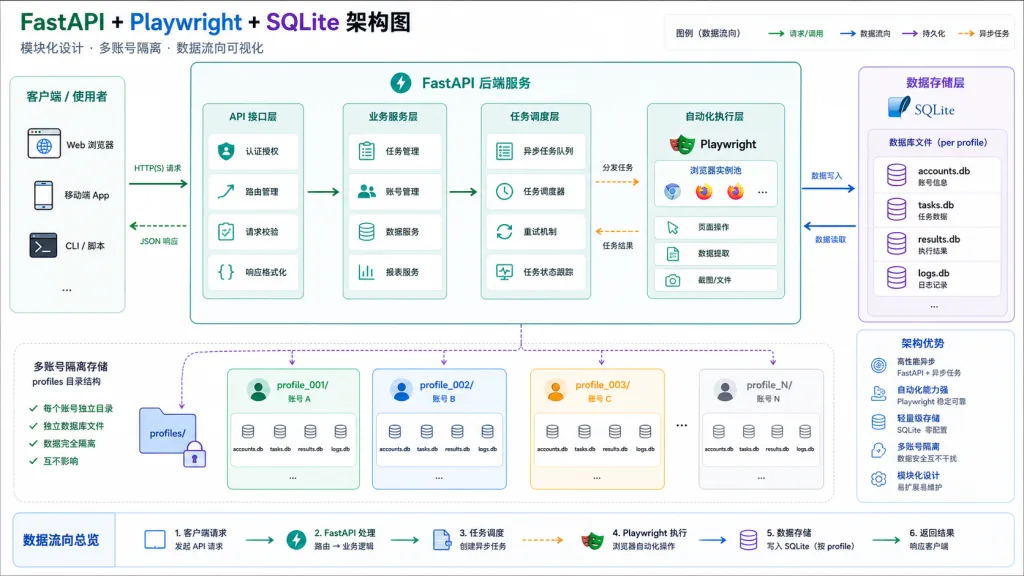
The stack shapes the experience. CreatorHub's backend is Python + FastAPI, whose async I/O suits high-concurrency scraping naturally; browser automation runs Chromium through Playwright, with an isolated profiles/ directory per account. SQLite holds the data, fields migrate automatically at startup, and an upgrade never means deleting the old database.
Key performance knobs live in config.yaml: scan_interval_seconds (polling interval, default 300s), scan_concurrency (scrape concurrency, default 2), worker_pool_size (download concurrency, default 2) and account_check_interval_seconds (account health check, default 1800s). With that set, CreatorHub runs stably on an ordinary laptop with a 4-core CPU and 8GB of RAM.
On ecosystem compatibility, notifications cover three mainstream channels — Bark, DingTalk and Telegram. Proxies support HTTP, HTTPS and SOCKS5, bindable per account. Windows, macOS and Linux each get a launch script, and the first run creates the virtualenv, installs dependencies and generates the config file, so the setup bar is low.
5. Scenarios and who it fits
Multi-platform matrix operators: creators or MCN operators maintaining four platform accounts at once, replacing four apps with one panel and seeing a clear jump in workflow efficiency.
Content teardown and material gathering: users who need to bulk-download competitor posts for research — link download plus quality selection plus resume makes building a material library straightforward.
Automation-minded teams: small and mid-sized teams that need trend monitoring, auto-commenting and cross-platform distribution; the rule engine and task queue get them to semi-automated operation.
Who it does not fit: light users running a single platform, one-off download needs, and anyone uneasy about automation (auto comments, replies and DMs are subject to platform risk controls, and heavy use risks a ban).
6. How it compares
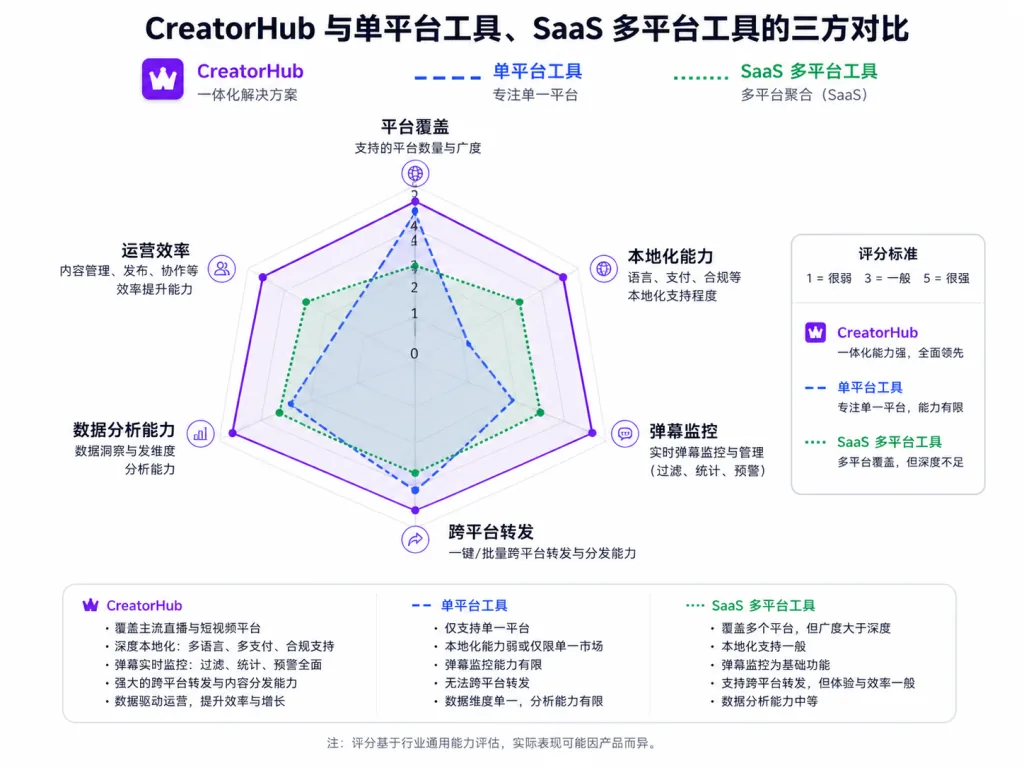
| Dimension | CreatorHub | Traditional single-platform tool | SaaS multi-platform tool |
|---|---|---|---|
| Platform coverage | Douyin / Xiaohongshu / Kuaishou / WeChat Channels | Usually 1 | 2-3 |
| Data ownership | Local SQLite + media files | Local | Cloud servers |
| Deployment | One-click local start | Local | Sign up and go |
| Danmaku monitoring | ✅ Douyin supported | ❌ | ❌ |
| Cross-platform forwarding | ✅ Douyin↔Xiaohongshu | ❌ | Partially |
| Notification channels | Bark / DingTalk / Telegram | Mostly email | In-platform notifications |
| Open source and customizable | ✅ | Partly | ❌ |
CreatorHub's real differentiation is unified four-platform management, danmaku monitoring, cross-platform forwarding and full localization — three combinations that are relatively rare among comparable tools. SaaS tools work out of the box, but data passes through third-party servers, and users who care about account security lean toward the local option.
7. Getting started fast
Prerequisites: Python 3.10+, a desktop environment (QR login needs to pop a browser), Node.js 18+ for Xiaohongshu publishing, and optionally ffmpeg.
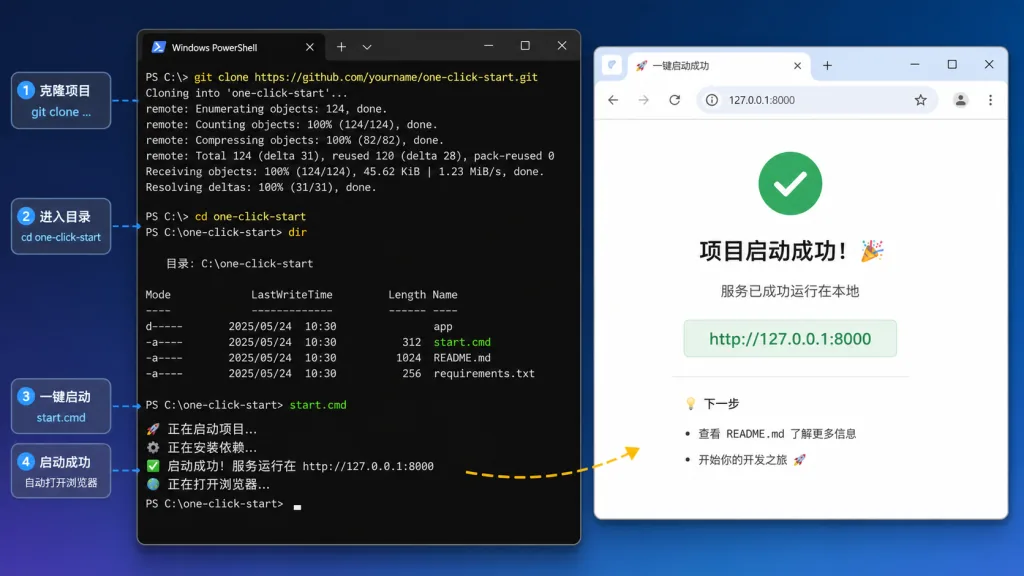
One-click start:
git clone https://github.com/3441293738/creatorhub.git
cd creatorhub
# Windows
.\start.cmd
# macOS / Linux
chmod +x start.sh
./start.sh
The first run creates the virtualenv, installs dependencies and Chromium, and generates config.yaml. Then open http://127.0.0.1:8000 in a browser.
Common commands: start.cmd install reinstalls dependencies; start.cmd check runs an environment self-check; start.cmd --port 8080 changes the port; start.cmd --reload enables hot reload in dev mode.
Further suggestions: ① bind a separate proxy per account to lower association risk; ② enable work_health_enabled to watch your own posts for zero plays, violations and takedowns; ③ set monitor_initial_backfill_count: 0 when monitoring a new target for the first time, so you do not trigger risk controls by pulling too much at once.
8. Takeaways and what to do next
CreatorHub's core value is packing the monitoring, collecting, downloading, publishing and notification chain for four platform accounts into one local web panel. 859 stars and a steady stream of dependency updates show the project is alive.
How to use it: start with one platform and expand to four once you are comfortable; keep auto-commenting and auto-replies at a low frequency; back up config.yaml and the data/ directory regularly; and follow platform rules and local regulations — use it for personal content management and technical learning only.
Project links:
- GitHub repo: https://github.com/3441293738/creatorhub
- Online preview: https://3441293738.github.io/creatorhub/
- Issue tracker: https://github.com/3441293738/creatorhub/issues
One-line pitch: if you run two or more platform accounts at the same time, CreatorHub is one of the few open-source local options that gets monitoring, downloading, publishing and notifications running end to end.