1. Intro: still stuck on this one?
Anyone generating images with AI has fallen into the same pit: endless color grading that makes you question your life choices.
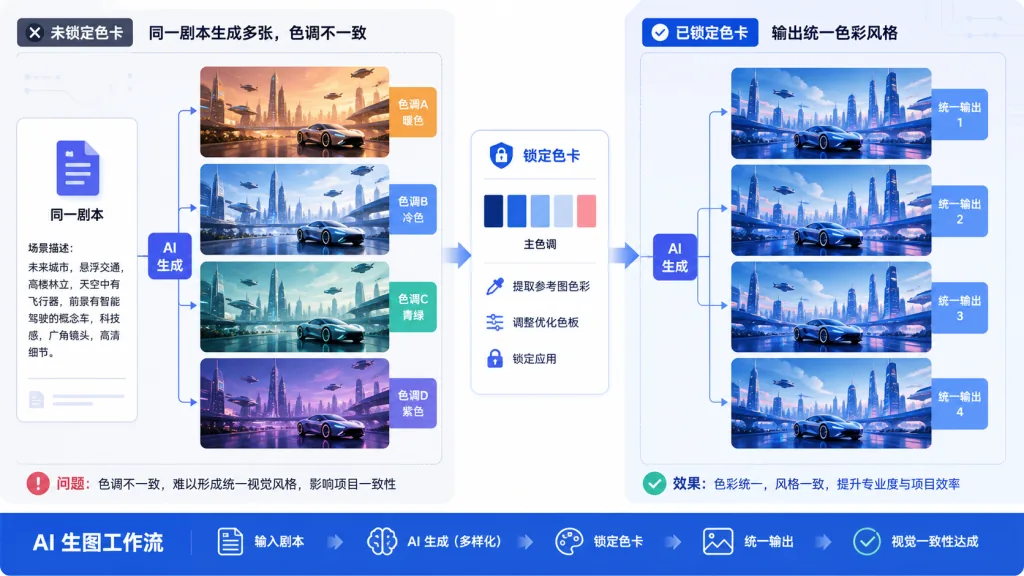
Hand the same script to Midjourney or ComfyUI and every run comes back with a different color cast — last batch leans cyan-gray, the next one inexplicably goes yellow. A colleague from the cinematography team waves a still at you and asks for "another one with matching color", and all you can do is smile weakly. Same "cyberpunk neon" prompt: one person gets Blade Runner, the next gets glowing signage at the edge of town.
So where does the problem come from? Color is written into the prompt as an adjective, and every model reads "premium gray" or "cyber pink" differently. When you need to produce style-consistent content in bulk, that fuzziness is a disaster.
style-pack-skill exists to fix exactly this.
2. Project overview: one sentence
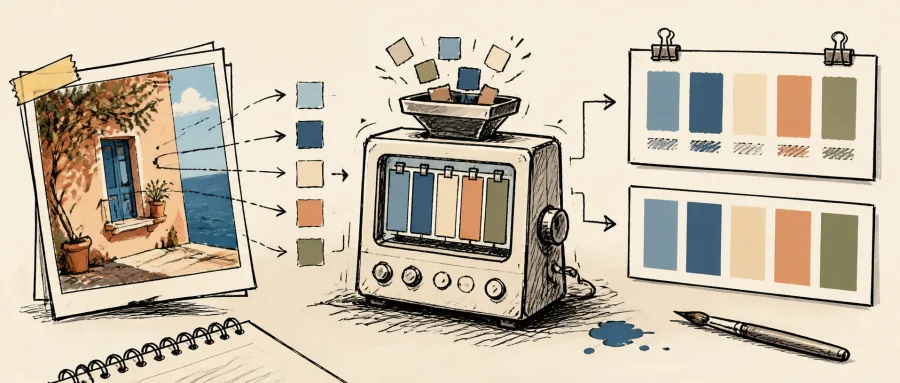
style-pack-skill is an AI Agent Skill focused on extracting reusable "visual style DNA" from reference images (film stills, video screenshots, reference folders) and forcing it into standardized palette cards, so any downstream image model can lock onto the same colors.
Four words cover the core idea: "visual deconstruction + color fixation". The repo currently has 45 stars, is built on Python 3 + Pillow + NumPy + OpenCV, and is a lightweight local tool.
3. Core features in depth
1. Modular visual breakdown
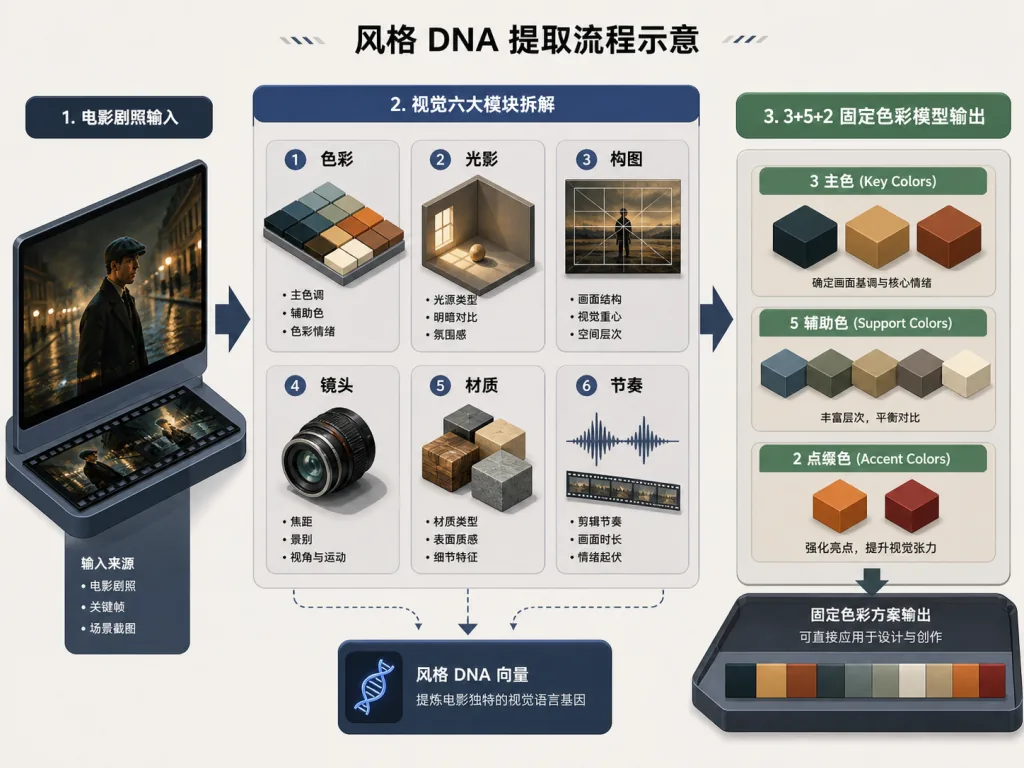
The project splits reference images along six visual grammar axes: color, light and shadow, composition, lens, material, and rhythm. Each module gets its own reference images and grouped prompts. Feed it a set of Grand Budapest Hotel stills and it won't naively try to reproduce the pink hotel lobby — it extracts a visual grammar of "symmetrical composition + cream-pink dominant + high-saturation accents" and applies that to your brand-new script. Original scenes and source scenes are fully decoupled.
2. Forced dual palette card generation
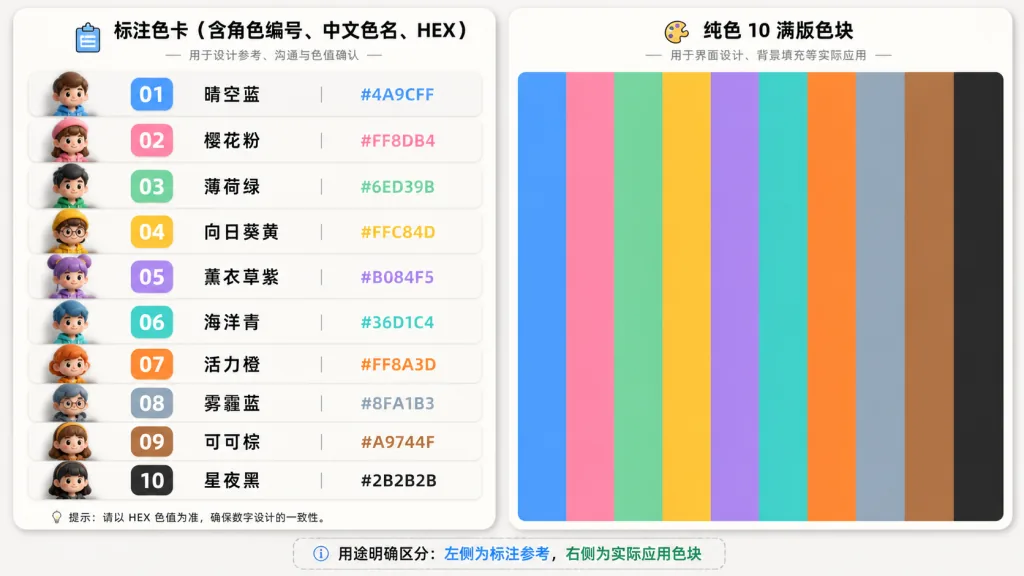
This is the project's killer feature. Every time a formal visual group is completed, it automatically generates two 1920×1080 RGB PNG palette cards:
- Annotated card: includes slot numbers, Chinese color names and uppercase HEX, handy for team communication;
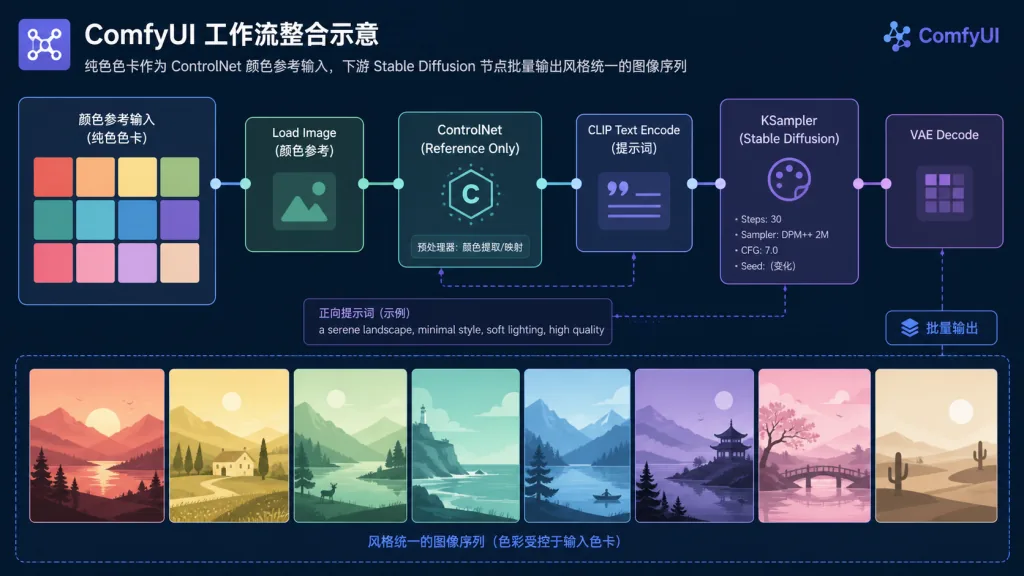
- Flat color card: pure — 10 full-bleed swatches, zero headline, zero text, zero padding, zero borders. This is the one you feed to ComfyUI / Stable Diffusion as a ControlNet color reference; models read it most accurately.
3. Fixed color model
The color structure is strictly locked to "3 primary + 5 secondary + 2 accent = 10 colors". That ratio comes from hands-on experience: primaries set the base tone, secondaries build up the layers, accents grab the eye. Ten swatches cover complex scenes without giving the model decision paralysis.
4. Automated acceptance checks
The project ships a generator, generate_palette_cards.py, and a validator, validate_palette_cards.py. The validator checks card by card — a single missing card fails the run outright. That welds shut low-level mistakes like "forgot to export the flat color version".
4. Technical highlights and performance numbers
| Dimension | Implementation |
|---|---|
| Image processing | OpenCV extracts dominant colors, K-Means clustering converges from pixel space to the target color count |
| Card generation | Drawn with Pillow; the flat version strips every decorative element |
| Strict specs | 1920×1080 RGB PNG; fixed dimensions mean no stretching when fed to ComfyUI |
| Validation | Automated script checks file existence + pixel purity (OpenCV reads the image and verifies each swatch is flat) |
| Outputs | Two palette card PNGs + an overview image + structured JSON (with HEX, HSL, Chinese color names) |
The whole card generation pipeline finishes locally in seconds, with no external API and no network cost.
5. Where it fits and who it's for
Good fit:
- people working in AI image generation pipelines (heavy ComfyUI / SD WebUI / Midjourney users);
- visual leads at short-drama / comic-drama / audiobook platforms who need style-consistent assets in bulk;
- film, advertising and brand design teams that want a visual style guide without grading from scratch;
- individual creators maintaining their own "visual style library".
Not a good fit:
- people producing single images who never reuse a style — tweaking the prompt is cheaper;
- people who need character or object content replication — this project deliberately avoids reusing scenes and elements;
- pure frontend / backend developers — this is a visual pipeline tool.
6. Comparison with alternatives
| Tool | Color fixation | Automated validation | Flat color card | Local run | Style library reuse |
|---|---|---|---|---|---|
Midjourney --sref | Fuzzy | ❌ | ❌ | ❌ | ✅ |
| ComfyUI IP-Adapter | Medium | ❌ | ❌ | ✅ | ⚠️ Depends on reference images |
| Palette extraction sites | Extraction only | ❌ | Partial | Partial | ❌ |
| style-pack-skill | Precise to HEX | ✅ | ✅ Forced | ✅ | ✅ |
The key difference: other tools either "extract but don't fix" (palette sites) or "fix but don't standardize" (Midjourney). style-pack-skill is one of the few open-source options that does "extract + fix + validate" in a single pass.
7. How to get started fast
Step 1: clone into your Agent Skills directory
git clone <repo-url> style-pack
Make sure SKILL.md sits at the skill root.
Step 2: install dependencies
pip install Pillow NumPy OpenCV-Python
Step 3: feed reference images and run color extraction
Drop film stills / video screenshots into the project directory and let the Agent process them with the style-extraction workflow under references/.
Step 4: generate + validate the cards
python3 scripts/generate_palette_cards.py "<style-pack-dir>" --title "<project-name>"
python3 scripts/validate_palette_cards.py "<style-pack-dir>"
If the second command fails, do not move on to ComfyUI — it is mandatory.
Advanced tip: drop the flat color card into ComfyUI's "Load Image" node, wire it into ControlNet's color reference, and batch-generate images with the style locked down.
8. Takeaways and next steps
style-pack-skill targets the most hidden and most time-wasting pain in AI image generation: inconsistent color. With visual module deconstruction + forced dual-version cards + automated validation, it turns "style reuse" from black magic into an executable SOP.
If you are being tortured by "every image has a different color cast", install this Skill into your Agent. It is small and light, but it gets every downstream image node onto the same color DNA.
Repo link: https://github.com/irenerachel/style-pack-skill
One-line pitch: extract the style DNA once, and downstream image generation never drifts again.