
Title options (pick 1 of 3)
Your manuscript held hostage by the platform and your AI locked down? This open-source web-novel app hands the data back to you
A fully local web-novel writing app with 692 stars: 160ms autosave, and you swap in whatever AI model you want
A must-read for Qidian and Fanqie authors: one open-source tool that keeps my manuscripts, API keys and prompts in my own hands
Easy Writing: what makes this fully local web-novel writing app with 600+ GitHub stars so good?
1. Opening: what do novelists fear most?
Two hours before the deadline, halfway through chapter 47, the web page crashes — three thousand words gone.
That is not a joke. It happens in web-novel circles every single day.
Worse: your work sits on some online platform's server. Want to switch platforms, keep a local copy, migrate your data out? Sorry, if the platform says no, the answer is no. Want AI continuation? Sure, buy a membership first. Want to try a DeepSeek model instead? Sorry, no API.
What writers actually want from a tool is simple: the draft has to be safe, it has to be in their own hands, and the AI model has to be swappable.
Easy Writing is built for exactly those three things — a fully local, open-source desktop app for web-novel writing with 692 stars on GitHub.

2. What it is: a desktop writing app that keeps the draft in your hands
The positioning is clear: a fully local desktop app for web-novel writing, built around novel drafting, AI-assisted writing, BYOK (bring your own key) and custom prompts.
A few key labels:
- Fully local: manuscripts, worldbuilding notes and writing history all live on your machine (as a SQLite database file)
- BYOK: DeepSeek, Qwen, Zhipu, Kimi, OpenAI and others are all configurable; the API key stays local and requests go straight to the provider
- Open source and free: AGPL-3.0, the whole codebase is public
- Refined by real use: rebuilt from the desktop client of a long-running writing platform, so the editor, autosave and chapter management have been through real authors' daily grind
It fits authors on Qidian, Fanqie, Qimao and Jinjiang, and anyone else who wants their drafts clenched in their own fist.

3. Core features in depth
1. The writing desk: stable enough to recover from a crash
The writing desk is built on the TipTap rich-text editor, with a volume/chapter tree, drag-to-reorder, whole-book search and find-and-replace.
Stability is the main selling point:
- 160ms local write plus a snapshot on window close, so an abnormal exit costs you nothing — reopen and everything is back
- Automatic history for every chapter, ready to review and restore at any time
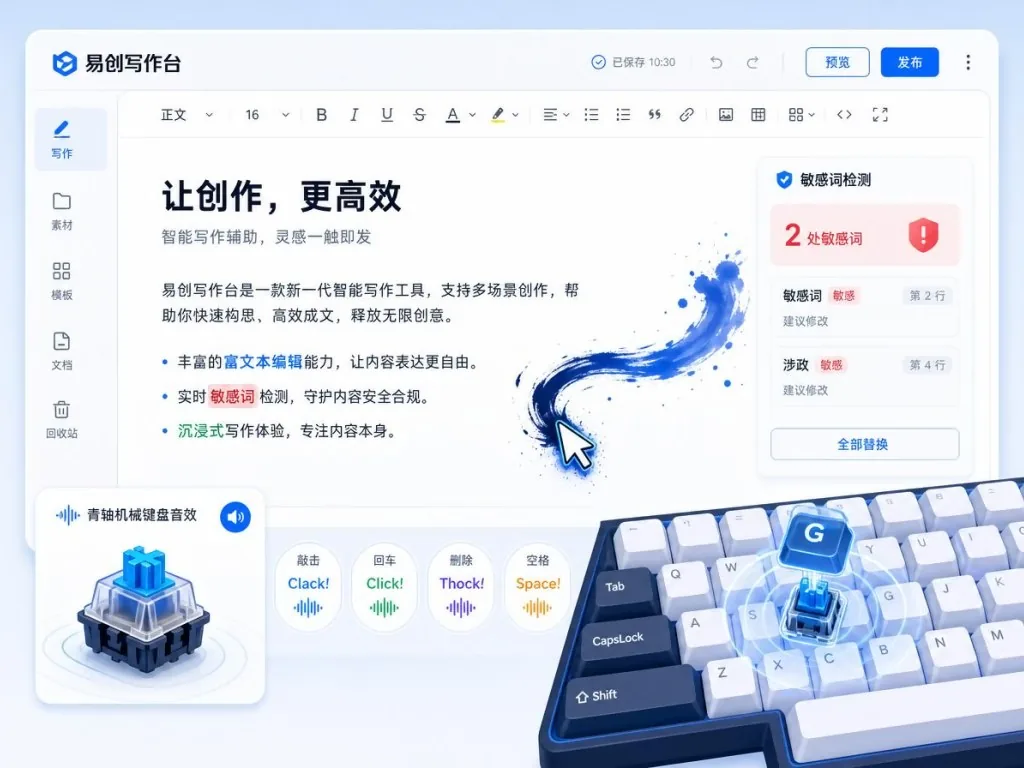
- Sensitive-word detection (local dictionary, customizable), typing sounds, focus mode, self-destruct challenge
Then there is the five-piece reference kit — outline, characters (with a relationship-map canvas), settings, timeline and story line (a mind-map canvas) — all stored locally and one click away while you write.
2. Immersive writing: from keystroke sounds to cursor effects
Writing a web novel is a mood game, and Easy Writing sweats the details:
- Keystroke sounds: blue-switch mechanical keys, brown-switch mechanical keys, an old typewriter, gunshots, a barking dog... mute it all if you would rather
- Cursor effects: each keystroke can trigger splashing ink, ink ripples, drifting mist, real flames or words of encouragement — one click to switch off
- Free editor layout: font, weight, color, size, line height, text width, paragraph spacing, alignment and grid-line style are all adjustable
- Four themes plus 8 background images: Borderless, Old Letter Paper, Forest Eye-Care and Night Ink, with custom backgrounds supported too
It also bundles focus and reading preview: full-screen writing, a self-destruct challenge that counts down once you stop typing, and a phone reading preview that scrolls in sync with the text. These features are aimed squarely at what web-novel authors deal with every day.
3. AI assistance: BYOK plus fully open prompts
AI is the headline act here, and the core idea is your key, your prompts, your model.
- Selection AI tools: select text and polish / expand / proofread / run a custom instruction in one click; keep the result or discard it
- Continuation: a shortcut writes a full beat straight into the text in streaming mode, plus ghost-text suggestions while you type (Tab to accept)
- Advisor chat: an AI consultant in the right-hand column for plot, characters and settings, with conversation history saved locally
- One-click book workflow: idea → outline → settings → create book → chapter-by-chapter generation, resumable from a checkpoint
- Competitor teardown: import a whole TXT, break down pacing and selling points chapter by chapter, deep-dive the golden first three chapters plus a whole-book report
- AI usage ledger: every call records the scene, word count, tokens and why it succeeded or failed
Worth calling out separately: every prompt is open. All AI prompts are local md files, editable through the UI or directly in the file, down to the sampling temperature for each scene. Want to write your own prompt set? Just edit the files.
Locally hosted models such as Ollama and LM Studio work too — leave the API key blank.
4. Ranking trends: scrape with your own network
A built-in crawler pulls from 80+ ranking sources on Qidian, Fanqie, Qimao and others, and the data stays on your machine. Trend analysis, tag shifts, CSV export and AI interpretation are all included.
Note: the scraping happens on your own device and your own network. Respect the target site's terms of service and keep the request rate down.

4. Technical highlights and performance data
- Stack: Vue 3 + TypeScript + Vite + Pinia + Element Plus + TipTap 3 + Tauri 2
- Storage: a SQLite database in the app data directory; automatic backups default to the Documents directory (txt+json)
- 160ms local write: type a sentence and it is in the local database within 160ms
- Desktop packaging: built with Tauri 2, far smaller than an equivalent Electron app
- Automatic version check: at most once a day, hitting only GitHub's public API
- AGPL-3.0: free to use, modify and distribute, and modified versions must be open-sourced too
5. Scenarios and who it fits
Who it fits:
- Web-novel authors on Qidian, Fanqie, Qimao, Jinjiang and similar platforms
- Writers who want the draft entirely under their own control and refuse to be held hostage by a platform
- People who want AI continuation, polish and teardown without being locked into one cloud writing tool
- AI writing tinkerers who like customizing prompts and comparing how different models behave
Who it does not fit:
- Team authors who just want an online collaboration tool (this is a single-machine local app)
- Total beginners who have no interest in dealing with API keys and model config (AI features need your own key)
6. How it compares
| Dimension | Easy Writing | Built-in editor of an online web-novel platform | Generic Markdown tool |
|---|---|---|---|
| Data ownership | Local SQLite, whole book exportable | Platform servers, hard to migrate out | Local files |
| AI models | BYOK: DeepSeek / Qwen / Kimi / OpenAI / Ollama | Usually locked to the platform's own model | You wire it up yourself |
| Prompts | All md files, visual editing | Not editable | Write your own scripts |
| Writing features | Word counts / ranking trends / focus mode / typing sounds | Basic editing plus platform features | Pure typesetting |
| Open source | AGPL-3.0 | Closed source | Mostly closed source |
| Platform | Desktop (macOS/Windows) | Web/APP | Every platform |
Core advantage: data autonomy, AI freedom and web-novel-specific features delivered in one package, open source end to end.

7. Getting started fast
- Download and install: grab the installer for your OS from the Releases page (
.dmgfor macOS,.exefor Windows) - First launch: click New Work, name the book and start writing — the writing features need no configuration at all
- Configure AI: sidebar Model management → pick a provider preset (DeepSeek, say) → paste your own API key → test the connection → save, then set it as the default model
- Customize prompts: every scene under Prompt management in the sidebar is editable, and restoring the defaults is one click away
- Migrate data: on a new machine, export the whole book as JSON from the bookshelf (reference material included) and import it there; or simply copy the app data directory
Dev commands (for anyone who wants to tinker):
pnpm install
pnpm dev        # browser dev mode (port 6789)
pnpm tauri build # build the desktop app
8. Takeaways and what to do next
Easy Writing solves a very plain pain point: web-novel authors want their drafts and their AI setup to be entirely their own.
692 stars is not top-tier, but the combination — fully local, BYOK, open prompts, web-novel-specific features — is unusually complete. 160ms saves, per-chapter history, 80+ ranking sources, a visual prompt editor: every detail lands on what a web-novel author actually does all day.
How to use it:
- On the first run, leave AI alone and just feel the writing desk and the immersive effects
- Once that works, add AI starting with DeepSeek (best value), then switch to a local Ollama model when you are comfortable
- Treat the prompt files as plain md and tune temperature against each model's output
Project: https://github.com/yilujian/easy-writing
A writer's pen should stay in the writer's hand.
#easy-writing #EasyWriting #yilujian #Frontend #WebDev #OpenSource #GitHub