
Choosing a title (pick 1 of 3)
Still cutting short videos by hand? AutoClip turns one link into posts for 7 platforms
AutoClip tested: a 1h43m interview becomes 10 clips in 7.5 minutes, automatically
9K-star open-source gem AutoClip: paste a link and AI cuts long video into shorts, publishing copy included
AutoClip: one link, one click, finished clips — what makes this 9K-star open-source AI editor so strong?
1. Opening: why you need this tool
Everyone who makes content has been tortured by the same thing: a two-hour interview podcast lands in front of you, and you need ten vertical clips sized for Douyin, Xiaohongshu and TikTok, each with subtitles, a cover, a title and hashtags. The traditional pipeline is: watch the whole thing → find the highlights → cut the timeline → transcribe subtitles → design covers → write copy → reframe → export. A skilled editor needs at least four hours for ten clips, and even with CapCut's smart slicing after AI arrived, you still adjust layouts over and over. AutoClip wants to compress that chain into three steps — paste the link → pick the platform → wait for the clips — and it has already collected 9.2K stars on GitHub.

2. In one sentence: what this project is
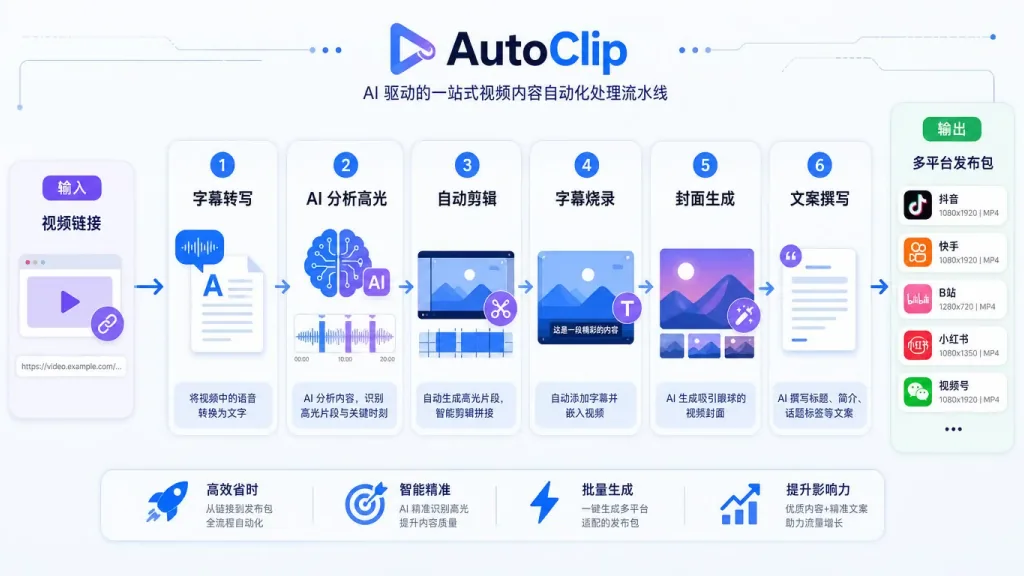
AutoClip is an open-source AI video editing desktop tool positioned as "one link, one click, finished clips". Paste a link to a long video — a podcast, an interview, a course — choose the target platform, and the tool analyzes the subtitles, selects highlights, edits and renders, then generates the video, cover, title, description, hashtags and a ZIP publishing package. It targets Douyin, Xiaohongshu, TikTok, Reels, YouTube Shorts, Bilibili and YouTube. The app itself is free under the MIT license, with cloud models billed by usage; the current release is v1.5.0 and ships in four forms: desktop, Docker, CLI and MCP.

3. Core features in depth
1. Paste a link, get clips: end-to-end automation
AutoClip merges video fetching, subtitle transcription, model analysis, highlight cutting, subtitle burn-in, cover generation, copywriting and publishing-package assembly into one pipeline. For each platform it automatically produces up to ten qualifying clips by score, lists the rest as candidates, and builds one when you hit "generate this one". Every finished clip comes with a cover, title, description, hashtags and a ZIP publishing package, so you skip manually assembling the assets.
2. Platform and aspect-ratio adaptation
The tool bakes in each platform's frame and duration rules: Douyin and Xiaohongshu default to an "interview-style" vertical layout, where one- or two-person conversations frame themselves around the speaker; TikTok, Reels and YouTube Shorts default to a "full-screen podcast" vertical layout that fills the frame; Bilibili and YouTube output the original horizontal frame. Subtitle copy switches language with the target platform, and the vertical version can toggle between two layouts in settings.
3. Your choice of models and transcription
Subtitles can come from three sources: an SRT file supplied by the creator, local Whisper / SenseVoice, or a configured cloud transcription service. The analysis model accepts any OpenAI-compatible service — a cloud API, or local Ollama or LM Studio. Cover image generation calls an AI model by default but can be turned off; the overall policy is "use the cloud where the cloud is required, stay local wherever local works".
4. Rendering locally, extending through the ecosystem
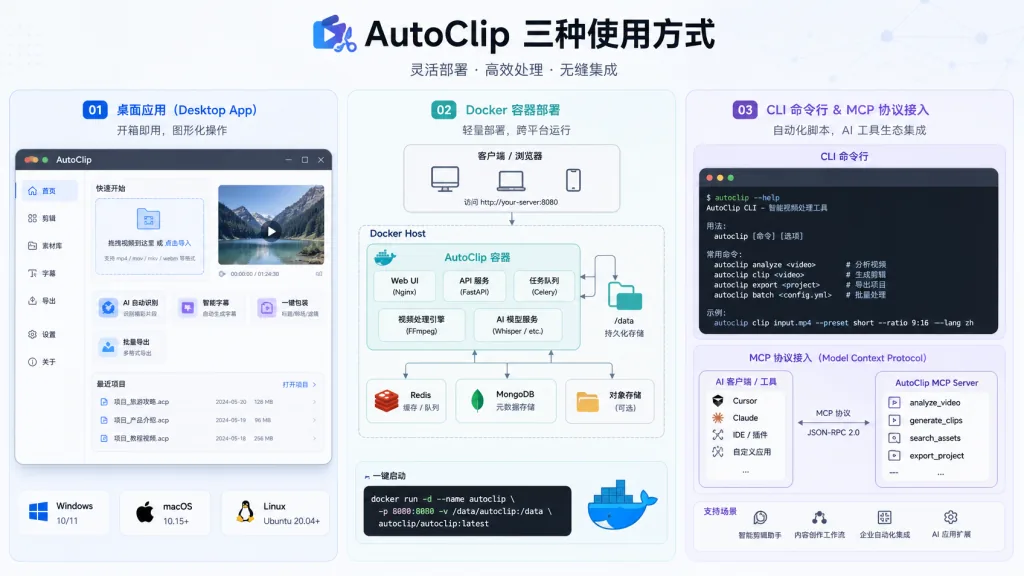
Editing, framing and rendering all happen on your machine, with FFmpeg bundled into the installer. Beyond the desktop GUI there's a Docker self-hosted web service, CLI batch processing, and an MCP protocol endpoint for agents — the CLI and desktop share the same one-click pipeline, which makes automation and workflow orchestration straightforward.
4. Technical highlights and performance
AutoClip combines a Tauri desktop shell with a FastAPI backend and a React front end; Python handles orchestration and calls FFmpeg for rendering. The benchmark numbers come from the official v1.5.0 tests on an Apple Silicon Mac:
| Version | Source | Time to clips | Text model cost |
|---|---|---|---|
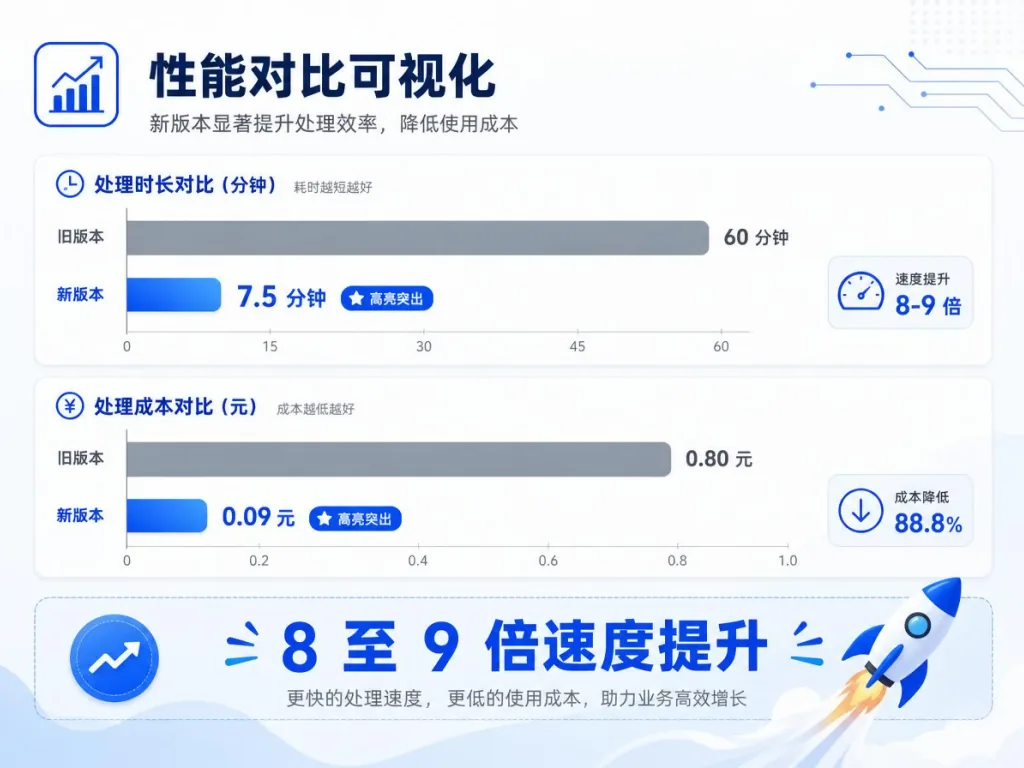
| New · with subtitles | Jensen Huang interview 1h43m (EN → Xiaohongshu) | 7.5 min / 10 clips | ¥0.09 |
| New · no subtitles | TIM × Luo Yonghao 2h52m (ZH → Douyin) | 29.5 min / 10 clips | ¥0.20 |
| Old version | MrBeast 2h06m (EN → TikTok) | 65 min | ¥0.64 |
Against the old version, the new one is 8–9× faster at producing clips and cuts text-model cost to between one third and one seventh. Version 1.5.0 also fixes subtitle pagination, framing stability and long-video queue handling.
5. Where it fits and who it's for
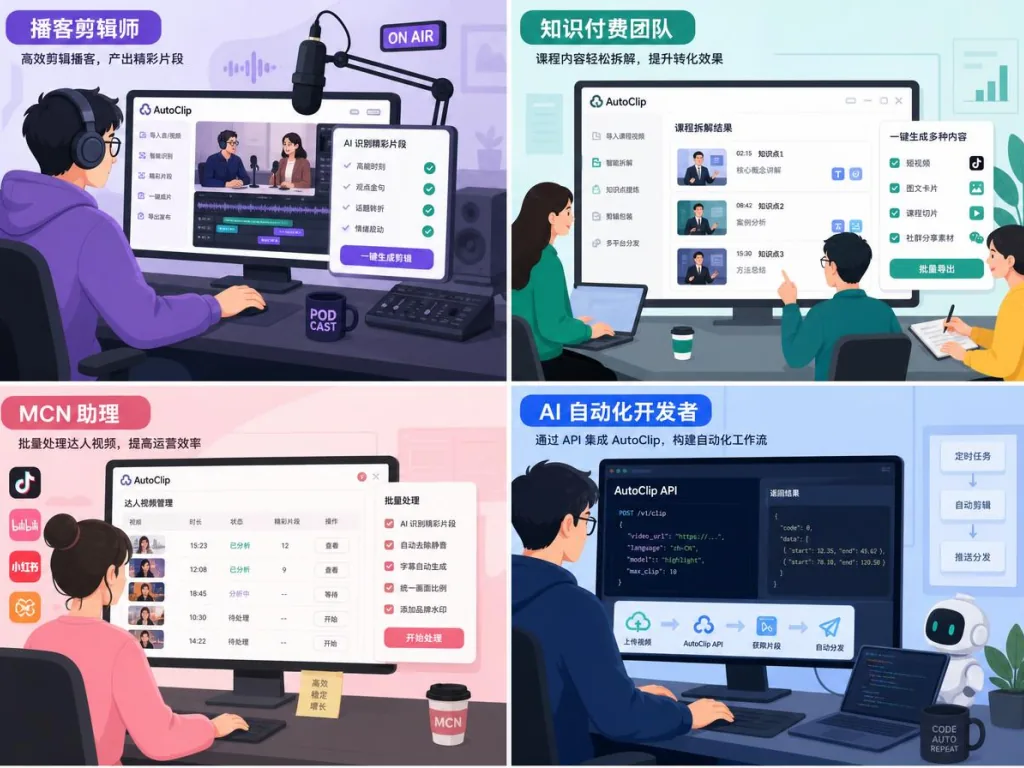
- Interview and podcast hosts: with lots of 1–3 hour raw material on hand, you need a steady stream of vertical clips distributed to Douyin, Xiaohongshu and YouTube Shorts.
- Paid-knowledge and course teams: break course recordings into short pieces that travel on their own, with hashtags to lift reach.
- Editing assistants at MCN agencies: batch-processing guest interview footage, where the CLI / MCP modes slot into automated pipelines.
- AI automation hobbyists: wire AutoClip into OpenCode, Claude and other agents via MCP to build a fully automatic "receive link → produce clips → publish" workflow.
It fits game recordings and low-narration footage less well — that kind of content needs manual segment selection or visual recognition, and the results still need human review.
6. How it compares
| Tool | Form | Auto clips | Multi-platform | Subtitle burn-in | Local rendering | Open source |
|---|---|---|---|---|---|---|
| AutoClip | Desktop + CLI + MCP | Yes, up to 10 auto plus candidates | 7 platforms | Yes | Yes | MIT |
| CapCut Smart Clip | Desktop | Partial | Mainly Douyin | Yes | Partial | No |
| OpusClip | SaaS | Yes | Multi-platform | Yes | No | No |
| Descript | Desktop + SaaS | Yes | General | Yes | Partial | No |
AutoClip's differentiator is "fully automatic pipeline + open source + local rendering", which is especially friendly to privacy-sensitive teams that need private deployment — and CLI/MCP let it embed deeply in automated workflows.
7. Getting started fast
Desktop (least effort)
- Download the installer for your platform from the Releases page —
.dmgfor macOS Apple Silicon,-setup.exefor Windows x64. The installer bundles Python and FFmpeg. - Open settings and pick a provider (OpenAI-compatible, Ollama, LM Studio and so on), enter the API key or local address, test the connection and save.
- Paste the video link, choose the target platform and layout, hit "one-click produce", then preview and download when it finishes.
Docker / web deployment
For Linux or self-hosted setups:
git clone https://github.com/zhouxiaoka/autoclip.git cd autoclip cp env.example .env mkdir -p data logs uploads docker compose up -d --build
Once it's up, open http://localhost:3000 for the web UI; the API docs are at http://localhost:8000/docs.
CLI / MCP (batch and automation)
Download the v1.5.0 CLI/MCP ZIP, create a virtual environment and install:
python3 -m venv venv source venv/bin/activate python -m pip install -r requirements.txt python -m pip install --force-reinstall --no-deps autoclip-1.5.0-py3-none-any.whl
One command produces the clips:
autoclip produce talk.mp4 --srt talk.srt --platform douyin --portrait-style podcast --json
In MCP mode, clients can trigger jobs and query status through start_quick_output / get_quick_output_status.
8. Takeaways and next steps
AutoClip's core value is compressing the whole long-video-to-clips pipeline into three steps — paste the link → choose the platform → collect the publishing assets — with local rendering so footage never leaves your machine and cloud models you can swap at will. For individual creators it means going from hand-cutting five clips a week to publishing ten a day; for teams it means editors spend their time tuning instead of repeating operations.
Start with a one-hour interview that already has creator subtitles, walk through the desktop tutorial end to end, and only then decide whether to move to Docker or CLI mode.
- Repository: https://github.com/zhouxiaoka/autoclip
- Website and case gallery: https://zhouxiaoka.github.io/autoclip_intro/
- Latest download: https://github.com/zhouxiaoka/autoclip/releases/latest
One-line recommendation: if long videos are burying you in short-clip work every day, AutoClip is worth ten minutes on a single test clip.
#autoclip #Autoclip #zhouxiaoka #AIVideoEditing #ScriptedVideo #TalkingHeadVideo #OpenSourceProjects #GitHub