
Title options (pick 1 of 3)
A desktop antidote for heavy Douyin users: better-douyin takes downloads, playback and AI in one grab
Author-level downloads plus MCP access: better-douyin rebuilds the Douyin desktop workflow
No browser extension installed, yet Douyin runs like a desktop workbench: a full teardown of better-douyin
1. Opening: one project between pain and love
Try to batch-download one creator's Douyin posts and the open-source scripts stall on login state, request signing and anti-crawl pacing nine times out of ten. Try to watch while downloading and manage it all from the desktop, and you end up hopping between browser tabs and some messaging app. Content creators, remix editors, data-backup hoarders, people syncing across devices — under high-intensity multi-account use, these annoyances compound until they eat your patience every single day. better-douyin exists for exactly these high-frequency desktop scenarios. It has picked up 769 stars on GitHub and ships a full desktop client, bidirectional MCP, optional AI modules, runnable automation and on-device data persistence, so "using Douyin more comfortably" gets solved in one pass.
2. Project overview: what it is in one sentence
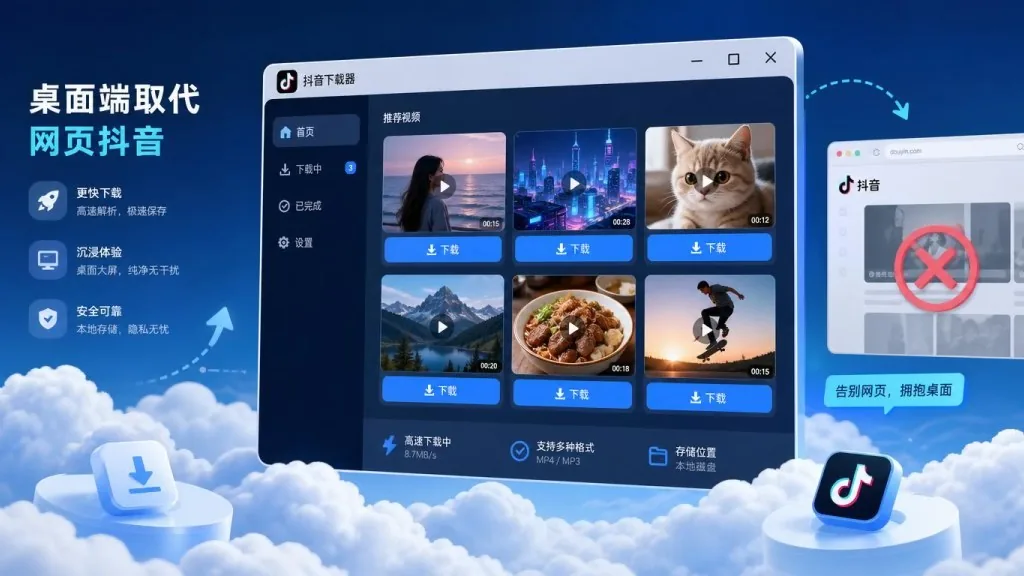
better-douyin is a "Douyin desktop enhancement tool" built on Rust + Tauri 2. It is organized around five scenarios — downloads, playback, interaction, AI and MCP — and covers the whole path from content capture to local management to desktop automation. A TypeScript frontend with React and Vite handles the UI; Rust/Tauri provides a lighter, steadier native window and local playback. It supports author-level downloads, immersive playback, likes and favorites, DM notifications, AI friend chat and MCP services that plug into AI toolchains, and it publishes the complete app on Releases while the public repo keeps the frontend UI, mock bridge and mock backend for secondary development and collaboration.
3. Core features in depth
1. Content capture and author-level downloads
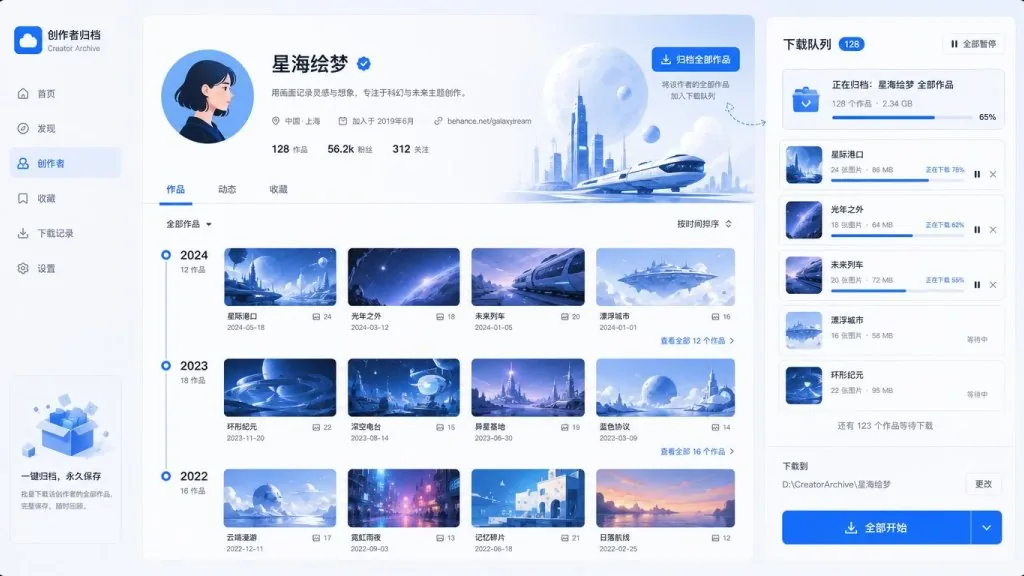
better-douyin takes "download" down to author granularity, not just single posts. You can paste a Douyin share link, short link or full URL to resolve a single video, image set or Live Photo; search users by nickname, Douyin ID or UID and browse their posts, following, followers and likes; and batch-scrape the recommendation feed, your likes list, your favorites list and favorites collections in one go. Author-level download means one action archives a creator's entire output, and the efficiency gap for content backup, asset organization and cross-platform migration is enormous — everyone else is still right-clicking one post at a time.
2. Desktop-grade playback and an immersive experience
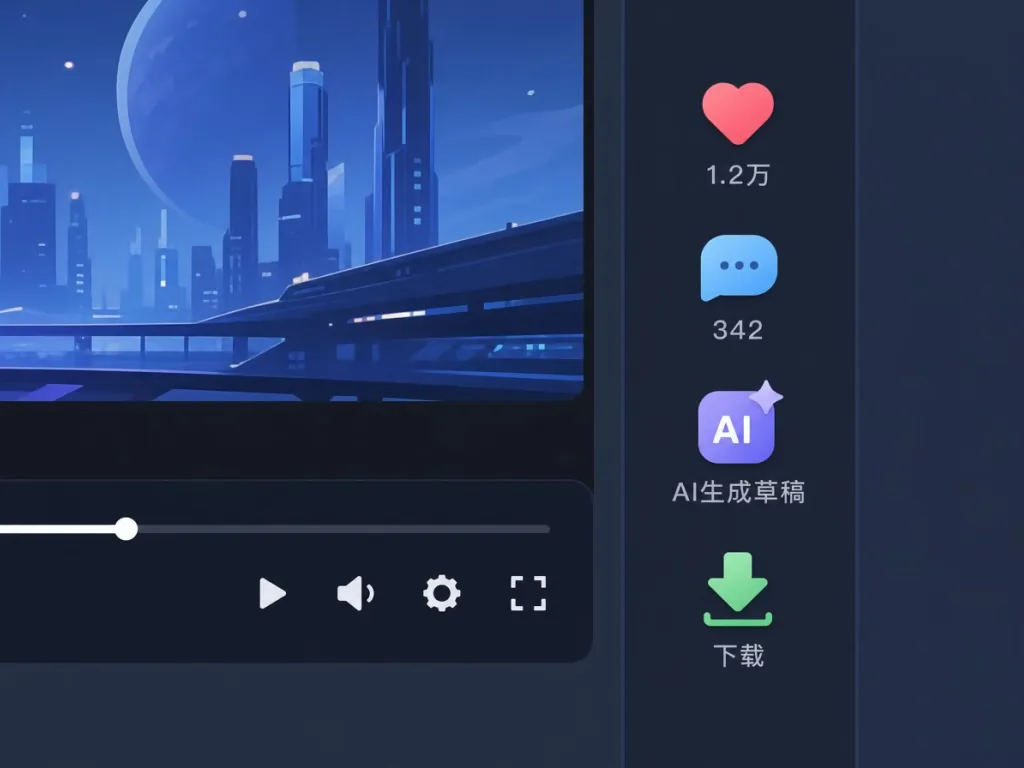
Thanks to Tauri 2's native windows and a local playback path, better-douyin replaces the "open it and it stutters" web experience with desktop-grade smoothness. The immersive player supports switching between video and image sets, progress control, volume, playback speed, resolution switching, autoplay and retry on failure; the sidebar expands and collapses, and small-screen adaptation is handled carefully. The download button lives in the playback panel — save it right after watching, no switching to an external downloader. Comments, likes, favorites and draft-comment generation are all in the same panel too.
3. Automation and AI interaction
This is the biggest divide between better-douyin and an ordinary "Douyin downloader". The notification center gathers likes, comments and follows, with background refresh and jump-to-context; the friends module supports friend lists, online status, DM threads and unread alerts. The AI side can connect to an OpenAI Compatible service to generate comments, DM replies and content analysis, and a built-in "friend AI" lets you chat with a virtual friend over DMs. Auto-monitoring covers the recommendation feed, friend DMs, notifications, comment sections and creator post updates, with keyword filters, thresholds, scan intervals and per-round limits — plus auto-comment, auto-DM, auto-like and follow-back flows that only run after explicit opt-in. Automation that goes all the way, with every step under control.
4. Local MCP service and cross-platform distribution
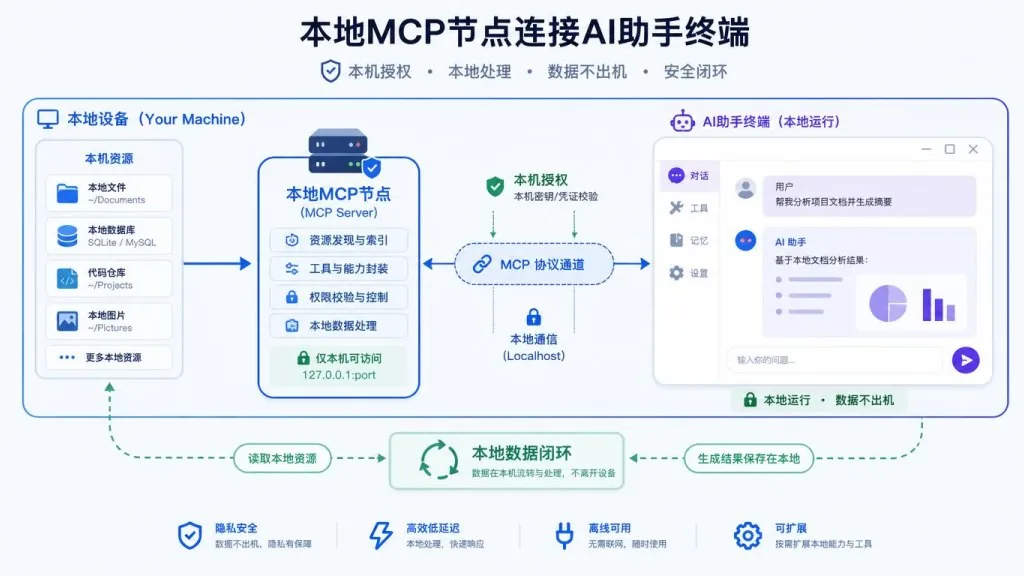
better-douyin bundles a local HTTP MCP service that lets AI tools like Codex, Claude Code and OpenClaw — with user authorization — read content, control download tasks and perform write operations that require explicit confirmation. That means you can have the AI take over the download queue, draft replies or schedule tasks, instead of stopping at "suggestions in a chat box". Combined with checksum verification, auto-update and cross-platform releases, the whole path from downloaded package to daily use has integrity guarantees. All cookies, accounts, configuration, download history, cache and local files stay on your machine — no cloud hosting to worry about.
4. Technical highlights and performance
better-douyin runs on Rust 1.80+ / Tauri 2, with a frontend stack of React + Vite + TypeScript + Tailwind CSS, Zustand for state, and Radix UI, lucide-react and framer-motion for components. The desktop experience is lighter and steadier than a pure web build or an Electron app. Build artifacts ship with SHA256 checksums, and both auto-update and a proxy channel are in place. GitHub counts 769 stars, and cumulative downloads plus version history on the Releases page are a reasonable activity signal. The whole interaction chain is built around "local first + explicit authorization + collaboration boundaries"; compared with a plain packet-capture script, the engineering is a complete loop.
5. Use cases and audience
- Indie media and content creators: batch-archive reference material, study competitor accounts, and keep high-quality videos and image sets long term.
- Remix and editing teams: collect while watching, save original audio / BGM / Live Photos to disk, and cut the manual aggregation time with author-level downloads.
- Heavy Douyin users: immersive desktop playback with likes, favorites, notifications and DMs managed in one place, and fewer tab switches.
- AI toolchain tinkerers: feed Douyin content into Codex, Claude Code or their own agents and drive it directly over MCP.
Who it's not for: if you only watch occasionally, don't need local management, aren't willing to take on account-compliance risk, or want it for commercial redistribution, just use the official client.
6. Competitive comparison
| Dimension | Plain packet-capture script | Browser-extension downloader | better-douyin |
|---|---|---|---|
| Form factor | CLI / one-off script | Browser extension | Native Rust/Tauri desktop app |
| Download granularity | Single post / simple batches | Mostly single post | Author-level, recommendation feed, full collections |
| Interaction | None | Limited | Likes / favorites / comments / notifications / DMs integrated |
| AI capability | None | None | Comment generation, AI DMs, configurable OpenAI Compatible |
| MCP access | None | None | Local HTTP MCP, works with Codex/Claude Code |
| Local data | Temp files | Browser storage | Cookies / accounts / history / cache all on disk locally |
| Commercial compliance | Depends on the script | Depends on the extension | Non-Commercial License, boundaries stated explicitly |
7. How to get started fast
- Go to the Releases page and download the installer for your system (Windows / macOS / Linux).
- Verify the hash against
checksums.sha256so you don't install a tampered third-party build. - On first launch, choose built-in login, manual cookie, or multi-account switching — all account data stays local.
- In "Downloads", paste a creator's profile link to trigger an author-level download, or save while scrolling directly in the "Recommendation feed".
- Connect AI: open settings, enter the key for your OpenAI Compatible provider, enable "Auto-monitoring" and set keywords and scan intervals.
- Connect MCP: enable the local MCP service in preferences, then point Claude Code / Codex at
http://127.0.0.1:<port>/mcp.
Note: automation is off by default. Every write operation requires explicit opt-in and confirmation, so nothing fires by accident.
8. Wrap-up and what to do next
The core value of better-douyin is folding "downloads + playback + interaction + AI + MCP" into one lightweight, stable, local-first desktop shell, so heavy Douyin users get an engineered experience in one shot. It draws the commercial boundary with a Non-Commercial License, the collaboration boundary with SECURITY_BOUNDARY.md, and an Open Shell mode that lets frontend developers safely iterate against a mock environment — this "clear boundaries plus complete experience" open-source strategy is worth long-term attention in a way that plenty of "everything runs" wild-script projects are not.
If you're stuck on content backup, asset archiving, unified desktop management, AI auto-replies or MCP integration, better-douyin is worth trying right now. Project site: https://douyin.yhan.fun/, source: https://github.com/anYuJia/better-douyin. Check the SHA256 before you install, and keep risk control and compliance in mind before you turn automation on.
One-line pitch: move Douyin onto your desktop and plug AI into Douyin — start with better-douyin.
#better-douyin #BetterDouyin #anyujia #OpenSource #GitHub