
Title options (pick 1 of 3)
Installing Claude Code plugins driving you crazy? This official 42K-star repo fixes it in one command
From hand-rolling MCP to a single install command: a hands-on guide to the official Claude Code plugin marketplace
Not a single line of config, yet it takes over your whole Claude Code workflow: inside the official plugin directory
The official Claude Code plugin marketplace: this 42K-star repo is reshaping AI coding workflows
1. Why this hurts, and almost every developer has felt it
Every time you start your AI coding assistant, do you have to repeat the same manual dance: paste the project conventions, configure MCP servers, load your custom skills, register slash commands? Everyone on the team ends up with their own version — config drift, version chaos, and hard-won lessons nobody can reuse. There are plenty of scattered Claude Code config snippets on GitHub, but a single trusted, installable, distributable entry point is basically nonexistent.
Anthropic's official answer is to turn plugins into a product you can install in one click and version properly. This repo is the official directory built for that goal: anthropics/claude-plugins-official, 42K stars, maintained by the Anthropic team itself. It pulls scattered extension capabilities into one standardized plugin ecosystem, fixing two chronic problems at once: fragmented configuration and community plugins of wildly uneven quality.

2. What it's for: the problem it solves
Claude Code Plugins Directory is the official plugin marketplace index for Claude Code, positioned as "a unified index and distribution center for high-quality plugins". It has four core traits:
- Official backing: a
/pluginsdirectory maintained by the Anthropic team itself, serving as the internal reference implementation - Two tracks: official plugins (
/plugins) and third-party plugins (/external_plugins) are both listed, for broader coverage - Standardized structure: every plugin follows the same directory and manifest conventions, so install-and-go works
- Security disclaimer up front: the README warns users to check a plugin's source from the first paragraph and states plainly that Anthropic does not endorse external plugins
On the milestone side, the repo has 42K stars, its primary language is Python, and it is the most authoritative plugin index in the Claude Code ecosystem today.
3. A deep dive into the core features
1. One-command install and Discover browsing
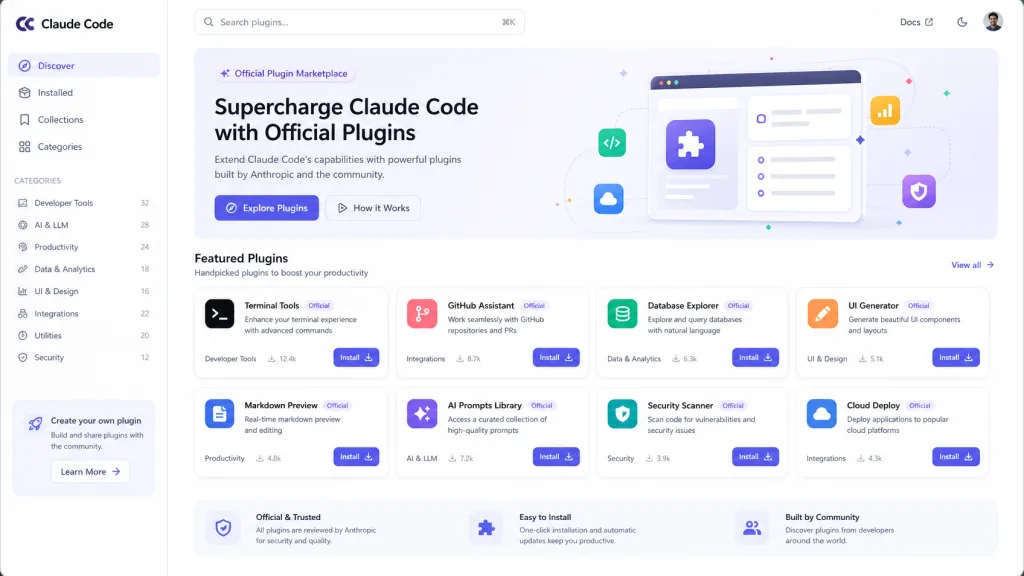
The official path offers two ways in: the command line, /plugin install {plugin-name}@claude-plugins-official, pulls a specific plugin directly; or you browse a visual list in the /plugin > Discover panel. Compared with the old routine of copying a GitHub repo and editing the manifest, installation goes from "find repo → clone → edit config → debug" down to one command.
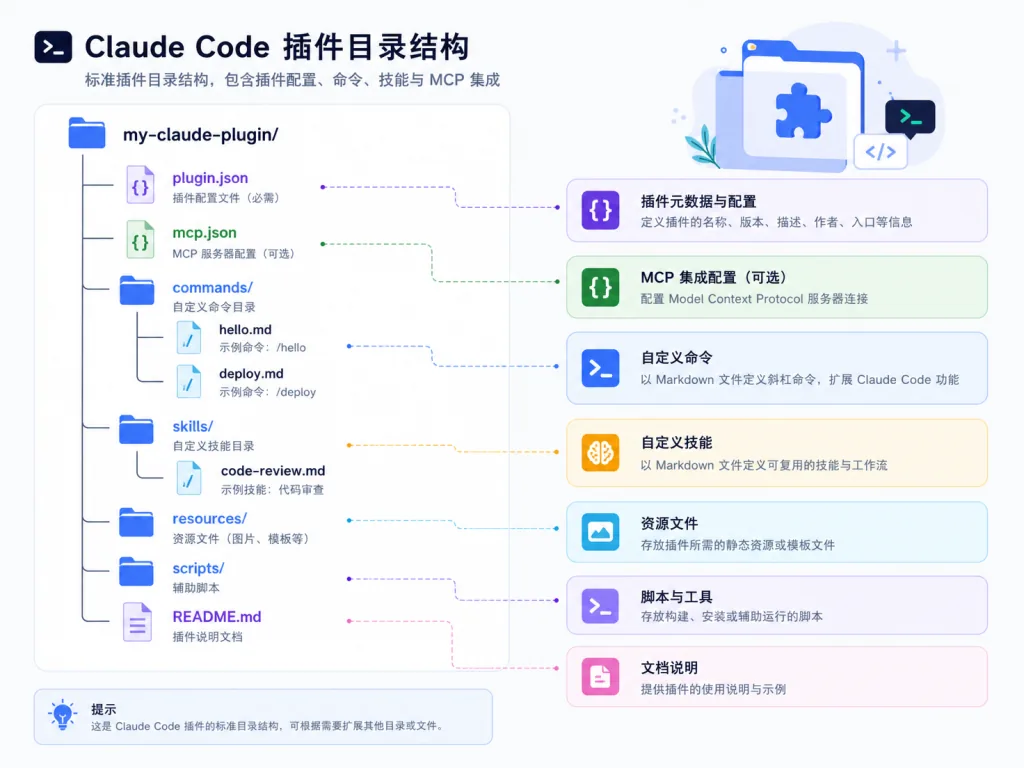
2. A standardized plugin directory structure
Every plugin follows the same skeleton: .claude-plugin/plugin.json holds metadata; .mcp.json declares MCP servers; commands/ holds slash commands; agents/ holds agent definitions; skills/ holds skill definitions; README.md provides docs. The uniform structure gives plugin authors a clear template and lets the Claude Code loader parse reliably.
3. Skill-bundle plugins: lightweight declarations that skip the manifest
For source repos that only have a SKILL.md and no plugin.json, a marketplace entry can mount them directly via strict: false plus an explicit skills array — for example exposing ./libA/skill-1 and ./libB/skill-2 as <plugin-name>:<skill-name>. This declaration style lets existing SDK repos get listed without any rework, which drops the barrier to extending the ecosystem considerably.
4. Immutable slugs and automatic migration
Once published, the name field is locked, so plugins users already installed don't break on a rename. If a rename is unavoidable, register the old-to-new mapping in the top-level renames map in marketplace.json, and the Claude Code loader rewrites the slug transparently on the next sync. UI copy changes go through displayName instead, decoupled from the underlying identifier.
4. Technical highlights and performance numbers
On the metrics side, the repo has 42K stars, is implemented in Python, and is backed by the official docs site at code.claude.com/docs/en/plugins. Three architectural details are worth noting:
- Git-subdir incremental sync: plugins point at a specific subdirectory via a
git-subdirsource and pin asha, pulling only what's needed instead of cloning the whole repo - Strict and loose modes: the
strictfield toggles how hard manifest validation is, so it can both enforce conventions for internal plugins and accommodate old-style skill packages - Ecosystem compatibility: MCP servers, slash commands, agents and skills are all supported, covering every Claude Code extension point
Compared with the early approach of hand-editing ~/.claude/settings.json, the plugin model breaks configuration granularity down from one global blob to independent per-plugin packaging — a smaller conflict surface and safer rollbacks.
5. Where it fits, and who it's for
At least three concrete scenarios:
- Team-wide AI coding conventions: package project-specific lint, commit and review rules into a plugin; members run
/plugin installonce and it takes effect - Distributing internal MCP servers in an enterprise: wrap internal knowledge bases, monitoring and CI triggers as plugins, so nobody has to configure MCP by hand
- SDK authors reaching Claude Code users: you already have a repo with a
SKILL.md— list it in the official marketplace via skill-bundle mode
Who it's for: teams that need to distribute AI coding capability at scale, SDK authors, heavy Claude Code users. Who it's not for: light users who just want to tweak a prompt locally now and then — writing it straight into settings.json is less hassle.

6. Comparison with alternatives
| Dimension | claude-plugins-official | Scattered GitHub Gists/repos | Self-hosted community marketplaces |
|---|---|---|---|
| Official backing | Yes, maintained by Anthropic | No | No |
| Install method | One command | Manual copy | Varies by project |
| Security review | Third-party plugins must pass review | None | No common standard |
| Version management | sha pinning + renames migration | Users handle it themselves | Depends on the implementation |
The core reason to pick it is that it satisfies all three at once: trustworthy, distributable and governable. Scattered approaches solve trust, self-hosted marketplaces solve distribution, and the official directory merges both under a single set of conventions.
7. How to get started fast
Installation is simple: in Claude Code run /plugin install example-plugin@claude-plugins-official, or browse the list in the interactive /plugin > Discover panel and click install.
Advanced tips: plugin authors should fork the repo first and write their manifest by following /plugins/example-plugin. Remember that name can't change once published; any rename must go through the renames map. If your source repo only has a SKILL.md, use the skill-bundle config described above — set strict to false and list the skills array explicitly, and you're listed.
8. Summary and what to do next
claude-plugins-official turns Claude Code's extension capabilities into standard parts you can install, version and distribute. Behind those 42K stars is a shared conclusion: AI coding workflows need engineering governance too. For users, one command installs a plugin; for authors, one submission reaches every Claude Code user.
Project links:
- GitHub: https://github.com/anthropics/claude-plugins-official
- Official docs: https://code.claude.com/docs/en/plugins
One-line pitch: if you're still hand-copying Claude Code configs, it's time to package your workflow as a plugin and get the whole team aligned in one command.
#claude-plugins-official #ClaudePluginsOfficial #anthropics #DevOps #containerization #open-source-project #GitHub