
Choose a title (pick 1 of 3)
context-mode ended my 40% context waste: the other half of the AI agent story
315KB of tool output cut to 5.4KB — context-mode saves me 98% of my context
47 Reads become 1 script: how context-mode reshapes AI coding
context-mode: ending the 40% context waste in AI coding agents
1. Opening: the invisible tax on your context window
You sit in Cursor coding for half an hour, ask the agent to read 20 GitHub issues, grab a Playwright snapshot, and skim an access log. Then the error hits: context full. The agent auto-compacts the conversation, and the file edits, the task in progress, the instruction you just gave — all gone. You restate everything from scratch, and the agent has to find its footing again. The model isn't dumb. A 56KB Playwright snapshot, 59KB of 20 issues and a 45KB access log are stuffing your context window, eating 40% of the capacity in half an hour. Add the agent's verbose greetings and explanations on the output side, and the token budget burns from both ends. context-mode exists to end this invisible context tax.
2. Project overview: what it actually is
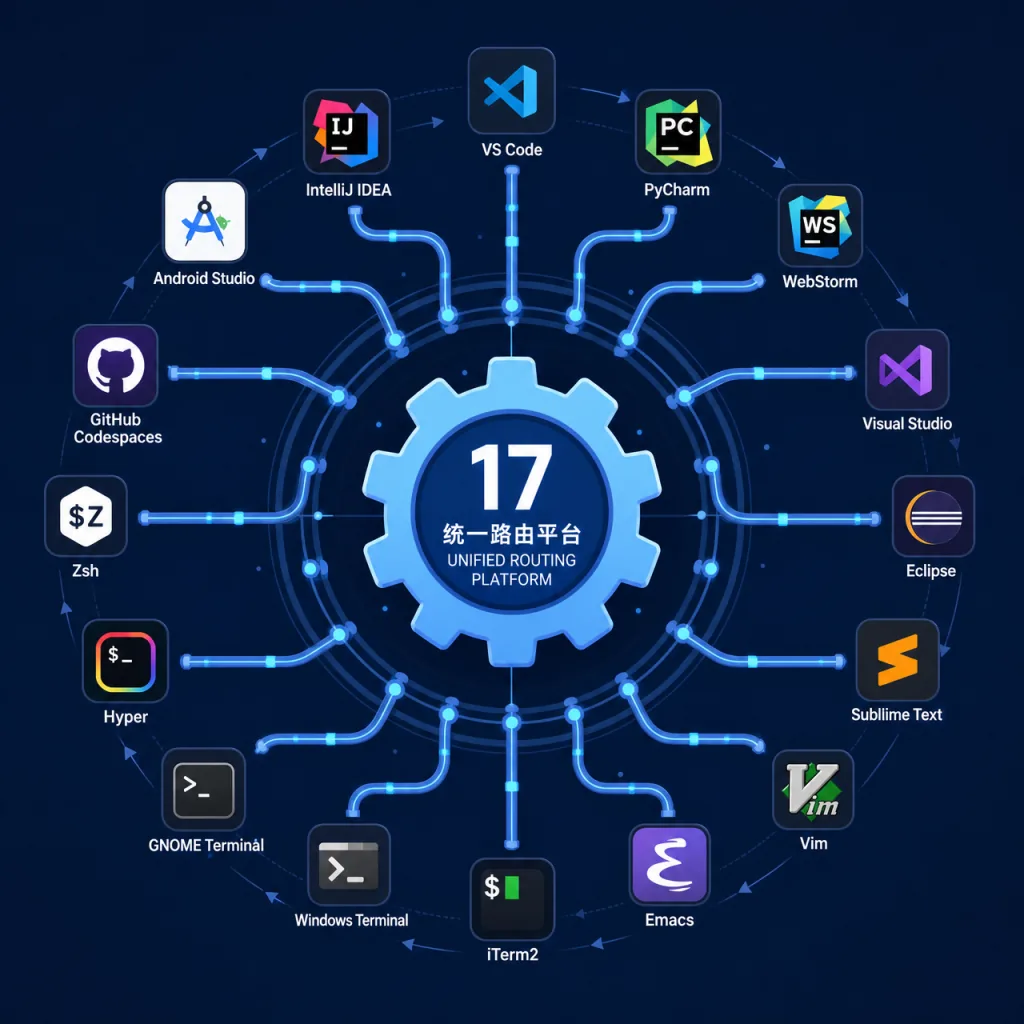
context-mode (30.6K GitHub stars, main repo mksglu/context-mode, primarily TypeScript) is an MCP service built to govern the context window of AI coding agents. It compresses context consumption from four directions at once: sandboxing tool output (up to 98% reduction), persisting session memory, enforcing the Think in Code paradigm, and routing execution across 17 platforms. The project hit #1 on Hacker News (570+ points) and has been adopted by teams at Microsoft, Google, Meta, Amazon, NVIDIA, ByteDance, Stripe, Datadog, GitHub and Cursor.

3. A deep dive into the core features
1. Context Saving
context-mode's sandbox keeps raw tool output out of the context window, keeping only metadata and indexes in the prompt. A 315KB tool output ends up occupying 5.4KB — a 98% reduction. When the agent genuinely needs that data, it retrieves it with ctx_fetch_and_index and loads it on demand. That means you can let the agent pull large logs or 100 issues and spend roughly the tokens of reading a few.
2. Session Continuity
Every file edit, git operation, task step, error and user decision is written to SQLite, with an FTS5 full-text index over the events and BM25 ranking for semantic retrieval. When the conversation is compacted, it doesn't dump the whole history back into context — it retrieves the relevant fragments on demand. That means after compaction the agent can still precisely recover which file it was editing, where the task stalled, and what you last asked for. Without --continue, old session data is wiped immediately, so a clean session always gets a clean start.
3. The Think in Code paradigm
context-mode enforces one paradigm: make the LLM write code to do the analysis instead of feeding it data and making the model compute. Counting lines in every TypeScript file used to take 47 Read() tool calls and 700KB of context; now one ctx_execute() running a 3.6KB script does it. One script replaces ten tool calls, a 100× context saving. It's mandatory across all 17 supported clients — treat the LLM as a code generator, not a data processor.
4. No prose-style enforcement
context-mode manages where data goes, not how the model talks. Whether it's terse, complete, or what format it uses is up to the model, or up to your own CLAUDE.md/AGENTS.md. Research shows overly aggressive brevity prompts actually hurt coding and reasoning benchmarks (see Moonshot AI's tests on kimi-k2.5), so context-mode keeps its routing blocks focused on data flow and leaves the model's expressive freedom intact.

4. Technical highlights and performance data
The toolset covers 6 sandbox tools (ctx_batch_execute, ctx_execute, ctx_execute_file, ctx_index, ctx_search, ctx_fetch_and_index) and 5 meta tools (ctx_stats, ctx_doctor, ctx_upgrade, ctx_purge, ctx_insight). It works natively with 17 platforms including Claude Code, Gemini CLI, VS Code Copilot, JetBrains Copilot, Cursor, OpenCode, KiloCode and OpenClaw, intercepting key events such as PreToolUse, PostToolUse, SessionStart and PreCompact through a dual MCP + Hooks channel. On OpenCode and KiloCode it runs in-process as a TypeScript plugin, skipping the stdio MCP subprocess overhead. Underneath it uses the better-sqlite3 synchronous driver with FTS5 indexes, so BM25 retrieval returns in milliseconds. Every hook is fail-open — even if context-mode breaks, it won't block your tool calls.
5. Where it fits and who it's for
Long-session developers: people coding in Claude Code or Cursor for an hour or more who need the agent to keep context continuity across compaction cycles. Large-codebase explorers: people who need to batch-read dozens of files, count lines or scan issues without drowning the context window in raw data. Multi-platform agent users: people switching between VS Code, JetBrains and terminal CLIs who want one context governance policy everywhere. Not for: pure chat Q&A users, lightweight script generation, or enterprises with strict compliance constraints on local SQLite storage.
6. How it compares
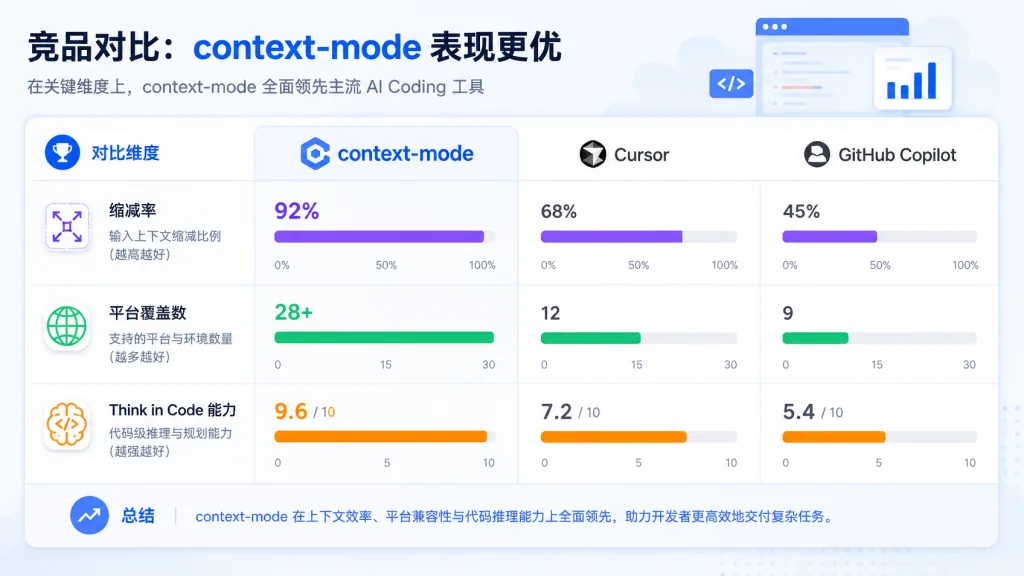
| Tool | Data reduction | Session memory | Platform coverage | Think in Code |
|---|---|---|---|---|
| context-mode | 98% | SQLite + FTS5 + BM25 | 17 platforms | Enforced |
| Hand-rolled MCP wrapper | Depends on the implementation | None | Single platform | No |
| Generic context compression (e.g. LLMLingua) | 30-50% | None | Model-agnostic | No |
The differentiation: it intercepts before the fact rather than compressing after it; it's a unified execution layer across 17 platforms rather than a single-platform solution; and it doesn't just save tokens — it also fixes the state loss that follows compaction.
7. Getting started
With Claude Code, it takes two commands:
/plugin marketplace add mksglu/context-mode
/plugin install context-mode@context-mode
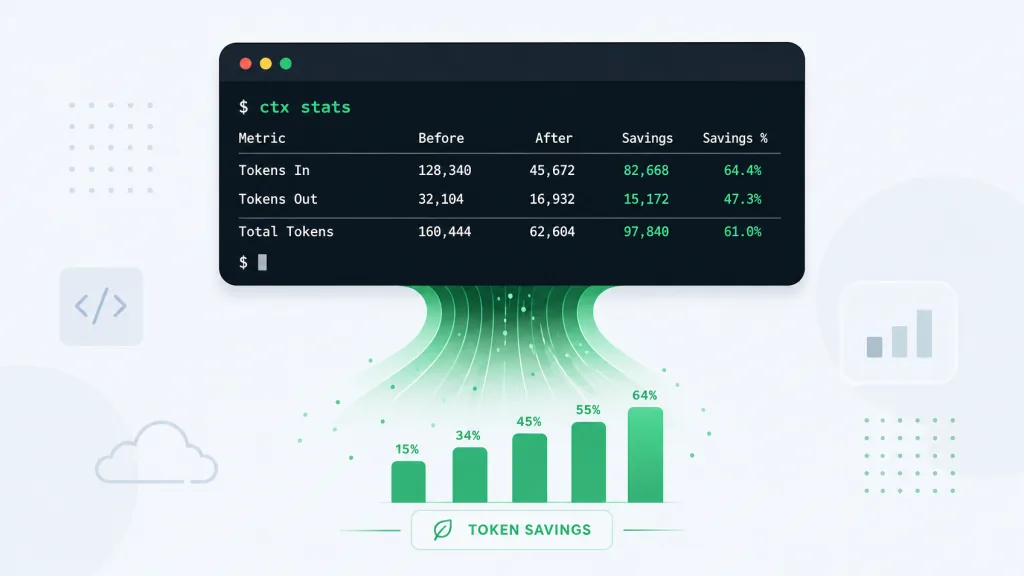
Restart Claude Code and run /context-mode:ctx-doctor; every check should show [x]. In Cursor you can install via a symlink from a local directory. On VS Code Copilot and JetBrains Copilot you create .github/hooks/context-mode.json and write in the three hook commands. On OpenCode/KiloCode you just add "plugin": ["context-mode"] to your config. Verification is the same everywhere: type ctx stats and check the real-time context savings.
8. Summary and what to do next
context-mode redefines context governance — it sandboxes tool output (315KB → 5.4KB, 98% reduction), writes session state to SQLite + FTS5 for continuity across compaction, collapses 47 Reads into one script execution, and routes all of it through a unified MCP + Hooks layer on 17 platforms. If you're running long tasks in Claude Code or Cursor, install it today and feel the double win of token savings and state recovery.
Project links:
- GitHub: https://github.com/mksglu/context-mode
- Website: https://context-mode.com
- Insight panel: https://context-mode.com/insight
- Discord: https://discord.gg/DCN9jUgN5v
One-line pitch: context-mode is the other half of the context solution for AI coding agents — turning 40% waste into 98% recovery.
#context-mode #ContextMode #mksglu #AIAgents #AIWorkflow #Automation #OpenSource #GitHub