1. Intro: still losing sleep over this?
Almost every developer's desktop has held at least two of these: DBeaver, written in Java; TablePlus, macOS only; plus an old Navicat install as backup. Every new laptop means reinstalling a JRE, every upgrade risks a fight with the system Java version, and connecting to a new database means downloading a driver by hand. GitHub Issues are full of complaints about tool bloat almost every week, and the moment one person on the team uses Windows and another uses Mac, your toolchain splits in two.
The AI toolchain is worse. Claude Code, Cursor and Windsurf want to read your database, so you copy connection details back and forth; you want them to write SQL for you, so you jump between editor, AI and database client over and over. People have been calling for a single "database workbench" for years, and nobody has actually built one.
DBX wants to settle it in one shot, with 20 MB and a single Rust binary.
2. Project overview: what it is in one sentence
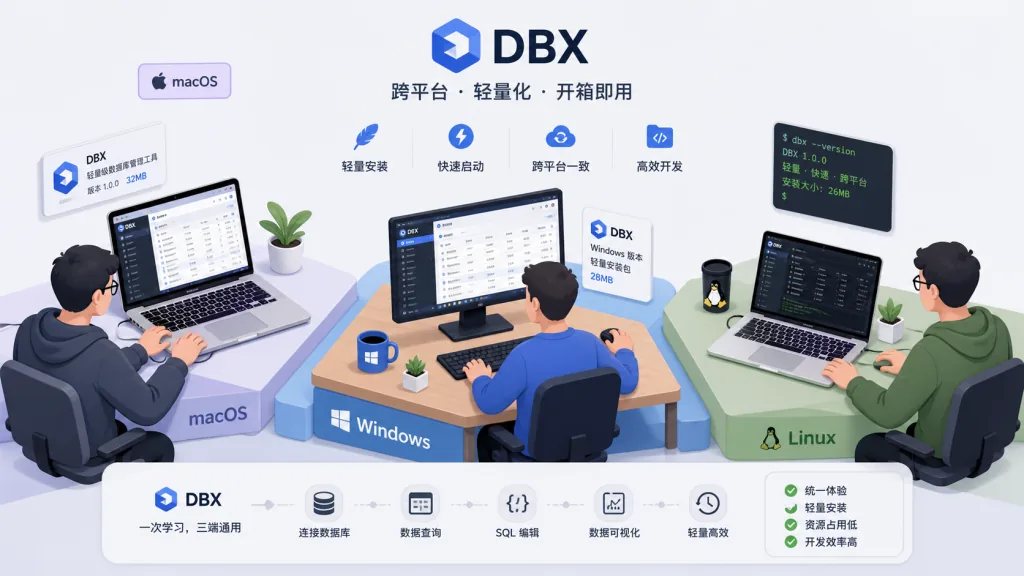
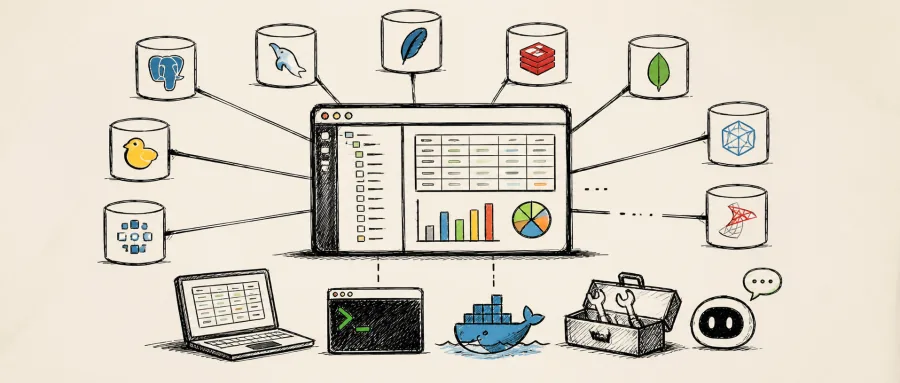
DBX is a lightweight, cross-platform database management tool written in Rust and built on Tauri 2, and its pitch is "a single 20 MB file, zero runtime dependencies, 70+ databases." It ships a desktop app (macOS / Windows / Linux), a Docker self-hosted web version, a native CLI, and a standalone MCP Server.
Core keywords: cross-platform, Rust native, AI assistant, MCP protocol, 70+ databases.
The GitHub repo t8y2/dbx has 14,297 stars, was featured on Product Hunt, recommended by HelloGitHub and listed by TrendShift. It supports MySQL, PostgreSQL, SQLite, Redis, MongoDB, DuckDB, ClickHouse, SQL Server, Oracle, DM (Dameng), KingbaseES, OceanBase, GaussDB and other mainstream and domestic Chinese databases — a coverage density that's among the best in its class.
3. Core features in depth
1. A 20 MB single binary, zero runtime
DBX uses Tauri 2 instead of Electron: no bundled Chromium, no Java JRE, no Python venv. What you download is a ~20 MB executable that works on macOS, Windows and Linux. By comparison, a DBeaver installer starts at 200 MB and then asks for a JRE of several hundred megabytes more; TablePlus only serves macOS users. This approach is especially friendly to ops and CI environments — DuckDB file preview, the SQL editor and the AI panel all live in one process.
2. A built-in AI assistant that writes SQL directly
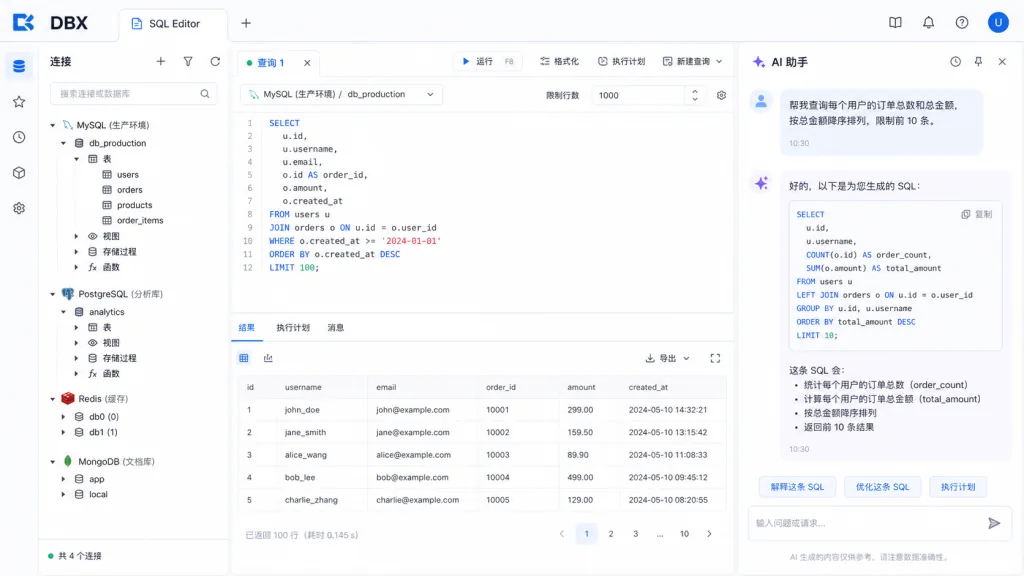
DBX puts AI inside the editor. Select a table or a chunk of SQL, describe what you want in natural language, and you get the result. You can also have the AI explain a query, optimize SQL, or fix an error. It supports Claude, OpenAI and any OpenAI-compatible endpoint; local models connect through Ollama. Generated SQL first passes a built-in safety check to prevent accidental data deletion. For anyone used to Claude Code or Cursor, this folds database work into the same AI pipeline.
3. MCP Server: let AI coding assistants connect straight to your database
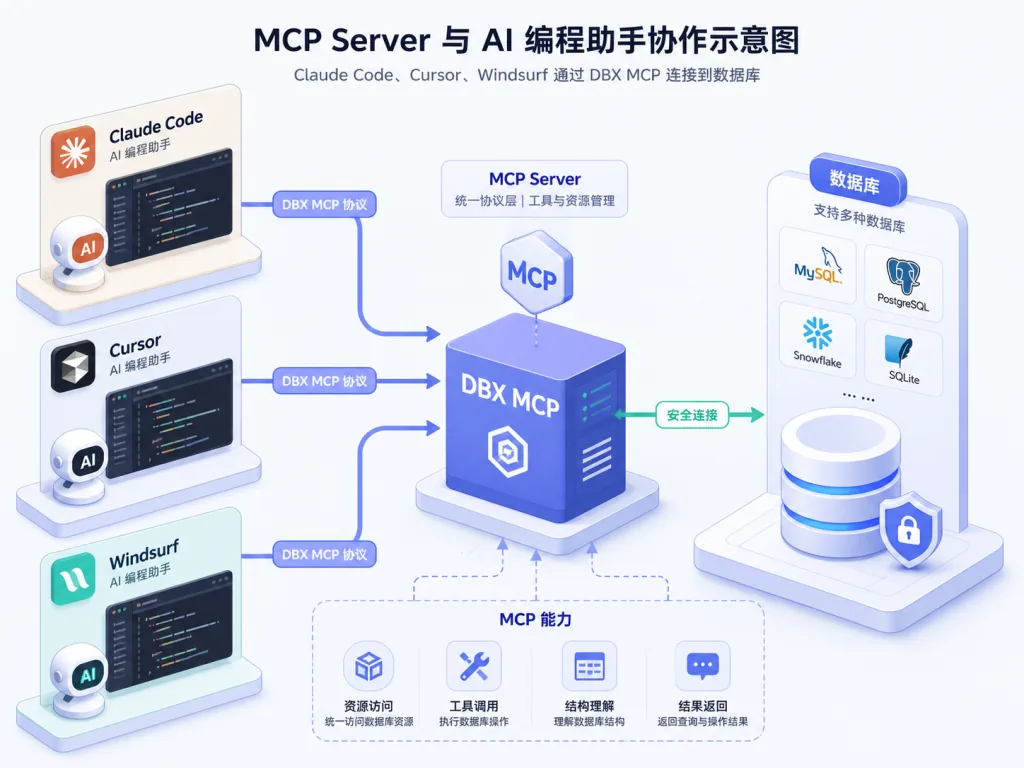
DBX publishes a separate MCP Server package written in Rust, installed via npx @dbx-app/mcp-server, with native binaries for macOS / Linux / Windows as well. Add a snippet to the .mcp.json of Claude Code, Cursor or Windsurf and the AI agent can list the connections you configured in DBX, browse table schemas, run SQL, and even open the result page right in the DBX UI. Connection reuse, allowlists and three permission tiers (Read only / Data read/write / Full access) are all managed centrally in DBX's Settings → MCP, with machine-readable values read_only, safe_write and high_risk_write.
4. Data grid and data migration
The results pane uses virtual scrolling and handles large result sets; clicking a column header filters, sorts or edits the WHERE clause; edited cells produce a SQL preview before you save; export covers CSV, JSON, Markdown, XLSX and INSERT statements. Table import handles CSV and Excel; data migration can load data directly between different databases; Schema Diff compares two connections; the ER diagram draws out table relationships. One more detail: drag in a Parquet / CSV / JSON file and DBX previews it instantly with the built-in DuckDB engine — no need to create a table and import first.
4. Technical highlights and performance data
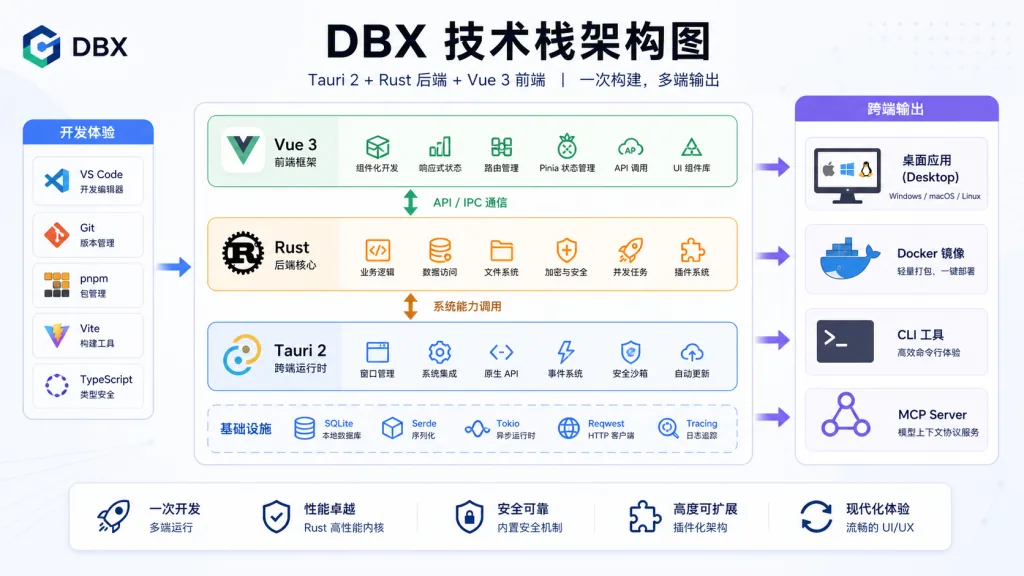
On the stack, the frontend is Vue 3 + TypeScript + shadcn-vue + Tailwind, with CodeMirror 6 as the editor core; the backend is all Rust, with sqlx, tiberius, redis-rs and mongo-rust-driver for database drivers; the framework is Tauri 2, and the web version is the same Rust core compiled straight into an HTTP service.
That choice of stack pays off three ways:
- The installer stays consistently around 20 MB, and memory use is an order of magnitude lower than Electron-based tools;
- The same Rust code compiles to the desktop app, the Docker image, the CLI and the MCP Server, so the feature matrix stays identical;
- No bundled Chromium, no JRE, no Python venv — suitable for air-gapped environments and enterprise compliance requirements.
On compatibility: the desktop app covers macOS / Windows / Linux; the Docker image supports amd64 / arm64; the web version can sit behind a reverse proxy, with the subpath set through DBX_PUBLIC_BASE_PATH. The MCP Server ships both a Node.js launcher and a native binary, covering offline, server and CI scenarios.
5. Use cases and who it's for
Who it's for
- Backend / full-stack developers maintaining several databases at once: MySQL, PostgreSQL, Redis, MongoDB and DuckDB in one place;
- Engineers who lean heavily on AI coding assistants and want Claude Code or Cursor to connect to a real database;
- Domestic-substitution (xinchuang) teams: DM, KingbaseES, OceanBase, GaussDB, GoldenDB, Vastbase, Doris, SelectDB and StarRocks are all supported;
- Ops and platform teams that want a web-based database console self-hosted on an internal Docker host and shared by the whole team.
Who it's not for
- Product or business colleagues who only want to draw ER diagrams graphically and never write SQL;
- Teams that already bought Navicat / DataGrip Enterprise and have no cross-platform or AI needs.
6. Comparison with alternatives
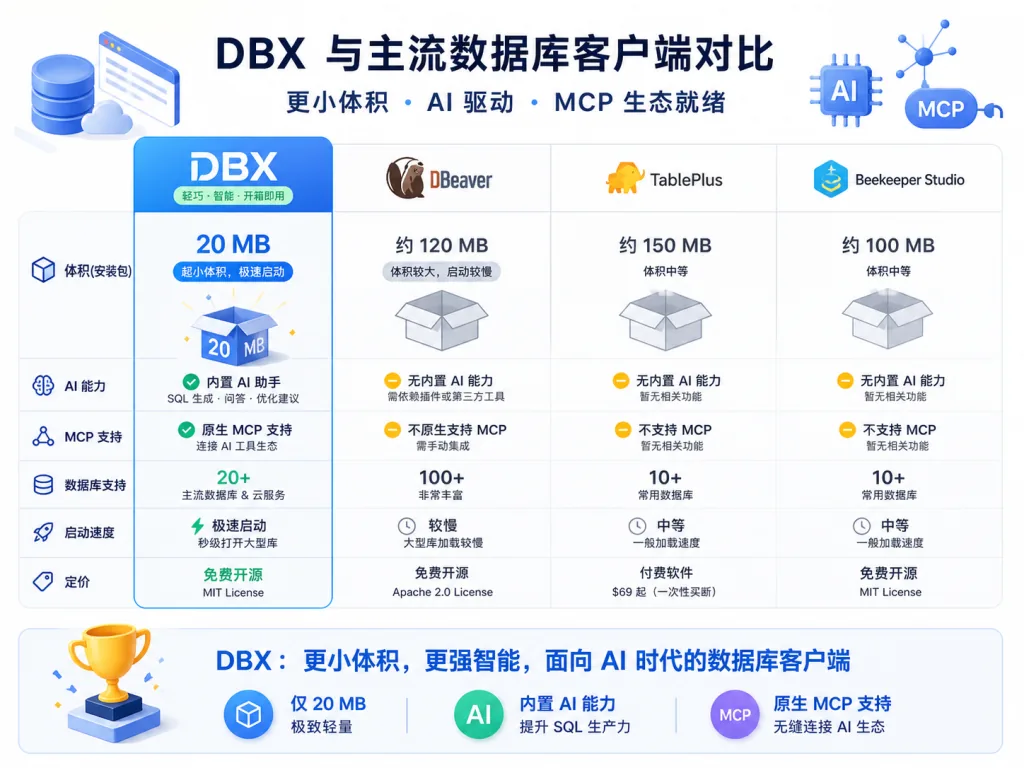
| Dimension | DBX | DBeaver | TablePlus | Beekeeper Studio |
|---|---|---|---|---|
| Installer size | ~20 MB | 200 MB+ (JRE included) | ~100 MB | ~150 MB |
| Runtime dependencies | None | Java JRE | None | Some driver dependencies |
| Platform coverage | macOS / Windows / Linux | All platforms | macOS only (community edition has Win/Linux) | All platforms |
| Number of databases | 70+ | 80+ | 30+ | 40+ |
| Built-in AI assistant | Yes | No | No | No |
| MCP Server | Yes (separate package) | No | No | No |
| Docker / web self-hosting | Yes | Community edition only | No | No |
| Main language | Rust (Tauri) | Java | Swift / Electron | Electron |
DBX's differentiation is clear: Rust nails "lightweight" and "cross-platform" at the same time, then wires AI and the MCP protocol in natively instead of acting as a GUI shell.
7. Quick start
Desktop install is the easiest path. On macOS, just brew install --cask dbx; on Windows use Scoop scoop install dbx or WinGet winget install t8y2.dbx; on Linux install the Flatpak from FlatPark, or grab the AppImage / deb from GitHub Releases.
For a team edition, run Docker:
docker run -d --pull=always --name dbx -p 4224:4224 -v dbx-data:/app/data t8y2/dbx:latest
On mainland China networks you can switch to the mirror docker.cnb.cool/dbxio.com/dbx:latest for faster pulls. Then open http://localhost:4224 in your browser; multi-architecture images cover both amd64 and arm64.
To connect an AI coding assistant, add a snippet to .mcp.json:
{
  "mcpServers": {
    "dbx": { "command": "npx", "args": ["-y", "@dbx-app/mcp-server"] }
  }
}
CLI users can install @dbx-app/cli, or use Homebrew brew install dbx-cli, then hit the database from a script with dbx query local "select 1" --json.
8. Summary and next steps
DBX's core value is compressing two things — "a lightweight cross-platform database client" and "an AI + MCP workflow" — into one 20 MB Rust binary. It needs no JRE and bundles no Chromium, and it shares the same connection config across desktop, Docker, CLI and MCP Server. That makes it a natural fit for three needs: many databases, AI coding assistants, and domestic-substitution migration.
If you're still putting up with JRE churn every time DBeaver updates, or you want Claude Code / Cursor to read your real schema, install it now and see:
- GitHub: https://github.com/t8y2/dbx
- Website: https://dbxio.com
- Docs: https://dbxio.com/en/docs/what-is-dbx
- MCP package: https://github.com/t8y2/dbx/tree/main/packages/mcp-server
- CLI package: https://github.com/t8y2/dbx/tree/main/packages/cli
Apache-2.0 licensed, no telemetry, no forced network access, and it runs in air-gapped environments. Free, light, and able to work alongside AI — a tool like this earns a place on your install list.