
Candidate titles (pick 1 of 3)
Still scheduling illustration jobs in Excel? This local tool covers the whole run, from brief to payment
Zero monthly fee, zero internet: a scheduling tool built for freelance illustrators, 47 stars and a closed loop from brief to archive
Blocked by SmartScreen because you didn't buy a code-signing certificate? This GitHub project keeps your order data on your own disk
Still scheduling illustration jobs in Excel? This local tool connects the whole pipeline from brief to payment
1. Opening: still losing sleep over this?
The worst part of taking illustration work isn't a lack of jobs — it's having so many that everything turns into a mess.
Client A's deadline is next Tuesday. Client B just paid a deposit and wants extra detail. Platform C takes a 20% cut, and you only realize after the math that barely anything reaches you. Invoice D was finished three months ago and the balance still hasn't arrived. Every freelance illustrator has lived through all of these.
Picking tools is worse. Commercial project management software costs hundreds a year, forces cloud sync and uploads client data to a third party. A spreadsheet tracks money but can't draw a Gantt chart. A phone calendar schedules work but can't remember when each installment lands.
oimimo Scheduler, a local job-scheduling tool built specifically for freelance illustrators, is now on GitHub. It covers the entire flow — brief → scheduling → follow-up → payment → stats → archive — and keeps every byte in a local SQLite file. No internet, no account.
2. Project overview: what it actually is
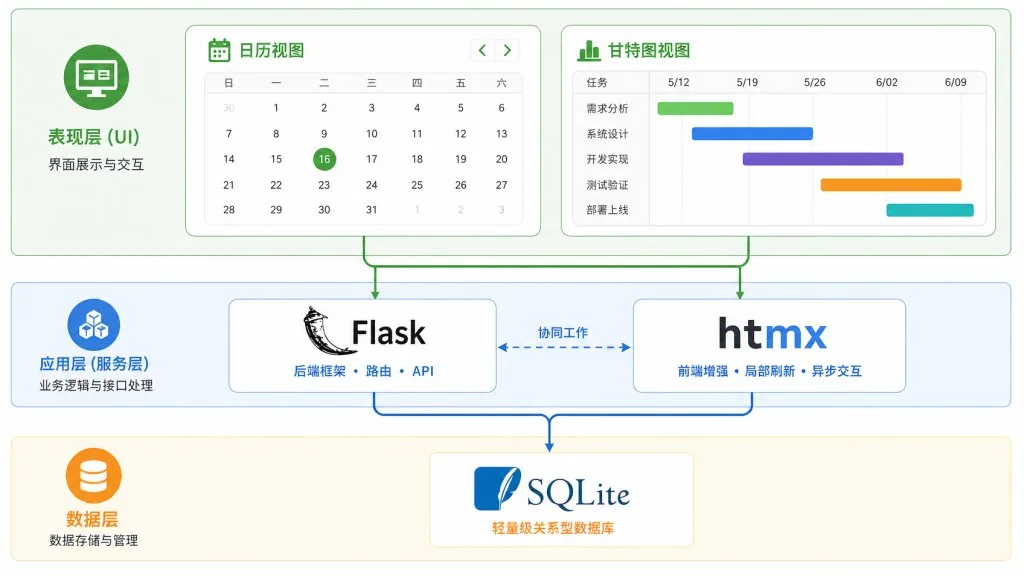
oimimo Scheduler is a localized order and scheduling manager for freelance illustrators. Its main language is Python, and it's a single-file offline app built on Flask 3 + HTMX 2.
- Positioning keywords: local storage / closed-loop workflow / built for illustrators
- Current state: 47 stars on GitHub, early stage but already fairly complete
- Core traits: zero cloud dependency, zero accounts, zero monthly fee, single-file SQLite, install and go
3. Core features in depth
1. Gantt + calendar dual-view scheduling
The dashboard ships a self-built SVG Gantt chart with day/week/month/year views; order blocks can be dragged to reschedule and save automatically. The calendar view (powered by FullCalendar 6) switches between month and week, unscheduled orders can be dragged in from the pool, and events can be dragged to adjust duration.
The most practical touch: five color modes — by source (Mihuashi / Xiaohongshu / referral), by stage (sketch / refinement / final), by deadline, by payment, by artwork category — so you can see at a glance which job to push this week.
2. Split payments + a discount-then-fee calculation chain
Orders support both one-off and installment payment. Each installment's arrival date maps to its month, the payment timeline records every entry, and the final installment automatically settles the order into the archive.
The billing chain follows industry practice exactly: quote → apply discount (VIP clients bring their discount automatically) → subtract platform commission → actual payout. The system works out what you really take home when you quote ¥1,000, the platform takes 20% and the client is a VIP with a 10% discount — so you don't discover at month-end reconciliation that your margin was eaten alive.
3. Revenue dashboard and hourly-rate stats
The revenue dashboard uses gridstack for custom layouts and shows monthly revenue, a year-to-date curve and a category pie chart. Built-in hourly-rate stats divide your monthly payout by the hours you actually spent drawing, telling you whether this month's rate is ¥80 or ¥300 an hour — often the number freelance illustrators need most and want to see least.
4. Price list and receipt printer
The price list offers both a long-strip view and a card view, with multi-image samples, category-based PNG export, price ranges and drag-to-reorder.
The receipt printer is the hidden highlight: a retro receipt style renders order details (freebies / add-ons / tiered discounts / barcode / perforated edges), with four preset styles you can save as templates. Handing a client a printed receipt feels far more ceremonial than emailing a PDF.

4. Technical highlights and performance data
| Dimension | Choice and behavior |
|---|---|
| Backend | Python Flask 3 + Pydantic v2, starts instantly, zero config |
| Database | Single SQLite file in WAL mode; back up by copying orders.db |
| Frontend | Jinja2 + HTMX 2, no npm, no build step, no Node dependency |
| Visualization | Self-built SVG Gantt + FullCalendar 6 + Chart.js 4, all vendored locally, works offline |
| Interaction | SortableJS board dragging, free-form gridstack layouts |
| Packaging | PyInstaller onedir + Inno Setup 6, shipping a Windows installer and a portable build |
The whole stack deliberately avoids anything that needs online compilation or cloud services, so the tool still works when the illustrator's studio has no connection.
5. Where it fits, and who it's for
Good fit:
- Freelance illustrators / independent artists handling 5–50 jobs a month
- Creators taking work across two or more platforms (Mihuashi, Xiaohongshu, Bilibili, Taobao, etc.)
- Creators who are sensitive about client privacy and won't put quotes or artwork details in the cloud
- Analytical artists who want to know exactly what their hourly rate was this month
Not a good fit:
- Collaborative studios (this is a single-machine tool with no multi-user permissions)
- Users who need a native mobile app (it's a web app for now; phone calendars sync indirectly via ICS subscription)
- Established studios with hundreds of orders (go get a proper ERP)
6. Comparison with alternatives
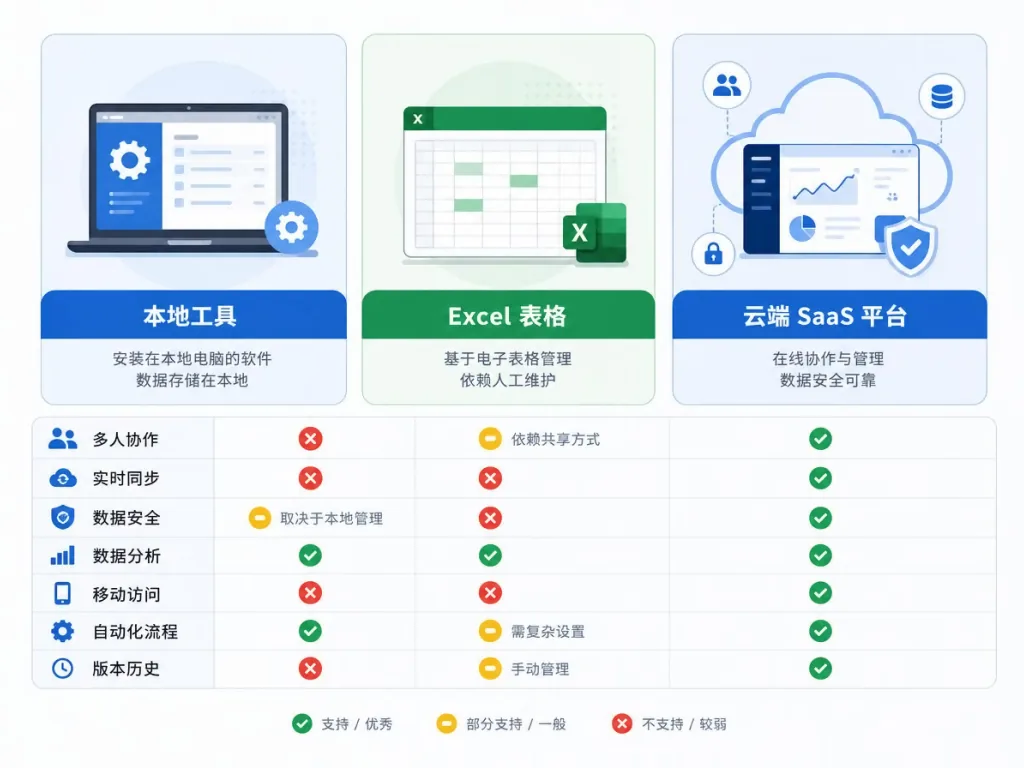
| Aspect | oimimo Scheduler | Excel/Notion templates | Commercial SaaS (e.g. Feishu Bitable) |
|---|---|---|---|
| Local storage | ✅ Single SQLite file | ✅ | ❌ Forced cloud |
| Gantt scheduling | ✅ Self-built SVG | ❌ Draw it yourself | ✅ |
| Installment bookkeeping | ✅ Auto month mapping | Manual | ✅ |
| Hourly-rate stats | ✅ Automatic | Manual | Partial |
| Price list PNG export | ✅ | Manual screenshot | ❌ |
| Receipt printing | ✅ Retro style | ❌ | ❌ |
| Monthly fee | ¥0 | ¥0 | ¥0–hundreds |
| Privacy | Fully local | Local | Data sits with a third party |
In one line: commercial SaaS has more features but charges monthly and uploads your data, Excel is free but you build everything yourself, and oimimo takes the "free + local + built for illustrators" road.
7. Getting started fast
Download the matching build from GitHub Releases:
oimimo-setup.exe: Windows installer, double-click, choose a path, desktop shortcut created automaticallyoimimo-portable-win64.zip: portable build, unzip and run, carry it on a USB stick
After launch the browser opens http://127.0.0.1:1096 automatically. On first run Windows SmartScreen may warn that it "protected your PC" — that's normal for an app without a purchased code-signing certificate. Click "More info" → "Run anyway"; the source is public and reviewable.
Minimum viable steps:
- Install and launch → the homepage opens automatically
- Click "New order", pick the modal or drawer mode, and fill in your first job
- Drag it into the calendar to set the schedule → record the first payment on the payment timeline
Advanced tips:
- Turn on "Calendar subscription" in settings, add the generated ICS link to your phone calendar, and deadlines sync to iOS/Android automatically
- Open "Price list" and generate a PNG with a preset style for posting to Xiaohongshu
- Check the hourly-rate number on the "Revenue dashboard" at month-end

8. Takeaways and what to do next
oimimo Scheduler solves the plainest pain point freelance illustrators have: pulling order information scattered across WeChat chats, spreadsheets, phone calendars and platform dashboards into one local, draggable, stats-capable tool.
Its core value isn't the feature count — it's three words: no internet. Client details, quotes and progress stay on your own disk, backup means copying one file, and the monthly fee is zero.
If you're an independent artist handling 5–50 jobs a month, sensitive about privacy and curious what your hourly rate really is, download the portable build and try it for a week. See whether Gantt scheduling and the payment timeline are the piece you've been missing.
- GitHub repo: https://github.com/mimo9708/oimimo-scheduler
- License: MIT (open source, commercial use allowed, forks welcome)
- One-line pitch: a single-file local SQLite, zero-monthly-fee, full-pipeline scheduling tool that frees freelance illustrators from Excel.

#oimimo-scheduler #OimimoScheduler #mimo9708 #CLI #DevTools #OpenSource #GitHub