1. Opening: almost every developer has been stuck here
You use Git and GitHub every day, yet a few things still stop you cold: whitespace noise drowns a code review, issues drift away from commits, quoting a single comment means copy-pasting it, and comparing branches sends you back to the terminal. The tools are right in front of you — most of us just use part of what they can do.
GitHub Cheat Sheet gathers those scattered tricks — URL rules, keyboard shortcuts, Markdown syntax and Git commands — into one list. The project has about 58k stars, which says it solves a real efficiency problem in day-to-day collaboration rather than some niche curiosity.

2. Project overview: what exactly is it?
GitHub Cheat Sheet is a reference sheet collecting high-frequency Git and GitHub tricks. It covers repository browsing, branch comparison, issue management, pull requests, diffs, Markdown, task lists, keyboard shortcuts and advanced Git commands.
Its keywords are "centralized", "learn it and use it immediately" and "covers the whole collaboration flow". The project was inspired by two Git and GitHub talks Zach Holman gave in 2012 and 2013, and ships in English, Japanese, Korean, Simplified Chinese and Traditional Chinese; the short link git.io/sheet makes it easy to bookmark.

3. Core features in depth
1. Tame diffs with URL parameters
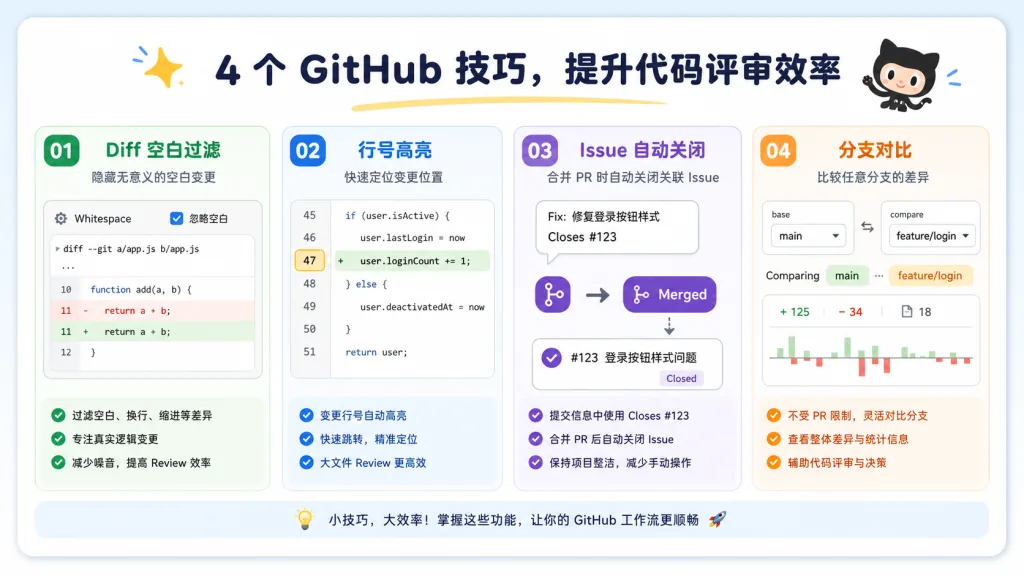
When you review code, pure formatting changes often sit mixed in with the real edits. Append ?w=1 to a diff URL and GitHub ignores whitespace-only changes, so reviewers can focus on the logic. If the default tab width looks too wide, append ?ts=4; the number after ts can be tuned to your own taste. No plugin needed — the URL carries the filters.
2. Chain issues, commits and pull requests together
Put fixes #12 in a commit that solves a problem, and once that commit lands on the default branch, GitHub links and closes the issue automatically. To review across forked branches, use compare/{user}:{branch}...{branch}; append .diff or .patch to a PR URL and you get a machine-readable or plain-text diff straight out. That beats copying commit hashes by hand when you want to trace how code moved.
3. Search, locate and quote in one step
Issues support filters such as is:issue label:activerecord and -label:activerecord, and PRs can be filtered by status:success or is:merged. Append #L53-L60 to a code URL to highlight a range of lines; on a comment thread, select some text and press r, and GitHub writes it into a blockquote for you. Search, locate and quote all involve fewer mouse trips.
4. Let Markdown carry the collaboration
GitHub supports task lists, code highlighting, relative links, tables and PDF rendering. Release notes can be written as - [x] Fix login; documents can link internally with [API docs](docs/api.md), and the internal link structure survives a repository move. Compared with stuffing everything into images, this is easier to maintain, review and reuse.
4. Technical highlights and performance data
The project has no runtime architecture of its own. Its value comes from combining native Git commands, GitHub URL state and GitHub Flavored Markdown. Looking up a commit history by author, comparing fork repositories inside a diff, freezing a file at a given revision, fetching an SSH public key — all of it rests on public URLs and the platform's native capabilities.
It also covers git.io short links, the hub command-line wrapper, git config aliases, autosquash, browsing a local repository in the browser, and cloning and embedding Gists. Compatibility spans Chrome shortcuts, the GitHub rendering ecosystem and the Git command line, but some features shift as the GitHub interface changes, and browser-only capabilities aren't a good fit for every team's shared conventions.
5. Use cases and audience
Code reviewers can use whitespace filtering, line highlighting and rendered diffs to judge a change quickly; open source maintainers can standardize the entry points for collaboration with issue templates, PR templates, task lists and the commit syntax that closes issues; people who analyze repositories regularly can lean on author filters, branch comparison, git grep and git log to locate things faster.
It suits developers who are new to GitHub and want to build a set of shortcuts, and it suits anyone preparing team training material. Experienced users can treat it as an index to confirm a hidden entry point or URL rule. Learning Git internals, a complete IDE tutorial or a guide to alternative platforms is not its focus.

6. How it compares
| Option | Better for | How it differs from GitHub Cheat Sheet |
|---|---|---|
| Official Git docs | Learning Git internals and options systematically | Complete but scattered, no GitHub page tricks |
| GitHub Docs | Looking up platform features and rules | Aimed at the current product, more explanation than quick reference |
| Shell frameworks like Oh My Zsh | Customizing terminal commands and prompts | Focused on the local command line, no issue or diff web workflows |
| GitHub Cheat Sheet | Quickly finding tricks across Git and GitHub | Centralized entry points, direct examples, usable the moment you open it |
There's one reason to pick it: when you need "how do I do this right now", a checklist beats a course.
7. How to get started quickly
Nothing to install. Open the repository and bookmark http://git.io/sheet in your browser. Pick the three most common moves first: add ?w=1 to a diff link, write fixes #<number> in commit messages, filter issues with label:<name>. Then set up a few high-value aliases in your terminal, for example git config --global alias.co checkout, and work hub clone user/repo into your flow.
Later, fill in templates for your team's scenarios: add CONTRIBUTING.md, ISSUE_TEMPLATE.md and PULL_REQUEST_TEMPLATE.md at the repository root or in the .github directory. Don't try to memorize every entry at once — build your own four-step sheet around "browse the code — commit — review — maintain issues".

8. Summary and next steps
The value of GitHub Cheat Sheet isn't any single feature. It arranges the most easily overlooked capabilities of Git and GitHub into an efficiency path you can look up: review diffs more clearly, trace commits more accurately, collaborate more smoothly.
Start with three rules today: ?w=1 to ignore whitespace, fixes #12 to close an issue, #L53-L60 to point at code. Keep using them, extend the list to match your team's habits, and a stable way of working together will form faster.
Project: https://github.com/tiimgreen/github-cheat-sheet
Short link: http://git.io/sheet
One-line pitch: if you use GitHub every day, this 58k-star cheat sheet belongs in every developer's bookmarks bar.