
1. Opening: AI writes code slower and slower, then drifts off course
If you've built a mid-sized project with Claude Code or Cursor, you've probably been through this: the assistant is fast and the code quality holds up right after kickoff. But once the context piles up to tens of thousands of tokens, output slows down, the model starts hallucinating, and it forgets the architecture you originally intended. This is the well-known context rot problem in AI engineering — once the context window fills up, model quality slides irreversibly.
The harder part: most AI coding workflows have no structured memory, so context vanishes between sessions. They also lack an acceptance step to confirm the generated code actually runs. The result is a lot of furious typing, a PR with a pile of bugs, and the developer cleaning up after the agent.
Is there a system that solves all three problems at once? GSD Core, with 8K+ stars on GitHub, was built for exactly this.
2. Project intro: from "it works" to "it's reliable"
GSD Core describes itself as a lightweight meta-prompting, context engineering and spec-driven development framework, and its mission is blunt: Git. Ship. Done.
Its four keywords:
- Context engineering: fight context rot so the model keeps producing high-quality output over long runs
- Spec-driven: discuss first, then plan, then execute — with strict process discipline
- Multi-runtime: native support for Claude Code, Codex, Cursor, Copilot, Windsurf, Kimi CLI, Antigravity CLI, Kilo and 10+ other AI coding tools
- MIT licensed: a permissive license, community-driven
GSD Core has picked up 8128 stars on GitHub. The latest version is 1.7.0, docs ship in English, Portuguese, Chinese, Japanese and Korean, and the ecosystem maturity is plain to see.
3. Core features in depth
1. A five-phase loop: turning messy AI coding into a repeatable craft
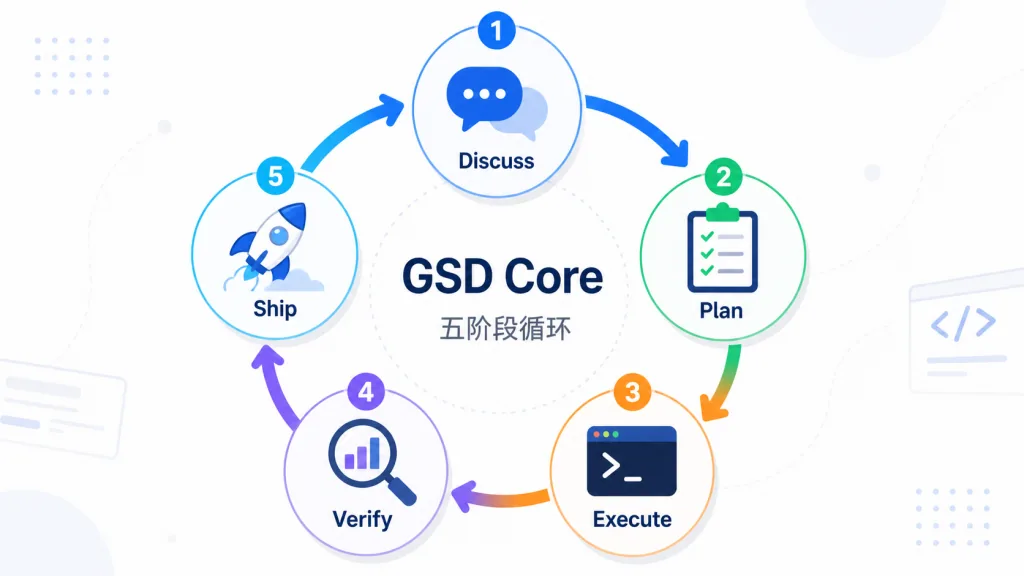
GSD Core splits every milestone into five steps, run in order: Discuss → Plan → Execute → Verify → Ship. The Discuss phase settles implementation decisions; Plan researches, decomposes tasks and checks whether the context is still "fresh"; Execute runs the plan in parallel waves, and every executor subagent starts from a clean 200K-token context; Verify walks the produced code on the ground, diagnoses problems automatically and emits a fix plan; Ship opens the PR, archives the phase and starts the next round.
The real value of this loop is that it turns "AI writes code" from a one-off flash of inspiration into a sustainable engineering rhythm.
2. Context engineering: every executor resets its memory
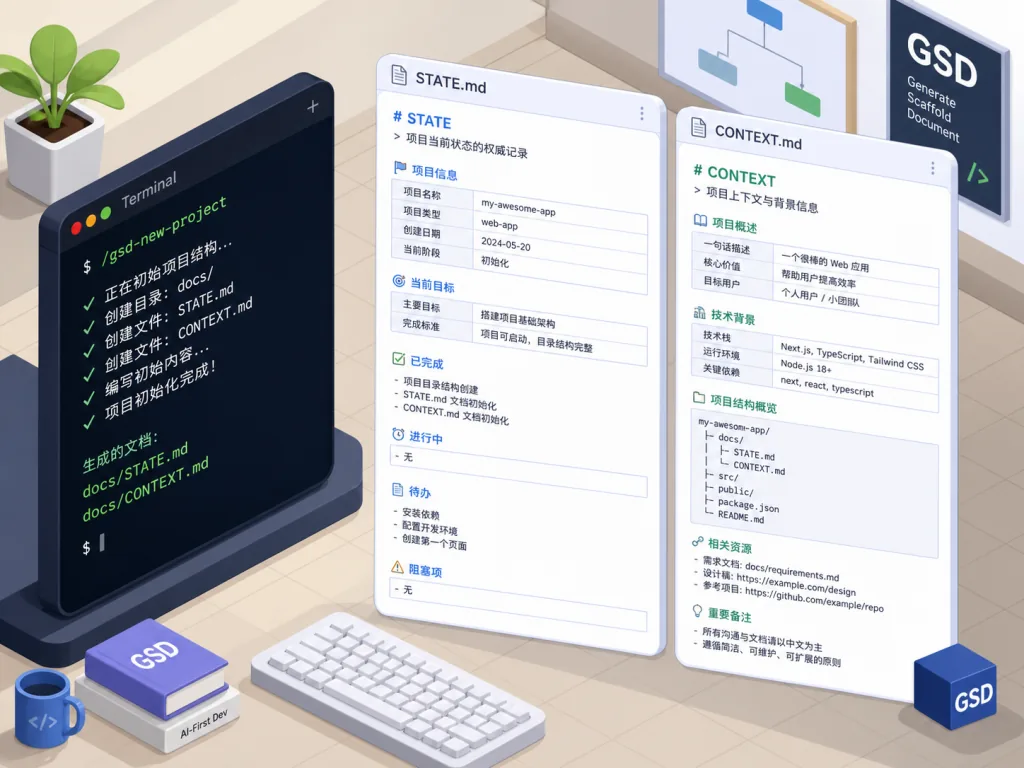
Against context rot, GSD Core takes a strategy that looks crude but works extremely well — push all the heavy work into fresh-context subagents. The main session only handles lightweight dispatch and outsources research and execution to subagents with brand-new context. Combined with structured artifacts like STATE.md and CONTEXT.md persisted across sessions, the main session stays lean and sidesteps context pollution.
3. Cross-runtime support: configure once, run anywhere
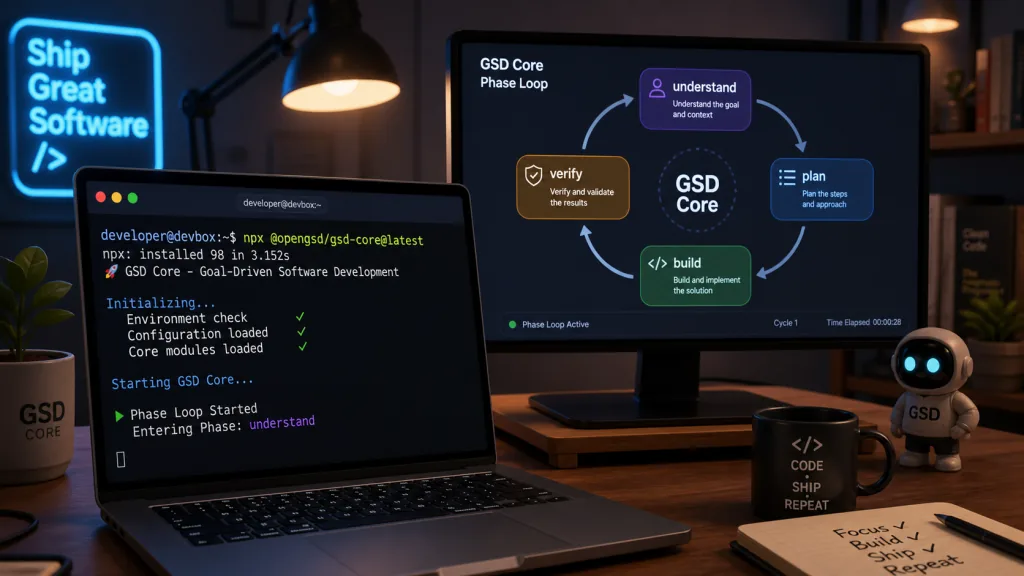
Whether your team runs Claude Code, OpenCode or Cursor, GSD Core adapts through a unified installer. On the command line it's just npx @opengsd/gsd-core@latest; pick your runtime and install scope (global or project) from the prompts and you're done. The docs explicitly warn: don't copy the agents/ or commands/ files directly — go through the installer to keep cross-runtime compatibility.
4. Two entry points: 0 to 1 and 1 to N are equally smooth
/gsd-new-project: a greenfield project launcher/gsd-onboard: an onboarding path for existing codebases
Whether you're starting a new repo or inheriting legacy code, there's a matching guided flow.

4. Technical highlights and performance
GSD Core's architecture centers on three things:
- 200K-token fresh-context isolation: every executor subagent starts in a clean context, eliminating context rot at the source
- Structured state persistence:
STATE.mdandCONTEXT.mdmake cross-session memory traceable and recoverable - A tight verification loop: the Verify phase actively walks the built artifacts and generates a fix plan the moment it finds a problem
On compatibility, GSD Core supports Claude Code, OpenCode, Antigravity CLI, Kimi CLI, Kilo, Codex, Copilot, Cursor and Windsurf — coverage that puts it in the top tier of similar frameworks. The CI pipeline runs end to end on GitHub Actions and the test badge stays green.

5. Use cases and who it's for
Good fit:
- Solo developers and small teams building mid-sized or larger projects with AI assistants
- Engineers who switch between several AI coding tools and want one unified workflow
- Tech leads who care about code quality and need an explicit acceptance step
Concrete scenarios:
- Cold-starting a new project: run
/gsd-new-projectonce to take the whole flow from planning to PR - Cleaning up an existing codebase: bring a legacy repo into GSD Core with
/gsd-onboardand reshape it into spec-driven development over time - Cross-tool collaboration: teammates use Claude Code and Cursor respectively but share the same phase rhythm
Bad fit: single-file script toys, or traditional developers who don't want AI in the loop at all.
6. How it compares
| Dimension | GSD Core | Ordinary AI coding assistants | Other spec-driven frameworks |
|---|---|---|---|
| Context engineering | ✅ Fresh-context subagents | ❌ Accumulates in the main session | ⚠️ Partial support |
| Cross-session memory | ✅ STATE.md/CONTEXT.md | ❌ None | ⚠️ Depends on the project |
| Verification loop | ✅ Automatic walkthrough + fix plan | ❌ None | ⚠️ Mostly missing |
| Runtime coverage | ✅ 10+ AI tools | ⚠️ Usually tied to one | ❌ Narrow |
| Learning curve | ⚠️ Moderate (you need the phase loop) | ✅ Low | ⚠️ Moderate |
GSD Core has an obvious combined edge across context engineering + verification loop + multiple runtimes, which suits engineering teams chasing long-term reliability.
7. Getting started fast
npx @opengsd/gsd-core@latest
Pick your runtime (Claude Code / Cursor / Codex and so on) and install scope (global or project-local) from the prompts. If your environment has no Node.js, see the official Install on your runtime guide.
Once installed:
- New project:
/gsd-new-project - Existing codebase:
/gsd-onboard
Suggested path: newcomers should follow Your first project once to cover install through first PR; for a legacy repo, read Onboarding an existing codebase. If something breaks, check recover-and-troubleshoot.
8. Summary and next steps
GSD Core sums up its value in one slogan: Claude Code is powerful. GSD Core makes it reliable. Through fresh-context subagents, structured memory and a hard verification loop, it hits the three pain points directly: context rot, cross-session amnesia and the missing acceptance step.
If you're tired of the "AI writes a ton, bugs pile up" loop, run npx @opengsd/gsd-core@latest and give it a chance — an 8K+ star community has already vetted the basics for you.
- GitHub: https://github.com/open-gsd/gsd-core
- Website: https://opengsd.net
- Docs: https://opengsd.net
- Community: Discord
mYgfVNfA2r