
1. Why you need this
macOS users have three ways to install a new app: search for the vendor site in a browser, download a DMG and drag it into Applications, or open a terminal and type a brew install --cask xxx incantation. The first is slow. The second is clumsy. The third has a real learning curve — and none of them help when you just want to see what's worth trying right now. The App Store is buried under games and subscription services, so the apps developers actually care about are essentially invisible.
The Homebrew Cask registry holds thousands of macOS apps — Raycast, iTerm2, Figma, Linear — each waiting for one line of command to pull it onto your machine. But not everyone wants to live in a shell: copying tokens, waiting on brew to resolve, forgetting exact app names. What most macOS users actually want is simple. Show me the icon. Tell me what category it's in. Tell me how many people installed it. Then let me install it with one click.
CaskHub exists to move that experience off the terminal and back onto the desktop.
2. What it is, in one sentence
CaskHub is a native macOS app store built specifically for Homebrew Cask. The repository is alielsokary/CaskHub, the primary language is Swift, it has picked up 448 stars, the latest release is 0.6.9, and it runs on macOS 15.6 or later.
Four keywords capture its positioning: a native SwiftUI interface, the official Homebrew API as the data source, real brew binary execution, and one-click adoption of apps you already have installed.
100% open source, no ads, no subscriptions, no premium tier — a gift to every macOS user from community developer alielsokary.
3. Core features, in depth
1. Discover: browse Homebrew like an app store
CaskHub puts serious effort into discovery. It pulls the full catalogue from the official Homebrew API (/api/cask.json), merges in install-count analytics, and offers five ways in:
- Featured: the top 100 casks by install count, so you immediately see what the community has actually voted for with real installs.
- Top Charts: 30 / 90 / 365-day windows, so you can chase trends or study the evergreens.
- Recently Added: casks added in the past 30–90 days, for early adopters.
- Categories: developer tools, productivity, design and more, laid out like shelves you can walk down.
- Search: hit
⌘Fto search across names, tokens and descriptions in full text, with millisecond responses.
So that browsing never blocks launch, the category data is pre-bundled into the app binary and available immediately — no network round trip required.
2. Manage: install, update and uninstall in one place
CaskHub's management covers almost the entire Homebrew Cask lifecycle:
- Install / Update / Uninstall: live download progress, cancellable, with state you can read at a glance.
- Adopt Apps: the killer feature. If you previously installed an app from a DMG or some other channel, CaskHub pulls it under brew management in one click while leaving the app where it is — from then on the CLI and the GUI stay in sync.
- Smart Update Detection: it skips apps that update themselves and normalises version strings that differ because of packaging suffixes, so the Updates badge only shows what genuinely needs updating.
For pkg installers that require admin rights, it invokes the native macOS authorisation dialog instead of an ugly terminal sudo prompt. Details make the experience.
3. Polish: native macOS craft
- Grid and list views, freely switchable, with multiple sort orders.
- Light / dark / follow-system themes.
- A custom design system with bundled font assets.
- Self-updates via Sparkle, so CaskHub itself stays current.
The more important detail is the app icons: every icon is extracted from its original source by a companion CaskFlow pipeline. These aren't degraded web favicons — they are real macOS app icon quality.
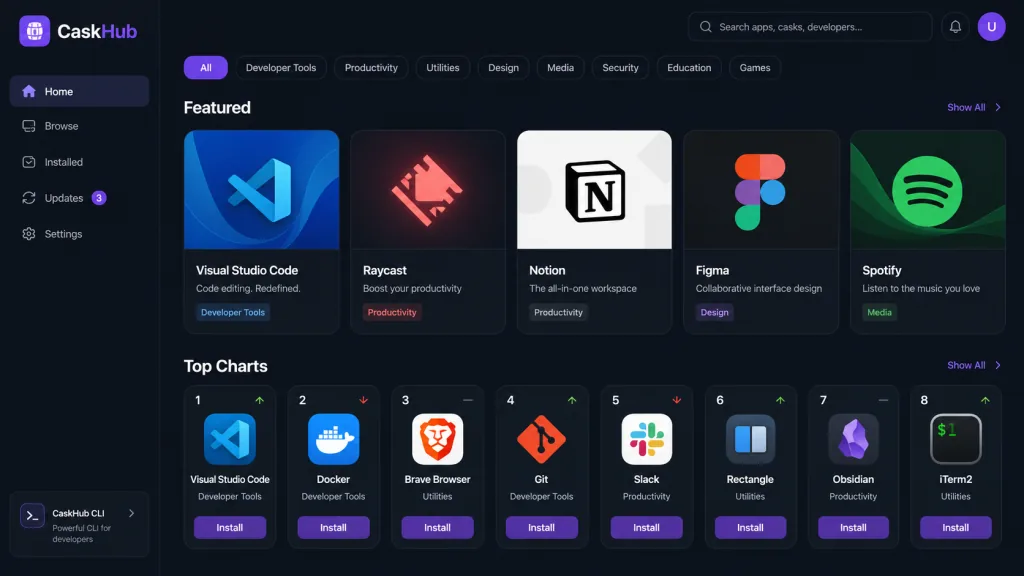
4. Technical highlights and performance
The stack is strikingly restrained and modern:
- Architecture: SwiftUI + MVVM, with ViewModels annotated
@Observableand main-thread isolation via@MainActor, matching Apple's recommended modern Swift concurrency model. - Networking: protocol-oriented, abstracted behind two protocols,
BrewAPIClientProtocolandNetworkServiceProtocol, wired up with dependency injection to keep unit tests easy. - Icon caching: two-tier memory plus disk cache, so repeat browsing costs zero network traffic.
- Dependencies: the whole project pulls in just three Swift packages — Sparkle (self-update), Sentry (crash reporting), TelemetryDeck (privacy-first analytics). No bloated third-party UI framework.
- Download size: estimated precisely from the HTTP
Content-Lengthresponse header, with no extra requests. - Test coverage: XCTest runs on PRs and pushes to the develop branch, Codecov reports coverage, Codacy does static analysis, and before a PR merges it automatically verifies that the bundled data is in sync with the latest CaskFlow release.
On performance: thanks to local caching and an async network layer, the first screen barely touches the network — categories, branding and day-one data are all built in.
5. Who it's for, and when to use it
- Scenario 1: setting up a new Mac. You get a new machine, open CaskHub, browse Featured and Top Charts, click through a batch, and end up with your IDE, terminal, design tools and productivity apps installed — all through a GUI.
- Scenario 2: syncing an app list across machines. You installed 50 apps with brew on machine A. On machine B you open CaskHub's Installed view and reinstall them one by one with a click.
- Scenario 3: recommending apps to non-technical colleagues. For designers and PMs who don't know the command line, CaskHub is much closer to what developers actually need than the App Store, and 10x cleaner than downloading DMGs by hand.
Who it suits: any developer, designer, tech blogger or long-time Homebrew user on macOS 15.6+.
Who it doesn't: people still on macOS 14 or older, and hardcore terminal purists who refuse a GUI (though you can still use it as a visual dashboard for the Homebrew catalogue).

6. How it compares
| Dimension | CaskHub | Homebrew CLI | App Store | Third-party "Mac app download sites" |
|---|---|---|---|---|
| App count | Thousands (all of Cask) | Thousands (all of Cask) | Thousands (reviewed listings) | Hundreds (manually curated) |
| Install source | Official brew binaries | Official brew binaries | Apple review | Scraped from websites |
| GUI | Native SwiftUI | None | Native | Web page |
| Adopt installed apps | Supported | Not supported | Not supported | Not supported |
| Install stats | 30/90/365 days | None | None | None |
| Self-update | Built-in Sparkle | brew upgrade | App Store | None |
| Open source and free | MIT | BSD | Partial | No |
Compared with the CLI, CaskHub adds visual discovery, app icons, categories and Top Charts. Compared with the App Store, it covers far more developer tools, never blocks apps distributed outside the App Store, and keeps everything manageable from the brew command line.
7. Getting started quickly
Option one: download the installer
Go to the Releases page, download CaskHub-0.6.9.zip, unzip it and drag it into Applications.
Option two: one-line Homebrew install
brew install --cask alielsokary/tap/caskhub
Option three: build from source
Requires Xcode 26 or newer:
git clone https://github.com/alielsokary/CaskHub.git
cd CaskHub
open CaskHub.xcodeproj
Select the CaskHub scheme, hit ⌘R, and Xcode resolves the three Swift package dependencies — Sparkle, Sentry and TelemetryDeck — automatically.
Suggestions for first launch: confirm the Homebrew path in settings (Apple Silicon defaults to /opt/homebrew, Intel to /usr/local) and enable your preferred theme. Browse Featured until you find the first app you want, then hit Install — and you'll understand the design philosophy: bring macOS app management back to the GUI without giving up the control of the command line.

8. Conclusion and what to do next
With one clean SwiftUI interface, CaskHub moves Homebrew Cask — the largest macOS app registry in the world — back to where it always belonged: the user's desktop. It is a discovery tool (Featured, Top Charts, categories, search), a management tool (Install/Update/Uninstall, Adopt Apps, Smart Update Detection), and a showcase of native macOS craft (native authorisation dialogs, Sparkle self-updates, dark mode, a custom design system).
What to do next:
- Go download a copy right now from caskhub.app or GitHub Releases.
- Install it with
brew install --cask alielsokary/tap/caskhuband experience a fully featured launch in under 30 seconds. - Look through the anonymous analytics policy in Settings → Privacy and turn off anything you're not comfortable with.
- If you find a bug or want a feature, file it on the Issues page. To contribute code, read CONTRIBUTING.md and open a PR against the
developbranch.
One-line recommendation: if you love Homebrew but are done typing commands, CaskHub is currently the most restrained, cleanest and most worth-installing App Store alternative out there.