Pick a title (choose 1 of 3)
Still wrestling with a video rendering pipeline? Try HyperFrames, which turns HTML straight into MP4
HyperFrames: a 30-second first cut, skipping the React build chain with HTML
This 66k-star open-source project turns video into HTML, and AI agents can shoot it directly
HyperFrames: render MP4 straight from HTML, and let AI agents shoot video too
1. Still losing sleep over this?
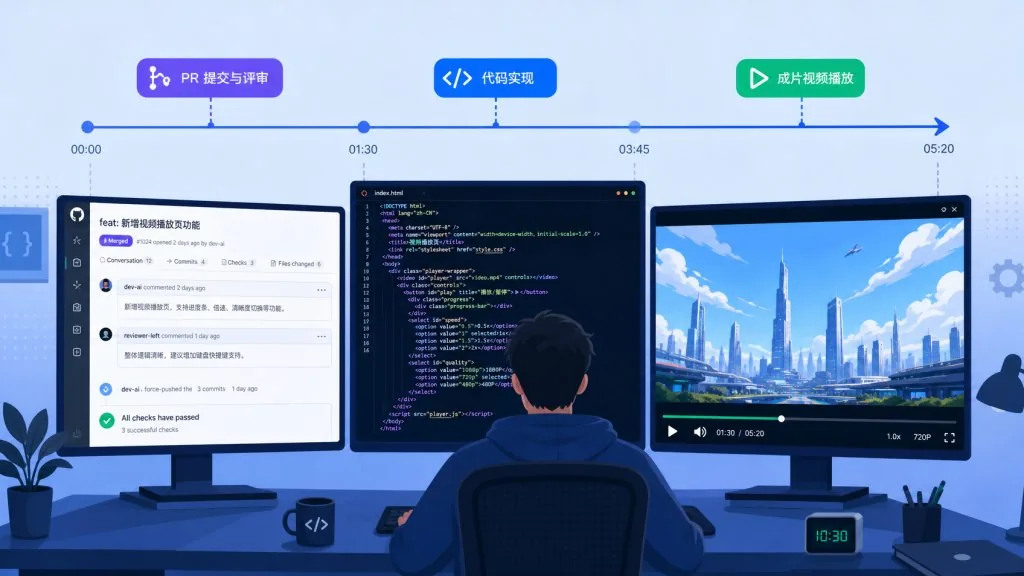
Shipping one product launch video means the team fights PR, script, soundtrack, motion and color swatches separately for days. Ask an AI for help and it gets stuck on "I don't know Remotion", "I don't know timelines", "I can't write React components". And when you finally export a version, the next CI run produces something different, so there's no way to regress it.
Worse: the CSS transitions, GSAP timelines and Lottie animations that look great on the web either disappear in a video pipeline or land on the wrong frame. Developers write the front end once, designers translate it into After Effects once, and the engineering team rewrites it as React components once — three languages, three versions of the truth.
HyperFrames, an open-source project with 66.4k stars, offers a counterintuitive answer: video is HTML.
2. Positioning: what problem it actually solves
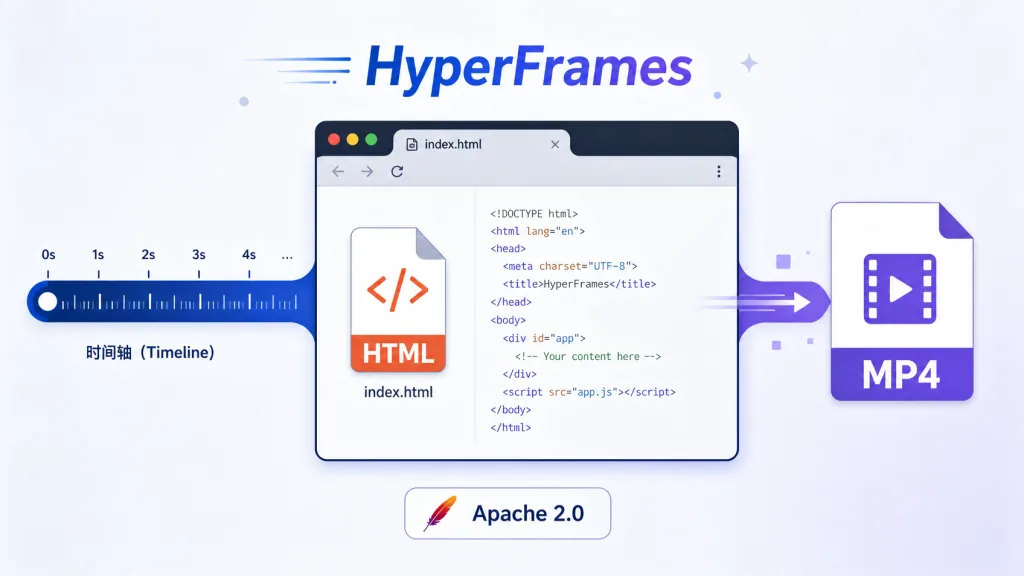
HyperFrames (heygen-com/hyperframes) is HeyGen's open-source "HTML-native video" framework. It compiles HTML, CSS, media and seekable animation into a deterministic MP4. You can run it from a local CLI, an AI coding agent can drive it through skills, and it also powers HeyGen's hosted creation workflows.
Four keywords: HTML-native, agent-first, deterministic output, zero build step. It already runs in HeyGen's production environment, adopters include the tldraw and TanStack teams, the license is Apache 2.0, and there is no per-frame billing and no commercial gate.
3. Core features in depth
1. HTML is the video: composition as code
The core contract of HyperFrames is a block of HTML with data attributes. Using data-composition-id, data-start, data-duration and data-track-index, you declare each element as a clip on the timeline: video, text, audio, or a plain div. The example below is a 6-second intro: the title fades in after the first second, and the background video plays in sync with the music.
<div id="stage" data-composition-id="launch" data-start="0" data-width="1920" data-height="1080">
  <video class="clip" data-start="0" data-duration="6" data-track-index="0" src="intro.mp4" muted playsinline></video>
  <h1 id="title" class="clip" data-start="1" data-duration="4" data-track-index="1">Launch day</h1>
  <audio data-start="0" data-duration="6" data-track-index="2" data-volume="0.5" src="music.wav"></audio>
  <script src="https://cdn.jsdelivr.net/npm/gsap@3/dist/gsap.min.js"></script>
  <script>
    const tl = gsap.timeline({ paused: true });
    tl.from("#title", { opacity: 0, y: 40, duration: 0.8 }, 1);
    window.__timelines = window.__timelines || {};
    window.__timelines.launch = tl;
  </script>
</div>
The biggest difference from React timeline tools: there is no build step. index.html can be previewed and rendered as-is, and what the agent gets is plain HTML — no JSX, no bundler, no component lifecycle.
2. Seekable animation: six runtimes, all adaptive
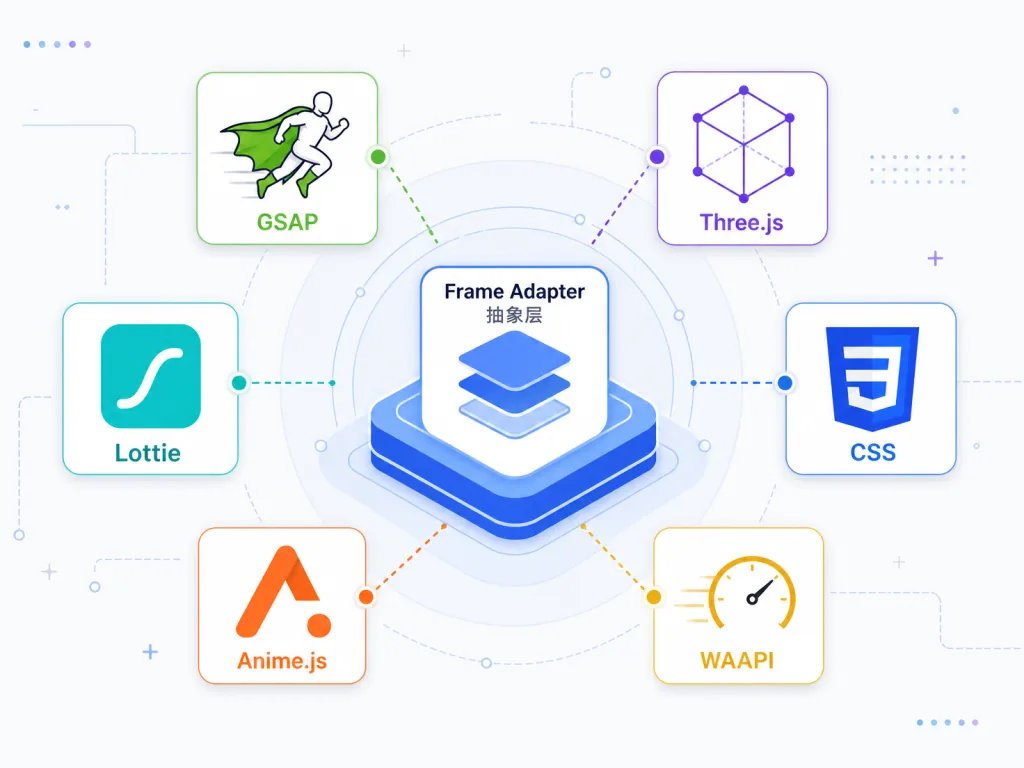
The biggest trap in video rendering is "the animation doesn't land on the frame". HyperFrames ships frame adapters that turn GSAP, CSS, Lottie, Three.js, Anime.js, WAAPI (even TypeGPU) into seekable form — the renderer seeks to any second and the animation stops in that exact state, so the exported MP4 matches frame by frame and CI can regress it.
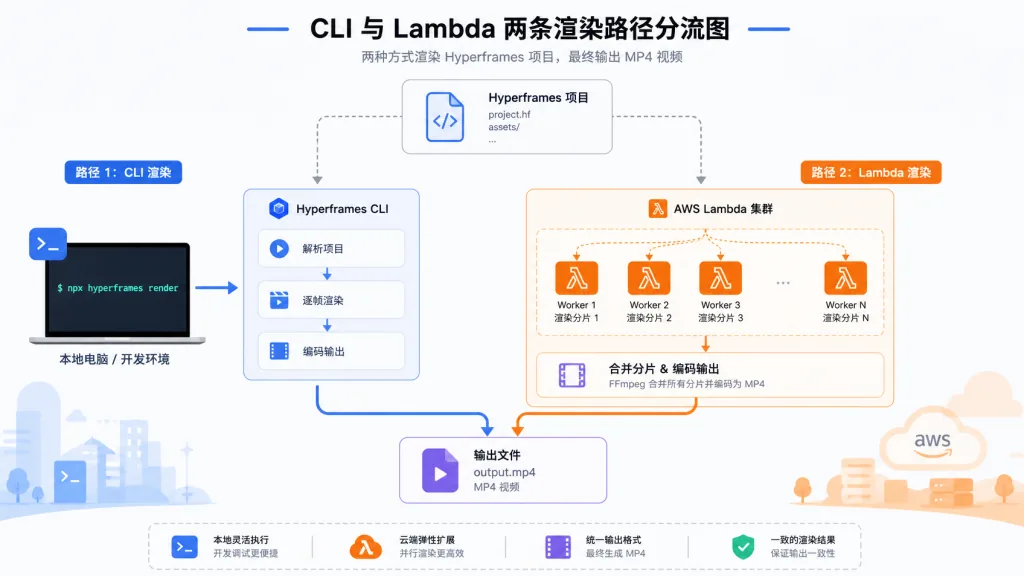
3. Two paths: CLI and cloud rendering
Locally it's three steps: npx hyperframes init my-video to start a project, npx hyperframes preview for live preview in the browser, and npx hyperframes render to produce the MP4. When you need large-scale distribution, hyperframes lambda deploy / render deploys to a distributed AWS Lambda cluster. The engine captures frames with Puppeteer driving headless Chrome and encodes with FFmpeg; the only dependencies are Node.js 22+ and FFmpeg.
4. 21 agent skills plus the frame.md design layer
The HyperFrames team has built skills for Claude Code, Codex, Cursor, Gemini CLI, IBM Bob and more. /hyperframes is the main router: it dispatches intents such as "make me a product intro", "turn this PR into a video" or "add captions to this talking-head clip" to 10 creation workflows like /product-launch-video, /pr-to-video and /embedded-captions. Those in turn load 8 domain skills on demand (core contract, animation, keyframes, audio, media assets, CLI, registry, Figma import).
The companion frame.md "inverts" the web-side design.md for the camera: the same token system, rewritten as a DESIGN.md superset that lets an agent generate promo videos directly. The official templates — Biennale Yellow, BlockFrame, Blue Professional and dozens more — are ready to remix.
4. Technical highlights and performance numbers
- Deterministic output: the same HTML input and the same media assets produce a byte-identical MP4 on any machine at any time — designed specifically for CI regression and automated content pipelines.
- Zero build chain:
index.htmlpreviews and renders directly, cutting out the whole webpack/vite/bundler path, so cold-start overhead is close to zero. - Adapter abstraction: six mainstream animation runtimes expose "seek to second t" through one interface, with no lock-in to a single animation library.
- Distributed rendering: the AWS Lambda path covers everything from a laptop to CI, and one repo can carry large-scale concurrency.
- Ecosystem compatibility: Apache 2.0, no per-frame fees, no commercial ceiling; integrations with the tldraw and TanStack teams are listed in the official ADOPTERS.md.
5. Who it's for
Good fit: SaaS teams automating PR videos; growth teams producing launch films and social clips; education and training teams turning docs or PDFs into explainer videos; design system teams producing on-brand motion assets from frame.md; and any frontend or full-stack engineer who already writes HTML.
Typical scenarios: (1) auto-generate a 60-second explainer from a changelog; (2) turn the week's GitHub PRs into a visual code-diff walkthrough; (3) visualize sales data as a shareable chart animation; (4) batch-add embedded captions, lower-thirds and quote bars to existing talking-head videos; (5) sync music beats to a kinetic typography short.
Not a fit: purely artistic, film-grade projects chasing particles, ink wash or hand-drawn irregular visuals — those still need After Effects, TouchDesigner and similar professional tools.
6. Versus the competition
| Dimension | HyperFrames | Remotion |
|---|---|---|
| Creation model | Plain HTML + CSS + seekable animation | React components + timeline |
| Build step | None, index.html renders directly | Requires a bundler |
| Agent collaboration | Hand over an HTML file | Requires JSX + a React project |
| Keyframe animation | All six adapters are seek-safe | Wall-clock has to be handled carefully |
| Distributed rendering | Local + AWS Lambda | Mature Remotion Lambda |
| License | Apache 2.0 | Source-available, commercial use restricted |
Put simply, Remotion bets on "write video in React"; HyperFrames bets on "write video in HTML, and HTML happens to be the language agents write best".
7. Getting started fast
Prerequisites: Node.js 22+, FFmpeg.
Path A: the AI agent route (recommended)
claude plugin marketplace add heygen-com/hyperframes
claude plugin install hyperframes@hyperframes
Once it's enabled, just tell the agent: "Use /hyperframes to make a 10-second product intro with a fading title, background video and light music." The agent then walks the full production chain: plan → HTML → animation → media → lint → preview → render.
Path B: the CLI route
npx hyperframes init my-video
cd my-video
npx hyperframes preview
npx hyperframes render
Path C: reuse existing components
npx hyperframes add flash-through-white
npx hyperframes add instagram-follow
npx hyperframes add data-chart
After getting started, remember to run npx hyperframes init to keep core skills up to date; in CI, use npx hyperframes skills update to pull exactly the core set.
8. Takeaways and what to do next
HyperFrames pulls video creation from "timeline + React" back to "HTML + CSS", and along the way solves the pain AI agents feel most — not knowing how to write a video project. One index.html: a human can preview it, an agent can render it automatically, and CI can regress against it.
If you're a frontend engineer, start a 30-second intro with npx hyperframes init. If you're a heavy agent user, install claude plugin install hyperframes@hyperframes into Claude Code or Cursor and let it produce your content assets. And if you're already on Remotion, the repo also ships a one-way /remotion-to-hyperframes migration skill.
Go look:
- GitHub: https://github.com/heygen-com/hyperframes
- Docs: https://hyperframes.heygen.com/introduction
- Playground: https://www.hyperframes.dev/
- Showcase: https://hyperframes.heygen.com/showcase
Video should be as readable, editable and agent-collaborative as HTML — HyperFrames has already made that real.

#hyperframes #Hyperframes #heygen-com #AIVideoEditing #ScriptedVideo #TalkingHeadVideo #OpenSource #GitHub