1. Introduction: why you need this tool
Slides until 3 a.m., export the deck, log into an account, wait for cloud sync, stuff the file into an email attachment — how many times have you repeated that this year? Worse, it opens on the other end with broken layout, missing fonts and dead animations, and a week of typesetting is gone in a second. Then look at the .pptx, .docx and .xlsx files on your drive: binary formats, version lock-in, and you need the right software to open them. Are those documents really something you own, or something you rent?
When all Office documents live in the cloud, require a login, require a connection and require a subscription, even opening a ten-year-old deck becomes a gamble. Bento offers another way: one HTML file is the entire suite, and office software returns to the plain idea of "the file is the software."

2. Project overview: what it is in one sentence
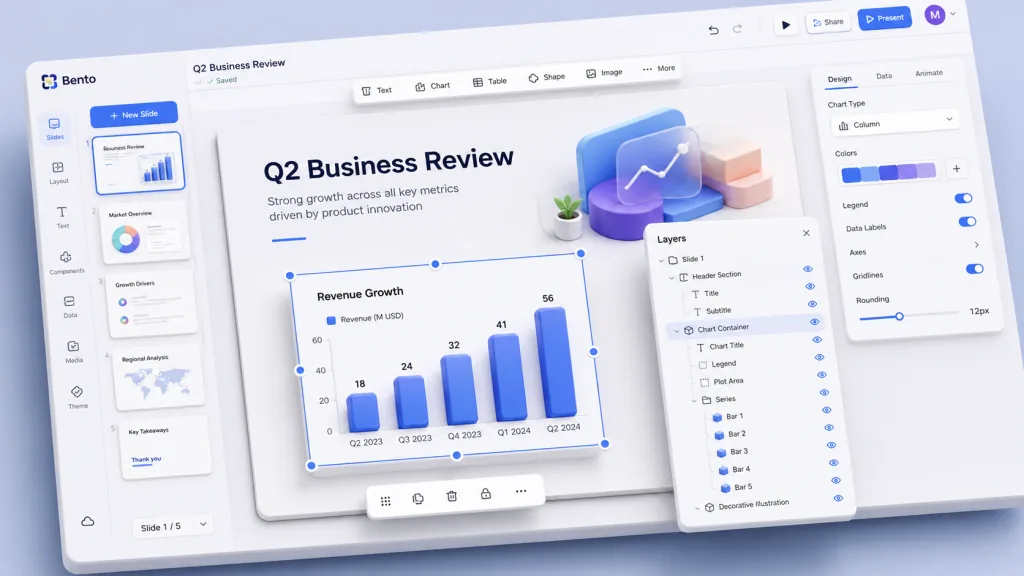
Bento is an office suite packed into a single file. It is positioned primarily as a PowerPoint replacement, but it's more than a slide tool — it's the first step of the bento/ family. The whole application, viewer, editor and presentation mode included, is bundled into one ~560 KB HTML file that you open in a browser to edit, present and share.
Key milestones: 3786+ GitHub stars, main language TypeScript, MIT licensed. The roadmap covers four modules — slides (shipped), notes (spaces), sheets (dash) and vault — each an independent .bento.html executable.
3. Core features in depth
1. Single-file and self-contained: the file is the software
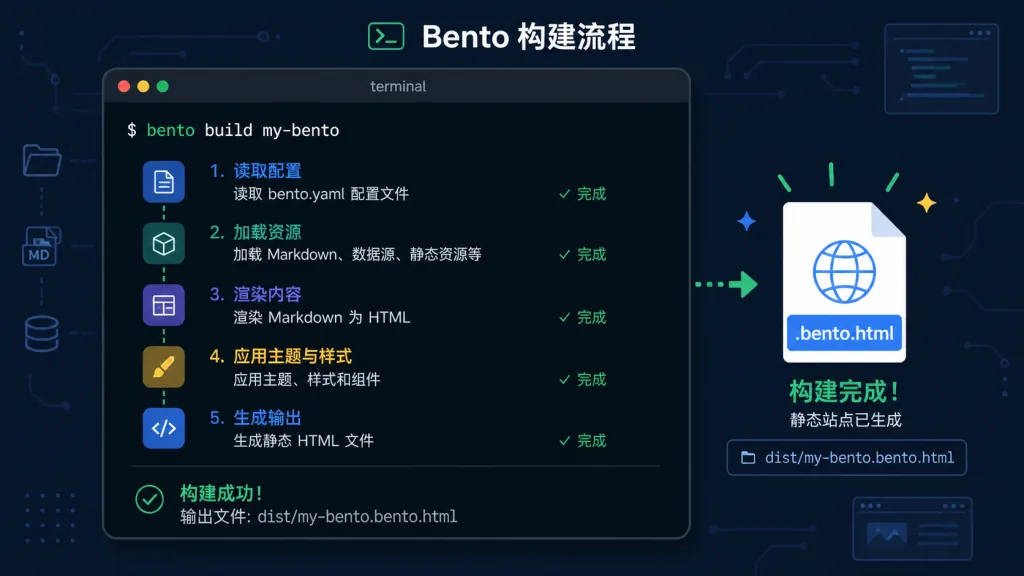
A .bento.html file embeds a plain JSON data block with the id #bento-doc at the top, and the rest of the file is the full application code. Open it and the browser renders an editor; save, and the file rewrites its own data block (File System Access API, falling back to a download where the browser doesn't support it).
That means a file saved in 2026 still opens in 2036. No binary format, no version lock, no awkward "you need Office 2024 to read this". You can right-click and view source — "view-source honest" transparency that is almost a luxury in the SaaS era.
2. Morph presentation animations: duplicate a slide, get your motion design
Give the same element the same id on two slides and Bento interpolates between them on transition — position, size, color, even gradients morph smoothly. Duplicate a slide, rearrange it, and the animation designs itself; no frame-by-frame tweaking.
Compare with Keynote's Magic Move: similar effect, but Bento depends on no cloud service, locks you into no Apple ecosystem, and the file itself is distributable.
3. End-to-end encrypted real-time collaboration
Collaboration uses AES-GCM encryption, with the key generated client-side when the document is created — it lives only inside the file, and the server never sees it. The accompanying "blind relay" stores ciphertext only; its source is about one file long, readable and auditable.
Harder core still: a homegrown CRDT (sync/crdt.ts), fuzz-tested through hundreds of thousands of convergence runs, merging offline edits down to the character level. When several people edit the same deck, "where did the content I saved go" stops being a question.

4. Built-in chart engine
Bar, line, pie and scatter charts are all drawn by Bento's own dependency-free engine (charts.ts). Charts stay interactive in presentation mode: hover tooltips, zooming, and data that morphs seamlessly when a bar chart turns into a pie chart.
No need for ECharts, Highcharts or Chart.js at a few hundred KB each — the entire chart system fits inside the 560 KB total.
5. Designed for the AI era
Documents are plain JSON, so any AI assistant that can read and write files (Claude Code, Cursor, Aider) can edit them directly. Claude Code users can additionally install the bento-slides skill pack from /plugin marketplace add nyblnet/bento, which downloads the latest Bento app automatically.
Fully offline capable: point Ollama, llama.cpp or LM Studio at the deck and no data leaves the machine. The agent guide is one page long (bento.page/agents.md), short enough to drop straight into any model's context window.
6. Signed self-updates
Version updates go through an ECDSA-signed channel with one-click in-app upgrades. An update writes a new file and keeps the old one as a rollback version — the server never touches your documents. The upgrade path is auditable and reversible, steadier than the auto-update of many desktop apps.
4. Technical highlights and performance data
Size: the full editor + presentation + collaboration + charts + animation engine bundles to about 560 KB (measured before the document data block). For comparison: a blank PowerPoint file is usually 50 KB+, but opening it needs a several-hundred-MB Office install.
Architecture highlights:
- A single renderer (
render.ts) drives the editor canvas, thumbnails and presentation mode at once — Reveal.js handles navigation, and Morph animations are computed from the data model rather than a DOM state machine - Homegrown animation engine (
anim.ts), chart engine (charts.ts) and CRDT (sync/crdt.ts) — the core modules are all in-house, so dependencies stay controllable - The CRDT is fuzz-tested at scale via
scripts/test-sync.ts, covering hundreds of thousands of convergence checks
Ecosystem compatibility: 8 interface languages; PDF export; hidden interactive states, hover reveals, motion paths, presenter view and a comment system all included; compatible with MIT-licensed runtime components such as Reveal.js, Moveable and Selecto.
5. Use cases and audience
Good fit:
- Indie developers and designers: creators tired of cloud subscriptions who want their documents to truly belong to them
- Teams that care about data sovereignty: local-first, end-to-end encrypted collaboration that keeps sensitive content off the cloud
- AI toolchain users: engineering teams automating slide and report generation with Claude Code or Cursor
- Education and non-profits: limited budgets and a need for archives that stay readable long-term
Not a great fit:
- Organizations heavily dependent on enterprise SSO, Active Directory integration and centrally managed IT — Bento's design is "holding the file makes you a member"; if you need a dedicated permission system, consider Office 365
- Heavy mobile editors — Bento's desktop editing experience is the best one; on phones it's currently mainly for viewing and presenting

6. Competitive comparison
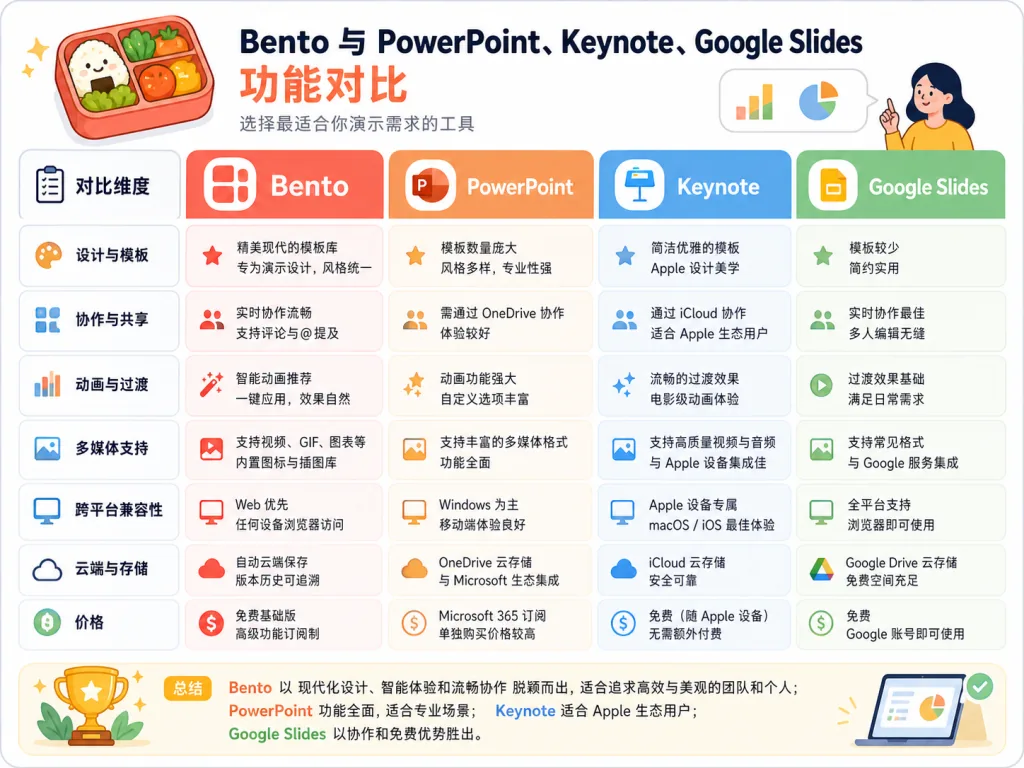
| Dimension | Bento | PowerPoint | Keynote | Google Slides |
|---|---|---|---|---|
| Single-file distribution | ✅ One HTML file | ❌ Requires Office | ❌ Requires macOS/iWork | ❌ Requires a connection |
| Local-first | ✅ Fully offline | ⚠️ Desktop can work offline | ⚠️ Desktop can work offline | ❌ Requires a connection |
| Encrypted collaboration | ✅ E2EE + blind relay | ❌ None | ❌ None | ⚠️ Transport encryption only |
| AI-friendly | ✅ Plain JSON + offline models | ⚠️ Needs plugins | ⚠️ Needs plugins | ⚠️ Depends on Gemini |
| Long-term readability | ✅ Still opens in ten years | ⚠️ Format keeps evolving | ⚠️ Format keeps evolving | ⚠️ Needs an account and export |
| Size | 560 KB | Multi-GB installer | Multi-GB installer | Browser-side |
The core reason to choose Bento: when you need "one file that goes anywhere", "still readable in ten years" and "data always in your hands", it is currently the only option that satisfies all three at once.
7. Getting started
10-second trial: open bento.page/slides — that's the full app running on the starter template, and the template doubles as a feature tour.
Download the full app: get Bento_Slides.bento.html from GitHub Releases or bento.page/releases/slides/Bento_Slides.bento.html (~560 KB, no account, no install), then double-click to open it in a modern browser and start editing.
Build from source:
cd slides
cd slides
npm install
npm run dev            # start the dev server (http://localhost:5173)
npm run build:single   # build → dist-single/Bento_Slides.bento.html (the product file)
Advanced moves:
- Install the
bento-slidesplugin marketplace pack in Claude Code and let AI generate slides - Turn on "offline mode" so no data leaves your machine
- Try Morph: duplicate a slide, give the elements the same id, and watch the automatic transition
- Run
node scripts/test-sync.tsto see the CRDT fuzz tests in action
8. Summary and next steps
Bento redefines the shape of an office suite with a single HTML file: the file is the software, the data is readable, collaboration is encrypted, AI is welcome, and it still opens in ten years. In an era where SaaS ties every office task to a cloud subscription, it offers a return path that is local-first and readable long-term.
Recommendations: if you do independent creative work, technical talks or internal training, put Bento in your toolbox; if you run enterprise IT and need SSO and permission control, watch how bento/spaces, bento/dash and bento/vault evolve.
Project links:
- Website: bento.page
- Repository: github.com/nyblnet/bento
- Docs: docs/architecture.md
- AI agent guide: bento.page/agents.md
One-line pitch: your next slide deck belongs in an HTML file that is yours forever.