1. Opening: why you need this tool
One of the most painful scenarios for iOS developers: regression testing location features. You're building a location-based service (LBS) and need to verify app behavior across different coordinates, different coordinate systems and different network environments. Physically traveling to the target location isn't realistic, and the simulator often can't run the full location chain. On top of that, iOS location caching, the coordinate-system difference (WGS-84 vs GCJ-02), and the private interfaces of Apple's location service make "change one coordinate" surprisingly complicated. General-purpose tools on the market either charge money, or rely on a Network Extension that breaks under free signing, or can only patch the code of a single app and therefore can't cover the whole test chain.
If you're an iOS location developer, a QA engineer, or someone studying how iOS location services behave, this 497-star open-source project may fill exactly the gap in your toolchain.
2. What it is: one sentence
Location Spoofer is an open-source tool for iOS location-service behavior research and development testing, built on Swift + Go 1.23. It provides native map-based point selection, a simulated Apple location-service response test environment, dual local and third-party proxy modes, WGS-84 / GCJ-02 dual coordinate management, plus environment checks and log diagnostics. The latest version is v1.0.5.
3. Core features in depth
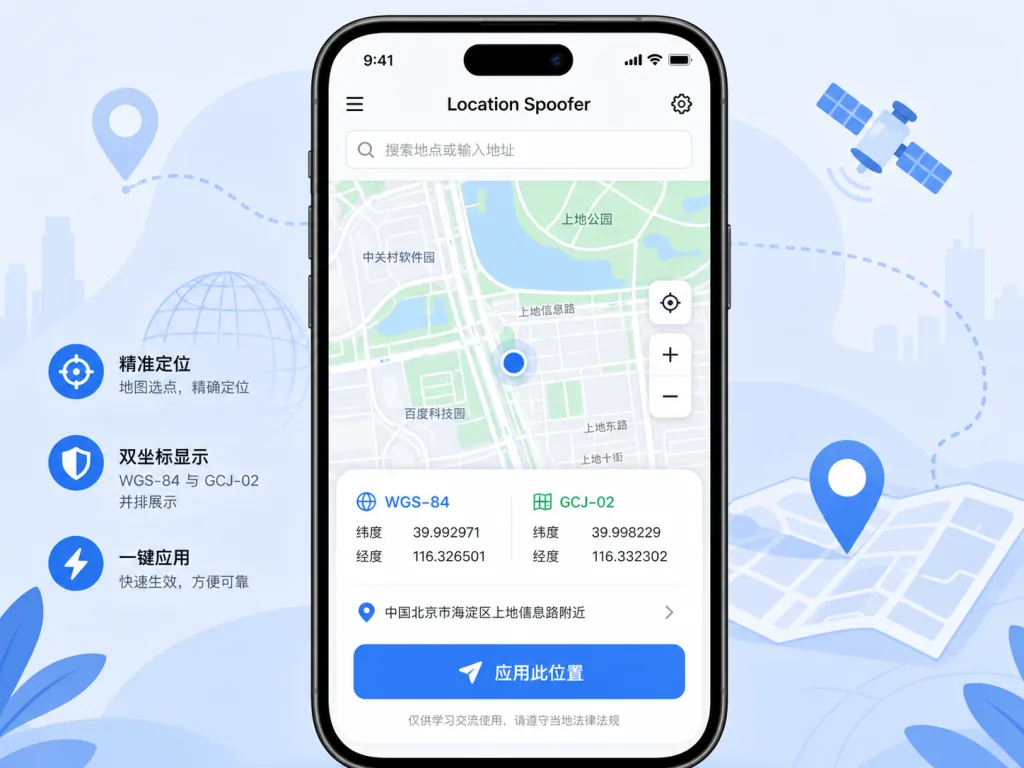
1. Native map selection and dual coordinate management
The project uses MapKit to render the map and the system blue dot, supporting search, tap-to-select, dragging the map center, zooming, saving locations and restoring the last selection. When you pick a point it shows both the international coordinate (WGS-84) and the domestic coordinate (GCJ-02), each copyable separately. MapKit doesn't expose an API that states which standard it is returning, so the project uses fixed-anchor queries and blue-dot changes for controlled refresh, and writes the full WGS-84 / GCJ-02 coordinate pair into the persistence boundary to avoid position drift from repeated conversion. This detail is critical for testing against domestic map providers.
2. Simulating location-service responses
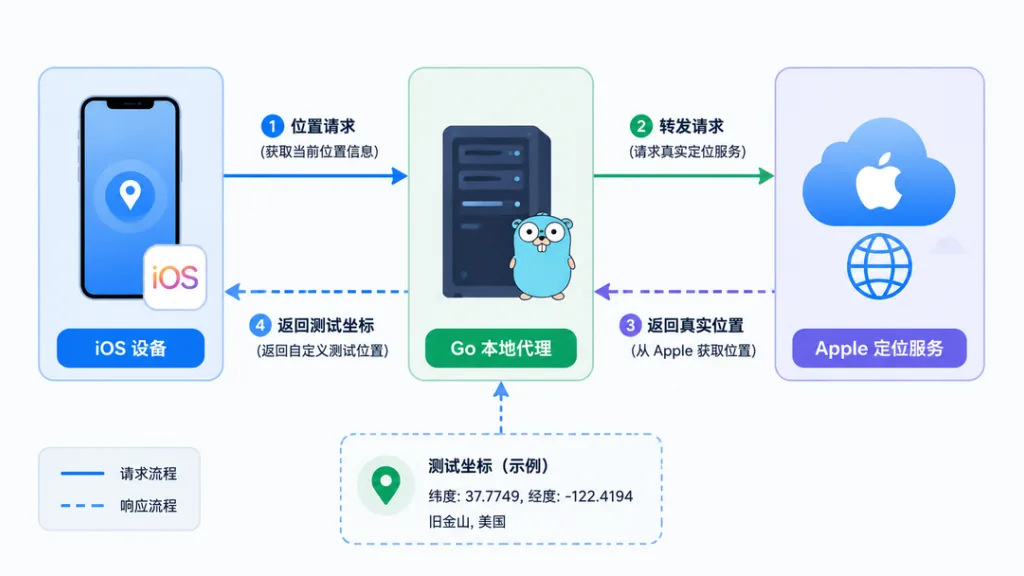
The core capability is proxying and rewriting requests to Apple's location service (gs-loc.apple.com / gs-loc-cn.apple.com/clls/wloc). Developers don't need to touch any code in the target app: pick a point inside the app, and the proxy layer returns the selected coordinate data in the test environment. Compared with modifying source code to add stubs, or capturing traffic and rewriting responses, this has the lowest deployment cost and the least intrusion into the real location chain.
3. Two run modes: local proxy and third-party proxy
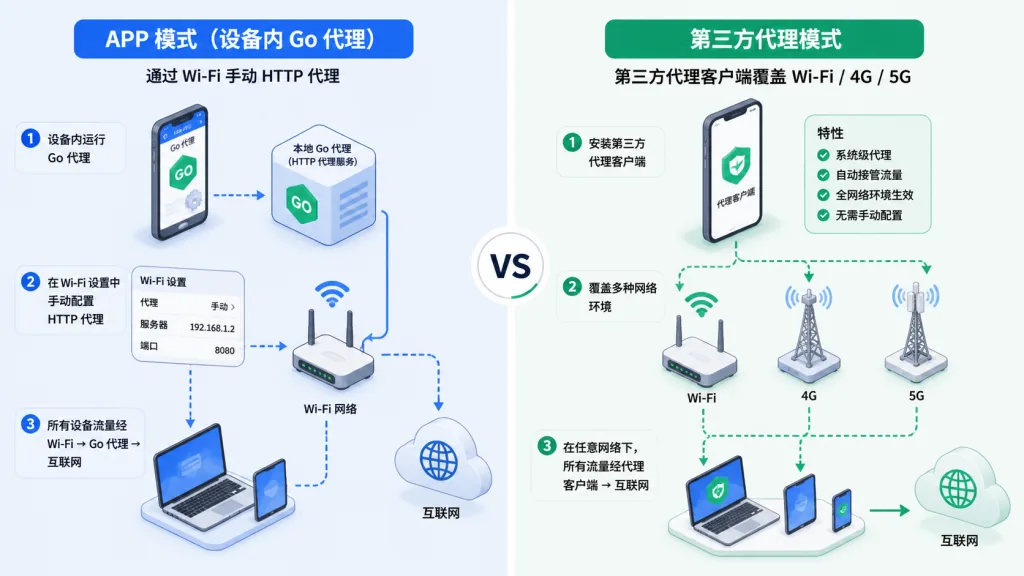
- APP mode: a Go proxy (wloccore) runs on the device, and a manual HTTP proxy on the current Wi-Fi routes the specified requests through the local proxy. No Network Extension is created, no system VPN is shown or occupied, only the current Wi-Fi is covered, and the on-device CA generated by the app must be installed and trusted. It works under free self-signing too.
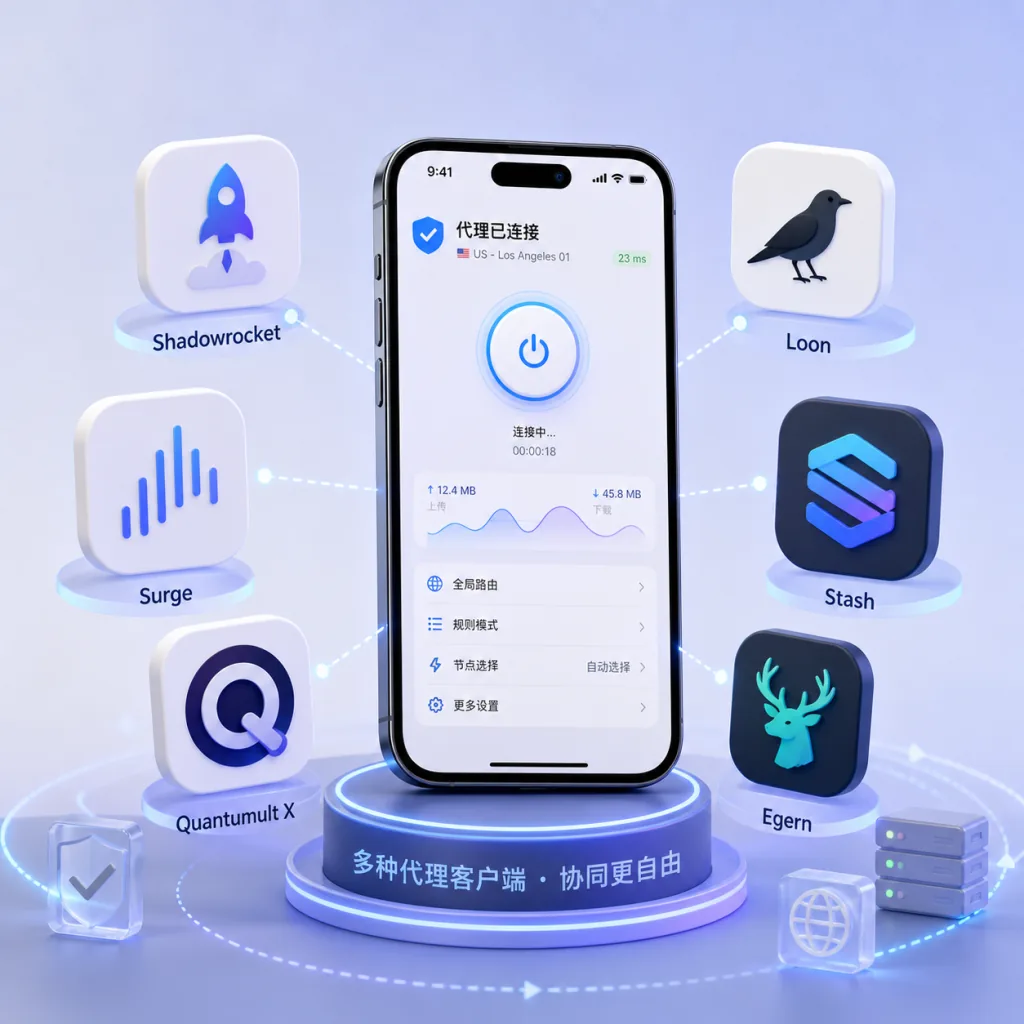
- Third-party proxy mode: the app doesn't start the built-in Go proxy and doesn't use a self-signed CA; instead it pushes coordinates to a supported third-party proxy client through the
https://gs-loc.apple.com/wloc-settings/saveGET configuration interface (supportingquery/save/clear), and the client handles MITM, VPN and rules. It covers Wi-Fi, 4G and 5G. Shadowrocket has been tested on a real device; configurations are provided for Surge / Quantumult X / Loon / Stash / Egern.
The two modes are mutually exclusive and cannot be enabled at the same time, so proxy paths don't interfere with each other.
4. Environment checks and debugging
In APP mode it checks the local proxy, certificate trust and the request path; in third-party proxy mode it checks the WLOC configuration interface and module responses, and on failure points you to the relevant configuration or diagnostics entry. Run logs are stored in the device's App Group container and kept for the last three days. The app can copy and clear logs, records coordinate-standard changes, and generates a redacted issue report (iOS version, app version, run mode, third-party client, reproduction steps, problem description and redacted logs) for filing a GitHub Issue.
4. Technical highlights and performance data
- Stack: iOS 15+ / Swift 5.9 (SwiftUI + MapKit) + Go 1.23+. The Go proxy handles certificate services and location responses, while the Swift side owns the UI, map, location and runtime flow.
- Architecture highlights: APP mode doesn't depend on Network Extension, so it works with free self-signing; the coordinate persistence boundary stores both WGS-84 and GCJ-02 pairs and picks by current map standard at use time, avoiding drift from repeated conversion; the CA private key lives in the Keychain, issue reports require the user to copy them manually, and the privacy boundary is clear.
- Ecosystem compatibility: third-party proxy mode covers the mainstream iOS network tool clients, ships subscribable module files, and accepts community tutorials through a reviewed section.
- Testability: the project ships XCTest and shell contract tests, and
./build.sh --testruns the simulator tests in one command.
5. Use cases and audience
- iOS LBS developers: verifying location reads, map rendering, distance calculation and reverse geocoding under different geographies (on a business trip, cross-city testing, overseas locations).
- QA engineers: covering location regression tests across Wi-Fi, 4G and 5G without leaving the desk — one pass with a third-party proxy client.
- iOS location-service researchers: studying Apple's location request chain, coordinate-system differences, caching strategies and how third-party apps use the location APIs.
- Not for: users who want a one-tap way to change the real location of any app in daily use. That isn't the design goal; the project explicitly states it doesn't guarantee compatibility with every iOS version or third-party app, and makes no promise to bypass third-party security policies.
6. Comparison with alternatives
| Dimension | Location Spoofer | Generic network proxy rewriting | Source-code stubs |
|---|---|---|---|
| Requires modifying the target app's code | No | No | Yes |
| Supports Wi-Fi + 4G/5G | Yes (third-party proxy mode) | Depends on the client | Independent of network |
| Usable with free self-signing | Yes (APP mode, no NE) | Partly needs Network Extension | Independent of signing |
| WGS-84 / GCJ-02 dual coordinates | Built-in management | Usually manual | Must maintain yourself |
| Environment checks and diagnostic logs | Built-in | Usually absent | Depends on the project |
| Third-party proxy client ecosystem | Shadowrocket / Surge / QX / Loon / Stash / Egern | Depends on the tool | Not applicable |
7. Quick start
- Get the IPA: download the latest
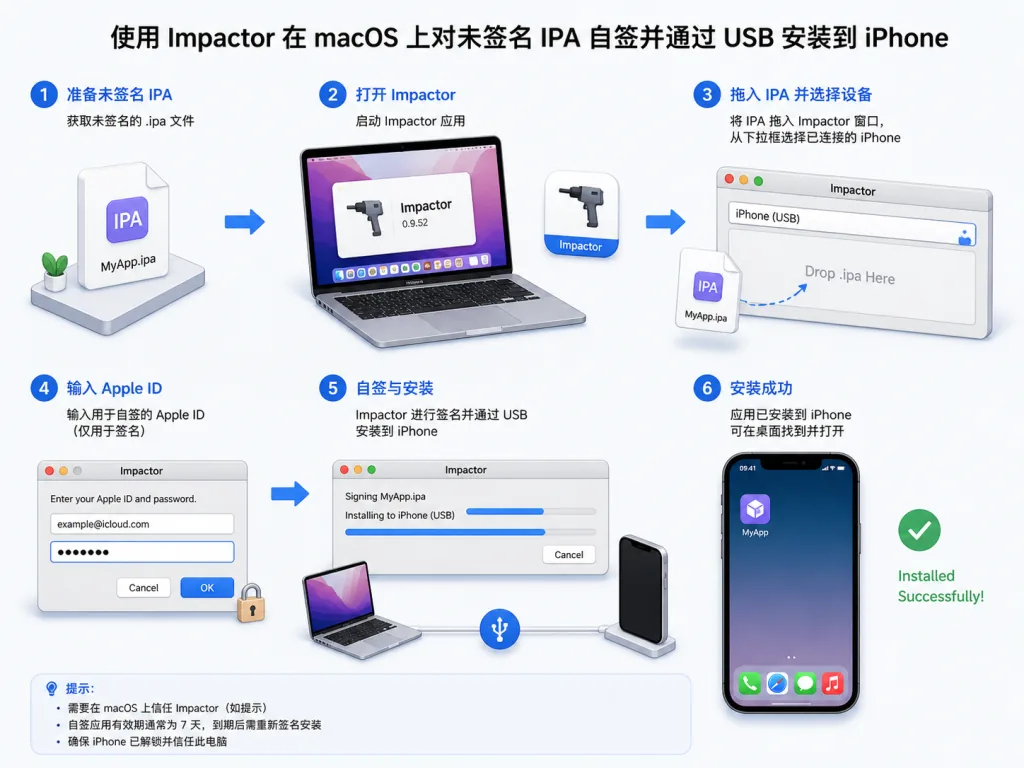
PaopaoLocationSpoofer-unsigned.ipafrom Releases, or build it yourself followingdocs/BUILD.mdwith macOS + Xcode + XcodeGen + Go 1.23+ and./build.sh --test. - Self-sign and install: on iOS 16+, enable Developer Mode first, then self-sign the unsigned IPA with Impactor or i4Tools, install it to the iPhone over USB, and trust it under "VPN & Device Management". A free Apple ID signature usually lasts 7 days.
- First launch: choose APP mode or third-party proxy mode, follow the in-app guide to finish configuration, run the environment check, pick a point on the map, enable the test location and verify it in the target app.
- Restore the real location: in APP mode, stop the test location and turn off the manual HTTP proxy on Wi-Fi; in third-party proxy mode, use the app to clear the WLOC coordinates and disable the module in the client. The system location cache may need time or a device restart to refresh.
8. Summary and action items
The core value of Location Spoofer: with one open-source, clearly structured, dual-mode proxy framework, it standardizes the simulation of an iOS location-service test environment — no Network Extension, no changes to the target app's code, built-in WGS-84 / GCJ-02 dual coordinates and diagnostic logs, plus adapters for the mainstream third-party proxy clients.
Usage advice: use it on devices and software you own or are authorized to test; review configurations and scripts before importing third-party modules; when filing a bug, prefer the in-app "Settings → Support → Report Bug" flow to generate a redacted report; never post real locations, credentials, certificate private keys or full sensitive logs to a public issue.
Project: github.com/xweiba/location-spoofer. If you're building test scaffolding for iOS location features, give it a try.