
1. Why you need this tool
What tool do you use most while writing code? Editor, IDE, browser? Or the terminal?
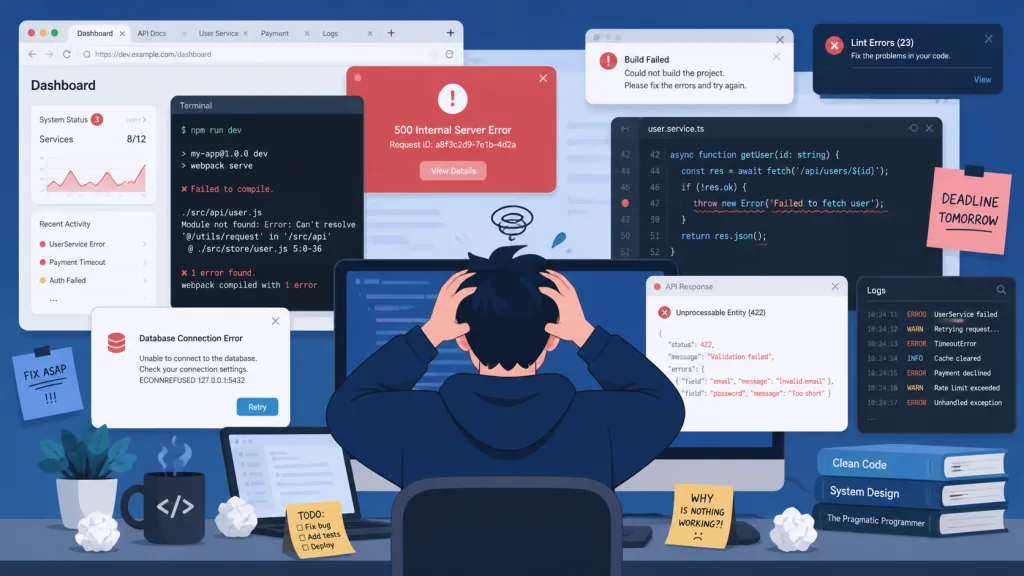
The data doesn't lie: in JetBrains' 2024 developer survey, 89% of developers open a terminal more than 10 times a day. Yet the status quo is that traditional terminals are either tedious to configure (a Hello World user bails immediately), bloated with features (a second to load just to run one command), or weak on AI coding support (a command fails and your only option is copy-pasting the error into a browser).
What stings more is that macOS's built-in Terminal.app makes you figure out tab management and split panes on your own. Now that Claude Code, Codex and Gemini CLI are part of daily work, the terminal is still stuck as "a plain text input box" and can't keep up with your workflow.
That is the problem Kaku wants to solve.
2. In one sentence: what this project is
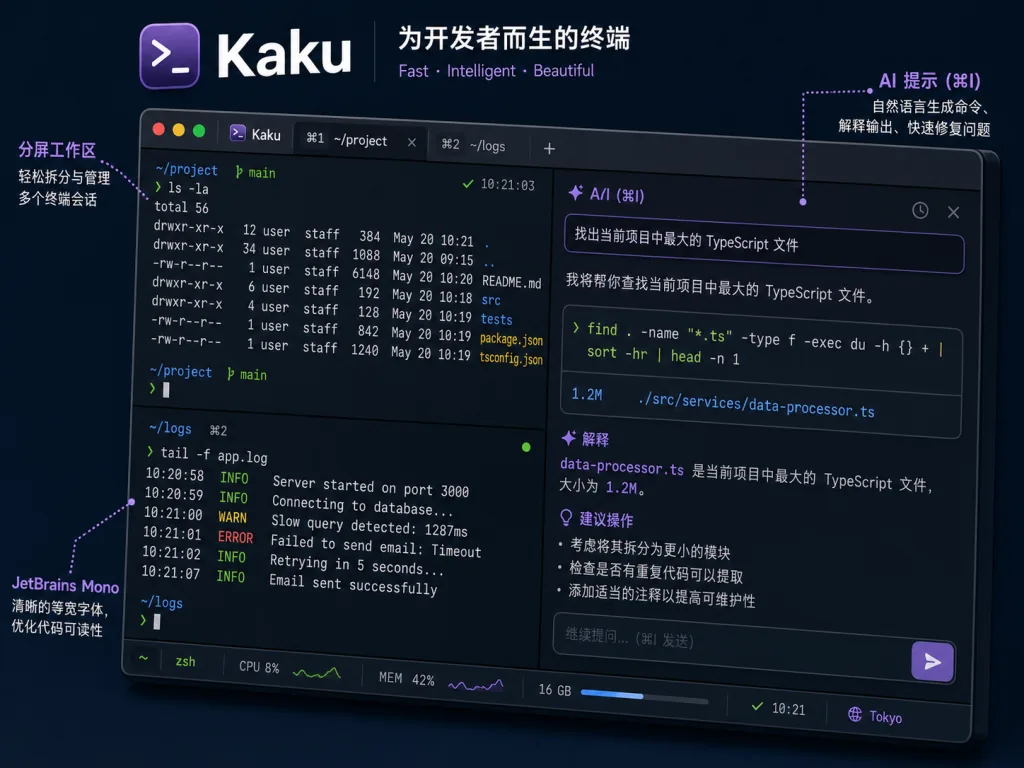
Kaku (the Japanese word for "to write") is a high-performance terminal heavily customized on top of WezTerm, built around "works out of the box + AI coding". Written in Rust, 5756+ GitHub stars, macOS only. It packages WezTerm's powerful Lua configuration, an AI coding assistant and a curated shell toolchain into a zero-config experience: download, install, open, go. The binary is 40% smaller than upstream and startup is close to instant.
3. Core features in depth
1. Zero-config, out of the box
Kaku ships with the JetBrains Mono font, native macOS font rendering, a font-size strategy tuned for low-resolution displays, and carefully calibrated dark/light themes (switching automatically with the system). What opens is a development environment that already looks good — no more digging through Oh My Zsh for a theme, tweaking font antialiasing, or agonizing over color saturation.
2. Two-mode AI assistant
This is the core capability that separates Kaku from a traditional terminal:
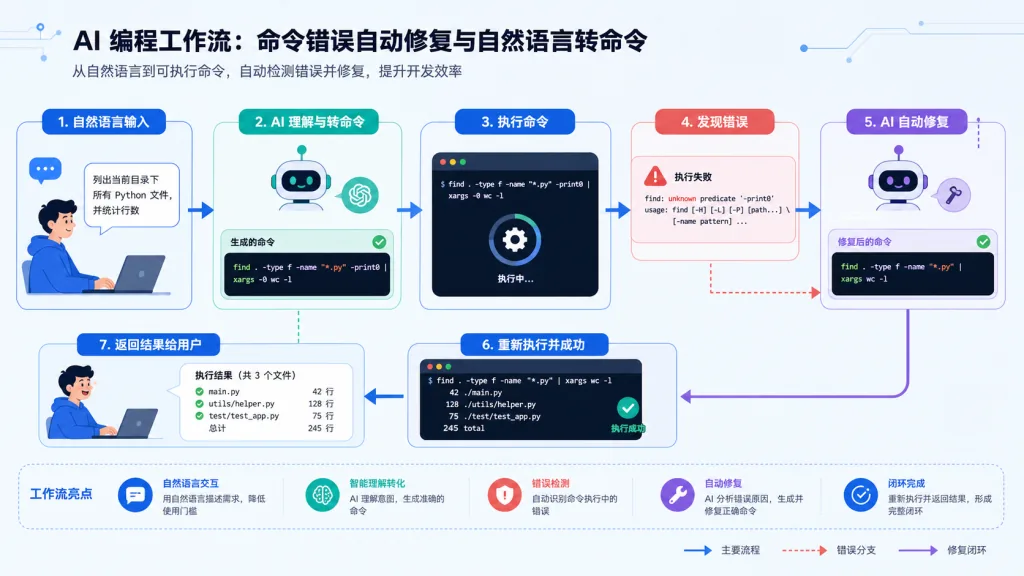
- Automatic error fixing: when a command fails, Kaku proposes a fix and you apply it with
Cmd + Shift + E. No more copying errors manually, opening a browser, pasting, and waiting for a reply. - Natural language to command: type
# unzip every tar.gz file in the current directoryat the prompt and hit enter; Kaku sends the description to an LLM and fills the generated command back into the command line so you can confirm it before running.
The kaku ai command gives you a visual panel for Auth Type, Simple Model, Deep Model, Base URL and API Key, and works with mainstream AI tooling such as Claude Code, Codex, Gemini CLI, Copilot CLI and Kimi Code.
3. Curated shell toolchain
A bundled set of zsh plugins plus optional CLI integrations cover the high-frequency cases: prompt enhancement, diff highlighting, directory navigation. Cmd + Shift + G brings up Lazygit directly, Cmd + Shift + Y summons the Yazi file manager, folding Git workflows and file browsing into the terminal itself.
4. WezTerm-compatible Lua configuration
Full compatibility with WezTerm's Lua API and configuration syntax means you can move the config under ~/.config/wezterm/ straight over at nearly zero migration cost. It also supports fine-tuning like config.window_background_opacity for transparent windows, so you get both "works out of the box" and "deeply customizable".
5. Details that push it over the top
Copy on Select, clickable file paths, full-screen app history preview, broadcast input across split panes, visual hints for background tab completion — each one is a small improvement you cannot give up once you have used it.
4. Technical highlights and performance data
Kaku's performance work is not marketing talk; the numbers back it up:
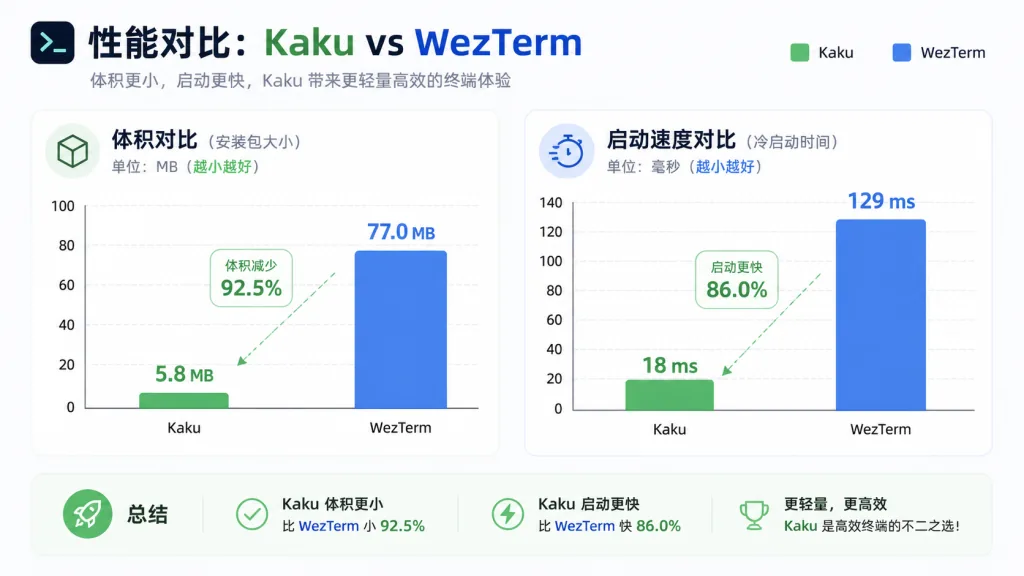
| Metric | Upstream WezTerm | Kaku | How |
|---|---|---|---|
| Executable size | ~67 MB | ~40 MB | aggressive symbol stripping + feature trimming |
| Asset size | ~100 MB | ~80 MB | asset compression + lazy loading |
| Startup latency | standard | instant | JIT initialization |
| Shell startup | ~200ms | ~100ms | preconfigured environment optimization |
Rust guarantees native performance, GPU-accelerated rendering keeps downstream capabilities, and lazy loading makes cold start nearly imperceptible. Shell startup drops from 200ms to 100ms — open and close the terminal 50 times a day and that's 5 seconds saved a year, and it adds up.
5. Where it fits and who it's for
Typical scenarios:
- AI-assisted coding workflows: developers writing code with Claude Code or Codex who need the terminal and AI tools to work seamlessly together.
- Heavy Git usage: dozens of
git statusandgit diffcalls a day; one keystroke for Lazygit is 10x faster than typing commands. - Remote server management: broadcast input across split panes lets you send one command to many machines at once — an ops favorite.
Who it suits: full-stack engineers chasing speed and productivity; advanced users who want a professional terminal without the configuration rabbit hole; indie developers who lean hard on AI coding tools.
Who it doesn't: Windows/Linux users (macOS only for now); pure product managers who only touch GUIs and never the command line.
6. Comparison with alternatives
| Terminal | Startup speed | AI integration | Config friendliness | Size |
|---|---|---|---|---|
| Kaku | instant | built-in two-mode AI | zero config + Lua compatible | 40 MB |
| WezTerm | standard | needs plugins | high Lua barrier | 67 MB |
| iTerm2 | slower | none | GUI configuration | 50+ MB |
| Alacritty | very fast | none | high config-file barrier | lightweight |
| Warp | slower | built-in AI | modern UI | heavy |
Kaku's differentiation is: take WezTerm's engine, cut the redundant bulk, build in AI, and configure everything by default. Lighter than Warp, easier than Alacritty, more modern than iTerm2, less fuss than vanilla WezTerm.
7. Getting started fast
Installation
Option one (recommended):
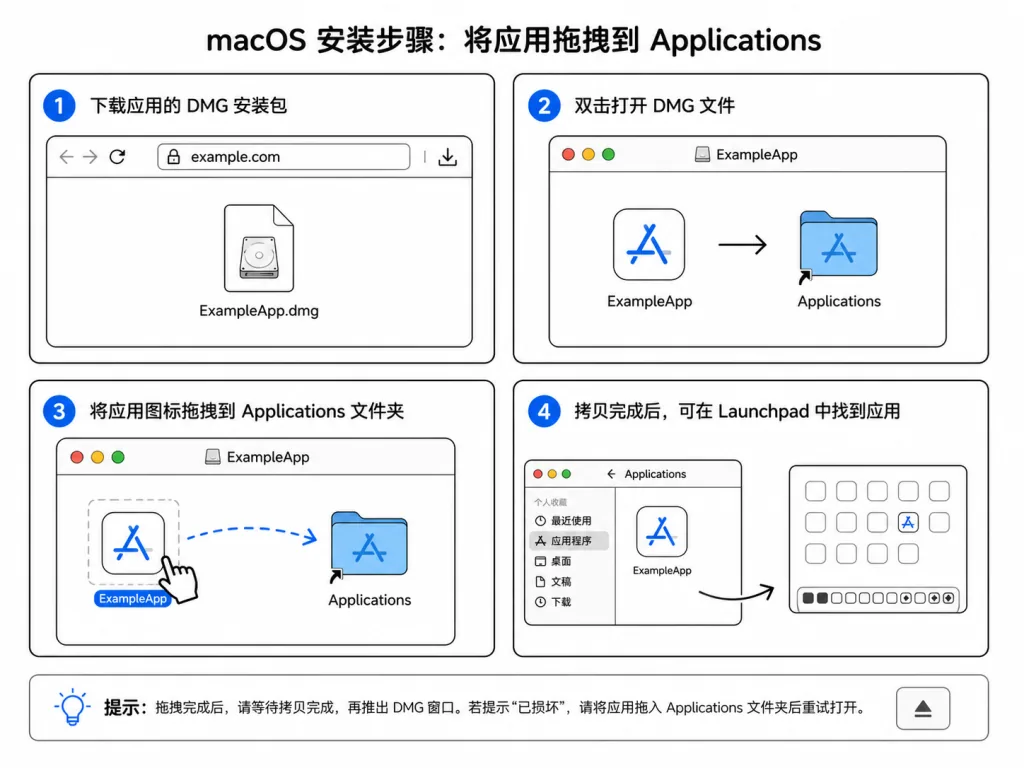
- Download the DMG from GitHub Releases
- Drag it into the Applications folder
- The shell environment is configured automatically on first launch
Option two: one-command Homebrew install
brew install tw93/tap/kakuku
The app is notarized by Apple, so no security warnings.
Advanced configuration
- AI assistant:
kaku aiopens the visual configuration panel - Health check:
kaku doctordiagnoses environment problems - Transparent window: set
config.window_background_opacityin~/.config/kaku/kaku.lua - Fix missing commands: run
/Applications/Kaku.app/Contents/MacOS/kaku init --update-only && exec zsh -l
8. Summary and what to do next
With a 40% smaller footprint, 50% faster startup and native AI integration, Kaku turns "a professional terminal" from a heavily configured tool into a download-and-use productivity product. Behind it is author Tw93's deep rework of WezTerm, and a serious answer to the fact that developers spend hours a day with their terminal.
What to do next:
- macOS users can just download the DMG and feel the joy of "works out of the box".
- Long-time WezTerm users can migrate their config seamlessly and enjoy the smaller footprint and faster speed.
- Heavy AI-coding users should try automatic error fixing and natural language to command first — the productivity jump is immediate.
Project links:
- Website: https://kaku.fun
- GitHub: https://github.com/tw93/Kaku
If Kaku makes your development life more comfortable, give it a star on GitHub — or go to https://cats.tw93.fun?name=Kaku and feed the author's two cats (Tangyuan and Cola). That's a good way to show support too. 🐱