Title options (pick 1 of 3)
Still typing every email by hand? This open-source macOS tool let me dictate a whole letter with Option+Space
Hold to talk, release to get text: Quill puts Gemini transcription into any macOS input field and cuts typing by 90%
Not a single key pressed, yet the whole document got written — how Quill does it
1. Intro: what if a tool could dictate the whole article for you…
A weekly report takes half an hour of typing; a reply email takes ten minutes of wording; when your train of thought breaks halfway, getting back into the flow costs even more. For macOS users who stare at a screen all day, keystrokes are far slower than the brain's output. Even the fastest input method still means typing character by character, and generic speech-recognition tools either force you to switch windows or make you copy-paste the result afterwards — which breaks the writing flow anyway. Quill compresses all of this into one shortcut: hold to talk, release to get the text.
2. Project intro: what it is in one sentence
Quill is an open-source system-level voice input tool for macOS 14+ with a simple positioning: “turn any editable text field across the system into your dictation pad.” Four core traits: cross-app dictation, a shortcut that's ready on install, the Gemini real-time transcription engine, and a privacy design that keeps data local. It is still early (0 stars), but the install-and-use experience is already complete.
3. Core features in depth
1. Cross-app dictation, no scene restrictions
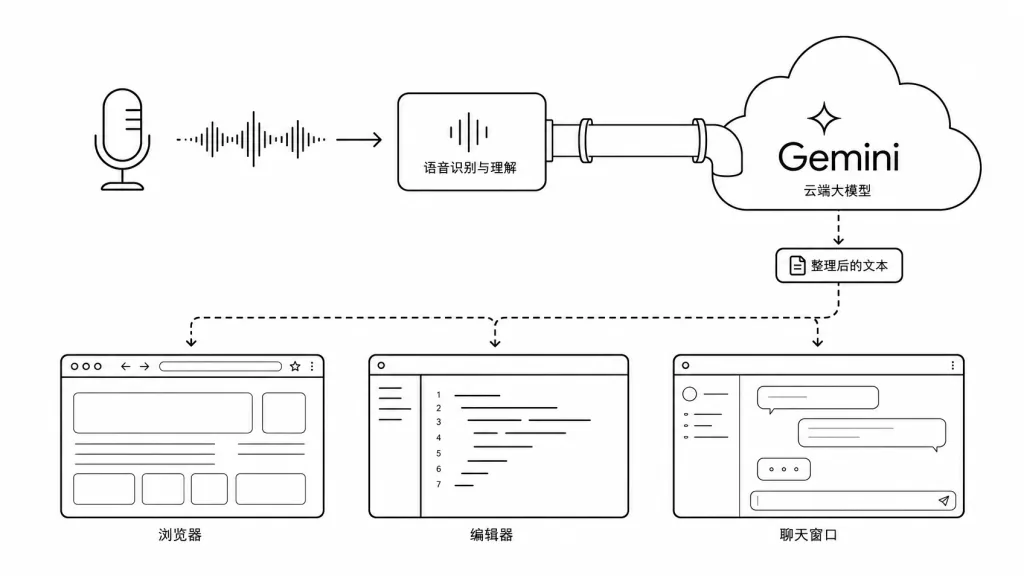
Quill isn't a voice button inside one app. Using macOS accessibility permissions, it turns whatever editable text field the cursor is in — browser, IDE, Notes, Slack, Mail — into the input target at the system level. The mechanism: when you press the shortcut it records the cursor position, then, once transcription finishes, uses the Accessibility permission to return focus to that spot and insert the text. No window switching, no extra panel, throughout the process.
2. Two-mode shortcut workflow
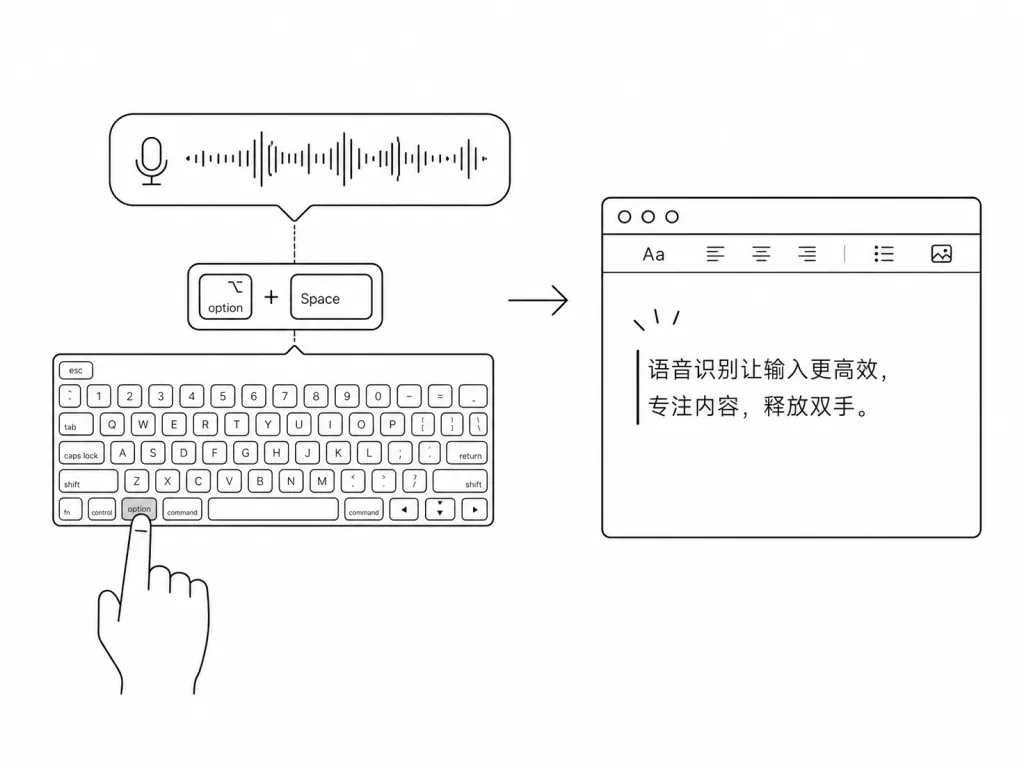
Quill offers two ways to work: by default you hold ⌥ Option + Space and talk while recording, releasing to stop; or you switch to “tap mode,” where one press starts and a second press stops. The shortcut for pasting the last transcription, ⌃ Control + ⌥ Option + V, is remappable too, and every shortcut can be recorded as any combination of modifier + regular key. More considerate than Whisper-style desktop tools, its default shortcut avoids the keys mainstream IDEs use most.
3. Smart vs. verbatim transcription styles
Smart mode takes the Gemini Live model's output and does a light polish pass, automatically adding punctuation and fixing sentence breaks; Verbatim mode stays as close as possible to what you actually said, with no edits. That distinction suits both writing technical docs and writing conversational dialogue. On languages, Quill can auto-detect the language or let you pin one preferred language in settings.
4. Custom vocabulary and local stats
In Settings → Vocabulary you can maintain proper nouns, technical abbreviations and product names, and the model will prefer those entries during transcription — avoiding classic failures like “Postgres” coming out as “Post Grids.” The stats feature only records the day's and cumulative “dictation count and word count,” and never stores any transcript text, so the privacy boundary is clear.
4. Technical highlights and performance data
Quill's transcription core calls Google Gemini's Live transcription model, and users must bring their own API key. That means model capability improves as Gemini upgrades, with no large model to maintain locally; on latency, the end-to-end hold-to-talk, release-to-insert experience is close to real time, depending on the network. Architecturally, Quill is a native macOS Swift app (inferred from the build notes in docs/BUILDING.md) with no Electron dependency; it starts up and lives in the menu bar with a very low resource footprint. The microphone can be the macOS default or a specific input device; if that device becomes unavailable it falls back to the system default automatically without interrupting your workflow. The Apache License 2.0 also means you can redistribute it and modify it for private use.
5. Use cases and audience
- Heavy writers of technical docs, emails and weekly reports — dictation is typically 3x faster than the keyboard.
- Developers who need to write comments, commit messages and issue replies — the shortcut doesn't pollute the main keyboard flow.
- Content creators doing long-form writing, blog drafts or interview cleanup — Smart mode's automatic polish saves a round of manual edits.
- Not for: Windows/Linux-only users, and teams with compliance concerns about Gemini API calls (audio is sent to Google).
6. Comparison with alternatives
| Dimension | Quill | macOS built-in Dictation | Wispr Flow | OpenWhisper desktop |
|---|---|---|---|---|
| System coverage | Any app's text fields | System-level | Any app's text fields | Usually single-app |
| Transcription model | Gemini Live | Apple on-device | In-house + cloud | Whisper local |
| Custom vocabulary | ✅ | ❌ | ✅ | Depends on implementation |
| Custom shortcuts | ✅ | ❌ | Partial | ✅ |
| Open source | Apache 2.0 | Closed | Closed | Mostly MIT |
| Network dependency | Yes (Gemini) | No | Yes | No |
By comparison, Quill's differentiation is the three-way combination of full open source + flexible shortcuts + high-quality Gemini transcription.
7. Getting started quickly
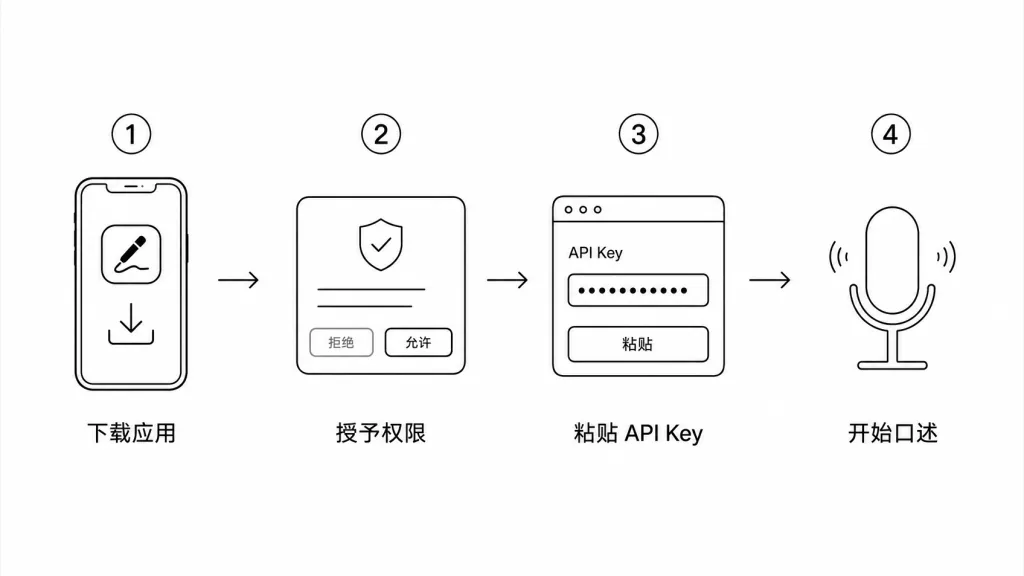
- Get a Gemini API key from Google AI Studio (with permission to access the Live transcription model).
- Download
Quill.appfrom Releases and drag it into the Applications folder. - On first launch, follow the onboarding prompts to grant Microphone and Accessibility permissions and paste the API key.
- Click into any text field, hold ⌥ Option + Space, say a sentence, and release — the text shows up at the cursor.
- Click the Quill icon in the menu bar → Settings to change shortcuts, microphone, language, Smart/Verbatim mode, vocabulary and launch-at-login.
- To build it yourself or contribute, see
docs/BUILDING.md.
8. Summary and next steps
Quill's core value is turning the “think it and say it” experience on macOS into a zero-learning-curve system tool: install and it works, the shortcut is right there on ⌥ Option + Space, transcription quality is delegated to Gemini, and privacy data stays in local stats. For anyone writing thousands of words a day, it's a small tool worth putting in the Applications folder. Try it for one workday across email, Slack and IDE comments, then tune the shortcuts and Smart/Verbatim preference to your habits.
- GitHub repo: github.com/skundu42/quill
- License: Apache License 2.0
- One-line pitch: hold Option + Space to dictate into any text field — the most hassle-free open-source voice input tool on macOS.
#quill #Quill #skundu42 #Frontend #WebDev #OpenSource #GitHub