
Title options (pick 1 of 3)
Two machines that can't connect across NAT? tailcat punches through your private network like netcat
One Go binary connects two machines: tailcat cuts deployment down to 30 seconds
The Tailscale network stack without Tailscale installed: inside tailcat's counterintuitive design
1. Opening: one project between you and a much better workflow
How many times have you SSH'd into that one machine on the company intranet? Every time it is port mapping, a jump host, an access request, and if you misconfigure something you wait on ops. Worse, across NAT, plain SSH direct connections often just fail; and if you want to temporarily open a port for a colleague, the security audit stops you before anything else does.
Almost every backend and ops engineer has lived this: two machines are online, but a network boundary keeps them from talking; you want to nc a file over, but both ends are behind NAT. tailcat, an official Tailscale project with 8269 stars, exists to fix exactly that awkward spot — it is as light as netcat, yet it traverses NAT, encrypts automatically, and runs with zero configuration.
2. Project intro: what it is in one sentence
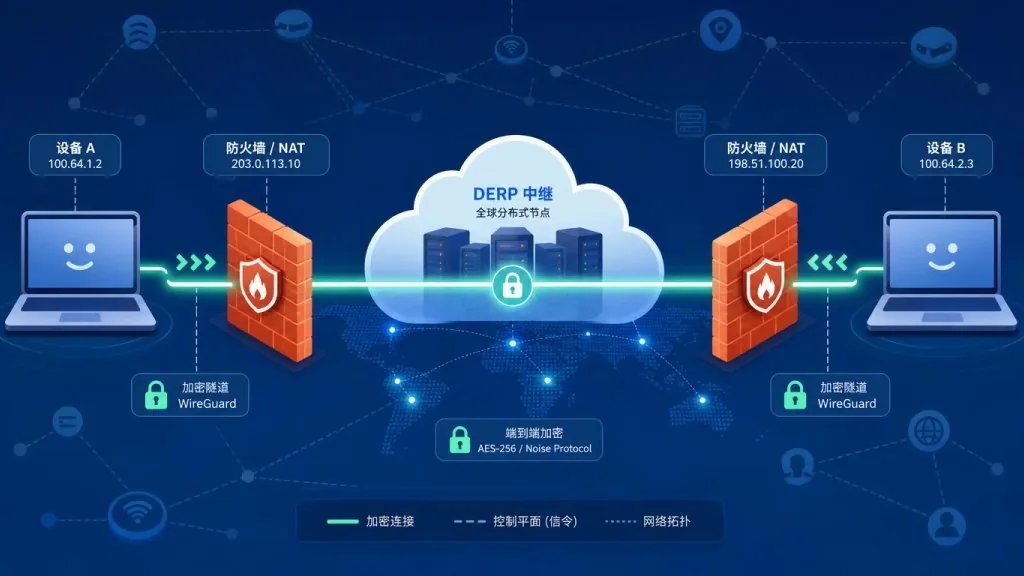
tailcat is the Tailscale team's open-source "Tailscale without the control plane", positioned as "as easy to use as netcat, but running over Tailscale's data channel". Core traits: WireGuard end-to-end encryption, NAT traversal, automatic hole punching, and a userspace network stack that needs no root. Milestone: 8269 stars on GitHub, with the main repo written in Go.
In one sentence: strip the hole punching and encryption out of Tailscale and you get a netcat with no account and no kernel module.
3. Core features in depth
1. stdin/stdout piping like netcat
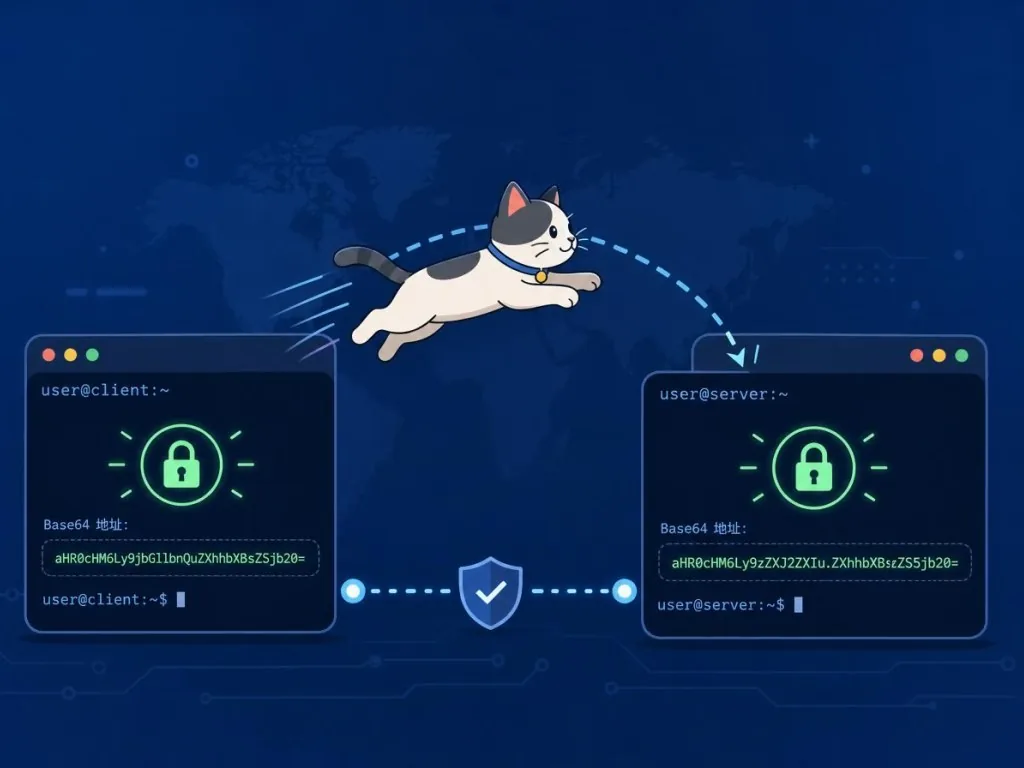
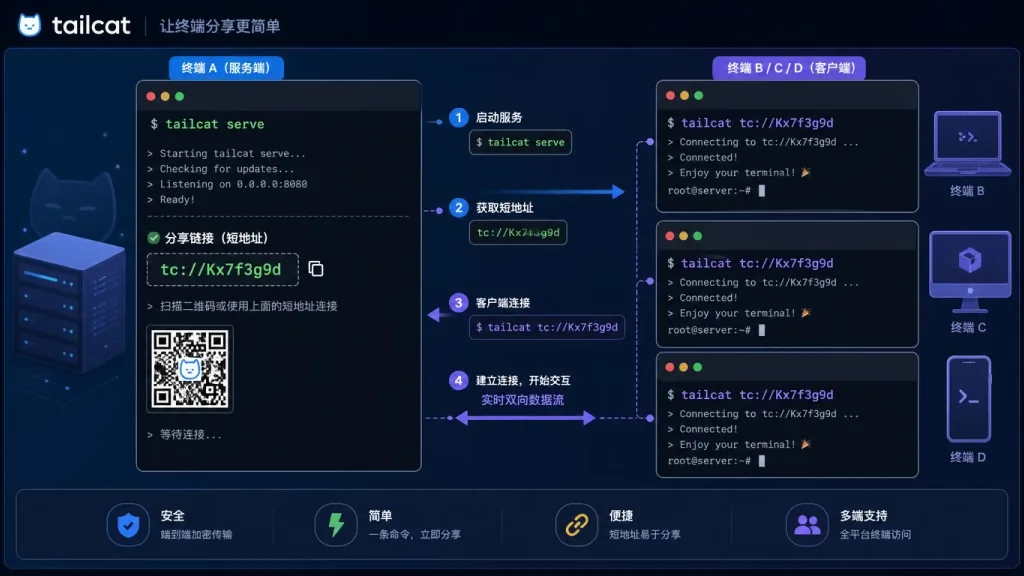
The server prints a short address (a tailcat address); the client takes that address and runs echo hello | tailcat <addr> directly. All traffic is encrypted with WireGuard, the initial handshake goes through a DERP relay, and after that it automatically attempts NAT hole punching to upgrade to point-to-point UDP. No Tailscale account, no root, and it will not touch your routing table or DNS.
2. Port forwarding and proxying
tailcat serve 8080,8443 exposes local ports to the peer; mappings like tailcat serve 5555:10.2.200.213:5555 proxy just the adb port of an Android device on the server's LAN, without exposing a whole exit-node. On the client side, the forward subcommand maps a peer port to a normal local port, which works for browsers, database clients and other tools that do not speak SOCKS.
3. SSH service and public key auth
An SSH service is built in, supporting ~/.ssh/authorized_keys, OpenSSH public key literals, and even pulling public keys straight from a GitHub account (alice@github). With --allow restricting client node keys, publishing a tailcat address in a DNS TXT record is safe — WireGuard runs before SSH authentication, so an unauthorized client never reaches the SSH layer at all.
4. File transfer and inetd-style command execution
tailcat recv ~/inbox starts a write-only drop box; tailcat cp report.pdf tcXXX: sends a file, using the system scp under the hood for a progress bar and -r recursion. The exec service runs a command per connection, inetd style, keeps stderr on the server, and exposes $TAILCAT_PEER_KEY so you can audit by client public key.
5. Performance testing and connectivity diagnostics
tailcat serve perf plus tailcat perf tcXXX gives you iperf-like throughput tests: 10 seconds by default, TCP/UDP, bidirectional, parallel streams, printing bandwidth and latency live. It waits for hole punching to succeed before measuring, so you do not mistake DERP relay throttling for your real result. ping --until-direct keeps probing until a direct path is established.
4. Technical highlights and performance data
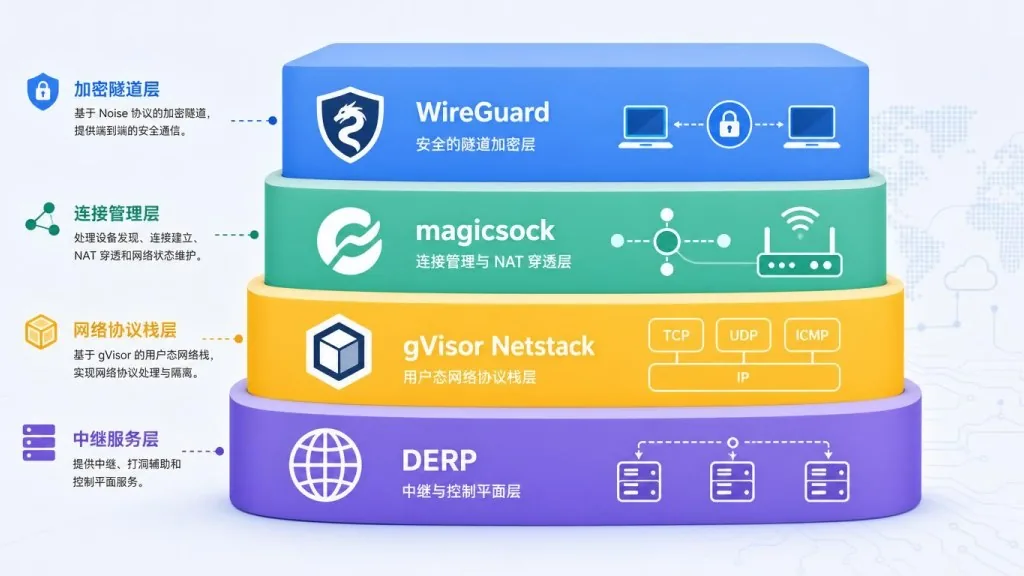
tailcat's network stack reuses Tailscale's battle-tested components wholesale: userspace WireGuard (no kernel TUN), magicsock (STUN + UDP hole punching), gVisor Netstack (userspace TCP/IP), and DERP relays (an encrypted rendezvous protocol). The data plane and control plane are fully decoupled — address negotiation happens out of band over any channel you like (chat, email, DNS TXT), with no dependency on a Tailscale control server.
On performance, the numbers in the README: 943 Mbit/s direct, rtt 1.2ms; under load min 1.9ms / avg 2.3ms / max 4.1ms. Each tailcat address carries its own 256-bit pre-shared key (PSK) by default, which stops a DERP operator who observes public keys from forging a tunnel and also provides post-quantum protection. On ecosystem compatibility it covers static binaries for Linux/macOS/Windows, Homebrew, Scoop, Snap, Nix, AUR and conda-forge, and it even compiles to WebAssembly so you can send and receive files directly in a browser.
5. Use cases and audience
At least three concrete scenarios: (1) temporarily opening a local port across NAT for a colleague to debug against, without filing a ticket for port mapping; (2) letting the outside reach a specific intranet IP safely through exit-node mode (down to the port level, without exposing the whole subnet); (3) moving files between a browser and the command line with the WebAssembly build, no installation at all.
Good for: DevOps/SRE doing ad-hoc remote handling, developers debugging across networks, and anyone who needs point-to-point file transfer on a locked-down machine with no root. Not good for: production scenarios that need long-term stable public services (the API/CLI makes no stability promises), or heavy throughput work where you refuse to run your own DERP relay but are sensitive to shared public relay bandwidth.
6. Comparison with alternatives
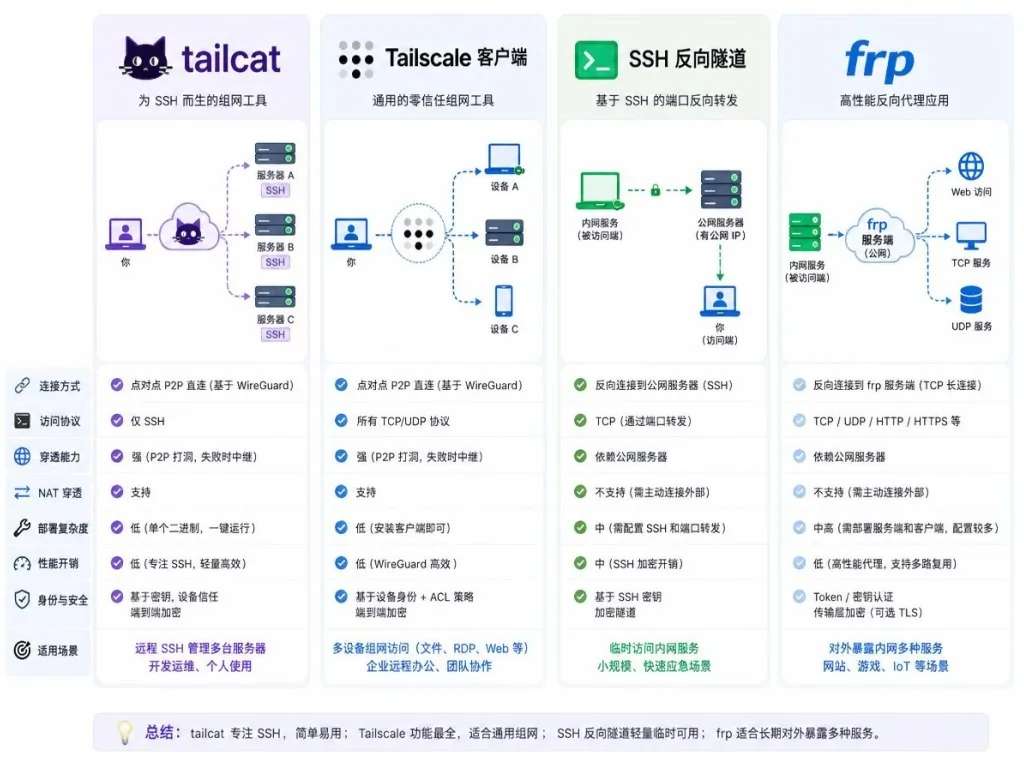
| Project | Control plane dependency | Auth method | Root required | Port forwarding |
|---|---|---|---|---|
| tailcat | None (address passed out of band) | Pre-shared key + optional client node key | No | Yes (down to port mapping) |
| Tailscale client | Tailscale control server | Tailscale account | No (userspace) | Full network / subnet routes |
| Traditional SSH reverse tunnel | None | SSH public key | Usually yes | Port level |
| frp / ngrok | Self-hosted or paid server | token | Usually yes | Port level |
Compared with the full Tailscale client, tailcat needs no account and does not change your routing table, which suits temporary work. Compared with frp/ngrok, it brings NAT traversal and encryption built in and does not depend on a fixed public relay server.
7. Getting started
One line on Linux (Debian/Ubuntu as an example): download the static binary from GitHub Releases and add execute permission. On macOS use brew install tailscale/tap/tailcat, on Windows use scoop.
Minimal working example: on the server run tailcat serve 8080 and note the printed tcXXX...; on the client run tailcat tcXXX... 8080, then open http://127.0.0.1:8080 in a browser.
Further suggestions: (1) when you need a stable address, use tailcat genkey --key=default --fixed-region to persist the key and pin a DERP region; (2) if you expose anything to the public internet, always add --allow=nodekey:... or --ssh-authorized-keys, otherwise a leaked address is a compromised box; (3) for heavy throughput, run your own derper, then tailcat genkey --region=derp.example.com to escape shared relay throttling entirely.
8. Wrap-up and what to do next
tailcat's core value: take Tailscale's NAT traversal and WireGuard encryption and turn them into a netcat replacement with no account, no root and no kernel module. A single short address is an entire encrypted tunnel, and you can share it over whatever channel you like (chat, email, DNS TXT).
Usage advice: use the default ephemeral key for temporary debugging; persist the key plus --allow to lock down the client for long-running services; and for anything public, go with the --ssh-authorized-keys SSH mode rather than no-auth-ssh.
Project links: GitHub tailscale/tailcat, website tailscale.com/tailcat, Go docs pkg.go.dev/github.com/tailscale/tailcat.
One-line pitch: netcat's simplicity plus WireGuard's security and NAT traversal — tailcat gives you both at once.

#tailcat #Tailcat #tailscale #OpenSource #GitHub