
Pick a title (choose 1 of 3)
OfficeCLI at 31.7K stars: giving AI agents eyes to actually see the Office documents they write
OfficeCLI replaces 50 lines of Python with one command — PPT/Word/Excel automation goes from an hour to 30 seconds
No Office installed and you still want AI to edit your docx? This single-file tool gives agents visual feedback
OfficeCLI: hand AI an Office it can actually see, and get a deck in 30 seconds
1. Why you need this
You're five slides into a presentation and the title overflows its box. You ask an AI to write the report, and it only changes the text — fonts, color scheme and table alignment all left broken. You finally get the AI to finish editing the docx, then discover you need Office installed on Windows just to check the result. Anyone who has used AI to write documents has stepped in this hole.
The root cause: traditional Office automation either depends on Office itself (heavy, expensive, crashes across platforms) or on libraries like python-docx (which only touch the DOM and never see the rendered output). AI writing documents is like painting blindfolded — it can edit XML, but it has no idea what the result looks like.
OfficeCLI, with 31.7K stars on GitHub, offers a clean way out: a single-file binary, a built-in high-fidelity HTML rendering engine, and a JSON CLI designed for AI agents. The AI doesn't just edit the document — it can see what it looks like afterwards.

2. What it is: the problem it solves
OfficeCLI is the world's first Office suite built for AI agents, one binary that reads, edits and automates Word/Excel/PPT. It positions itself as "the bridge layer between AI and Office documents," and its core features boil down to four keywords:
- AI-Native: every command supports
--jsonoutput, errors carry asuggestionfor self-healing, all designed for agents - Zero dependencies: a single-file binary with the .NET runtime embedded — no Office, no Python
- Observable: a built-in HTML rendering engine that renders
.docx/.xlsx/.pptxto HTML or PNG, so the AI can "see" the result - Cross-platform: one-line install on macOS/Linux/Windows, works with Claude Code, Cursor, Copilot and every other mainstream AI tool
Repo: github.com/iOfficeAI/OfficeCLI, Apache 2.0 license.

3. Core features in depth
1. A built-in HTML rendering engine — giving AI "eyes"
This is OfficeCLI's killer feature. It wrote a high-fidelity rendering engine from scratch, covering shapes, charts (including trendlines, error bars, waterfall charts, candlesticks and sparklines), formulas (OMML → LaTeX, rendered with KaTeX), 3D .glb models and shape effects. It offers three modes:
view html: outputs standalone HTML with assets inlined, opens directly in a browserview screenshot: outputs a PNG screenshot for multimodal agents to readwatch: a local HTTP server (defaulthttp://localhost:26315) that refreshes after everyadd/set/remove
That means even in CI, Docker or on a headless server, the AI can close the "render → look → fix" loop.
2. Formula and pivot table engine — 350+ Excel functions evaluated automatically
Write =SUM(A1:A2), immediately get the cell, and the result is right there — no round trip to Excel to recalculate. It supports spilling dynamic arrays like FILTER/SORT/UNIQUE/LET/LAMBDA/MAP, XLOOKUP/VLOOKUP/INDEX/MATCH, financial and bond functions like XIRR/PRICE/YIELD, and statistical functions like NORM.DIST/T.TEST/LINEST.
A pivot table in one command:
officecli add sales.xlsx '/Sheet1' --type pivottable \
  --prop source='Data!A1:E10000' --prop rows='Region,Category' \
  --prop cols=Quarter --prop values='Revenue:sum,Units:avg' \
  --prop showDataAs=percentOfTotal
The pivot cache and definition are written straight into OOXML, so the aggregated results are there the moment Excel opens the file.
3. Template Merge — design once, fill N times
The agent designs the layout once (expensive); downstream code fills it N times (cheap, deterministic, zero token cost):
officecli merge invoice-template.docx out-001.docx --data '{"client":"Acme","total":"$5,200"}'
It supports {{key}} placeholders in paragraphs, table cells, shapes, headers and footers, and chart titles. That avoids the waste of "AI regenerates every report and produces N inconsistent layouts."
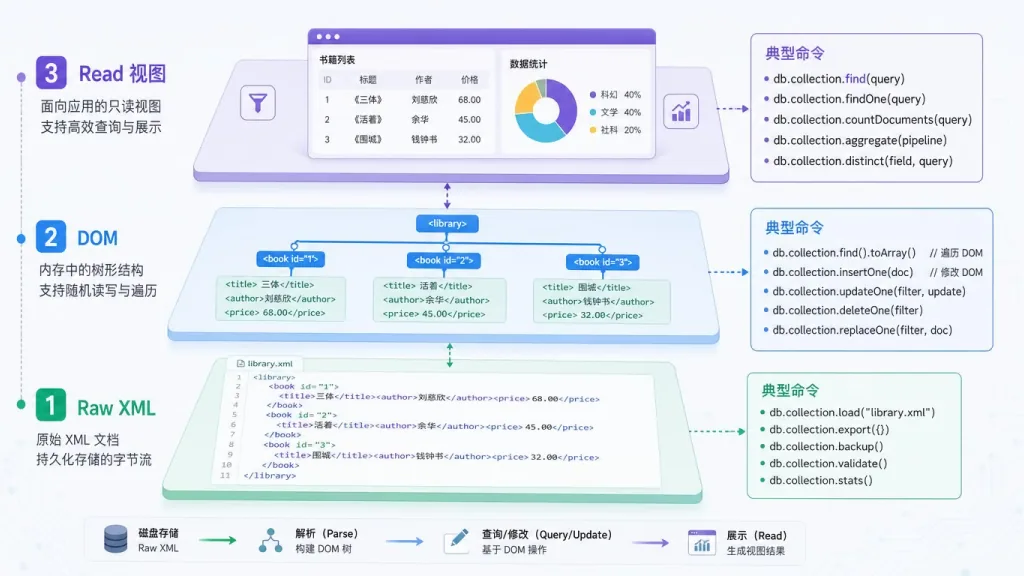
4. Three-layer architecture — go as deep as you need
| Layer | Purpose | Commands |
|---|---|---|
| L1 Read | Semantic view | view (text/annotated/outline/html/screenshot) |
| L2 DOM | Structured element manipulation | get/query/set/add/remove/move/swap |
| L3 Raw XML | XPath escape hatch | raw/raw-set/add-part/validate |
The agent starts from the read-only view, escalates to DOM operations when needed, and falls back to raw XML only as a last resort. Token consumption stays minimal.

4. Technical highlights and performance numbers
- Zero-dependency single file: embeds a .NET 9 AOT-compiled runtime, ~30MB, download and run
- Resident Mode: the document stays in memory and commands talk over named pipes, so multi-step workflows see near-zero latency
- Batch Mode: multiple commands in one execution, atomic transactions (any failure rolls back everything), plus
--best-effortfor partial success - Self-healing errors: every error code —
not_found/invalid_value/unsupported_property— ships with asuggestionand valid range, so the agent can correct itself without a human - Cross-platform MCP Server:
officecli mcp claude/cursor/vscoderegisters in one command, exposes everything over JSON-RPC, no shell permissions required - Internationalization: full Word i18n + RTL (Arabic
create --locale ar-SAturns on RTL automatically; locale-aware page numbers for Hindi/Thai/CJK) - Ecosystem compatibility: auto-detects Claude Code, Cursor, Copilot, Codex and other AI tools and installs the skill files for them
5. Use cases and who it's for
Use cases:
- AI agents generating decks: turn a natural-language request into a complete presentation, start to finish, with the agent working on its own
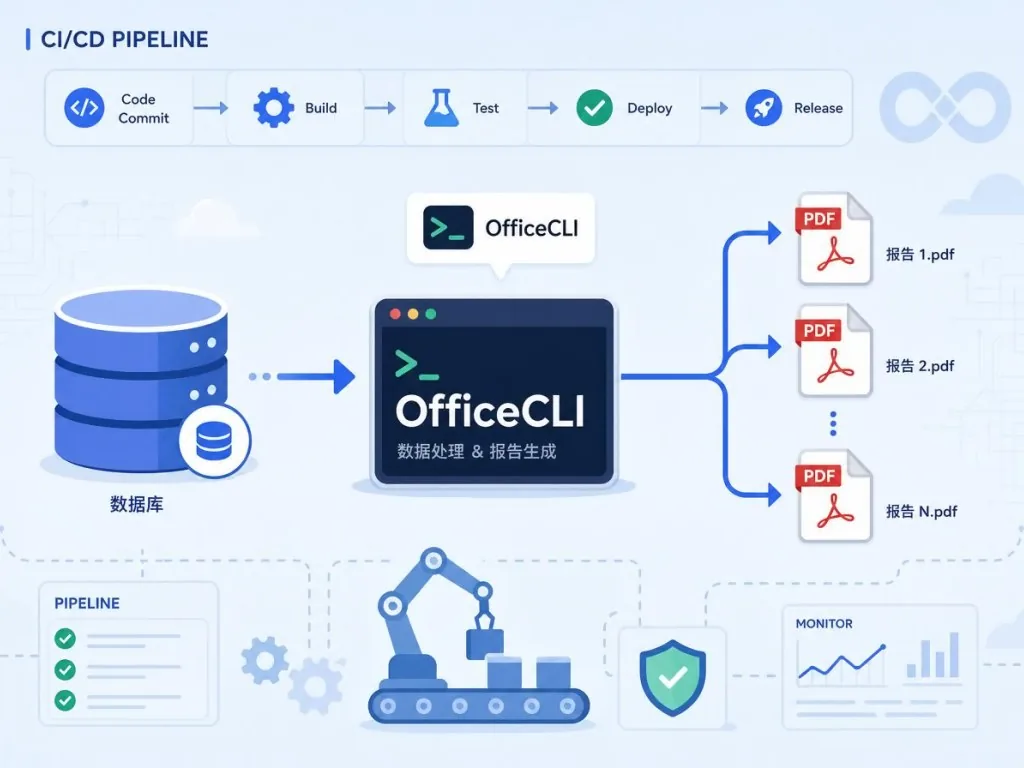
- CI/CD documentation pipelines: run tests → generate reports → validate structure inside Docker, no Office installation
- Bulk template filling: generate templated contracts, invoices, certificates and similar documents at scale
- AI self-reviewing document quality:
view issueschecks formatting consistency, the AI fixes it and re-renders
Who it's for: engineers building AI agents, ops and data teams that need to automate office work, and founders shipping enterprise document products.
Who it's not for: heavy traditional Office users who need complex macros (VBA), and designers who do fine manual typesetting inside Office.
6. How it compares
| Capability | OfficeCLI | python-docx/openpyxl | LibreOffice CLI | Microsoft Office |
|---|---|---|---|---|
| Open source and free | ✅ Apache 2.0 | ✅ | ✅ | ❌ Paid |
| AI-native CLI + JSON | ✅ | ❌ | ❌ | ❌ |
| Zero-install single file | ✅ | ❌ Needs Python + pip | ❌ Hundreds of MB | ❌ GBs |
| Callable from any language | ✅ Any language | ❌ Python only | ❌ Complex UNO API | ❌ COM/Add-in |
| Visual rendering | ✅ Built-in HTML/PNG | ❌ | ⚠️ Needs a desktop | ⚠️ Windows only |
| Built-in formula evaluation | ✅ 350+ | ❌ | ⚠️ | ✅ |
The core reason to pick OfficeCLI: it makes "letting AI actually write Office documents" an end-to-end pipeline that's observable, batchable and cross-platform.
7. Getting started fast
One-line install (macOS/Linux):
curl -fsSL https://raw.githubusercontent.com/iOfficeAI/OfficeCLI/main/install.sh | bash
Windows PowerShell:
irm https://raw.githubusercontent.com/iOfficeAI/OfficeCLI/main/install.ps1 | iex
Homebrew (brew install officecli), Scoop and npm (npm install -g @officecli/officecli) also work.
A 30-second taste:
officecli create deck.pptx
officecli watch deck.pptx  # open http://localhost:26315 in your browser
officecli add deck.pptx / --type slide --prop title="Hello, World!"
Open the browser and watch the deck refresh itself. For AI users it's even simpler: paste curl -fsSL https://officecli.ai/SKILL.md into your agent's chat box and the agent reads the skill file and installs it on its own.
8. Takeaways and next steps
OfficeCLI's core value: it upgrades Office automation from "call a library and edit XML" to "an end-to-end pipeline AI can observe." The built-in renderer gives agents visual feedback, the formula engine makes Excel automation work without Excel recalculating, and template merge makes bulk document generation stable and repeatable.
For developers: wire it into your AI agent toolchain and Office automation takes 30 seconds. For teams: use it to build CI documentation pipelines. For founders: build AI document products on top of it — far faster than writing OOXML handling from scratch.
- Repo: github.com/iOfficeAI/OfficeCLI
- Website: officecli.ai
- Companion GUI: github.com/iOfficeAI/AionUi
One-line pitch: give your AI agent OfficeCLI, and it can finally "see" the documents it writes.
#officecli #Officecli #iofficeai #AI video editing #scripted video #talking-head video #open source #GitHub