
Pick a title (1 of 3)
Stop installing a browser downloader, qBittorrent and yt-dlp side by side: just use Varia
Varia manages files, torrents and video downloads in one GUI — two fewer tools to install
The three-in-one downloader Varia: built on aria2 + yt-dlp, it covers HTTP, BitTorrent and video streams
Varia: one downloader for files, torrents and video
1. Opening: stop bouncing between the browser, qBittorrent and IDM
You want a regular file, so you open the browser. You want a magnet link, so you fire up qBittorrent. You want to save a video from Bilibili or YouTube, so you head to the command line and type yt-dlp. Three tools, three interfaces, three download histories — that's the daily routine for most tinkerers.
Worse: the browser's built-in download manager fumbles resumption and basically has no multi-threading; qBittorrent's HTTP support is bleak; and the yt-dlp CLI is awkward for managing past jobs. Every time a large download crashes the browser and the whole queue vanishes, your blood pressure spikes.
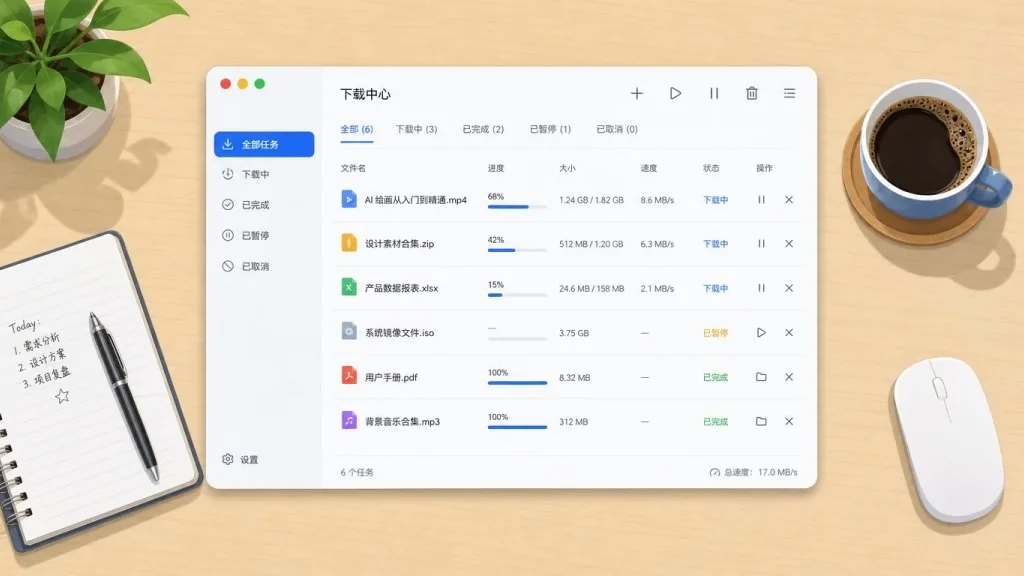
What if one tool took over all three kinds of downloads and put thread count, speed, progress and queue in a single clean interface? Varia, the subject of this post, is built for exactly that.

2. Project intro: in one sentence
Varia is an open source download manager built on GTK4 / Libadwaita — essentially a graphical front end for aria2 and yt-dlp. It folds ordinary file downloads, torrents and video/audio stream grabbing into one native Linux / Windows app, with an experimental macOS build and Firefox / Chrome browser extensions.
Core keywords: cross-platform, native GTK4, aria2-driven, yt-dlp integration, MPL 2.0 open source. The repo lives at giantpinkrobots/varia, has passed 1.8K GitHub stars, and the latest release is v2026.8.5-1.
3. Core features in depth
1. One entry point for every protocol
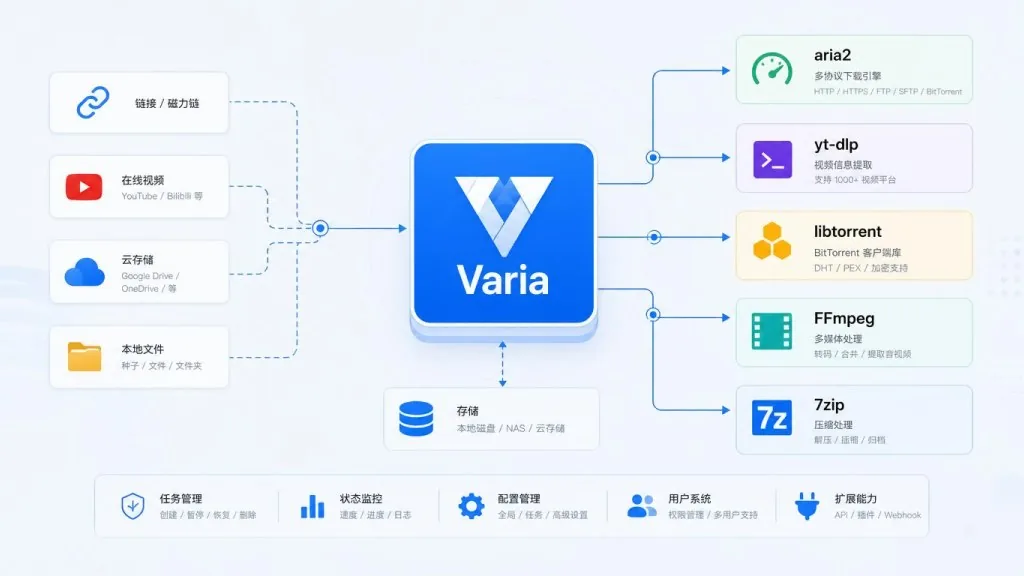
Varia handles HTTP / HTTPS / FTP / SFTP / magnet links / torrent files / video stream parsing. Under the hood it calls aria2 for HTTP and BitTorrent, and yt-dlp for YouTube, Bilibili, Twitter and thousands of other video sites. Paste a link into the interface and Varia detects the type and picks the right backend — no manual switching.
2. Batch queue and segment management
The download panel runs multiple tasks in parallel, lets you pause, resume and reprioritize individual jobs, and shows progress per segment — all powered by aria2's multi-threaded chunking. Paired with 7zip and FFmpeg, Varia can also auto-extract archives and transcode audio/video once a download finishes.
3. Browser extensions that take over in one click
Official Firefox and Chrome extensions let you right-click a link on a page and send it to the Varia queue. That sidesteps every limit of the browser's built-in downloader while keeping aria2's resumption and multi-threading.
4. Cross-platform packaging and system integration
On Linux the main channel is Flatpak (official Flathub source), alongside Snap, AUR and AppImage; on Windows there's an installer with built-in auto-update and a portable build; on macOS there are DMGs for both Apple Silicon and Intel (experimental). System tray, desktop notifications and auto-shutdown when downloads finish are all covered.
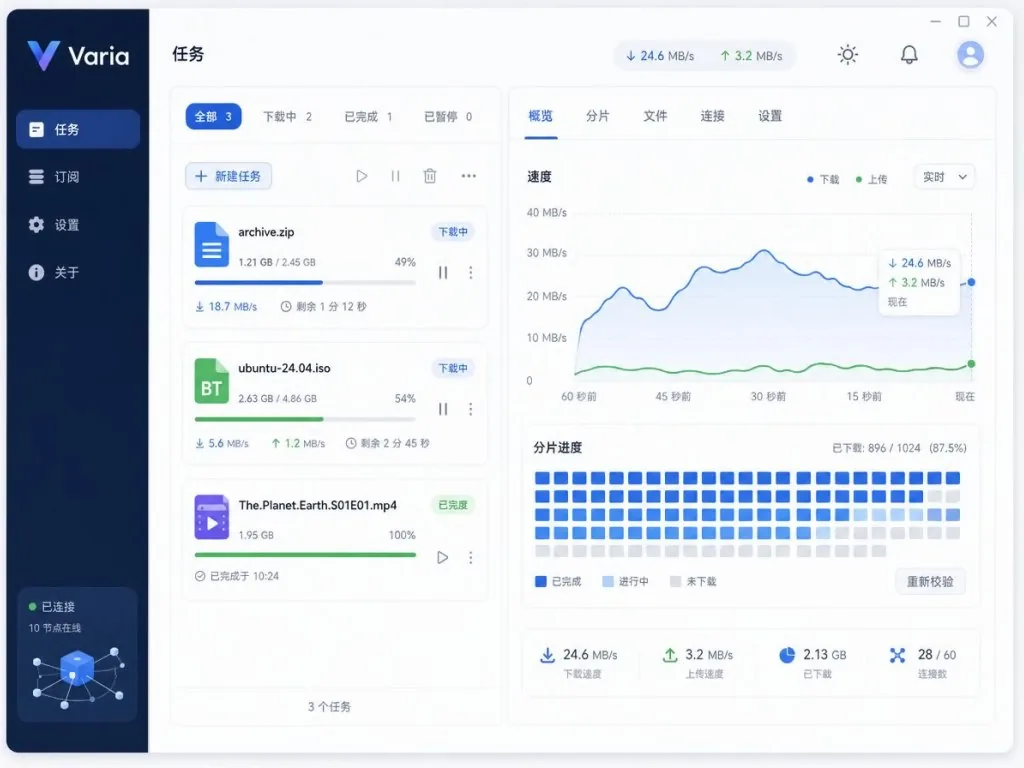
4. Technical highlights and performance numbers
On the stack side, Varia chooses Python + GTK4 + Libadwaita: GTK4 guarantees a native look on Linux, Libadwaita makes the interface follow the GNOME HIG automatically, aria2p acts as the Python binding that drives the aria2 backend, libtorrent's Python bindings handle torrent jobs, and yt-dlp maintains the huge list of site extractors.
On performance, aria2 supports up to 16 segments per task and up to 16x bandwidth utilization, which is a clear speedup over the browser's built-in downloader; torrent jobs use libtorrent's DHT, PEX and encryption protocols, seeding more efficiently than most lightweight clients.
On i18n, Varia is wired into Weblate and the translation status bar already shows several languages lit up. The license is Mozilla Public License 2.0 — friendly to closed-source distribution, but modifications must be published.
5. Where it fits, and who it's for
- Everyday multi-source downloaders: people who regularly pull plain files, torrents and video courses at the same time, with one interface for every job.
- Linux natives: GNOME users who care about GTK4 aesthetics — Varia's Libadwaita styling blends into the system almost seamlessly.
- Self-hosted / NAS users: remote downloads and auto-shutdown afterwards suit a small server.
- Who should skip it: light users who occasionally grab a small file don't need the hassle; anyone who needs a stable macOS build has to accept experimental status; gearheads who want the full aria2 command-line feature set should still use aria2c directly.
6. How it compares
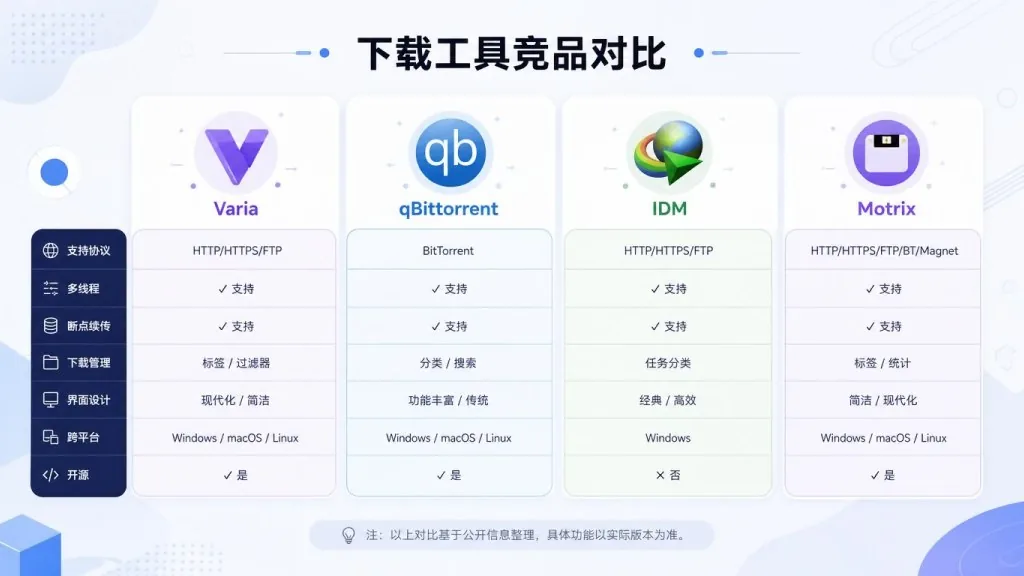
| Tool | Download types | Interface | Platforms | Edge |
|---|---|---|---|---|
| Varia | Files + BT + video | Native GTK4 GUI | Linux / Win / macOS (experimental) | All three needs unified + yt-dlp integration |
| qBittorrent | BT first, weak HTTP | Qt GUI | All platforms | Deeper BT features, but no video grabbing |
| IDM (Windows) | Strong HTTP / FTP | Closed-source GUI | Windows only | Commercial, no cross-platform, no open source |
| Motrix | Files + BT | Electron GUI | All platforms | Also aria2-based, but bulky and less native |
By comparison, Varia's differentiation is "native, lightweight, and it folds yt-dlp's video grabbing in along the way" — the blind spot neither Motrix nor qBittorrent covers.
7. Getting started fast
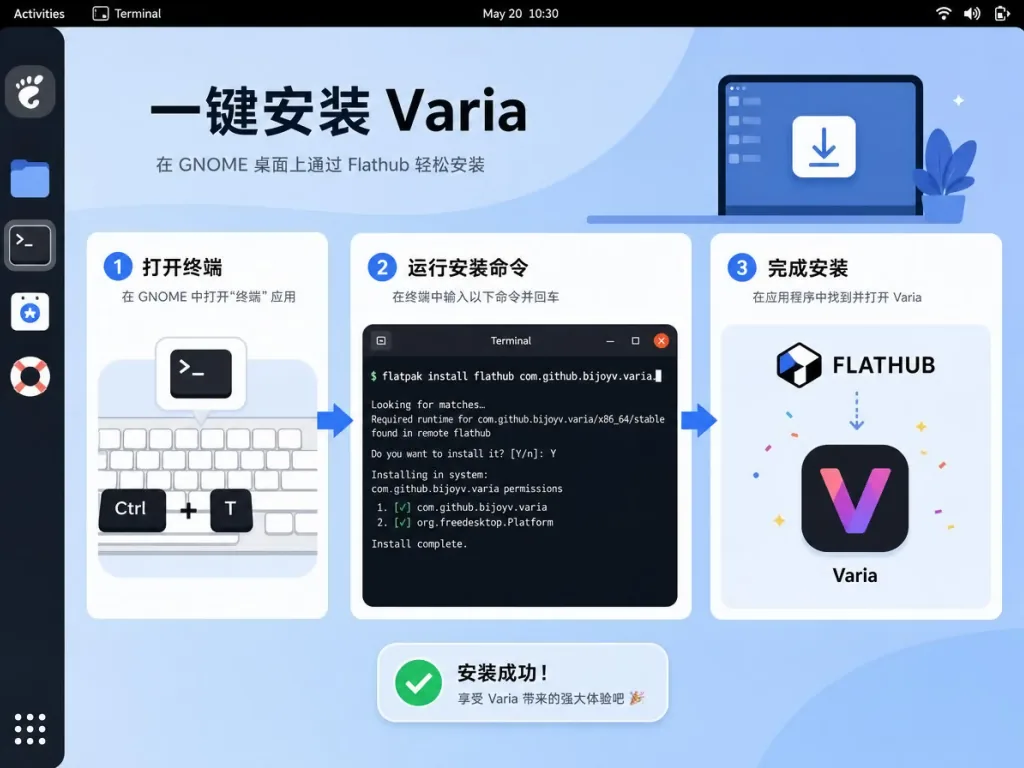
Linux (Flatpak recommended):
flatpak install flathub io.github.giantpinkrobots.varia
Enable "shut down when downloads finish":
sudo snap connect varia:shutdown # only needed for the Snap install
Windows: grab varia-windows-setup-amd64.exe from the Releases page; the installer ships with auto-update. For portable use, download the zip build.
macOS: pick the DMG matching your chip from Releases. Experimental status means some features may not be fully stable.
One upgrade worth making: right after installing, add Varia Integrator from your browser's extension store so you can right-click a link and send the job over. If you want finer-grained aria2 settings, edit ~/.config/aria2/aria2.conf by hand to tune connection count, encryption and other parameters.
8. Wrap-up and what to do next
Varia stuffs three previously fragmented jobs — file downloads, BitTorrent and video grabbing — into one clean, native, lightweight GTK4 app. It isn't a replacement for aria2; it's a usable skin and a single entry point on top of aria2 and yt-dlp.
If you're tired of switching between the browser, qBittorrent and the command line, spend ten minutes installing Varia and try the "paste once, one interface, every download" workflow.
- Project page: https://giantpinkrobots.github.io/varia/
- GitHub repo: https://github.com/giantpinkrobots/varia
- Translation contributions: https://hosted.weblate.org/engage/varia/
The one-line pitch: install Varia, and your download manager becomes the only one you need.
#varia #Varia #giantpinkrobots #AIVideoEditing #ScriptedVideo #TalkingHeadVideo #OpenSource #GitHub