
1. Opening: why you need this tool
Your music folder holds 300GB of local tracks and your playlists are scattered across drives; to hear one new song you search Deezer, switch to Spotify to compare, open spotDL to copy the link and download, wait for it to land in the library, then open Navidrome to play — 15 minutes every single time. That's before counting the download progress-bar anxiety and the mess of a local library that doesn't line up with the online one.
The sharper pain: you're jumping between apps, and none of them answers "do I already own this track?" Self-hosting players don't solve finding music; streaming services don't solve owning it. That split experience is what Reverb wants to end.
2. In one sentence: what this project is
Reverb is a Go + React self-hosted music app that pulls your local library, online catalog search, one-click downloads and web playback into a single web UI. Core keywords: self-hosted / unified search / one-click spotDL / single-binary deployment. The stack is Go 1.26 + React 19 + Docker, licensed AGPL-3.0, with 39 GitHub stars — early, but with a clear architecture.
3. Core features in depth
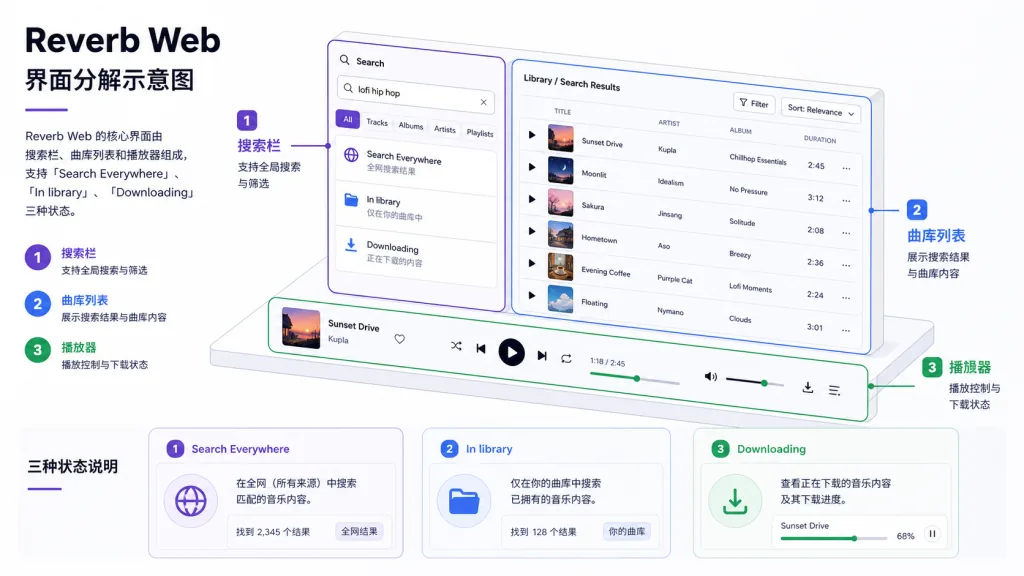
1. Search Everywhere: real-time search across local and online
One search box covers your local Subsonic/Navidrome library and online sources (Deezer works with no key, Spotify is optional). Results stream back over SSE, each source filling in as soon as it finishes, without waiting for all of them. Each row is labeled "in library" or "needs download", matched on ISRC + metadata, which hits far more often than plain text search.
2. One-click downloads + live WebSocket progress
Missing tracks download through the built-in spotDL, progress pushes back live over WebSocket, and when a download finishes the library is rescanned and "needs download" flips to "playable" in place. The downloader supports a configurable concurrency (REVERB_DOWNLOAD_WORKERS, 1–4), YouTube auth cookies, automatic cooldown and retry to dodge rate limits and bot detection.
3. Embedded web player
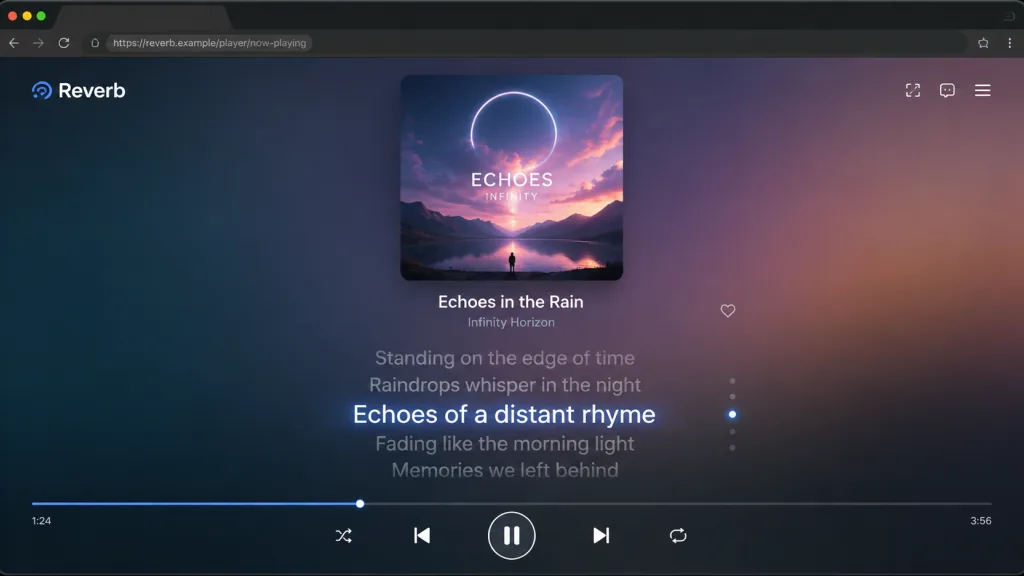
The React 19 SPA supports queues, shuffle, repeat-one, seek and keyboard shortcuts. Lyrics sync from local LRC files or LRCLIB online, can go fullscreen and are clickable to seek — close to mainstream streaming apps. Installed as a PWA, it can also take over OS media keys and lock-screen controls.
4. Adapter architecture + single-binary deployment
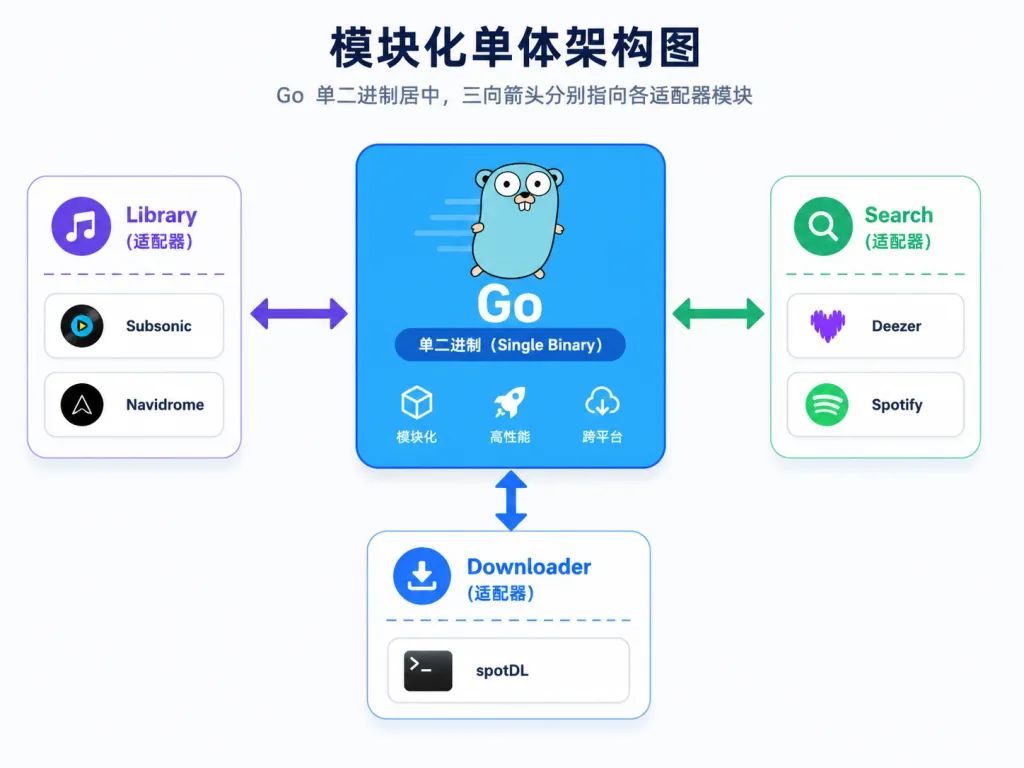
The backend is a modular monolith in Go with three clean adapter seams: library (Subsonic/Navidrome), search (Deezer / Spotify) and downloader (spotDL), all registered explicitly in the composition root with no init() side effects. The SPA is embedded into the binary at compile time via -tags prod, so the final artifact is one static file plus one Docker image (Python3 + ffmpeg + a pinned spotDL) — no extra containers, no extra config.
4. Technical highlights and performance
- Single-binary modular monolith: a Go service plus an embedded React/TypeScript SPA, all dependencies in one Docker image; the HTTP API is described in OpenAPI and served at
/api/v1/openapi.yaml. - Event-bus driven: an internal
EventBusbacks both the WebSocket and the download manager, keeping state and event flow clear. - Pluggable adapters: library, search and download backends are all configured in Settings inside the app, with a setup wizard on first launch.
- Low deployment barrier: default port 8090, default download and library directory
/music, SQLite on a managed volume; concurrent downloads are adjustable from 1 to 4 and out-of-range values are rejected. - Ecosystem compatible: it bundles Navidrome by default but works with any Subsonic-compatible server; Spotify connects via Client ID/Secret, Deezer needs no key.
5. Who it's for
- Self-hosted music enthusiasts: already running Navidrome or Subsonic and wanting "find + download" in the same web panel, without spotDL on the command line and external player switching.
- People managing multi-source libraries: mixing local tracks with online search and wanting to see at a glance whether they already own something.
- One-image deployment fans: no multi-container maintenance, no nginx config, just one Compose file and it's up.
- Who it's not for: pure streaming users (just use Spotify), and anyone without legal download rights who wants to bulk-pull music (respect local law and each service's ToS).
6. Comparison
| Capability | Reverb | Navidrome / Subsonic | spotDL CLI | Plex + Tidal | Lidarr | Funkwhale |
|---|---|---|---|---|---|---|
| Local library management | ✓ (bundled Navidrome) | ✓ | ✗ | ✓ | ✗ | ✓ |
| Unified search (local + online) | ✓ | ✗ | ✗ | Partial | ✗ | ✗ |
| One-click download to local | ✓ | ✗ | ✓ | ✗ | ✓ (auto-fill) | ✗ |
| Single binary / single image | ✓ | ✓ (library only) | ✗ | ✗ | ✗ | ✓ |
| Built-in web player | ✓ | ✓ | ✗ | ✓ | ✗ | ✓ |
| Live download progress push | ✓ (WebSocket) | ✗ | ✗ (CLI) | ✗ | ✓ | ✗ |
Reverb's differentiation is making library + search + download + playback one web panel, instead of leaving you to stitch a workflow together across Navidrome, spotDL and Spotify.
7. Getting started fast
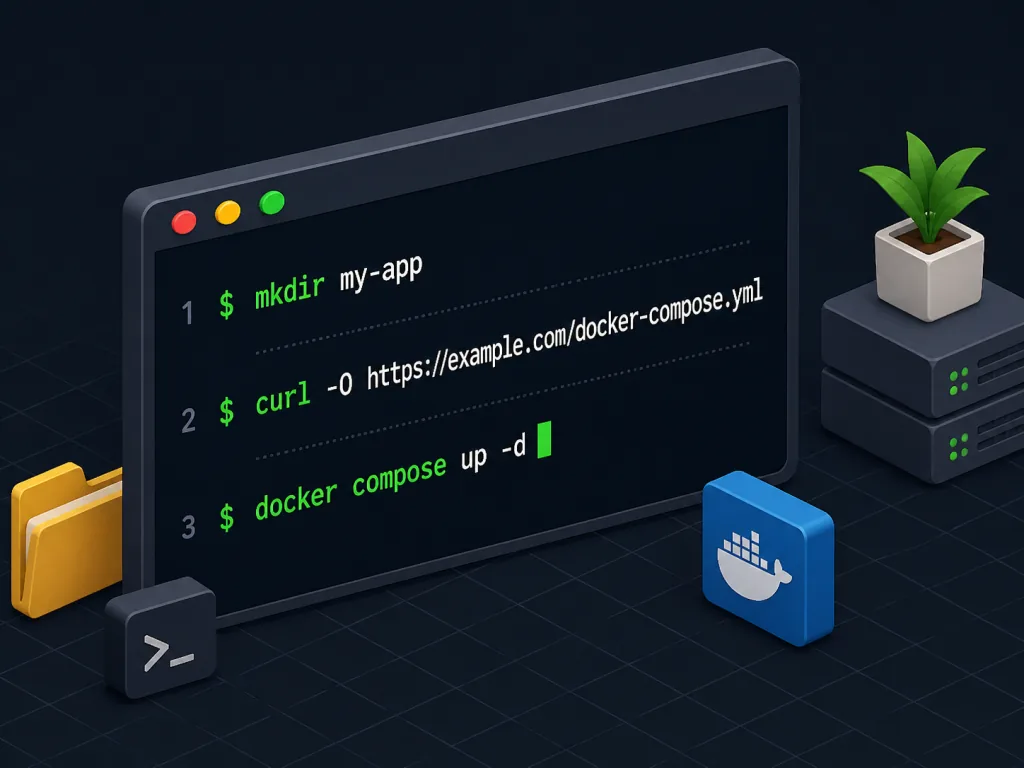
One Compose file to start, no need to clone the repo:
mkdir reverb && cd reverb
curl -O https://raw.githubusercontent.com/maxjb-xyz/reverb/main/docker-compose.yml
mkdir music
docker compose up -d
Once it's up, visit http://localhost:8090 and finish the first-run wizard. ./music serves as both download and library directory, and the database lives on a managed volume.
Advanced configuration: copy .env.example to .env and uncomment what you need — custom port (REVERB_PORT), SQLite path (REVERB_DB), concurrent downloads (REVERB_DOWNLOAD_WORKERS=2), Spotify credentials (REVERB_SPOTIFY_CLIENT_ID / REVERB_SPOTIFY_CLIENT_SECRET), seeded admin password on first launch (REVERB_ADMIN_PASSWORD, uncomment it right away on first boot). To mount an existing music folder into the container, map the directory to /music; to use your own Navidrome, go to Settings → Library backend and switch to External Subsonic, no container changes needed.
If you expose it to the internet, put a TLS reverse proxy (Caddy / nginx / Traefik) in front and make sure it covers the X-Forwarded-Proto header — docs/deployment.md in the repo has drop-in config snippets.
8. Wrap-up and what to do next
Reverb squeezes the four high-frequency self-hosted music actions — search, find, download, play — into one web panel backed by a Go single binary and a React SPA, with pluggable adapters keeping it extensible. For anyone tired of the "Navidrome + spotDL + Spotify" trio, it's a unified frontend worth trying.
Before you start: only download tracks you own or are legally entitled to obtain; spotDL is a third-party tool Reverb orchestrates, and how you use it is on you; remove REVERB_ADMIN_PASSWORD from .env as soon as the first-run setup is done.
- Repo: https://github.com/maxjb-xyz/reverb
- Deployment docs:
docs/deployment.mdin the repo - API description:
/api/v1/openapi.yamlat runtime
Run docker compose up -d now and get finding, downloading and playing into a single tab in 10 minutes.