
1. Opening: still stuck on this?
You finish a meaty article and the illustrations turn out to be the hardest part. You run a prompt through Midjourney for a "futuristic tech illustration" and get a moody decoration that explains nothing. You want a chart with data labels, and it either comes back with a layout nobody can read or the Chinese text smears into a blob. You want a PKCE flow diagram, a Kirkpatrick model diagram, a Panopticon metaphor — and for niche concepts you can't even find accurate reference material. In the end you drop a "pretty but useless" image into the article, and readers scroll straight past it.
That missing mid-article image is quietly destroying your content's reach.

2. Positioning: the problem it solves
Guizang's material illustration skill (guizang-material-illustration) is an illustration Skill built for agent environments such as Claude Code and Codex, and its whole pitch is "text, data and labels inside the image". The repo has 997 stars and is the official companion to guizang-social-card-skill: this one handles the central illustration inside a card, the other handles the outer layout of the whole card.
It does three things:
- Explanatory diagrams: turn abstract concepts, processes, mechanisms and system relationships into labelled visuals.
- Chart beautification: pull the meaning out of a screenshot or raw data and regenerate a material-style chart that travels better.
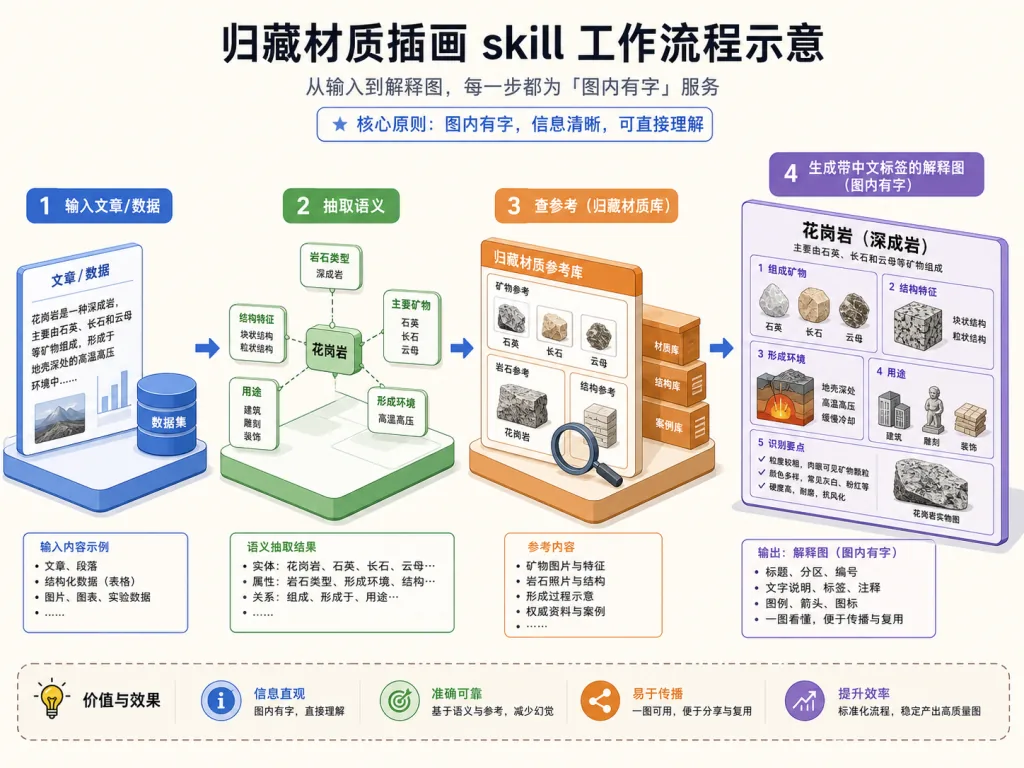
- Reference-assisted generation: for niche concepts, brands, models, scientific instruments or historical objects, look up reference facts and images first, then render them in a unified Guizang material style.
3. Core features in depth
1. Text inside the image: no more decoration with no words
The headline selling point of this Skill is that Chinese text can actually live inside the image. Most AI illustration tools treat text as a nuisance, so you get either pure visuals or text smeared into a blob. Guizang's approach writes short labels, arrow annotations and data callouts directly into the generation prompt so they land in place, instead of being patched on afterwards.
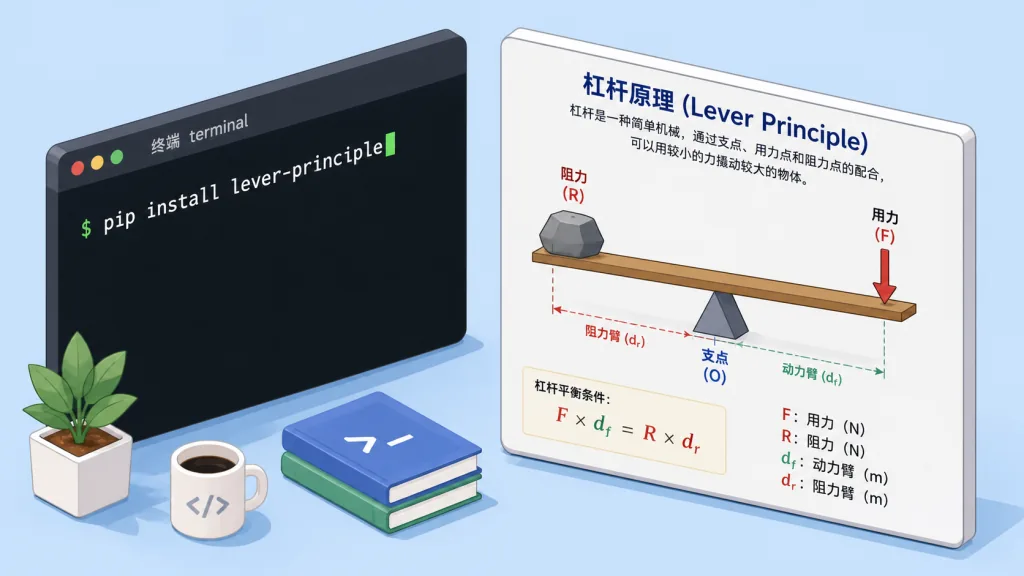
It ships with an assets/prompt-template.md template that teaches the agent how to write Chinese labels reliably. For a lever diagram, for example, it labels the fulcrum, the effort point, the resistance point and the lever arms outright, so even a primary-school kid gets it at a glance.
2. Semantic chart redrawing: a screenshot comes back transformed
The input can be a bad chart screenshot or a raw dataset. The agent first extracts chart type, title, both axes, units, category order, values, percentages and error bars, then regenerates a chart that is easier to circulate.
The key rule is "never invent data". Numbers, coordinates and units come first; style and material treatment come after. The end result is that the chart body can shrink while small scenes, icons, explanatory labels and visual emphasis move to the sides. The goal is comprehension, not reskinning the original.
3. Reference search: niche concepts still come out right
For subjects like PKCE, Andon, Zettelkasten, Kirkpatrick, the Panopticon, a model's logo or a piece of scientific equipment, reference search only answers three questions: what the thing is, which structures must not be drawn wrong, and which visual cues let the audience identify it instantly.
It copies no visual style, it only fills in facts. After the lookup it goes back into the unified Guizang material illustration style, which keeps niche concepts from turning into fake-science diagrams that look plausible and are wrong in every detail.
4. Scene coverage: from teaching to work reports
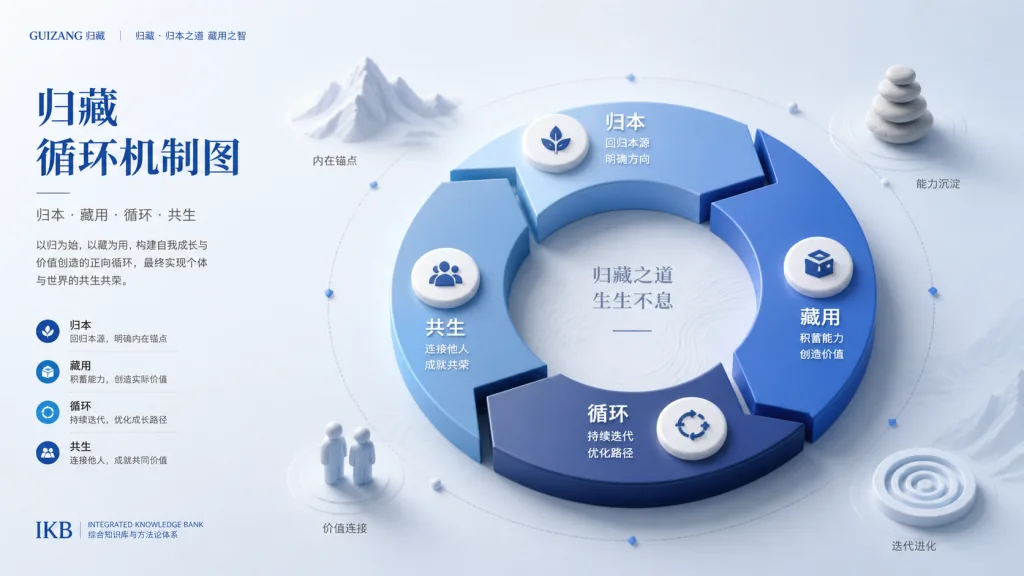
The supported diagram types are broad: concept breakdowns, flow diagrams, loop mechanism diagrams, comparisons, hierarchy diagrams, scenario explanations, scientific mechanism diagrams, humanities imagery, material-style charts (bar, line, Gantt, Sankey, heat map, funnel, cumulative flow) and reference-assisted images. That covers article illustrations, product mechanism diagrams, work reports, teaching material, humanities arguments and the central image of a Xiaohongshu card.
4. Technical highlights and performance numbers
guizang-material-illustration puts its design effort into engineering constraints:
- Standardised visual spec:
references/visual-style.mddefines the Guizang material illustration style, ratios, safe areas and theme colours — IKB blue by default, with lemon yellow, lemon green, safety orange and graphite black as extension themes. - Prompt pattern library:
references/prompt-patterns.mdcaptures prompt structures for loops, processes, hubs, comparisons and hierarchies so the agent can reuse them consistently. - QA-first mechanism:
references/qa-checklist.mdrequires a pre-delivery check of Chinese labels, data, cropping, reference accuracy and readability at social-card size. - Automatic type routing:
references/use-cases-and-routing.mdhas the agent decide on its own whether it is a flow diagram, mechanism diagram, chart, humanities scene or teaching diagram, so users never have to pick a mode. - Chart semantic extraction spec:
references/chart-beautify.mddefines the data-first redrawing flow, making sure data is protected before style is discussed.
On ecosystem compatibility it supports Claude Code and Codex natively, installs with a single npx skills add command, and works in any agent environment with image generation capability.
5. Who it is for
Good fit: technical bloggers, product managers, content operators, teachers and students, researchers, independent media creators. Anyone who needs abstract concepts, processes or data turned into a diagram that explains itself.
Not a fit: full Xiaohongshu card layout (use the Social Card Skill), full PPT deck design (use the PPT Skill), real photo retouching, portrait photography, long-form poster layout, or publication-grade scientific figures.
Three typical scenarios:
- Article illustration: break a long piece into 1–4 core concepts and generate one explanatory diagram for each.
- Niche technical explanation: for abstract ideas like PKCE, Kirkpatrick or Zettelkasten, look up references first, then build the flow diagram.
- Weekly report visuals: map progress, risks, decisions and next week into a four-quadrant or flow visual instead of a wall of text.
6. How it compares
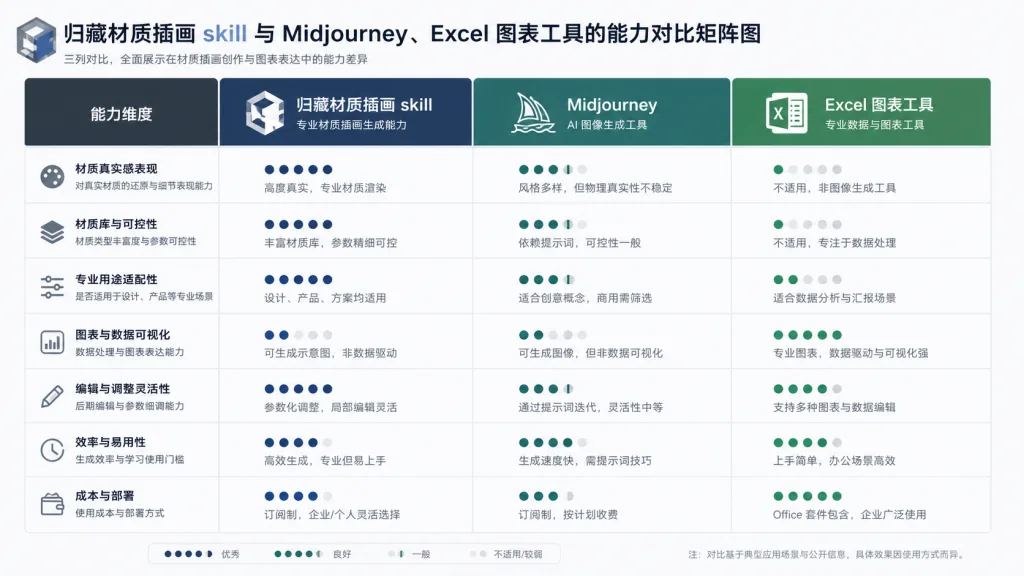
| Dimension | Guizang material illustration skill | Midjourney / Jimeng direct generation | Generic chart tools (Excel / Flourish) |
|---|---|---|---|
| Chinese labels inside the image | Native and stable | Text smears, needs post-editing | Supported but visually flat |
| Reference search for niche concepts | Built-in reference-gathering flow | You look it up yourself | Not supported |
| Material-style 3D look | Unified Swiss editorial + 3D material | Random style | Mostly flat |
| Semantic chart redrawing | Extract data → regenerate | Not supported | Manual editing required |
| Integration with outer card | Direct hook into Social Card Skill | Manual import | Manual export |
Compared with generic image generators, Guizang treats the explanatory diagram as its own artifact class: stable labels, accurate data, solid references, consistent style.
7. Getting started fast
Install with one line:
npx skills add https://github.com/op7418/guizang-material-illustration --skill guizang-material-illustration
Or hand the install instruction straight to your agent:
Install
guizang-material-illustrationfor me. Clone the repo to~/.claude/skills/guizang-material-illustration, and when it's done check thatSKILL.md,assets/andreferences/are present.
Minimal working example:
Use Guizang's material illustration skill to turn this product description into a mechanism diagram with Chinese labels.
Advanced usage:
- "Pick three core concepts from this article and generate one labelled illustration for each."
- "Redraw this bar chart in Guizang's material style; don't change the data or axes."
- "Make a lever diagram for this primary-school science lesson, labelling the fulcrum, effort point, resistance point and lever arms."
- "Generate the central illustration first, then hand it to the social media card Skill for a 3:4 Xiaohongshu card."
8. Takeaways and next steps
Guizang's material illustration skill turns the mid-article image from decoration into an explanation tool: text inside the picture, accurate data, real references, consistent style, and a clean handoff to the Social Card Skill. It suits creators whose content is already good and is being held back by one useless illustration.
Act now:
- Repo: https://github.com/op7418/guizang-material-illustration
- Companion card project: https://github.com/op7418/guizang-social-card-skill
- Detailed rules live in
SKILL.mdandreferences/*.mdin the repo.
One-line verdict: when your image has to explain something rather than just look nice, Guizang's material illustration skill is the most engineered option among Chinese AI illustration tools today.