Choose a title (pick 1 of 3)
watermarks-remover: can't scrub AI traces clean? This 22K-star project strips them in one shot
watermarks-remover in practice: from a 5-minute deploy to AI watermark removal across 20+ file formats
Before you installed this 22K-star tool, you had no idea every AI draft handed to you came with a fingerprint
watermarks-remover: stripping AI traces, and why this 22K-star privacy tool actually holds up
1. Intro: still losing sleep over AI traces?
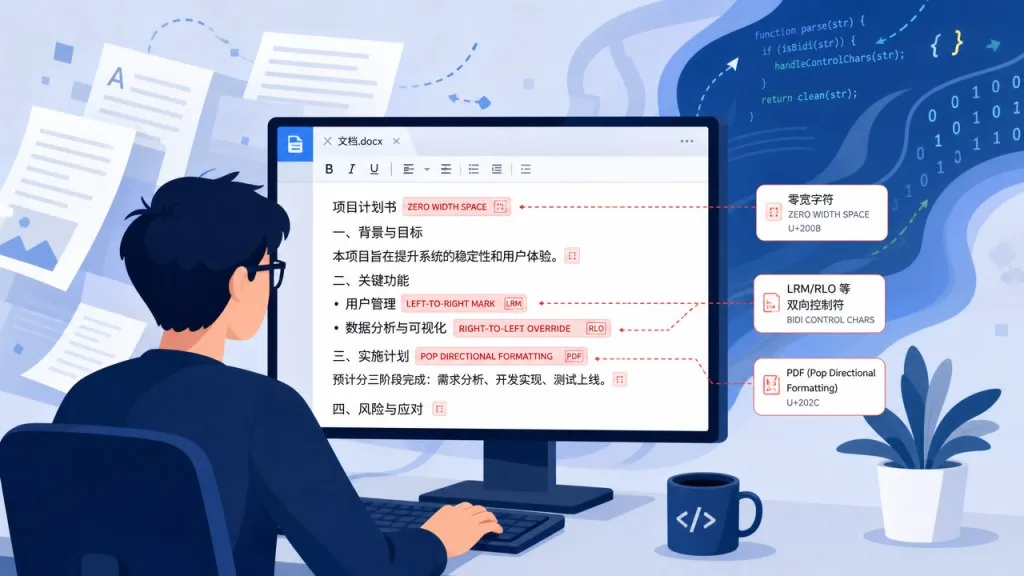
You just finished an article with AI. You paste it into your own blog — and the text is speckled with odd zero-width characters, the document properties carry Claude's provenance metadata, and the photo's EXIF says "Generated by Gemini." You can see these digital fingerprints; your readers can't. But they can restore the origin with 100% accuracy. In one recent audit, the team pinned the generator to a specific model using only three samples — that's what makes AI watermarking scary. It was meant for provenance, but once "you own the content," it becomes a source of privacy leaks and style contamination.
2. What the project is: which problem it solves
guillaumemeyer/watermarks-remover is an AI-trace cleaning suite for "content you own." It has 22,963 GitHub stars, and the latest version is v0.7.0. It consists of two layers:
- Skill (agent skill): a pure Markdown instruction set. The AI agent calls the backend service over HTTP, so the host machine needs no Python dependencies.
- Service (HTTP service): implemented purely on the Python 3.10+ standard library, with no third-party dependencies. It exposes REST endpoints such as
/inspect,/clean,/detectand/watermark.
Coverage at the core: five major vendor/ecosystem families — Claude, Gemini/SynthID-Text, OpenAI provenance, open-LLM Kirchenbauer green-list, keyed-Gumbel/EXP (Aaronson). It handles more than twenty formats spanning text, images, PDF, DOCX, EPUB, HTML, Markdown, MP4, WAV and FLAC.
3. Core features, in depth
1. Two-layer text watermark stripping (Layer A + Layer B)
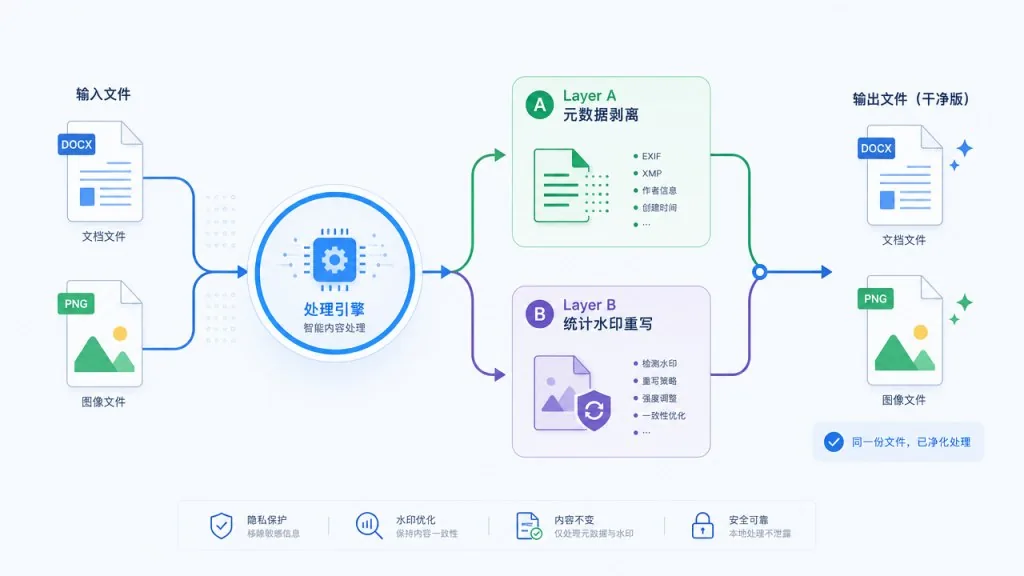
Text cleaning runs in two layers:
- Layer A handles the invisible carriers behind visible watermarks — zero-width Unicode characters (ZWSP, ZWNJ), alternative spaces, bidirectional control characters (Bidi), Tag characters and so on. A deterministic Python script does this.
- Layer B targets statistical watermarks (such as the green-list bias left behind by token sampling). It works through agent rewriting plus an optional
rewrite_text.pyhook, and supports ordered strategy combinations likeparaphrase@0.8andmlm@0.2.
This "clear the carrier first, then break the statistics" design covers all four major systems: Claude, SynthID-Text, OpenAI and open-LLM.
2. Image and multimedia watermark stripping
C2PA / EXIF / XMP / document properties are where image watermarks cluster. A single clean_file.py command handles nine image formats: PNG, JPEG, WebP, AVIF, HEIC, BMP, GIF, TIFF and SVG. For PDFs it automatically dispatches exiftool and qpdf for a structural rebuild — deleting metadata isn't enough; you have to rebuild the PDF to actually erase the provenance traces.
For pixel-domain SynthID-style watermarks (StegaStamp, Tree-Ring and StableSignature included), an optional CtrlRegen backend (ControlNet + DINOv2 IP-Adapter) offers a deep-clean path — but it's built locally only and never published.
3. Smart format detection and refusing "fake text"
Early versions had a hidden risk: decoding a .docx as UTF-8 text produced garbage bytes. The new version introduces a classify() function that checks the magic number first, then decides:
- For binary files in unknown formats, it refuses to clean automatically (exit code 2, no output produced).
- To force a scan, add
--as textor--force-textexplicitly. - Text tools that hit a ZIP container (DOCX, ODT) error out immediately and point you to the right
clean_file.py.
Think of it as a safety valve on the cleaner, so a wrong call can't destroy the original file.
4. AI-agent-friendly Hook and Plugin mechanics
A Skill is an "instruction": the model decides whether to call it. A Hook is an "executor": it fires on every matching Tool Call. The plugin registers a PostToolUse hook on Write|Edit|MultiEdit|NotebookEdit:
checkmode (default): reports traces, leaves the file alone, lets the model decide whether to clean.cleanmode: strips in place and uses a sibling temp file plus a diff swap, so files that were already clean don't get their mtime touched.
Claude Code users can install it with two commands:
/plugin marketplace add guillaumemeyer/watermarks-remover
/plugin install watermarks-remover@watermarks-remover
Cursor, Grok, Cowork and claude.ai cloud sessions all have their own install paths.
4. Technical highlights and performance data
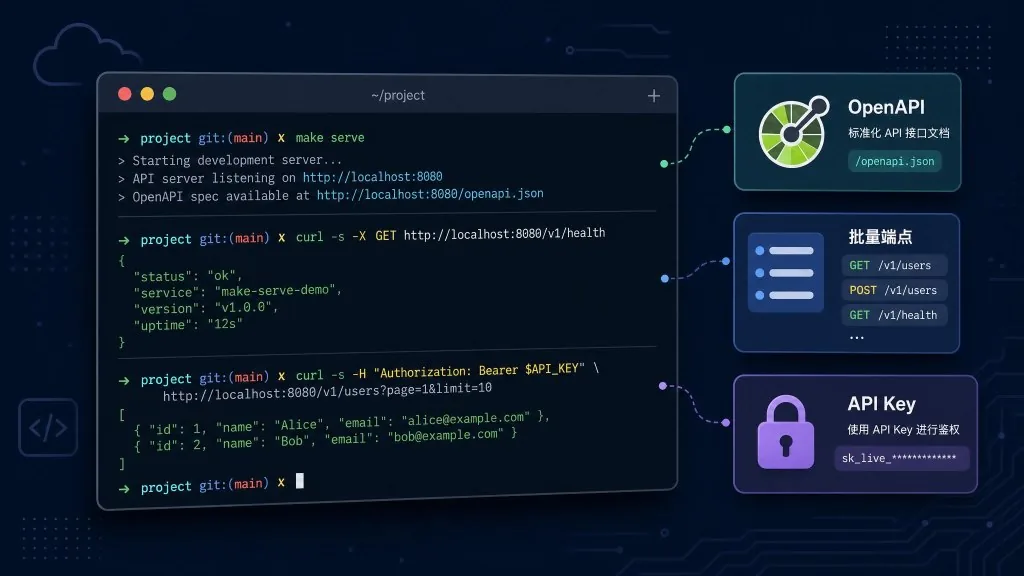
- Zero-dependency core: the HTTP service uses only the Python 3.10+ standard library; one
make serveand it's running on127.0.0.1:8765. - Dynamic OpenAPI:
/openapi.jsonis a 3.0.3 contract generated at runtime, so frontend integration needs no hand-written docs. - Batch endpoints:
/inspect/batch,/clean/batch,/detect/batchand/watermark/batchprocess up to 50 files at a time, and one failure doesn't take down the batch. - Fail-soft detectors: an unconfigured SynthID scorer, MARKLLM or keyed-Gumbel returns
available: falseinstead of blocking the main cleaning flow. - API key safety:
WATERMARKS_REWRITE_API_KEYis read from environment variables only, never placed in argv, so it can't leak through shell history. - Ecosystem compatibility: core / markllm / markdiffusion images are published to GHCR; CtrlRegen and the SynthID scorer are built locally only, for licensing reasons.
5. Use cases and who it's for
- Bloggers and editors: clean AI-assisted drafts and remove invisible pollution such as ZWSP, Bidi and zero-width ligatures.
- Designers and photographers: scrub C2PA / EXIF / XMP metadata from AI-generated images before delivering to clients.
- Legal and compliance teams: strip provenance metadata before archiving your own documents, so fingerprints can't leak.
- Heavy AI agent users: drop the Hook into Claude Code / Cursor and let every Write get audited automatically.
Who it's not for: people who want to "rewrite" someone else's work with it or dodge platform moderation — the project explicitly limits its scope to "content you own."
6. Competitor comparison
| Dimension | watermarks-remover | Generic EXIF tools (exiftool etc.) | Academic watermark research scripts (MarkLLM alone) |
|---|---|---|---|
| Text watermarks | Layer A + Layer B, two layers | Not covered | Layer B only, manual configuration |
| Image watermarks | Metadata + pixel domain (optional CtrlRegen) | Metadata only | None |
| HTTP interface | Full REST + OpenAPI | None | None |
| Agent integration | Skill + Hook + Plugin | None | None |
| Dependencies | Mostly standard library | System tools | transformers + model weights |
7. Getting started fast
Minimum viable path (text/metadata only):
git clone https://github.com/guillaumemeyer/watermarks-remover
cd watermarks-remover
make serve   # starts http://127.0.0.1:8765
In another terminal, run the cleaner:
SCRIPTS=service/scripts
python3 "$SCRIPTS/clean_file.py" draft.md -o draft.cleaned.md
python3 "$SCRIPTS/clean_file.py" photo.png -o photo.cleaned.png
Install into Claude Code (two commands):
/plugin marketplace add guillaumemeyer/watermarks-remover
/plugin install watermarks-remover@watermarks-remover
Going further: to enable Layer B text rewriting, configure the WATERMARKS_REWRITE_* variables in .env. For pixel-domain scoring, run make docker-synthid-build to bring up the wr-synthid-score sidecar.

8. Takeaways and next steps
The core value of watermarks-remover is that it turns AI watermark removal into infrastructure that is engineerable, auditable and pluggable — two-layer text stripping, twenty-plus formats, and native AI agent integration, all three done properly at once. For content creators, it gives you full control over your work's digital fingerprint; for heavy agent users, it turns every Write into an automatic audit.
- Repository: https://github.com/guillaumemeyer/watermarks-remover
- Latest release: v0.7.0 (pushed to GHCR in sync)
- Docs entry points:
skills/remove-ai-marks/SKILL.mdanddocs/
If you write with AI or run agents, those invisible traces are already there — you just haven't seen them yet. Install this, and at least you'll be able to.
#watermarks-remover #WatermarksRemover #guillaumemeyer #Frontend #WebDev #OpenSource #GitHub