
Title options (3 to choose from)
A data person's daily meltdown: a 100GB file freezes instantly? Dataset Viewer ended my download-and-unzip routine
Dataset Viewer: 100GB files open in a second, search in milliseconds — the data viewer built entirely by AI
Not one line of ETL, yet PB-scale previews just work: what makes Dataset Viewer so formidable
Dataset Viewer: 100GB files open in a second, and this AI-built data viewer has real substance
1. Intro: the same headache every data person repeats
Anyone who works with data has lived this moment of collapse: your boss drops an 80GB Parquet file on you and wants the outliers in one column within ten minutes; or product hands you a ZIP sitting in an S3 bucket with 300,000 images inside, waiting on a naming-convention audit. You open the local editor — it hangs. You start downloading — the disk turns red. You start unzipping — it hangs again. The whole loop costs half an hour at best, half a day at worst. That is the honest state of traditional data viewing tools: either no large-file support, or no remote protocols, or a mandatory full download before you can look at anything. Dataset Viewer, a project with 1.1k stars, rebuilt that entire chain and claims "second-level" response on 100GB+ files.

2. In one sentence: what this project is
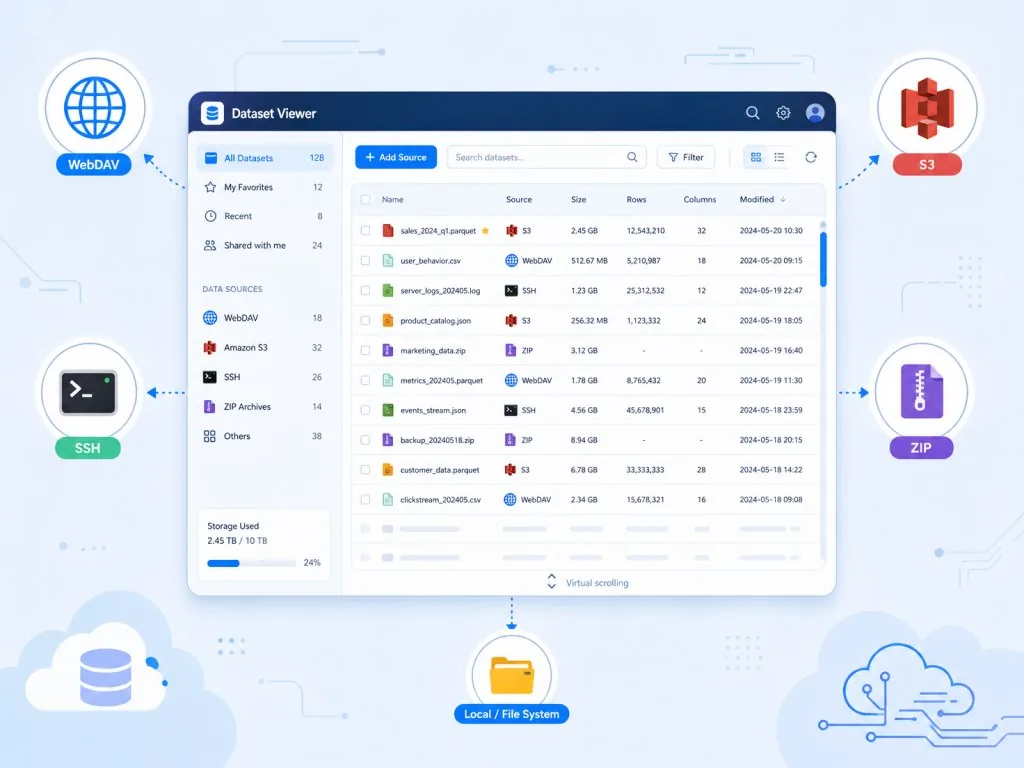
Dataset Viewer is a modern dataset viewer built on Tauri + React + TypeScript, with three keywords: streaming large-file loading, direct multi-protocol access, and fully AI-generated development. It supports WebDAV, SSH/SFTP, SMB, S3, local files, HuggingFace Hub and more, and opens Parquet, Excel, CSV, JSON, ZIP/TAR natively — no downloading, no unzipping, straight to preview. It covers Windows / macOS / Linux and is open source under MIT.
3. A deep look at the core features
1. Streaming rendering for 100GB+ files
A traditional editor loads the whole file into memory, and falls over at a few GB. Dataset Viewer uses virtual scrolling plus chunked loading, fetching only what the visible area needs. In a 100GB JSON file, scrolling to line 8,000,000 loads the data around line 8,000,000, and memory stays in the MB range the whole time. That means you can flip through giant logs or exports the way you scroll a web page.
2. Millisecond real-time search
For large-file search, the project implements real-time retrieval with highlighting — the official description is "millisecond search". It does not slow down linearly as files grow, because the underlying layer uses streaming indexing and incremental matching. Combined with highlighting, you can find a target field inside hundreds of thousands of JSON lines instantly, which is especially useful when debugging API responses or chasing log issues.
3. Archives read in place
ZIP/TAR files can be browsed without unzipping: click any entry and preview its contents. This is very friendly to dataset distribution: many public datasets are hosted as zips on HuggingFace or OSS, and the traditional route is download first, unzip second, which eats both disk and time. Dataset Viewer simply removes those two steps.
4. Broad protocol and format coverage
On protocols: WebDAV, SSH/SFTP, SMB/CIFS, S3, Local, HuggingFace Hub. On formats: Parquet (optimized), Excel, CSV, ODS, JSON, YAML, XML, plus syntax highlighting for JS/Python/Java/C++/Rust/Go and other source files. It also handles Markdown, Word, PPT, PDF, images, video, audio, and even 3D point clouds.
4. Technical highlights and performance data
The project's most eye-catching label is "100% AI-Generated" — the entire codebase was produced by AI agents working together, which is an interesting engineering experiment in itself. On the stack, Tauri (Rust backend) handles native performance and cross-platform packaging, React drives the UI, and TypeScript provides type safety. Architecturally, the core is the combination of streaming chunked transfer and virtual scrolling: the network layer only downloads the necessary chunks, the UI layer only renders visible rows, and million-row tables and GB-scale logs both become usable. There is also a @dataset-viewer/sdk package for plugin development, with community extensions such as CAD Viewer and Sketch Viewer already out — the ecosystem is beginning to take shape.

5. Where it fits and who it's for
Data scientists: everyday exploration of large Parquet/CSV sets, and with HuggingFace Hub direct access you can skip the download script. Ops and SRE: log into a server over SSH/SFTP and search logs on the spot instead of pulling them local. AI training engineers: browse training-sample archives on S3 or OSS and quickly verify data integrity. Algorithm engineers: inspect multimedia datasets such as point clouds and video.
Where it fits less well: pure mobile viewing (this is a desktop app), ultra-light small files (a VS Code extension is enough), and workflows that need complex data writing and editing (the project is built around read-only browsing).
6. Competitor comparison
| Dimension | Dataset Viewer | VS Code + plugins | Jupyter Notebook |
|---|---|---|---|
| Large-file support | 100GB+ streaming | usually <1GB | memory-bound |
| Remote protocols | WebDAV/SSH/S3/SMB/HF | needs extension setup | needs code to connect |
| Archive preview | reads ZIP/TAR directly | not supported | must unzip |
| Launch mode | desktop app | editor | browser / service |
| Learning curve | none, GUI-based | medium | high |
Compared with traditional options, Dataset Viewer's core advantage is "all in one place": no script to connect to S3, no pile of plugins, download and use.
7. How to get started quickly
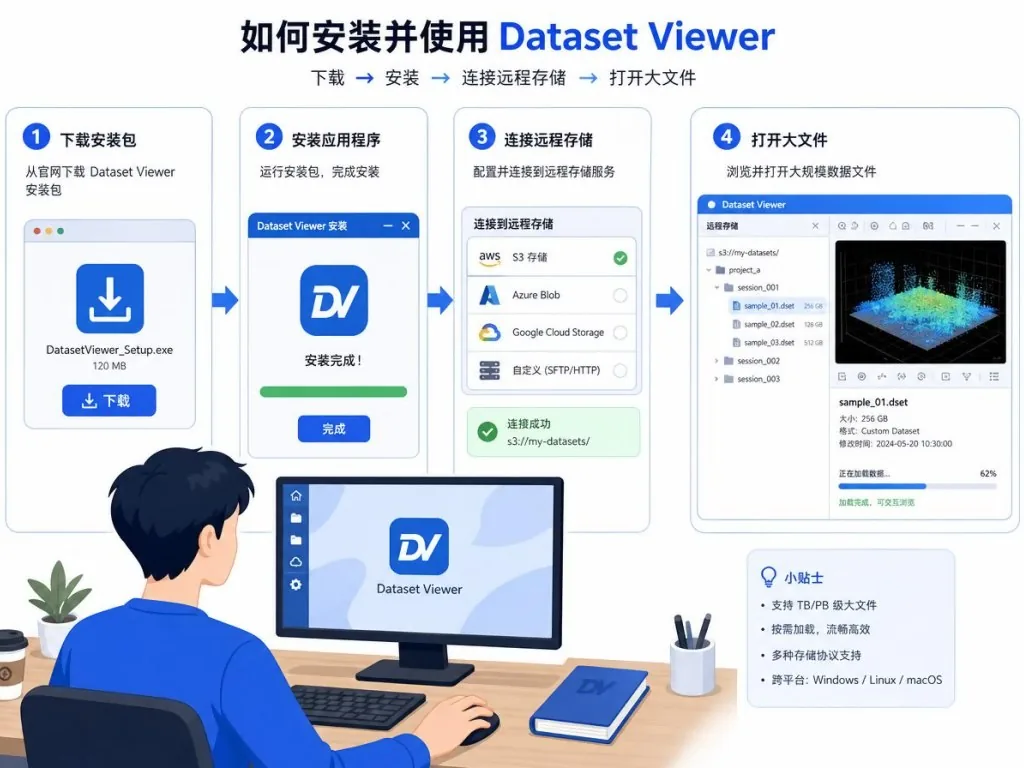
- Go to the Releases page and download the installer for your platform (Windows / macOS / Linux all available).
- Install and launch, then click "New connection" in the top left and pick a protocol as needed (Local for local files, AK/SK for S3, a token for HuggingFace).
- Browse to the target file and double-click to open it — large files enter streaming mode automatically, and the search box takes keywords directly.
- Want to extend it? Look at the example plugins under
packages/and build a custom format viewer with@dataset-viewer/sdk.
I'd suggest starting with a log file over 10GB to feel the streaming scroll, then connecting a public HuggingFace dataset to try direct remote access.
8. Summary and what to do next
Dataset Viewer is a genuinely usable tool with hardcore performance, written by AI, and it covers the high-frequency pain points of everyday large-data viewing: many remote protocols, instant large-file opening, in-place archive reading, millisecond search. For anyone who deals with data daily, this is a desktop app that can directly replace your scripts plus editor. If you are still being tortured by the download-unzip-open triplet, install it and see.
- Project: https://github.com/stardustai/dataset-viewer
- Docs: https://stardustai.github.io/dataset-viewer
- Plugin SDK: https://www.npmjs.com/package/@dataset-viewer/sdk
Looking at data was never supposed to be this much work.
#dataset-viewer #DatasetViewer #stardustai #AIAgents #AIWorkflow #Automation #OpenSource #GitHub