
1. Opening: why you need this
Which AI developer hasn't been tortured by API fragmentation? Want GPT? Go apply for a key at OpenAI. Want Gemini? Learn a different calling convention. Want DeepSeek? Adapt to yet another SDK. Every vendor brings its own auth, its own rate limits and its own error codes — and just writing the adapter layer eats half the project schedule.
The more practical problem: indie developers, students and independent researchers work on limited budgets and can't afford to run every paid API. But the moment they want to compare how different models perform, they end up farming free tiers one vendor at a time, and account management costs explode.
There's a 66.5K-star project on GitHub that solves this in one shot — a single unified interface for GPT, Claude, Gemini, DeepSeek, Kimi, Llama and dozens of other models, plus a local GUI, an OpenAI-compatible API, image/audio/video generation and an MCP Server. It's called GPT4Free (g4f).

2. Project intro: what it is in one sentence
GPT4Free is a community-driven multi-model aggregation client. A unified interface hides the integration differences between LLMs and media generation models, and it ships in several shapes: a Python client, a JavaScript browser client, a local web GUI, a FastAPI service and an MCP Server.
Core keywords: multi-provider aggregation, OpenAI-compatible API, local GUI, Python/JS clients. It has already been iterated to support Opus 4.6, GPT 5.3, Kimi 2.5, DeepSeek V3.2, Gemini 3 and other mainstream model versions, putting its ecosystem maturity in the top tier of comparable projects.
3. A deep dive into the core features
1. A unified multi-provider adapter layer
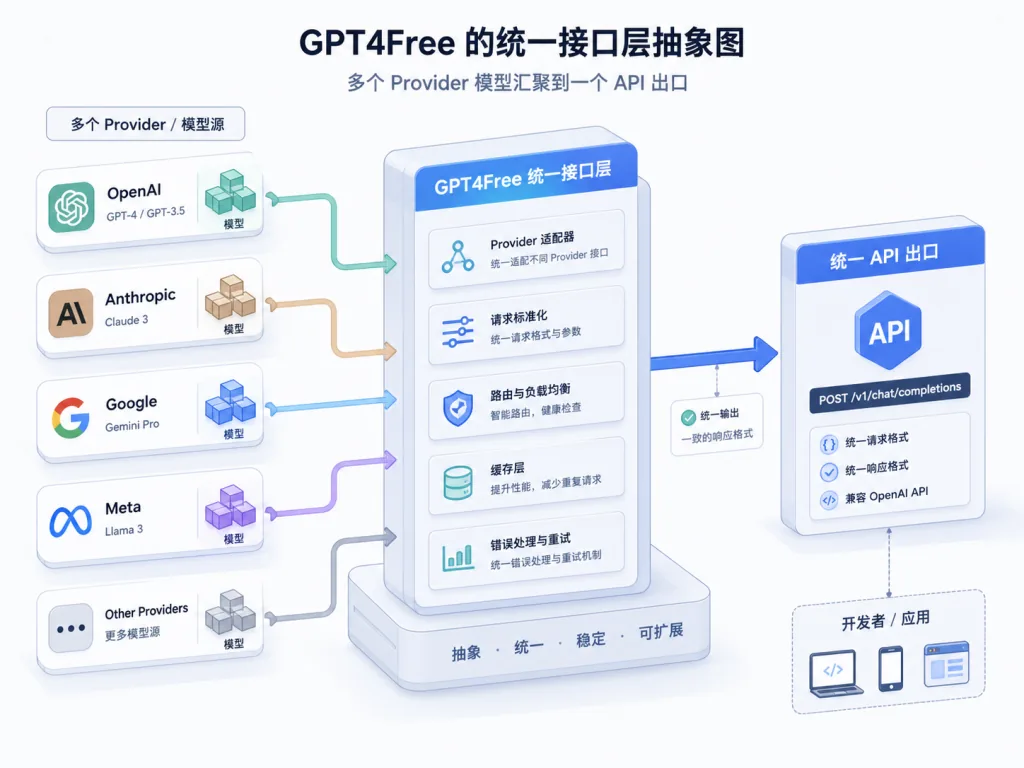
g4f bundles dozens of provider adapters (OpenAI-compatible, PerplexityLabs, Gemini, MetaAI, Pollinations, local inference backends and more). You only specify a model name and the framework routes the call to the right backend. For providers that rely on browser automation, it also supports HAR files and persistent cookies so sessions can be reused.
Compared with LangChain's LLM abstraction layer, g4f's advantage is "zero config, works out of the box" — most providers need no manually configured API key, and three lines of code get a conversation running.
2. An OpenAI-compatible Interference API
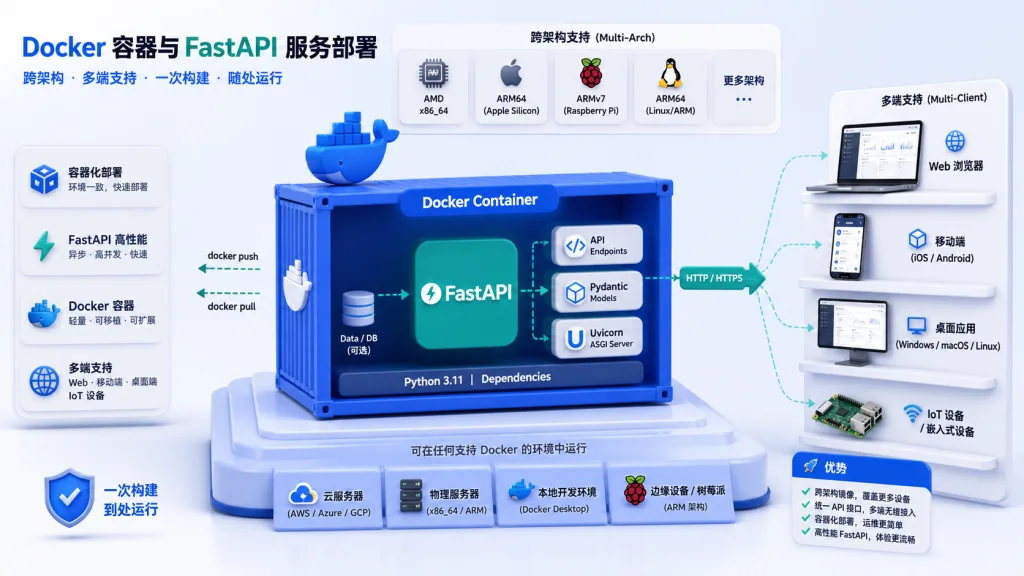
A REST service built on FastAPI, mounted at /v1, fully compatible with the OpenAI Chat Completions spec. That means your existing OpenAI SDK code works by changing a single base_url. The Docker slim image exposes it on localhost:1337 by default and ships a Swagger UI (/docs) for debugging.
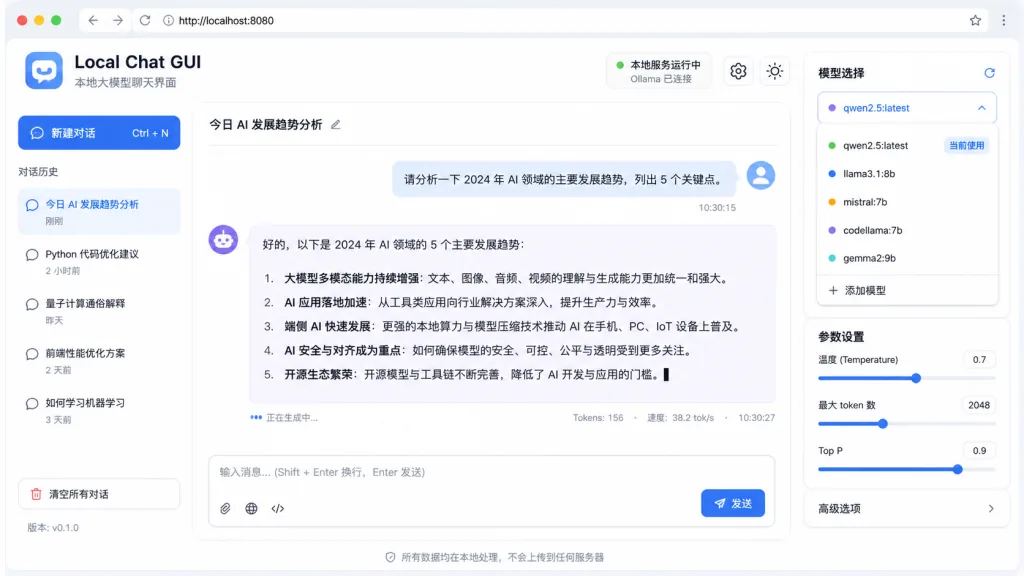
3. A local web GUI
python -m g4f.cli gui --port 8080 spins up a chat interface in one command, with streaming output, image upload and session management. The responsive layout works on phones too — handy for local debugging and quick demos.
4. Media generation (images / audio / video)
Through providers such as Pollinations, g4f supports text-to-image and text-to-audio/video. client.images.generate(model="flux", prompt="...", response_format="url") returns an image URL, and generated media is persisted to a mounted directory so container rebuilds don't lose it.
5. MCP Server (Model Context Protocol)
This is g4f's recent highlight: a built-in MCP Server that lets AI assistants such as Claude Desktop call g4f's web search (DuckDuckGo), web scraping and image generation over a standard protocol. Start it with g4f mcp --http --port 8765; the JSON-RPC endpoint is /mcp and the health check is /health.
4. Technical highlights and performance data
- Cross-architecture support: the Docker slim image supports both x86_64 and arm64, so it runs on a Raspberry Pi or Apple Silicon.
- Async-native:
AsyncClientworks directly withasyncio, so high-concurrency workloads don't turn into callback hell. - Streaming responses: SSE streaming follows the OpenAI standard, so frontends can reuse ecosystem components such as Vercel AI SDK and LangChain JS.
- Flexible configuration: environment variables, CLI flags or a config file;
g4f[all]covers the everything-installed case while optional extras let you keep the install lean. - Ecosystem integration: the official docs explicitly cover LangChain and PydanticAI integration, and projects such as MoneyPrinter V2 already depend on it.
- Media persistence: mount a
generated_mediadirectory with Docker-vand container restarts won't wipe your output.
5. Use cases and who it's for
Who it fits:
- Indie developers and researchers: experimenters on a budget who want to compare model capabilities side by side.
- AI app prototypers: engineers who want a quick demo without writing an adapter for every provider.
- Teaching and learning: students who need a local GUI plus model switching to understand how LLM behavior differs.
- Claude Desktop power users: people who want to stuff web search and image generation into their Claude workflow via MCP.
Who it doesn't fit:
- Enterprise production environments used directly (auth, auditing and SLAs all need extra work).
- Real-time workloads with very tight latency budgets (the extra aggregation hop adds 100–300ms to P99).
- Finance and healthcare scenarios that require official compliance guarantees.
6. Competitive comparison
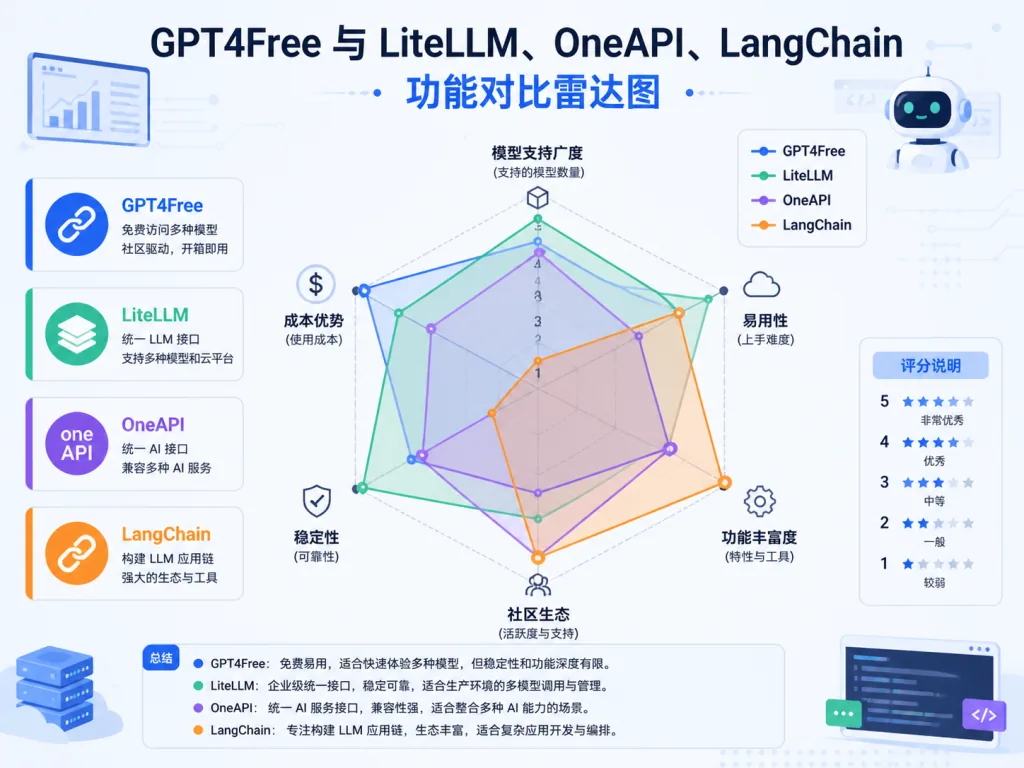
| Project | Core positioning | Multi-model aggregation | OpenAI-compatible | GUI | MCP | Stars |
|---|---|---|---|---|---|---|
| GPT4Free | Multi-provider aggregation client | ✅ Dozens | ✅ | ✅ | ✅ | 66.5K |
| LiteLLM | Enterprise LLM gateway | ✅ | ✅ | ❌ | ❌ | 30K+ |
| OneAPI | API aggregation and distribution | ✅ | ✅ | ✅ | ❌ | 20K+ |
| LangChain | LLM app orchestration framework | ✅ | Partial | ❌ | ❌ | 90K+ |
g4f's differentiation is "community-driven + GUI and JS client included + built-in MCP", leaning toward indie developers and fast experiments; LiteLLM/OneAPI lean more toward enterprise gateways and billing distribution.
7. How to get started fast
One-line install (recommended):
pip install -U g4f[all]
Start the GUI:
python -m g4f.cli gui --port 8080 --debug
Open http://localhost:8080/chat/ in your browser and start chatting.
Minimal Python call:
from g4f.client import Client

client = Client()
response = client.chat.completions.create(
    model="gpt-4o-mini",
    messages=[{"role": "user", "content": "Hello, how are you?"}]
)
print(response.choices[0].message.content)
One-command Docker deployment:
docker run -p 8080:8080 -p 7900:7900 \
  --shm-size="2g" \
  -v ${PWD}/har_and_cookies:/app/har_and_cookies \
  -v ${PWD}/generated_media:/app/generated_media \
  hlohaus789/g4f:latest
Advanced tips: test provider availability with the slim image first; in production, map the Interference API to an internal port on its own; for browser-automation providers, always raise --shm-size to 2g or more.
8. Summary and recommended actions
GPT4Free lowers the engineering bar for "calling many different LLMs" to three lines of code. Whether you want multi-model comparison experiments, a local chat tool, or MCP capabilities inside Claude Desktop, it offers a low-cost entry point.
Core value recap: one unified interface, coverage across clients (Python/JS/GUI/API/MCP), an active community and fast iteration.
Usage advice: start locally with pip install g4f[all]; once you've confirmed which providers work, deploy to a server with Docker; when you need auditing and billing, look at enterprise gateways like LiteLLM for a second layer of wrapping.
Project links:
- GitHub: https://github.com/xtekky/gpt4free
- Docs: https://g4f.dev/docs
- PyPI: https://pypi.org/project/g4f
- Docker: https://hub.docker.com/r/hlohaus789/g4f
One-line pitch: want a Swiss Army knife with an OpenAI-compatible API that can switch between dozens of models? GPT4Free at 66.5K stars is worth a star before you try it.