1. Opening: why you need this tool
It's 2 a.m. and you're pasting the project background, the architecture diagram and last month's postmortem into a fresh agent session for the third time. The agent politely says it understands, then asks the same question in the next step. You stare at the screen and a familiar exhaustion washes over you.
This isn't an edge case. A 2025 Gartner report found that enterprise developers hold 11+ agent sessions a day on average, and 42% of turns go to re-transmitting context; within a single project, knowledge reconstruction typically eats 30%–50% of total time. Worse still: a colleague leaves today, an agent restarts tomorrow, and the whole team's muscle memory resets to zero.
If you're done with this kind of treadmill-style AI collaboration, TencentDB Agent Memory (17,042 GitHub stars), just open-sourced by Tencent Cloud, may be the agent-team brain worth installing in 2026.

2. In one sentence: what this project is
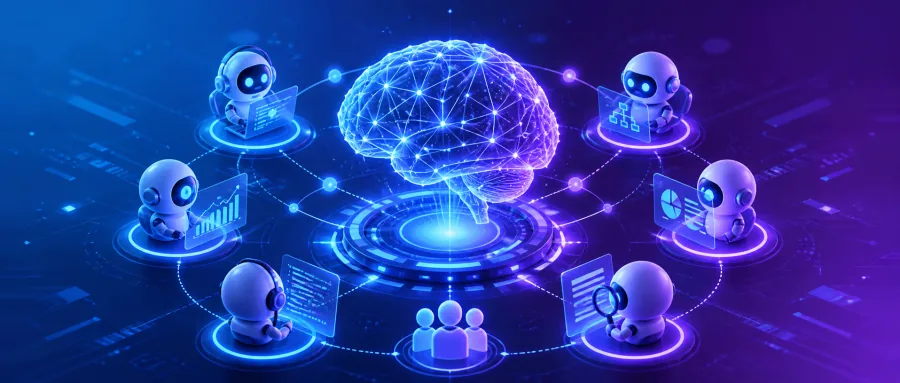
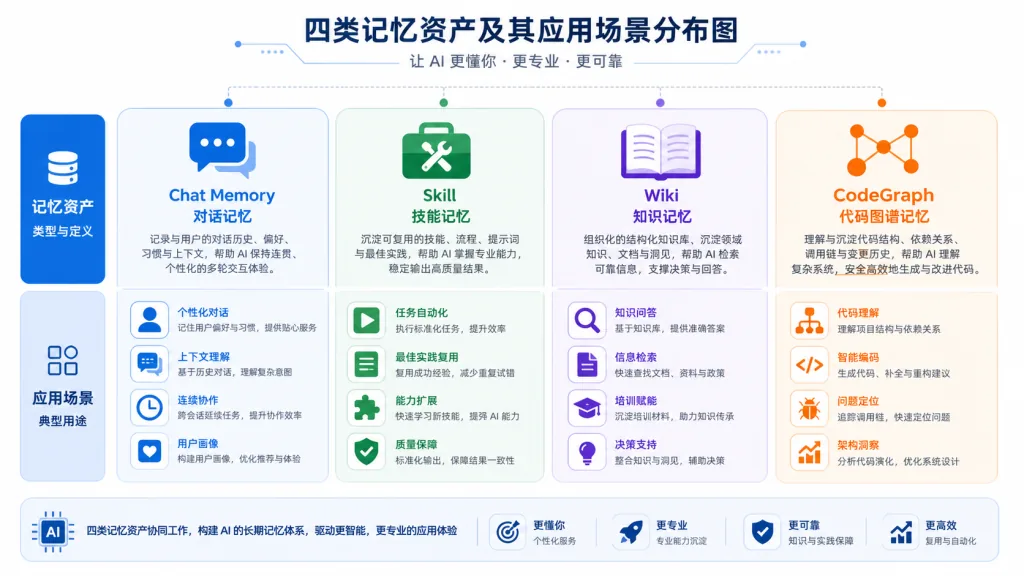
TencentDB Agent Memory is a memory hub for agent teams — it distils conversations, documents and code into four kinds of memory asset (Chat Memory / Skill / Wiki / CodeGraph) that can be reused, governed, shared and loaded, and it moves them across agents and frameworks.
- Core traits: four asset types · team governance · multi-framework support · layered memory
- Milestone: 17,042 GitHub stars, MIT license, written in TypeScript, supports mainstream frameworks including OpenClaw, Claude Code, CodeBuddy and Hermes
- Positioning: more than RAG — a control panel for team-level memory assets
3. Core features in depth
1. Chat Memory: remember a person's preferences and context
Chat Memory is responsible for keeping user preferences, key decisions and interaction history over the long run. Every agent gets its own memory space on creation, so next time there's no re-introduction.
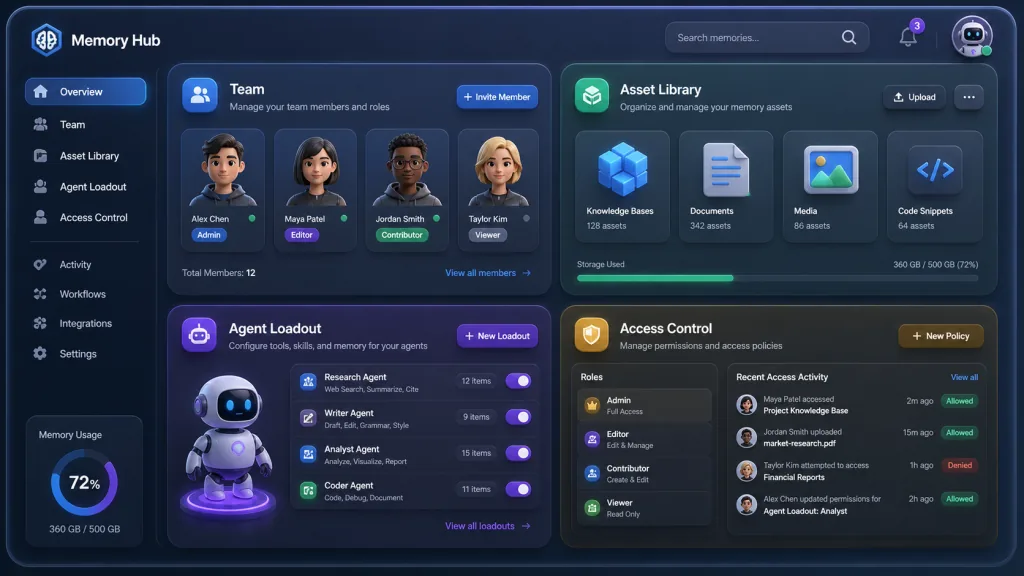
It uses a four-layer L0 → L1 → L2 → L3 distillation architecture: raw conversations are archived in full as L0; an async pipeline extracts facts, preferences and constraints into L1 Atoms; those aggregate by project or scenario into L2 Scenarios; and finally they distil into a long-term persona profile, L3 Persona.
Day-to-day retrieval goes through L2/L3 for a fast bootstrap; when exact facts are needed it falls back to BM25 + vector search + RRF to pull raw evidence out of L1/L0, with three gates — result count, character budget and timeout — preventing context overflow.
The payoff: PersonaMem benchmark accuracy rises from 48% to 76%, a relative gain of +59% — meaning the agent's grasp of user context nearly doubles.
2. Skill: an executable experience pack
A Skill is not a snippet of prompt text. It is a full workflow asset with a version, resource files, trigger boundaries, execution steps and validation rules. After finishing a complex task, an agent can extract a Skill from the conversation and tool calls on its own, and after review share it with the rest of the team.
Personal Skills are private by default; only after owner review do they become team-shared and get loaded onto specific agents. Incident triage, code review, release checklist — once anyone on the team has run it end to end, the whole agent team can reuse it.
3. Wiki + CodeGraph: a two-way knowledge graph of docs and code
Wiki converts product docs, design specs and runbooks into structured pages with a link graph (inspired by Karpathy's LLM Wiki idea); CodeGraph indexes code symbols, files, call relationships and impact paths into a graph.
An agent no longer has to scan files line by line. It discovers capabilities through /v3/tools/list and then reads pages, source or impact paths on demand through /v3/tools/call. Documents and code are no longer "dumped in full" but "called on demand" — which fundamentally changes how an agent understands a large repository.
4. Memory Hub: the team-level control panel
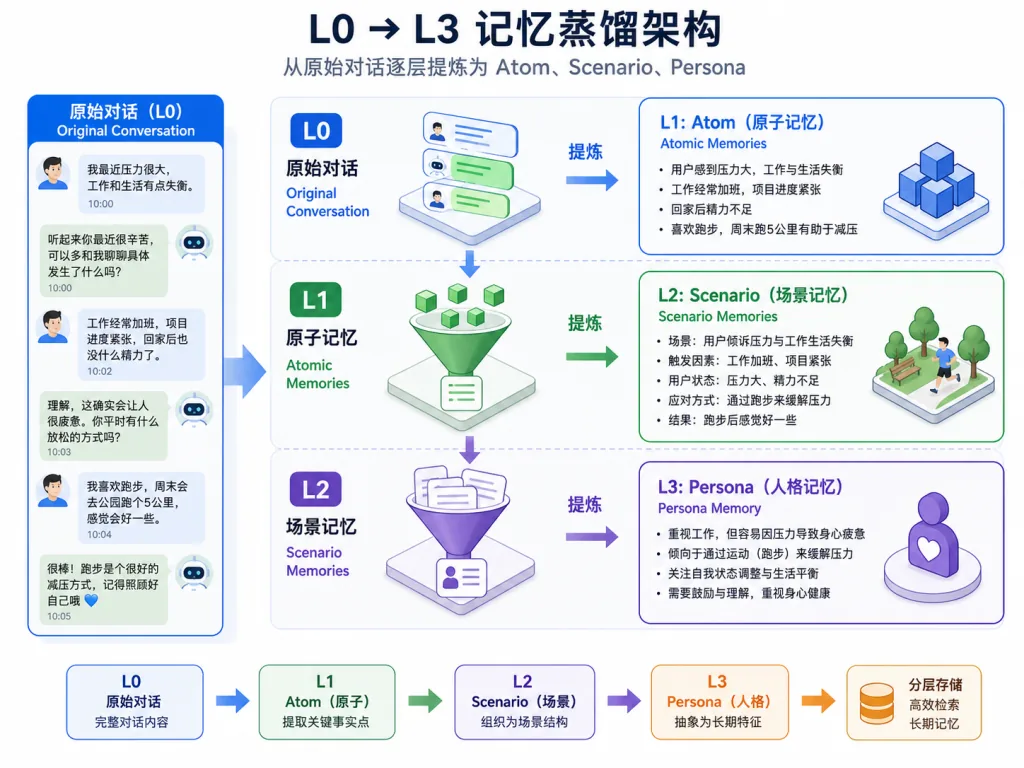
Memory Hub offers four core operations: Team Up (create a team, add members, draw boundaries), Asset Library (browse, search, review assets), Agent Loadout (bind different assets to different agents with priorities), and Access Control (private / team / ACL, three levels).
Assets also carry full governance fields: owner, version, status, visibility, usage count and agent bindings. Open an asset and you see not just what it says but which version it came from, who has used it and when it was last called — the operational visibility RAG simply cannot provide.
4. Technical highlights and performance numbers
- Layered memory architecture: four-level L0–L3 distillation, with generation and retrieval both handled in layers, balancing fast bootstrap against precise backtracking.
- Fixed binding + ACL retrieval: the permission scope narrows by team, user, agent and visibility first, then retrieval runs against the current query — team-shared experience without leaking private data.
- Knowledge as tools: Wiki and CodeGraph never enter the prompt; they register as tools and get called on demand through
/v3/tools/call, so the context window doesn't explode. - Ecosystem compatibility: OpenClaw, Hermes, Claude Code, CodeBuddy and SDK integration are all supported; migrating across frameworks means reloading, not retraining.
- Benchmark result: PersonaMem from 48% → 76%, a relative gain of +59%.
5. Who it is for
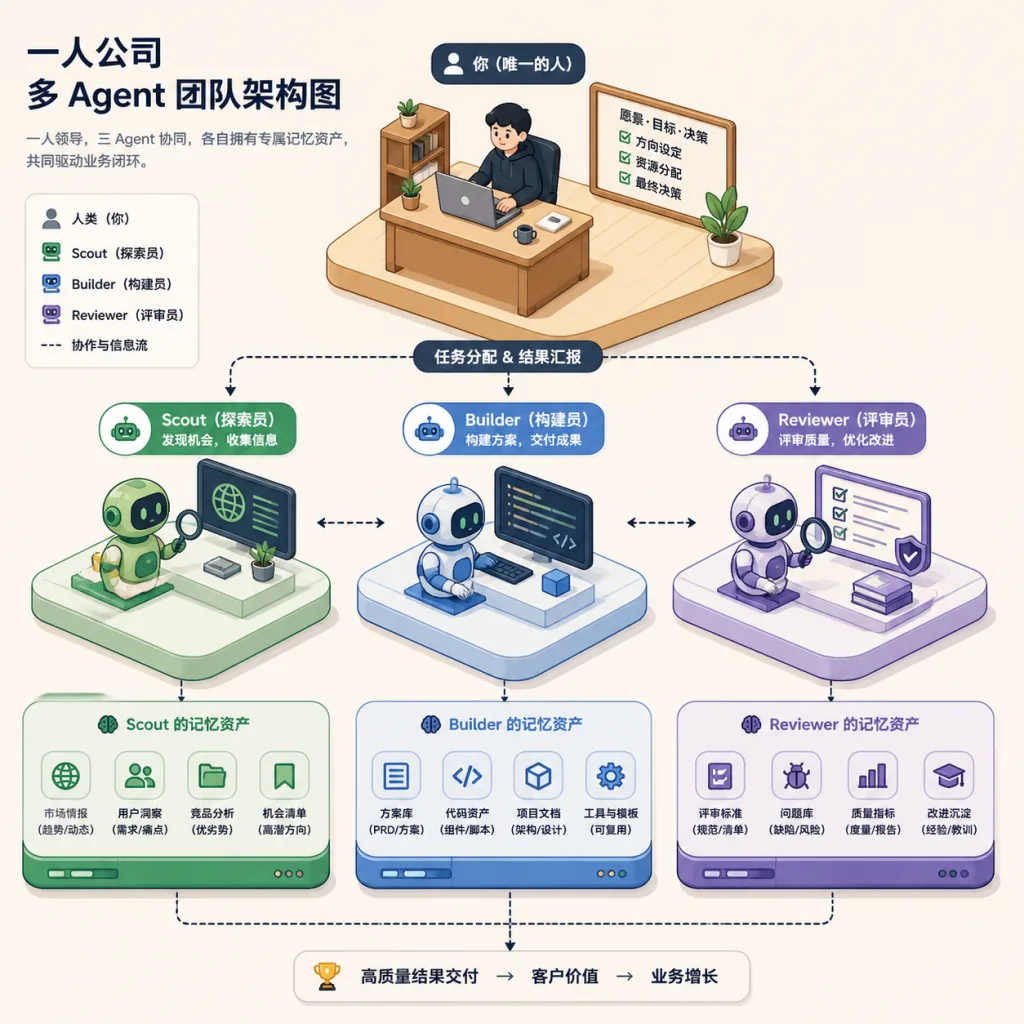
Scenario 1: solo company / micro team — spin up a three-agent team of Scout, Builder and Reviewer, each loaded with different memory assets, so a small company still accumulates experience.
Scenario 2: code review and change impact analysis on large projects — CodeGraph tells you directly which callers a function change will hit, turning review from "based on experience" into "read it off the graph".
Scenario 3: long-term memory for support and consulting agents — L3 Persona lets an agent pick up the conversation the second time it serves a returning customer, with no re-confirming of basics.
Good fit: engineering teams that maintain medium-to-large projects long term, ops teams that need to accumulate SOPs, independent developers building multi-agent systems.
Not a fit: purely one-off scripting, or pipelines that demand extreme real-time performance (<50ms) and can't tolerate async indexing lag.
6. How it compares
| Dimension | Plain chat history | Standard RAG | TencentDB Agent Memory |
|---|---|---|---|
| Cross-session user understanding | △ | △ | ✅ Chat Memory |
| Executable experience distillation | — | — | ✅ Skill |
| Document structure and relations | — | △ Chunk retrieval | ✅ Wiki + link graph |
| Code call graph and blast radius | — | △ Text matching | ✅ CodeGraph |
| Owner / version / status | — | — | ✅ |
| Team sharing and agent loadout | — | — | ✅ |
| Private / team / ACL | — | △ | ✅ |
Put simply: RAG tells you what's in the documents. Agent Memory also tells you who can use it, which version is current and which agent should have it installed.
7. Getting started fast
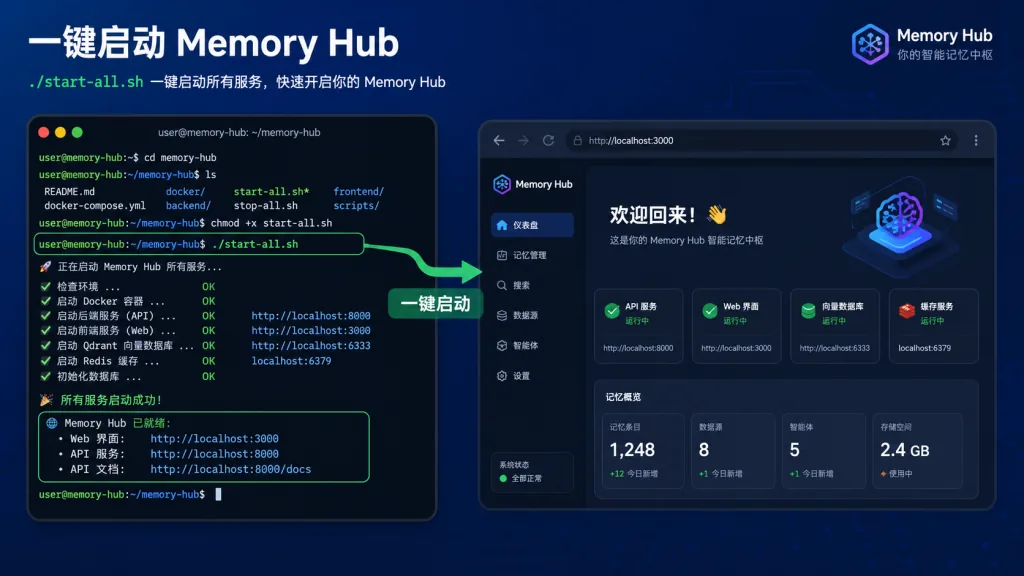
One command brings up all three services — memory-core, memory-hub and proxy:
git clone https://github.com/Tencent/TencentDB-Agent-Memory.git
cd TencentDB-Agent-Memory/deploy/global-images
cp .env.example .env
$EDITOR .env
./start-all.sh
When it finishes, the terminal prints a one-line config you can paste straight into Claude. Open the console at http://localhost:8125 and the Memory Hub panel is there.
Minimal working example: create a Team in the panel → add a Builder agent → import your code repo (CodeGraph is generated automatically) → import past conversation sessions (Skills and Chat Memory are extracted automatically) → load the assets Builder needs.
Going further: run the end-to-end flow on a test project first, then use the official migrate-v2-to-v3 tool to move v1.x/v0.x data up to v2.0.0+. For production, read INSTALL.md in full — it covers standalone Hub deployment, running Proxy with Claude Code/CodeBuddy, shutdown and cleanup, and the port reference.
8. Takeaways and next steps
TencentDB Agent Memory upgrades memory from one agent's session history into a team-level asset that can be governed and moved around. It doesn't answer "how do we store more" — it answers "what's worth storing, who can use it, and how do we retrieve less next time".
- Core value: four asset types × layered architecture × team governance × cross-framework compatibility
- Adoption advice: start with CodeGraph + Wiki (the most immediately visible payoff), then layer on Chat Memory and Skill
- Project links:
- GitHub: https://github.com/TencentCloud/TencentDB-Agent-Memory
- Docs:
INSTALL.md·CONTRIBUTING.md· OpenAPI:MemoryKnowledge/openapi.yaml - Community: Discord · GitHub Discussions
One-line verdict: stop making every agent start from zero — turn the road your team has already walked into the next agent's starting line.