
Title options (pick 1 of 3)
Agent memory is expensive and hard to debug? OpenViking puts it in a file system
A 38K-star open-source project: agent memory accuracy from 24% to 82%, tokens cut by 91%
Why is agent memory always a black box? This 38K-star project wants to overturn it with a file system
OpenViking at 38K stars: agent memory, knowledge and skills in one file system
1. Opening: agent memory is a black box — are you okay with that?
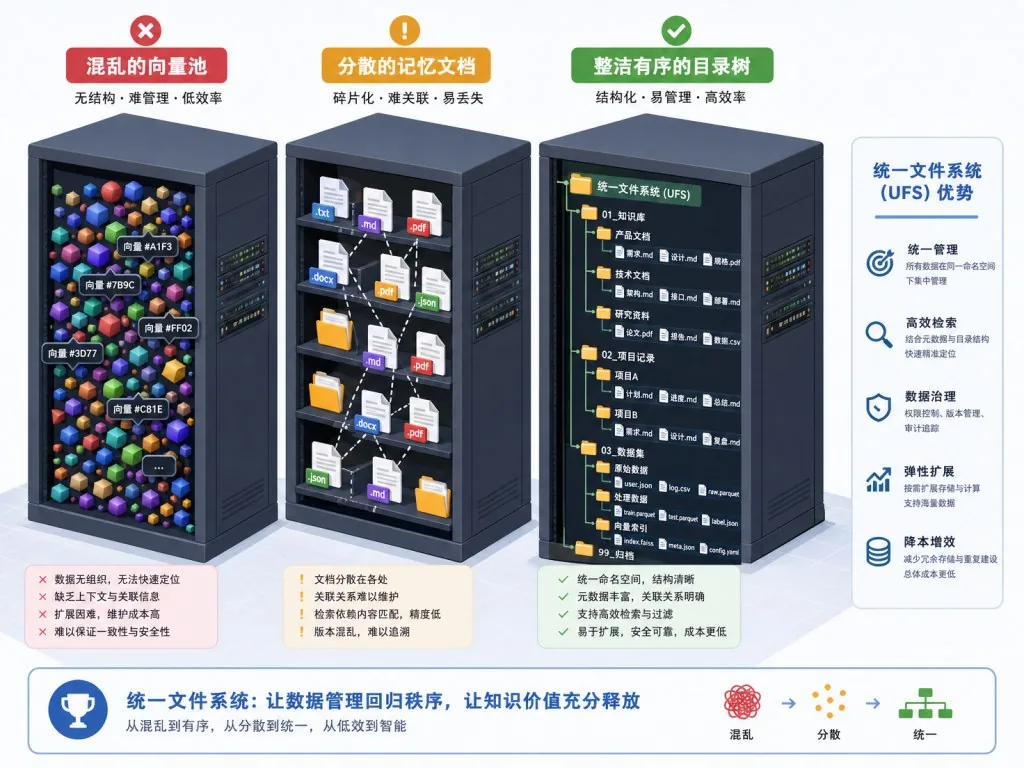
You feed a pile of documents to an AI agent and it spits out an answer. But do you actually know what it "remembered"? The memory mechanism in most agents works like this: text goes in, vectors come out, and nobody can see what happened in between. A developer wants to debug a bad recall? Wants to delete an outdated preference? Wants to see which context the agent actually stuffed into the prompt? The answer is: you can't take it apart, can't look it up, can't change it.
The recall quality itself is the bigger problem. On the LoCoMo long-conversation memory benchmark, OpenClaw's native memory scores only 24.20% accuracy, Hermes gets 33.38%, and even Claude Code manages just 57.21%. That means the agent you carefully configured is, on cross-session memory, guessing half the time. Input tokens stay high and response latency swings unpredictably — the memory system is both a quality bottleneck and a cost black hole.
2. In one line: what this project is
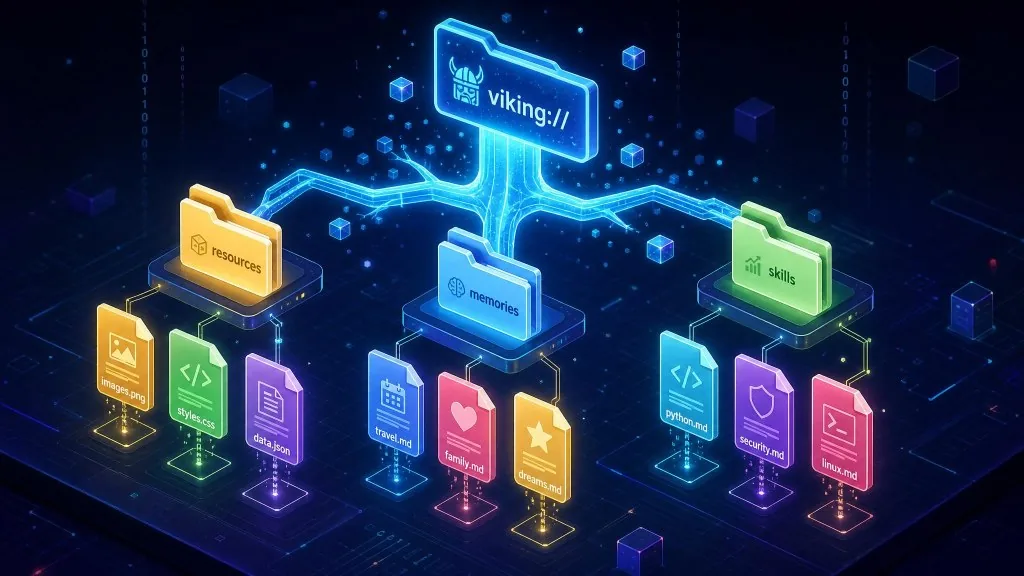
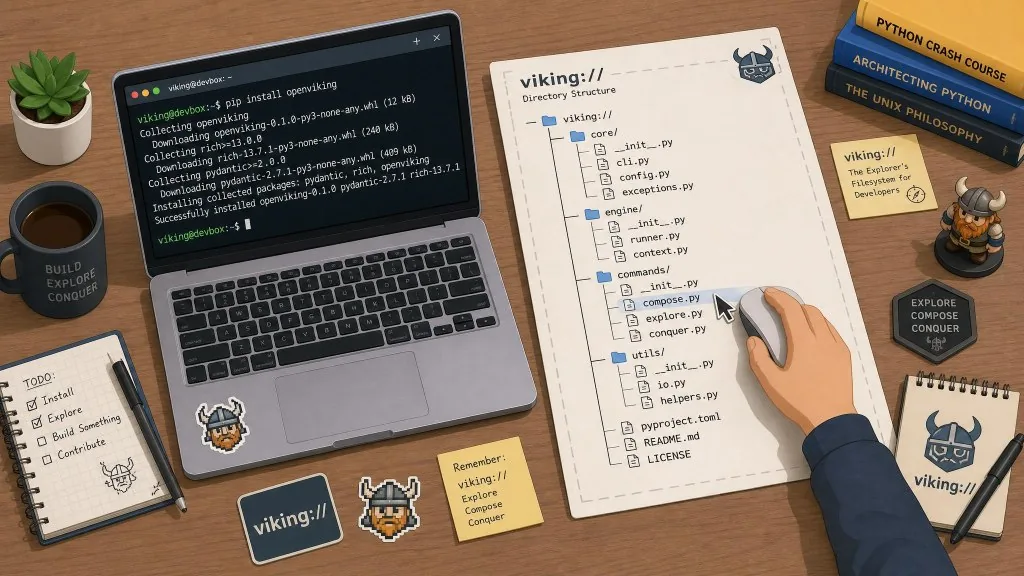
OpenViking is an AI agent context database open-sourced by Volcengine (38.8K stars on GitHub), positioned as "one file system that manages an agent's knowledge, memory and skills." It organizes agent context into a viking:// virtual file system and supports familiar file operations such as ls, tree, read and grep; every directory carries L0/L1 summaries, so an agent can scan summaries to judge relevance first and then read full content on demand. The latest version is 0.3.22, with results validated on the public LoCoMo and tau2-bench evaluations.
3. Core features in depth
1. Everything is a file: knowledge, memory and skills under one URI scheme
OpenViking uses the viking:// protocol to bring three kinds of context into one tree: resources/ holds project docs and code, user/{user_id}/memories/ stores user preferences and experience, and user/{user_id}/skills/ defines task execution flows. Each resource gets its own URI, so it can be browsed and retrieved directly. Compared with the traditional "vector pool plus several separate stores" approach, this design removes the complexity of stitching multiple systems together — the agent uses one set of interfaces for every context type.
2. Directory-level retrieval: search "a directory," not "the whole index"
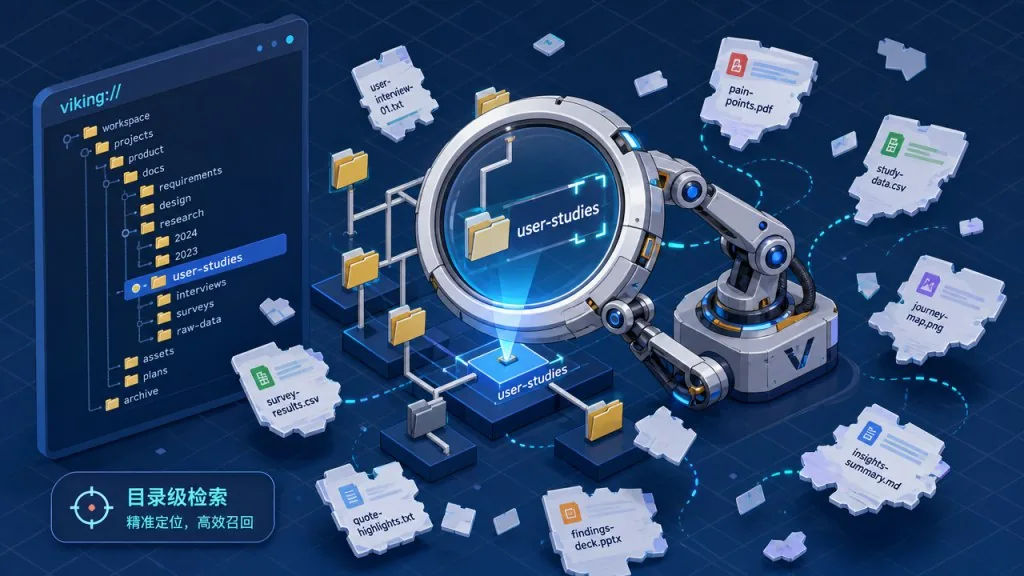
Traditional RAG retrieval searches globally in a flat vector pool, so results scatter across the index. OpenViking can scope retrieval to a project subdirectory or a memory subtree. ov find "what is openviking" runs a semantic search directly; ov search plans a retrieval path based on conversation context. Together with the TrieHI index (already integrated), the system resolves directory scope before vector ranking, which significantly reduces irrelevant recalls.
3. Three-layer loading: summaries first, full content on demand
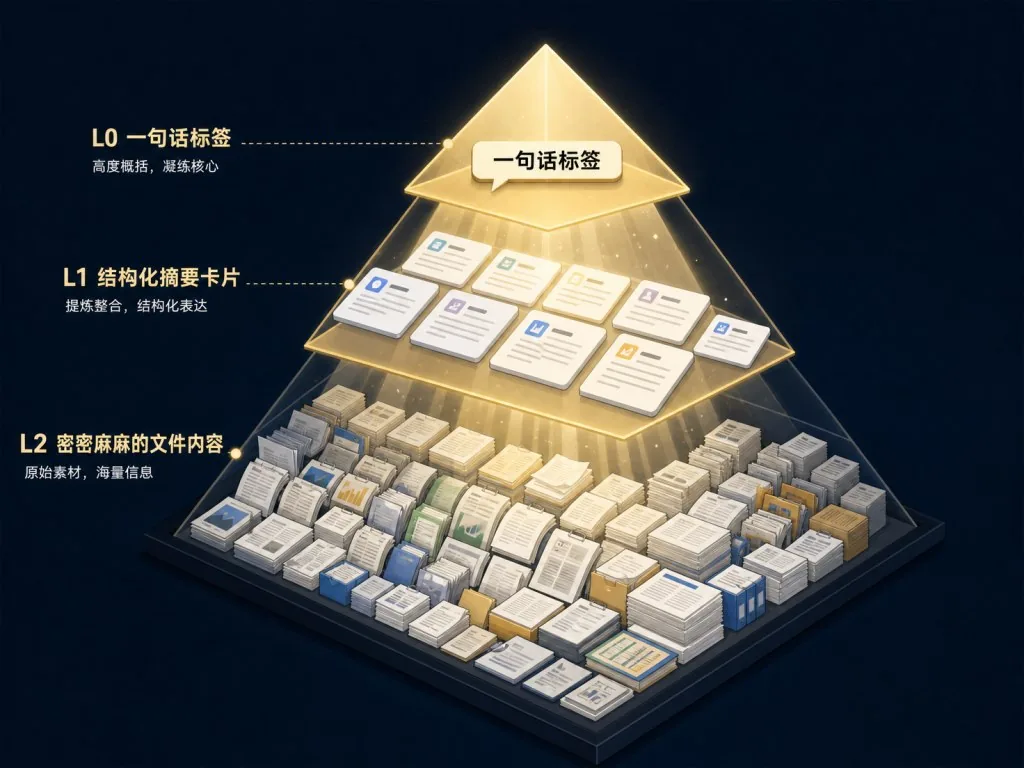
Every semantically processed directory carries two summary layers: .abstract.md (L0, a one-line relevance judgment) and .overview.md (L1, structure and key points). The agent scans summaries to decide whether to go deeper, then reads full content (L2). This "load on demand" mechanism is the key to lower token cost — official numbers show input tokens drop by 34.3% to 91.0% after adopting OpenViking.
4. A session is a file: readable, editable, mergeable
Running ov compile archives the current session as readable Markdown and automatically extracts memory entries from it. Developers can edit that Markdown directly and then have OpenViking merge the human revisions back into the memory store. With VikingBot enabled, ov compile can also organize material into a Wiki, a knowledge graph or a report — the session itself becomes a governable asset rather than a throwaway log.
4. Technical highlights and performance data
On the LoCoMo long-conversation memory benchmark, three agents all jumped to the 80–83% range after adopting OpenViking: OpenClaw went from 24.20% to 82.08%, Hermes from 33.38% to 82.86%, and Claude Code from 57.21% to 80.32%. Query latency dropped by 58.45% to 66.10% at the same time. On the tau2-bench multi-turn task benchmark, experience memory raised task success rate by +6.87pp in the retail scenario and +11.87pp in the airline scenario.
Architecturally, OpenViking integrates three research efforts into a single system: VikingMem's event-driven memory management, VikingRAG's structured retrieval, and TrieHI's directory-aware index. It supports multiple model providers including Volcengine, OpenAI, Codex OAuth, Kimi, GLM and local Ollama; the SDK covers Python, Go and TypeScript and ships an HTTP API; prebuilt integrations exist for more than ten agent frameworks such as Claude Code, Codex, Cursor, TRAE, OpenClaw, Hermes and LangChain. The server supports multi-tenant account isolation with optional ACLs, the license is AGPLv3, and it can be self-hosted without an activation key.
5. Use cases and audience
- Case one: a personal assistant that needs stable cross-session memory. You want the agent to remember your writing style, coding habits and project background — OpenViking's
user/memories/tree maps directly to that need. - Case two: team agents that need governable context. When RAG knowledge is scattered across vector stores, document stores and memory services, auditing becomes impossible; OpenViking's file-system model turns governance actions (delete, merge, revise) into simple file operations.
- Case three: multi-turn agents handling long task chains. In retail, support and airline scenarios that require many tool calls, experience memory measurably raises task success rates.
Who it fits: backend and platform engineers building memory/knowledge infrastructure for production agents; architects evaluating memory approaches for agent frameworks; AI product owners sensitive to token cost. Not a great fit: lightweight bots that only do one-off Q&A and need no persistent context.
6. Comparison with alternatives
| Dimension | OpenViking | Traditional vector databases (Milvus/Qdrant) | General agent memory frameworks (Mem0 etc.) |
|---|---|---|---|
| Data model | Virtual file system (directories + files + URIs) | Flat vector collections | Mostly KV or document collections |
| Context types | Knowledge, memory and skills managed together | Usually RAG retrieval only | Memory-centric |
| Observability | Directly visible via file browsing | Black box, requires a self-built audit layer | Black box |
| Retrieval granularity | Directory-scoped retrieval | Global retrieval | Usually global |
| License | AGPLv3, commercial self-hosting allowed | Apache 2.0 and similar | Depends on the project |
| Mainstream agent integrations | Ten-plus prebuilt | Build your own | Partially supported |
The core reason to choose OpenViking: when what you need is not "another vector store" but "a unified governance plane for agent context," the operability of the file-system model is hard to replace with other approaches.
7. Getting started fast
OpenViking needs Python 3.10+ plus a usable embedding model and VLM (cloud or local both work). Install and start it with four commands:
pip install openviking --upgrade
openviking-server init      # configure the model provider
openviking-server doctor    # check connectivity
openviking-server           # start the service
init writes ~/.openviking/ov.conf; fill in your API key as prompted. Once the service is up, use the ov CLI in another terminal to import resources and query them:
ov add-resource https://github.com/volcengine/OpenViking
ov task status TASK_ID     # poll until the status is completed
ov tree viking://resources/volcengine -L 2
ov find "what is openviking"
Advanced usage includes building custom agent integrations with the Python SDK, deploying the Docker version (which ships with VikingBot and a console UI), and connecting any compatible agent over MCP. For production deployment, read the authentication docs first and enable account isolation.
8. Summary and next steps
OpenViking uses the minimal abstraction of a "virtual file system" to bring the three agent context assets — knowledge, memory and skills — into one governable tree. On public benchmarks it lifts long-conversation memory accuracy from 24–57% to 80%+, while cutting input tokens by 34–91% and query latency by nearly 60%. For teams building a memory layer for production agents and stuck with vector black boxes, it belongs on the evaluation shortlist.
Suggested path: try OpenViking Studio online to feel semantic retrieval and directory browsing; then get openviking-server and the ov CLI running locally; finally pick an agent you already use (Claude Code / Cursor / Codex and so on), integrate it following the official docs, and compare accuracy and token usage before and after.
- GitHub: https://github.com/volcengine/OpenViking
- Website and docs: https://openviking.ai/ · https://docs.openviking.ai/
- Papers: VikingMem (arXiv:2605.29640), Directory-Aware Query (arXiv:2606.16903), VikingRAG (arXiv:2609.11390)
Agent memory should not be a black box. It should be like your project code: readable, editable and auditable.
#openviking #Openviking #volcengine #AIAgents #AIWorkflow #Automation #OpenSource #GitHub