
1. Intro: why do AI agents keep tripping over the browser?
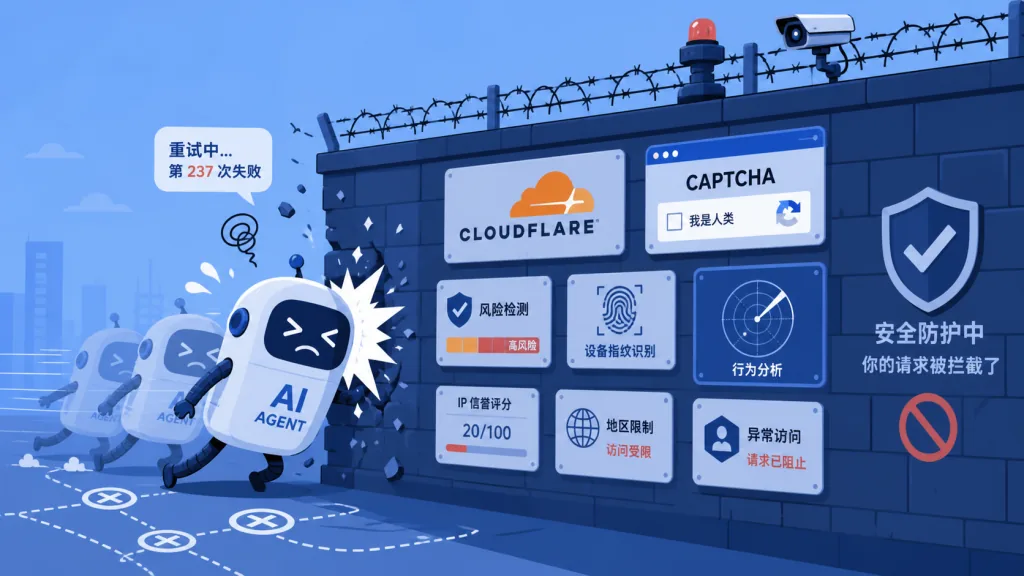
2 a.m. You send an AI agent to scrape product prices from an e-commerce site. The agent opens the page fine, then stalls at Cloudflare's five-second shield and trips CAPTCHA over and over. You clear the check by hand, and now the agent gets blocked by risk control because its fingerprint looks abnormal. You switch to another machine, the session is gone, and the account gets frozen. A whole night passes and the task list reads 0/200 done.
This is not an edge case. Plenty of AI agents still run on bare browsers through Playwright or Puppeteer, and against the bot-detection stack that got upgraded across the board in 2025, the average task failure rate is above 60%. So where is the problem? Scripts were written for humans reading a DOM, but browsers were designed for humans operating them — a browser for AI has to be rebuilt from scratch. That is what BrowserAct Skills (GitHub 5.3k+ stars) exists for.
2. Project positioning: a real browser built for AI agents
BrowserAct Skills is a browser automation CLI toolkit aimed at AI agents, and its core idea comes down to one sentence: "A browser for agents must get four things right." — get past anti-bot systems, support remote takeover across platforms, keep parallel tasks from interfering with each other, and be designed for LLM reasoning.
Three key labels: a real browser engine, stealth fingerprints plus residential proxies, and a Skill protocol layer. It collected 5.3k stars in two weeks, keeps the community active on Discord, and already works with mainstream agents such as Claude Code, Cursor, VS Code, OpenCode, OpenClaw, Codex and Gemini CLI.
3. A close look at the core features
1. A three-layer progressive anti-detection system
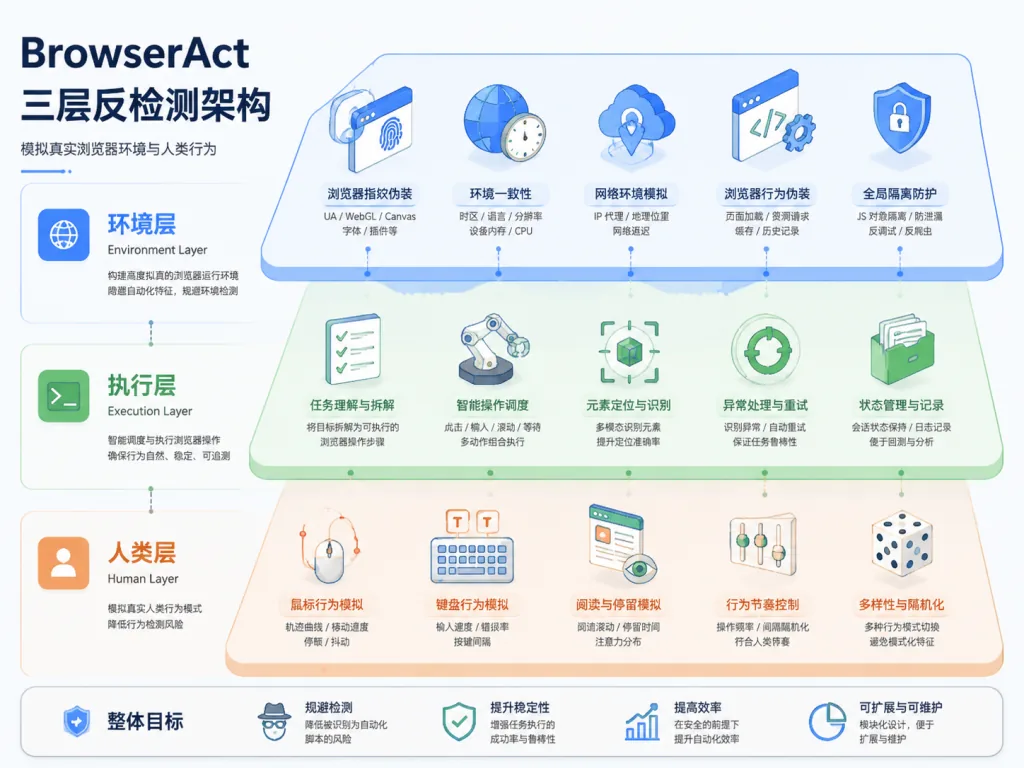
BrowserAct splits anti-bot evasion into three layers that escalate step by step. The first is the environment layer: stealth fingerprint spoofing, TLS fingerprint rotation and proxy switching handle ordinary risk control directly. The second is the execution layer, which ships solve-captcha for automatic CAPTCHA solving and stealth-extract to pull protected pages with a single command. The third is the human layer: remote-assist generates a live link, the user takes over from any device, and the agent carries on seamlessly. The three layers cover each other, so the vast majority of sites need no manual intervention.
2. Three browser modes for real-world scenarios
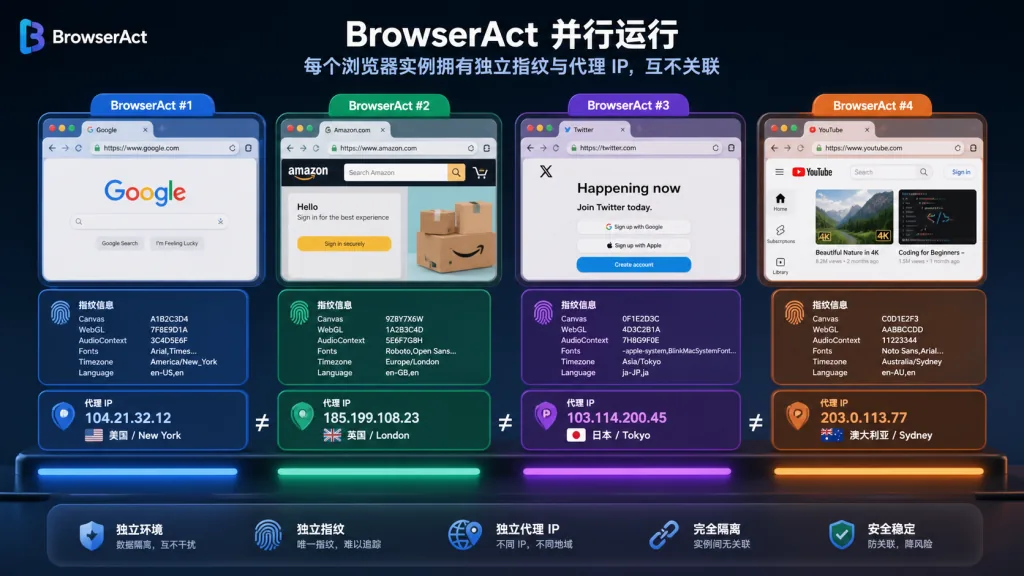
chrome mode reuses the login state of your local Chrome, which suits tasks that need an already-signed-in account. stealth privacy mode generates a fresh fingerprint for every session and rotates proxies automatically, which suits anonymous bulk scraping with zero residue. The stealth fixed-identity mode pins the fingerprint and the IP, and is built specifically for running the same account across several browsers in parallel without getting linked and flagged. Those three modes map directly onto the three real scenarios: "reuse local", "anonymous at scale" and "many accounts in parallel".
3. Interference-free concurrency
When browsers run in parallel, each one holds its own cookies, its own fingerprint and its own proxy, so a site cannot link accounts across sessions. Multiple sessions inside one browser share the login state but execute in isolation, so tasks never block each other. In privacy mode, the fingerprint and profile are destroyed when the session ends, leaving zero data behind. For teams that need hundreds of accounts running at once, this is a hard requirement.
4. An interaction model built for LLM reasoning
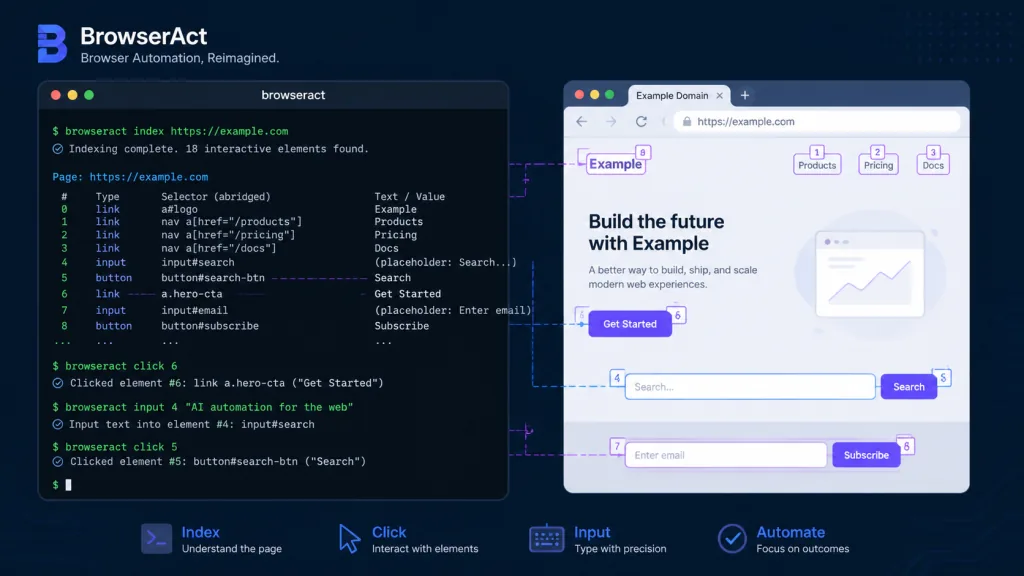
Unlike traditional scripts, BrowserAct returns indexed text instead of JSON or HTML, cutting token consumption several times over. The state command returns a list of interactive elements, so the agent can just call click 3 or input 2 "hi" by index without parsing the DOM. Every browser carries a desc semantic description, so tasks are matched by meaning. Session ownership plus explicit naming keeps concurrent agents from colliding. This interaction model turns "writing scripts" into "describing intent".
4. Technical highlights and performance data
BrowserAct's stealth engine combines a residential proxy pool, TLS fingerprint rotation and Canvas/WebGL fingerprint spoofing, backed by a CAPTCHA solving service. Architecturally it lifts the browser engine out into a cloud container and keeps only the Skill protocol layer locally, so the agent calls a real browser over the network. The Skill Forge submodule can explore a site once and generate a reusable Skill package, and a single path reliably sustains batch jobs of 500 to 5,000 records. Compatibility covers Windows, macOS, Linux and the seven major AI agents. Sensitive operations — creating or deleting a browser, importing a profile, changing proxies — go through a confirmation gate with per-action approval, so config can't be broken by accident.
5. Use cases and who it fits
Scenario one: cross-border e-commerce price monitoring. An operations team needs to scrape SKU prices from 50 sites in parallel, and BrowserAct's fixed-identity mode keeps 50 browser instances running different accounts at once with no linkage between them.
Scenario two: background data collection for AI agents. Agents like Claude Code and Cursor need live data from the web, and traditional Playwright keeps collapsing in front of Cloudflare. BrowserAct's three-layer anti-detection solves it directly.
Scenario three: social sentiment and job-posting scraping. Skill packages for LinkedIn, Reddit and WeChat official accounts generated by Skill Forge work out of the box and run batch jobs reliably.
Who it fits: AI agent developers, data engineering teams, cross-border e-commerce operators, scraping engineers. Who it doesn't: front-end-only automation testers (Playwright is smoother there) and users who just need a one-off local screenshot.
6. Comparison with alternatives
| Dimension | BrowserAct Skills | Playwright + Stealth | Browser-Use open source |
|---|---|---|---|
| Anti-detection layers | Three (environment / execution / human) | Fingerprint spoofing only | Fingerprint spoofing only |
| Remote human takeover | Yes, cross-device link | No | No |
| Concurrency isolation | Cross-browser + multi-session per browser | Roll your own | Roll your own |
| LLM-friendly output | Indexed text, token-efficient | DOM/HTML | DOM/HTML |
| Automatic CAPTCHA solving | Built in | Third-party required | Third-party required |
| Free tier | 5 stealth browsers + full features | Entirely free | Entirely free |
The verdict: for a single anti-bot obstacle, Playwright is enough. But if you need scale, stability and an AI agent driving it, BrowserAct is currently the most complete option.
7. Getting started fast
Installation is just a prompt you hand to the agent:
Install browser-act. Skill source: https://github.com/browser-act/skills/tree/main/browser-act . Verify it works after installation.
Verify the install:
browser-act get-skills core --skill-version 2.0.2
A minimal working example — scrape a protected page with zero configuration:
browser-act stealth-extract https://example.com
A full automation flow:
browser-act --session my-task browser open <id> https://example.com
browser-act --session my-task state
browser-act --session my-task click 3
browser-act --session my-task input 2 "hi"
Further advice: for batch jobs, generate a dedicated Skill package with Skill Forge; for multi-account work, name sessions explicitly with --session; sensitive operations trigger the confirmation gate, so keep it enabled in production.
8. Summary and what to do next
The core value of BrowserAct Skills is that it pulls browser automation back from "writing scripts" to "describing intent". With a real browser engine, three layers of anti-detection and a Skill protocol layer, it solves the two nastiest problems in agent deployments: anti-bot evasion and concurrency isolation. The 5.3k stars and the active Discord community show the path works.
How to use it: first run one stealth-extract command to check how it handles anti-bot defenses; then have Skill Forge generate a dedicated Skill for your target site; finally manage concurrency with --session and run your batch jobs.
Project links:
- GitHub: https://github.com/browser-act/skills
- Website: https://www.browseract.com/?co-from=github
- Docs: https://docs.browseract.com
One-line recommendation: if you want AI agents to actually get things done on the web, BrowserAct Skills is the browser toolkit most worth installing right now.