
1. Intro: almost every developer has hit this pain
"I already fixed that bug last time — why are you asking again?" "What about the plan we discussed before? Now we're starting from scratch."
If you've used an AI coding assistant, you've been through this. Every new session the model has amnesia — the ten minutes you spent explaining project background, the potholes you hit, the decisions you made, all reset to zero.
The numbers make it concrete: Claude's context window is 200K tokens per session. At current mainstream model prices, fully replaying one past session costs about $0.6; open 20 sessions a day and just "feeding history" burns $360 a month. Worse, anything past the window gets truncated — the model simply can't recall it.
AI isn't dumb here. It genuinely has no memory.
2. What it is
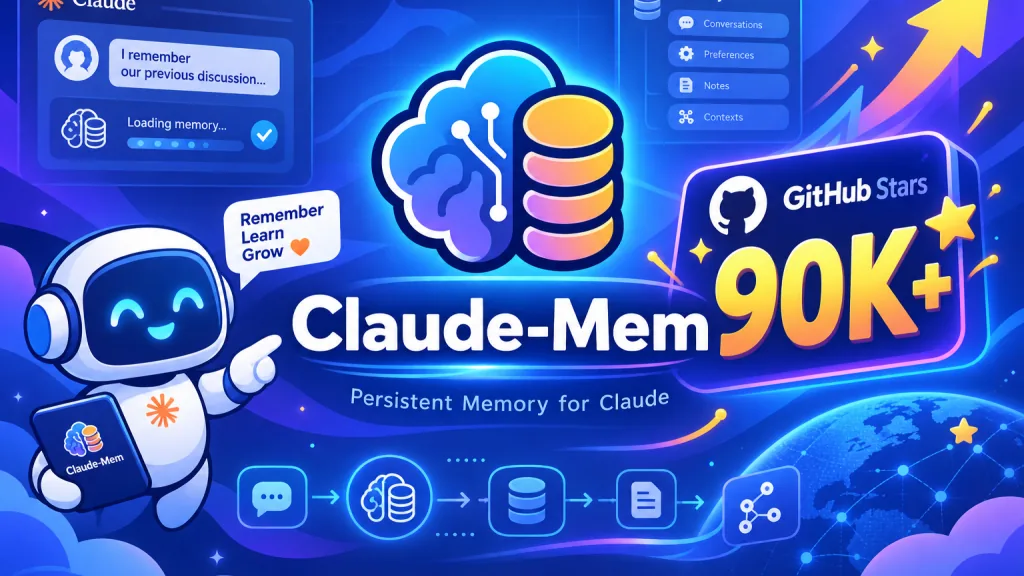
Claude-Mem is a persistent memory compression system built for AI coding agents. While the agent works, it automatically captures every tool-call observation, uses AI to compress them into structured summaries, and injects those into future sessions.
Three keywords define it: persistent memory, layered retrieval, automatic operation.
Milestones: GitHub stars past 90,541, current version v13.4.0, runs on Node 20+. It's part of the Vercel open source program and listed on Awesome Claude Code.
Coverage is broad: Claude Code, OpenClaw, Codex, Gemini, Hermes, Copilot and OpenCode are all supported — effectively "install once, every agent benefits".
3. Core features in depth
1. Five lifecycle hooks, zero manual work
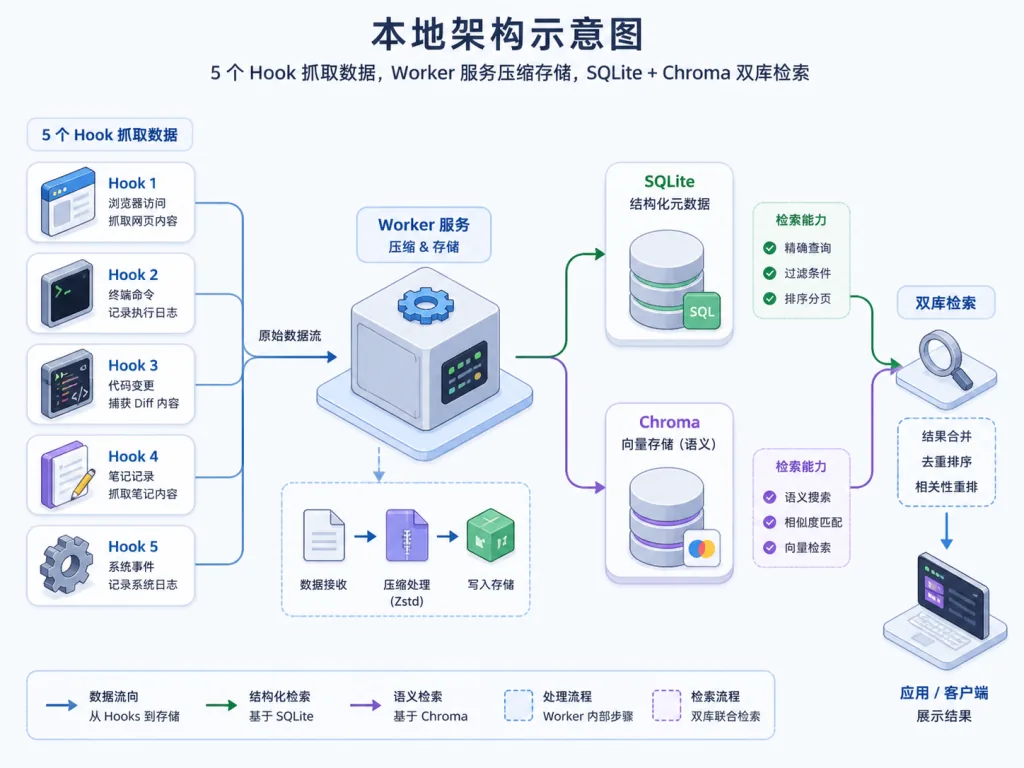
Claude-Mem hooks into five points — SessionStart, UserPromptSubmit, PostToolUse, Stop, SessionEnd — with no human intervention: after every tool call, PostToolUse records "which file was read, what code changed, why it changed this way"; at SessionEnd everything is compressed and archived. You just write code; the memory system works quietly on the side.
2. AI-driven semantic compression
Raw observations run to thousands of tokens. Claude-Mem uses AI to distill them into compact summaries of the form "this session solved problem X, made decision Y, left risk Z". According to the docs, compression ratios reach 10:1 and storage cost is essentially negligible.
3. Three-layer progressive retrieval
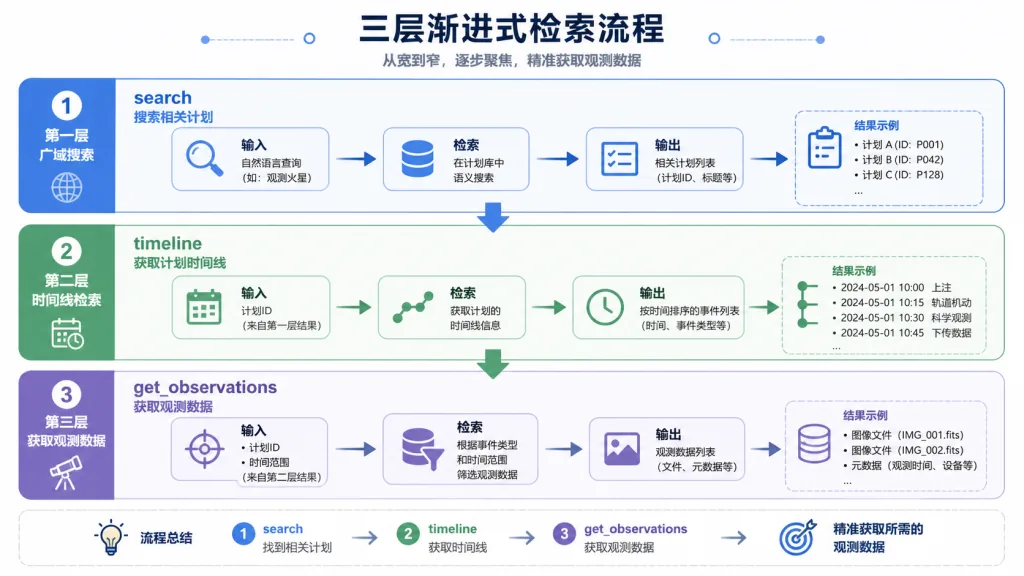
This is the most valuable design decision. The model never pulls the full history up front; it walks search → timeline → get_observations:
- Step one,
search, returns only the index, 50–100 tokens per entry; - Step two,
timeline, pulls the timeline to locate key moments; - Step three,
get_observations, fetches details only for the selected IDs, 500–1,000 tokens each.
Official numbers: compared with pulling details directly, this saves roughly 10x the tokens.
4. Hybrid retrieval + privacy controls
Underneath, SQLite FTS5 handles full-text search and a Chroma vector database handles semantic matching — keywords and semantics together. A <private> tag is also supported, keeping keys and tokens out of storage entirely.
4. Technical highlights and performance data
- Architecture: 5 lifecycle hooks + 1 pre-install detection script + a Bun-managed local Worker service + SQLite + Chroma. Everything runs locally, with no cloud dependency.
- Retrieval efficiency: the three-layer progressive workflow saves about 10x the tokens; hybrid retrieval covers both exact keyword recall and fuzzy semantic matching.
- Ecosystem compatibility: supports mainstream IDE/CLI agents including Claude Code, OpenClaw, Codex, Gemini and Copilot. OpenClaw can also push memories to Telegram, Discord and Slack in real time with one click.
- Multilingual: 30+ interface languages built in, including a Simplified Chinese
code--zhmode, with README translations covering Chinese, Japanese, Korean, Arabic and more. - Multi-branch releases:
main(stable, published to npm),core-dev(core fixes),community-edge(community integrations) — stability and early access both covered.
5. Who it's for
Scenario 1: long-running project maintenance. A microservice that's been alive for six months. Every new session recalls "why we picked gRPC last time" and "how that edge-case bug in the orders module was fixed" — and a new hire doesn't need to read the docs first.
Scenario 2: AI coding teams working together. Environment issues teammate A debugged and dependencies she installed are available to B the next day; no more asking "which version of this SDK are we on".
Scenario 3: context-heavy research and investigation. Performance tuning, security audits — tracking one topic across many sessions, Claude-Mem keeps the full chain of experiment → hypothesis → verification → conclusion.
Who it suits: developers who lean on AI coding assistants daily and maintain complex projects long-term; teams that want to cut token costs; engineers building second-level integrations on top of agent toolchains.
Who it doesn't: light users who occasionally ask "what does this snippet do" inside an IDE, and minimalists who won't accept a resident local Worker service.

6. Comparison
| Project | Persistent memory | Auto capture | Layered retrieval | Multi-agent support | Local deployment |
|---|---|---|---|---|---|
| Claude-Mem | ✅ Permanent | ✅ Fully automatic | ✅ Three-layer workflow | ✅ 7+ agents | ✅ |
| Manually copy-pasting history | ❌ Easily lost | ❌ By hand | ❌ | ❌ | — |
| Generic vector DB (RAG) | ✅ | ❌ Pipeline DIY | Usually none | Needs adaptation | ✅ |
| IDE built-in history | Current IDE only | Partial | ❌ | ❌ | ✅ |
Claude-Mem's difference is that it's tailor-made for AI agents: hook timing, AI compression, visible token cost, a layered retrieval protocol — none of which generic RAG setups provide.
7. Quick start
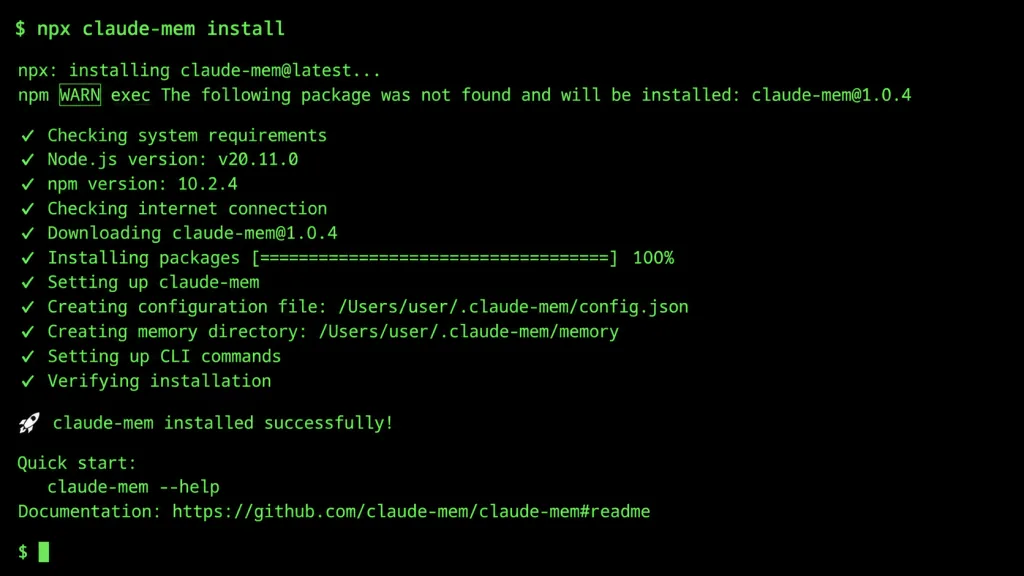
One command installs it:
npx claude-mem install
OpenCode users add --ide opencode; for Antigravity CLI add --ide antigravity. Restart Claude Code after installing and the previous session context shows up in the new session automatically.
The config file is ~/.claude-mem/settings.json, where you can adjust the AI model, Worker port, data directory and more; to switch to Chinese mode, set CLAUDE_MEM_MODE to code--zh.
Next steps: enable Cloud Sync (docs at https://docs.claude-mem.ai/cloud-sync ) to sync memory seamlessly across machines; when debugging, hit the URL the Worker prints on startup and watch the memory stream live in the Web Viewer.
8. Takeaways
Claude-Mem's core value in one sentence: it gives your AI coding assistant real cross-session long-term memory while cutting token cost to a tenth.
How to adopt it: run the defaults for a week and check whether the captured entries make sense; tag sensitive information with <private>; then tune CLAUDE_MEM_MODE and the Worker port to your team's habits.
Links:
- GitHub: https://github.com/thedotmack/claude-mem
- Website: https://claude-mem.ai
- Docs: https://docs.claude-mem.ai
The one-line pitch: install it, and your AI coding partner finally feels like a colleague who actually remembers things.