
Choose a title (pick 1 of 3)
Slim: one command ends the localhost HTTPS warnings and port-forwarding nightmare
Slim cuts 90% of your local dev config: HTTPS domain, path routing and public sharing in one step
Not a single nginx line changed, yet the local service came up on a public HTTPS domain — here's how Slim does it
Slim: one command gives localhost an HTTPS domain and shares it publicly
1. Opening: why you need this tool
If you do local development, you have almost certainly hit these moments: the OAuth callback URL has to be HTTPS, the WeChat Pay sandbox rejects http://localhost, a frontend colleague asks for a preview link, or you want to test a PWA on your phone and get stuck on "how do I let someone else reach my local server?"
What makes it worse is that the usual ngrok route means signing up, opening a web page for a token, then copy-pasting the URL — almost every time. And running https://localhost with a self-signed certificate just triggers a red browser warning. Slim, a Go tool with 2.1k+ stars, compresses all of that into one command.

2. Project overview: what it is in one sentence
Slim is a reverse proxy and tunneling tool for local development, positioned as "one command gives localhost a clean HTTPS local domain". Its four keywords are automatic CA certificates, path-based routing, public tunnel sharing and zero-config startup. Built on Go 1.25+, it covers macOS and Linux, has 2.1k stars and is actively maintained.
3. Core features in depth
1. Automatic local HTTPS domains
When Slim starts, it generates a local CA in user space and installs the root certificate into the system trust store and the browser trust store. Every subdomain (say myapp.test) gets a certificate signed by Slim, so the address bar shows a green padlock and never asks whether your connection is private again. One command is all it takes:
slim start myapp --port 3000
From then on https://myapp.test points at localhost:3000. No manual /etc/hosts edits, no mkcert, no dismissing browser warnings.
2. Path-level routing
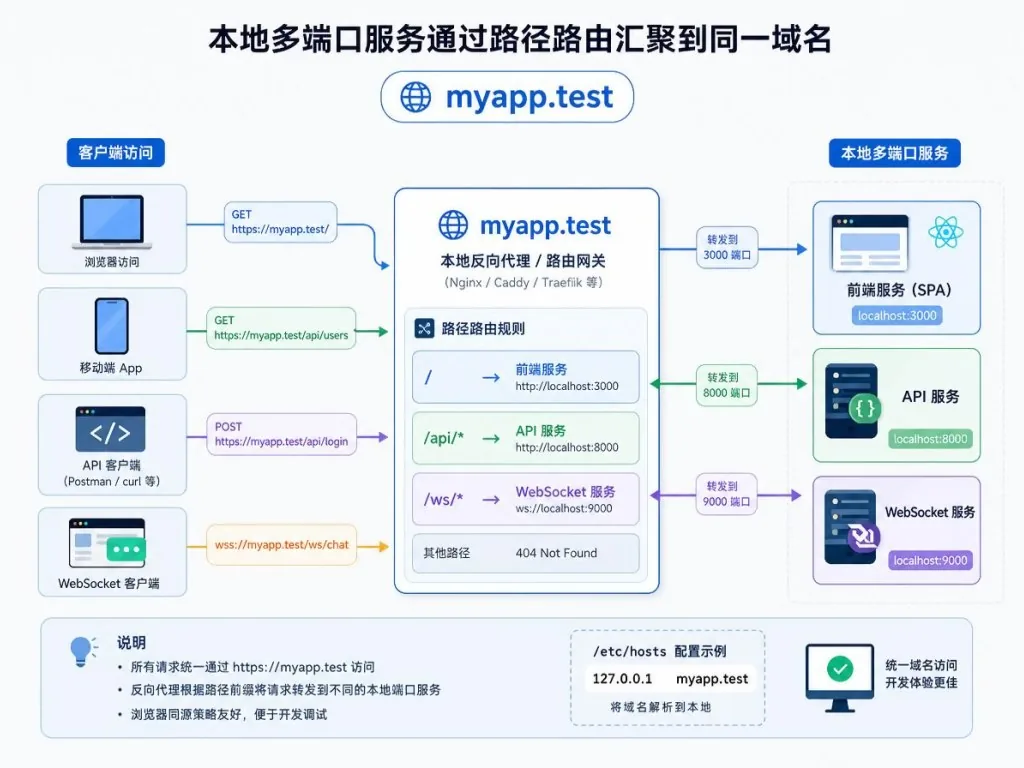
The frontend runs on 3000, the backend API on 8080, WebSocket on 9000. Slim merges this multi-port setup onto a single domain:
slim start myapp --port 3000 --route /api=8080 --route /ws=9000
Requests to https://myapp.test/api/users go to port 8080, https://myapp.test/ws goes to 9000, and CORS, cookie scope and frontend routing all stay consistent. It is far less painful than opening three ports and hand-rolling a temporary nginx reverse proxy.
3. Config file for team-wide management
Drop a .slim.yaml in the project root and teammates can boot the whole local environment with slim up:
services:
  - domain: myapp
    port: 3000
    routes:
      - path: /api
        port: 8080
  - domain: dashboard
    port: 5173
log_mode: minimal
cors: true
log_mode accepts full | minimal | off, and cors: true adds cross-origin headers to proxied responses automatically. slim down stops everything in one go, so ports don't stay occupied and config doesn't scatter across machines.
4. Public tunnel sharing
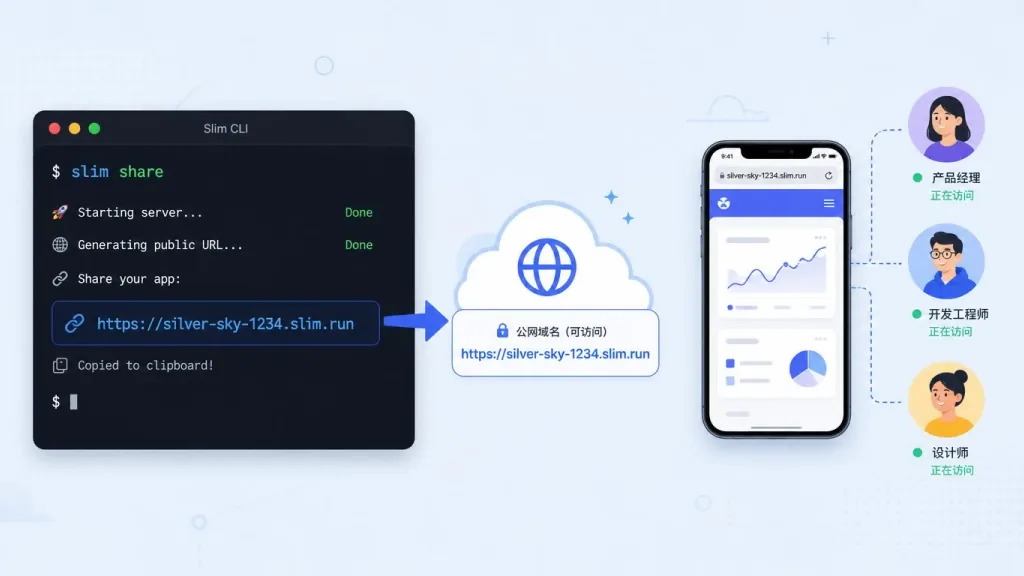
slim share --port 3000 immediately hands you a public https://xxx.slim.show address with no account required. Fixed subdomains, password protection, expiry and custom domains are all just flags:
slim share --port 3000 --subdomain demo --password secret --ttl 30m
For anonymous tunnels, the first browser visit shows a one-time interstitial saying "this preview is served from someone's computer", which keeps the slim.show domain from being abused. Tunnels with a password, a custom domain or a fixed subdomain skip that page entirely — so webhooks, curl and mobile SDKs never see it.
4. Technical highlights and performance data
Slim is written in Go 1.25+ and ships as a single binary: download and run, covering macOS and Linux. Certificate issuance and renewal happen in user space, with no OpenSSL command line involved. The built-in slim doctor diagnostic checks item by item: CA validity (default through 2035), system trust status, port forwarding (80→10080, 443→10443), /etc/hosts injection and subdomain certificate status, so problems are easy to pinpoint. slim list --json emits structured data that scripts can consume, and slim logs --follow tails access logs per domain — debugging feels close to production.
5. Use cases and audience
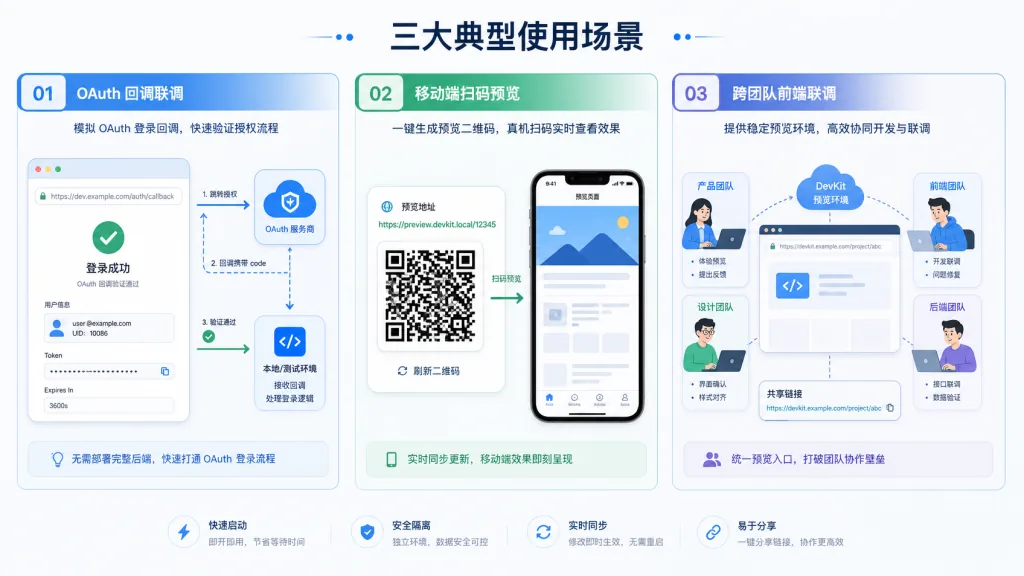
Case one: local debugging that requires HTTPS. WeChat Open Platform, Apple Push, Stripe callbacks, Service Workers, the Cookie Secure flag — all of them demand HTTPS, and with Slim local integration costs almost nothing.
Case two: frontend-backend collaboration across a team. Backend, frontend and QA each start the same .slim.yaml, so domains match and OAuth and CORS are configured once.
Case three: temporary demos and external collaboration. slim share turns a local service into a public link in seconds: send it to a client to demo a webhook integration, scan it on a phone for a preview, or let a remote colleague see the page over HTTPS.
It suits frontend, full-stack and mobile developers especially well. It is a poor fit for exposing production ports long-term or for latency-sensitive services — those still belong on a deployment platform or a dedicated tunnel.
6. Comparison with alternatives
| Tool | Local HTTPS domain | Path routing | Config file | Public sharing | Install |
|---|---|---|---|---|---|
| Slim | ✅ automatic CA | ✅ --route | ✅ .slim.yaml | ✅ slim share | single binary |
| ngrok | ❌ paid | ❌ | ❌ | ✅ core feature | binary + account |
| localtunnel | ❌ | ❌ | ❌ | ✅ public only | npm |
| Caddy + hosts | ⚠️ manual config | ✅ | ✅ | ❌ | system service |
Slim's differentiator: local HTTPS works out of the box — no sign-up, no login, no copying an authtoken.
7. How to get started fast
One install script does it:
curl -sL https://slim.sh/install.sh | sh
Or build from source:
git clone https://github.com/nilbuild/slim.git
cd slim
make build
make install
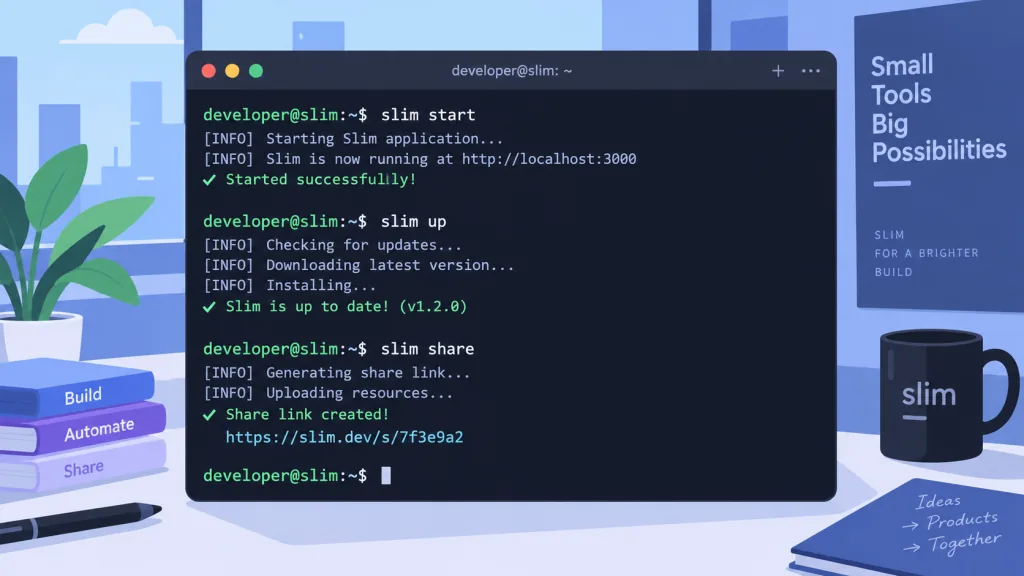
For a first run, just do slim start myapp --port 3000 and open https://myapp.test to confirm the green padlock. Then write a .slim.yaml in the project root and standardize the team on slim up / slim down. When anything looks wrong, run slim doctor first — 90% of certificate, port and hosts problems are diagnosed right there.
8. Summary and next steps
Slim merges two capabilities that have long been split apart — local HTTPS domains and public tunnels — into one Go binary, and .slim.yaml lets teammates share the same local environment config. If OAuth callbacks, CORS debugging and external sharing are routine in your workflow, install it with curl -sL https://slim.sh/install.sh | sh; within ten minutes you will feel the relief of typing far fewer commands.
- GitHub: https://github.com/nilbuild/slim
- Website: https://slim.sh
- Docs: the project README contains the full CLI reference
#slim #Slim #nilbuild #frontend #webdev #opensource #GitHub