Title options (pick 1 of 3)
video-talkcraft: still paging through slides for your talking-head videos? Let Claude Code shoot them for you
Hands-on with video-talkcraft: 53 seconds to change one shot, 108 motion cards for the agent to dispatch
Not a single editing script written, and the AI turned a narration script into a word-synced explainer
video-talkcraft: turn Claude Code into your talking-head motion studio
1. Intro: if writing the script counts as making video, who is actually shooting?
You finish a 100-second narration script, record the voiceover, drop it into an editor — and you're still stuck with the same three jobs: timing the timeline, building kinetic text, hunting for motion templates. These three don't burn creativity, they burn patience. What you want isn't "it moves", it's "the motion lands on the word".
Worse is another thing: a talking-head video stitched from ready-made templates looks like a slideshow at a glance. Each card sits still for two seconds or more, the camera never moves, the subject and the subtitles never get out of each other's way, and the audience's attention is gone by second 15. The thing is, slideshow-style stutter isn't an aesthetic problem, it's a structural one — as long as the camera isn't pushing or pulling and transitions aren't carrying motion forward, static frames are structurally inevitable.
What video-talkcraft wants to do is direct: let an AI agent read your narration script and finished voiceover, then handle motion, camera moves, subtitles and acceptance checks itself — with every beat locked to an exact word.
2. Project overview: what problem it solves
video-talkcraft is an open-source AI agent skill that turns Claude Code or Codex into a talking-head motion studio. It has four core capabilities:
- Word-level voiceover sync: aligns the script to the audio so every motion beat anchors on an exact word;
- 108 motion recipe cards: each card carries intent, parameters, known pitfalls and self-contained Remotion source;
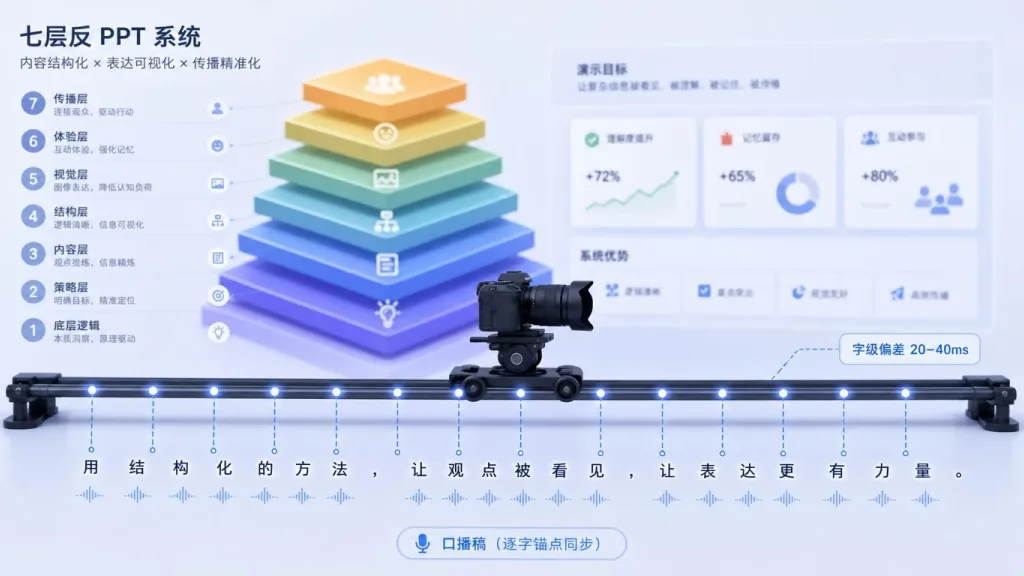
- A seven-layer anti-slideshow camera system: makes static frames structurally impossible;
- Triple acceptance: dual visual-health judgement, an energy check on the pure sound-effects track, and an independent review with motion-anchor frames.
The project currently has 1459 stars, main language HTML (the preview layer for the motion recipe cards), with rendering based on Remotion. Chinese narration comes first, mixed Chinese-English is fully supported, and it's free for personal, educational and research use (PolyForm Noncommercial).
3. Core features in depth
1. Word-level voiceover sync — which word does a motion anchor to?
Traditional subtitles relate to the voiceover at the "one line at a time" granularity, while video-talkcraft drills down to the word. It ships two ASR backends: FireRedASR2-CTC int8 by default (a 767MB model download on first use), with faster-whisper as the alternative (no manual download). Tested on a 110-second mixed Chinese-English narration against a GPU forced aligner, the median word-level deviation was 20–40ms, worst case 200ms, with zero false positives in quality checks.
More importantly, the "voiceover pre-trim" script added on 2026-09-11, scripts/voice_trim.py, trims filler words, stuttered retakes and overlong pauses using the script as ground truth before generating timestamps. The cut boundary follows one strict rule: inserted segments that aren't in the script get cut, but words the ASR misheard are never cut — so it never "cuts away a word the user meant to say".
2. 108 motion recipe cards — recipes, not templates
Unlike CapCut templates, each card here is "self-contained Remotion tsx source + HTML preview": copy, color, font size and position are all adjustable, but the rhythm's critical point (the beat anchor) is fixed and not exposed — so it can't be dragged around until the motion turns into a slideshow.
Card coverage is broad: kinetic text cards, data shots, evidence fly-throughs, six-style motion-carry transitions, long-take world canvases, subject compositing. Every card declares its input type (video / image / text only / web screenshot), so cards get filtered by material type before selection. On 2026-09-05, 19 cards were ported over from the sister library video-shotcraft, pushing the inventory from 89 to 108.
3. A seven-layer anti-slideshow system — killing static frames structurally
The root cause of "slideshow paging" is a camera that doesn't move plus transitions that don't carry. video-talkcraft's answer is a seven-layer model:
- A very slow push-in / pull-out camera curve for every scene;
- Yield lifecycle — other layers actively get out of the way as the protagonist enters or exits;
- Six-style motion-carry transitions — no cuts to black between scenes, motion bridges them;
- Layout budget — on-screen elements can't exceed the budget ceiling;
- Face safe zone — subtitles automatically avoid the subject on camera (measured with OpenCV YuNet, not eyeballed);
- Automatic static-segment detection — a machine gate catches whatever slips through;
- Rhythm anchors — every semantic beat maps to one motion beat.
In the "do less" update of 2026-09-04, idle micro-motion, ambient breathing and pulses were all switched off by default, keeping only the push-pull camera curve and yielding — less is more.
4. The motion workbench — a CapCut-style finishing desk
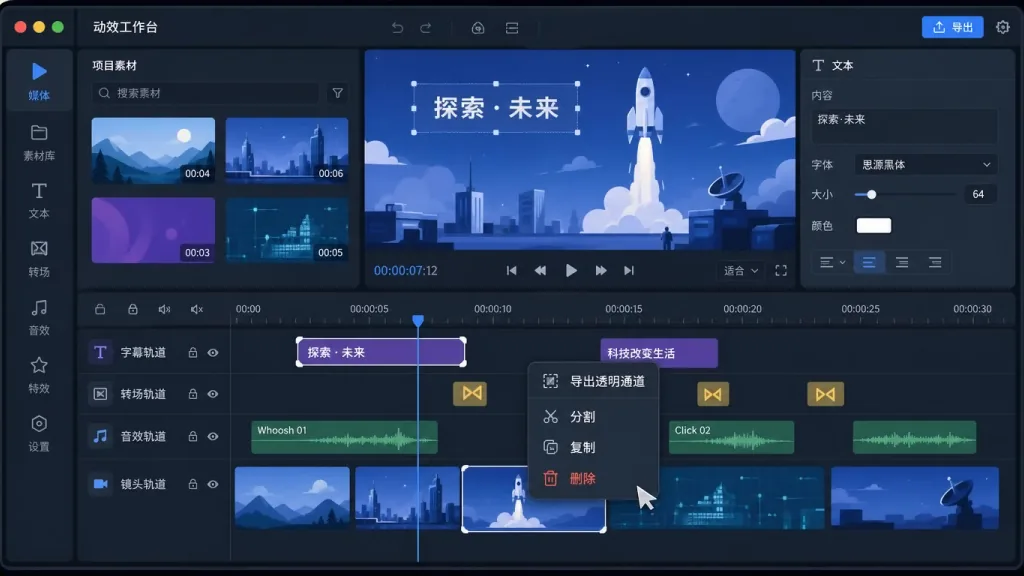
workbench/, launched on 2026-09-02, is a multi-track timeline tool: asset library (motion library / sound effects / backgrounds) + schema property panel + live preview + one-click export. All 108 cards are 100% parameterized, and a finished talking-head video can be split with one click into seven multi-track units — subtitles, transitions, ambient, digital human, camera, voiceover, sound effects — for item-by-item fine-tuning.
Worth special mention is "right-click export with alpha channel": right-click any motion clip on the timeline and export a transparent video containing just that segment (MOV ProRes 4444 / WebM VP9 alpha), with the card's root backdrop layer and character silhouette placeholders automatically removed, ready to use as an overlay asset in CapCut / Premiere / After Effects.
4. Technical highlights and performance numbers
Render speed is its hardest metric. Measured on a 201-second vertical video:
| Measurement | Before | Now |
|---|---|---|
| First full render | 13 min | 9 min |
| New video with sound after changing one shot | Full re-render | 53 s |
| Sampling 43 still frames | 11 min | ~1 min |
| Review reading 160 QA frames | ≈160k tokens / 21 min | ≈40k tokens / 7 min |
The speedup comes from scripts/render_shots.mjs splitting the render by shot and running in parallel, with a single process per segment to keep rasterization consistent — changing one shot only re-renders that segment ± its neighbors. Review speedup comes from scripts/contact_sheet.py: QA frames are tiled into a 3×4 grid so the review subagent can browse a whole sheet at once, and burst frames are only sampled at state-change anchors marked as burst.
On ecosystem compatibility, remotion/node_modules and workbench/node_modules in every project are symlinked to runtime/node_modules, with versions pinned in exactly one place: runtime/package.json. One copy of node_modules is ≈760 MB (including a 190 MB headless browser); six projects used to take 3.9 GB and now take under 1 GB.
5. Where it fits and who it's for
Five scenarios that fit:
- Educational explainers (3–5 minute mixed Chinese-English walkthroughs);
- Product reviews and feature demos (with B-roll screenshots and data cards);
- News commentary and opinion pieces (tight pacing, word-level sync matters);
- Self-media commentary in landscape format (Chinese first);
- Course videos (needing chapter topic layers and plain-layout subtitles).
Who it's for:
- Content creators: want to mass-produce explainer videos but have no time to learn editing;
- Knowledge bloggers: the script pipeline is solid but the motion step keeps stalling;
- AI tool enthusiasts: already using Claude Code / Codex for code generation and want to extend into video production;
- Small and mid-sized teams: no dedicated motion designer, and no appetite for delivering slideshow-style videos.
Scenarios that don't fit: pure entertainment skits, strongly narrative drama, and film-grade projects that need live actors and complex color grading.
6. Competitive comparison
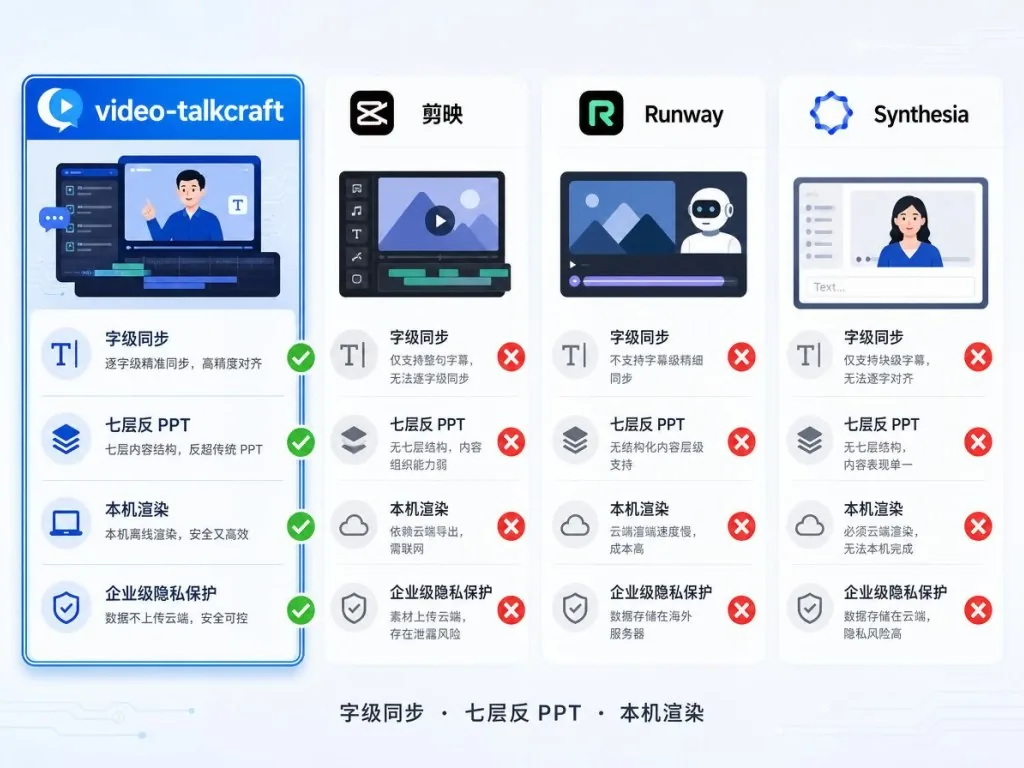
| Dimension | video-talkcraft | CapCut | Runway / Pika | Synthesia |
|---|---|---|---|---|
| Input | Narration script + voiceover + optional assets | Video clips + templates | Text → AI-generated video | Text → AI avatar |
| Word-level sync | Yes (20–40ms deviation) | No (separate subtitle track) | No | Partial |
| Motion granularity | 108 parameterized cards | Fixed templates | Random AI | Fixed avatar motion |
| Anti-slideshow mechanism | Seven-layer structural system | None | None | None |
| Offline / local rendering | Yes (Remotion) | No | No | No |
| Fit for talking-head explainers | Strong match | Mediocre | Poor match | Mediocre |
Its core advantage: it treats talking-head video as an engineering problem that can be structurally decomposed, not a template-matching problem — which is why it gives you "the motion lands on the word" instead of "looks cool".
7. Getting started fast
The most direct route: hand the repo link to your agent.
In Claude Code / Codex, just say:
Install this skill for me: https://github.com/Vincentwei1021/video-talkcraft
Or use the skills CLI:
npx skills add Vincentwei1021/video-talkcraft
Manual install:
git clone https://github.com/Vincentwei1021/video-talkcraft.git cd video-talkcraft ln -s "$(pwd)" ~/.claude/skills/video-talkcraft # Claude Code ln -s "$(pwd)" ~/.codex/skills/video-talkcraft # Codex
Environment dependencies: Node 18+, Python 3.10+ (CPU timestamp alignment needs zhconv pypinyin sherpa-onnx soundfile numpy), ffmpeg.
Minimal working example:
Use video-talkcraft to turn this narration script + voiceover.wav into a video. Make a 100-second explainer on "your topic"; the script and audio are here.
Advanced tips:
- If you don't have a voiceover yet, you can optionally generate one with Fish Audio streaming (
scripts/tts_fishaudio.py), which requests the frees2.1-pro-freetier by default; - For later fine-tuning, have the agent render the video first, then open
workbench/for multi-track adjustments; - To see all the motion at once, visit the online gallery and browse all 108 previews on one page.
8. Summary and next steps
video-talkcraft turns talking-head video from manual template collage into an engineering problem an agent can automate. Word-level voiceover sync solves the precision problem of "the motion lands on the word"; 108 recipe cards provide a motion component library covering most talking-head scenarios; the seven-layer anti-slideshow system structurally eliminates static frames; and the motion workbench leaves room for manual fine-tuning after automatic generation.
If you're already using Claude Code or Codex for code generation, your narration scripts come out steadily, and you keep getting stuck at the editing step — hand it to video-talkcraft once and see. It won't write your script for you, but it will walk the whole road from voiceover to finished video.
Links:
- GitHub: https://github.com/Vincentwei1021/video-talkcraft
- Online gallery: https://vincentwei1021.github.io/video-talkcraft/
- Docs entry: SKILL.md
Videos made with this skill belong to you. Free license (PolyForm Noncommercial 1.0.0): use it directly for personal, educational and research purposes; for commercial use, contact the author in advance (vincentwei1021@gmail.com).

#video-talkcraft #VideoTalkcraft #vincentwei1021 #AIVideoEditing #ScriptedVideo #TalkingHeadVideo #OpenSource #GitHub